
ASUS
ASUS TUF Gaming X870-PLUS WiFi
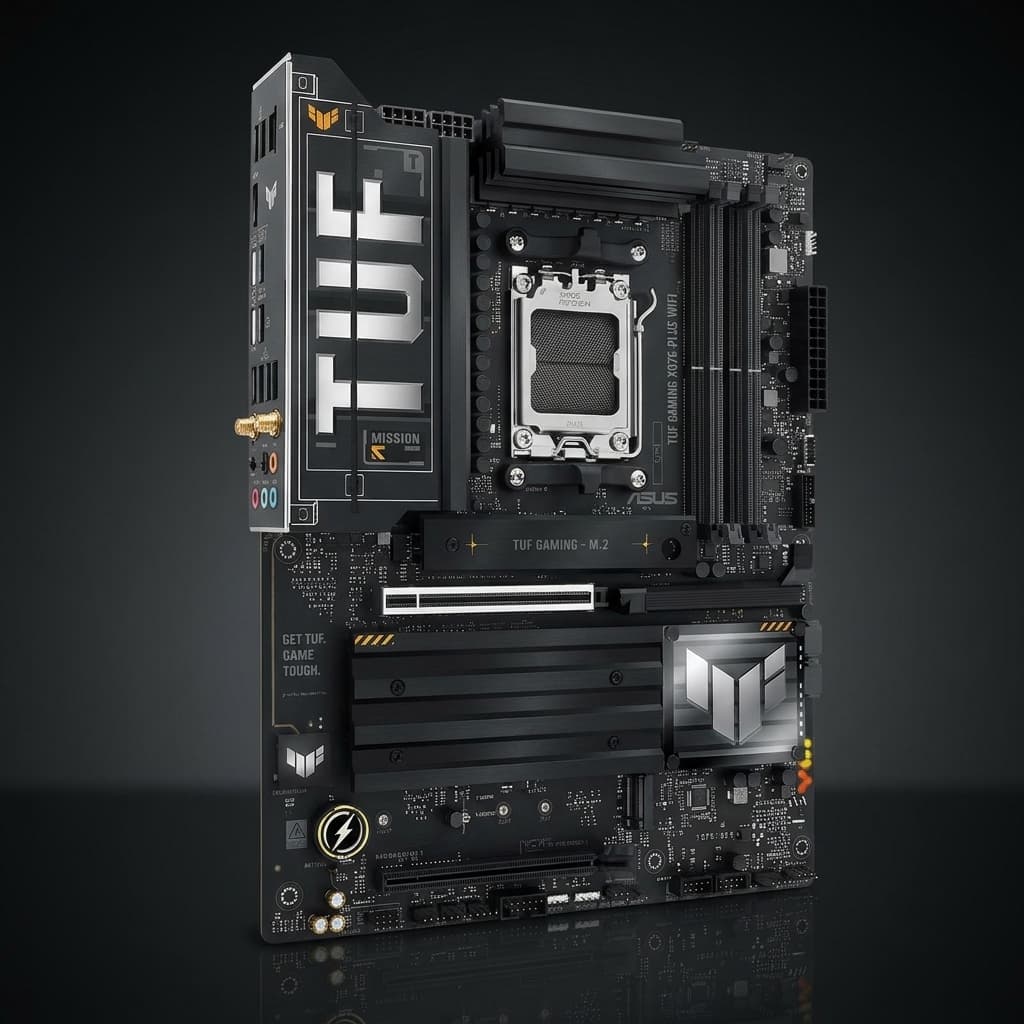
An AMD X870 ATX motherboard for AM5 Ryzen 9000, 8000 and 7000 processors. It has 16+2+1 80A power stages, four DDR5 slots (up to 256GB, EXPO and AEMP), a PCIe 5.0 x16 graphics slot and four M.2 slots, two of them PCIe 5.0. Wi-Fi 7, dual rear USB4, Realtek 2.5Gb Ethernet and Q-Release hardware make it a durable, easy-to-build base for Ryzen 9000 gaming PCs.
ASUS TUF Gaming X870-PLUS WiFi Review: Introduction
The ASUS TUF Gaming X870-PLUS WiFi is a TUF Gaming X870 board that keeps the platform's headline features: PCIe 5.0 graphics, PCIe 5.0 NVMe storage, two USB4 ports and Wi-Fi 7. It's aimed at builders who want an AM5 motherboard for Ryzen 9000 with a strong VRM and modern I/O, but who don't need ROG extras such as premium audio or 5GbE networking.
This ASUS TUF Gaming X870-PLUS WiFi review explains what each feature means in a real build, the M.2 lane-sharing rule to plan around, how it compares with four rival X870 gaming motherboards, and who should save with a B850 board instead.
ASUS TUF Gaming X870-PLUS WiFi Overview
X870 is AMD's single-chipset AM5 platform. AMD requires every X870 board to provide USB4 and PCIe 5.0 for graphics and NVMe storage. X870E adds a second chipset chip for more downstream lanes and ports. This board is X870, not X870E.
TUF Gaming is ASUS's durability-focused line, below ROG Strix. The ASUS TUF Gaming X870-PLUS WiFi keeps styling simple and spends on power delivery, cooling and connectivity.
- Power delivery: 16+2+1 power stages, all rated at 80A.
- Memory: Four DDR5 slots, up to 256GB, rated to 8000+ MT/s (OC), with AMD EXPO and ASUS AEMP.
- Storage: Four M.2 slots (two PCIe 5.0, two PCIe 4.0) and two SATA 6Gb/s ports.
- Expansion: A PCIe 5.0 x16 graphics slot with SafeSlot, plus a PCIe 4.0 x16-length slot running at x4.
- Connectivity: Wi-Fi 7, Bluetooth 5.4, Realtek 2.5Gb Ethernet, two rear USB4 ports and a 20Gbps front Type-C header with up to 30W charging.
- DIY features: PCIe Slot Q-Release, M.2 Q-Latch, Q-Antenna, Q-LED, BIOS FlashBack and a pre-mounted I/O shield.
Key Specifications
| Specification | Details |
|---|---|
| Socket / chipset | AMD AM5 / AMD X870 |
| CPU support | Ryzen 9000, 8000 and 7000 Series |
| Form factor | ATX, 30.5 x 24.4 cm (12 x 9.6 in) |
| Power stages | 16+2+1, 80A (SPS for Vcore and SoC, DrMOS for Misc) |
| Memory | 4 x DDR5, up to 256GB; 8000+ MT/s (OC) |
| PCIe | PCIe 5.0 x16 (CPU); PCIe 4.0 x16 slot at x4 (chipset) |
| M.2 | 2 x PCIe 5.0 x4 (CPU), 2 x PCIe 4.0 x4 (chipset) |
| SATA | 2 x 6Gb/s |
| Networking | Wi-Fi 7 2x2 (160MHz), Bluetooth 5.4, Realtek 2.5GbE |
| Rear USB | 2 x USB4 Type-C, 3 x 10Gbps, 4 x 5Gbps, 1 x USB 2.0 |
| Video / audio | HDMI 2.1, DisplayPort 1.4a via USB4; Realtek ALC1220P |
Design and Build Quality
The board uses a standard ATX layout on an eight-layer PCB, which ASUS says helps spread VRM heat. Styling is TUF's restrained dark grey and black, with three addressable Gen 2 headers for adding lighting.
Large VRM heatsinks cover the power stages and chokes. Heatsinks also cover three of the four M.2 slots, and the chipset heatsink has an expanded surface. ASUS uses TUF chokes and 5K black metallic capacitors rated for a wider temperature range and longer life than standard parts. ESD guards, a stainless-steel rear I/O, SafeSlot reinforcement and ProCool 8+8-pin CPU power connectors round out the build.
Power Delivery: 16+2+1 80A Power Stages
"16+2+1" describes how the VRM is divided. Sixteen stages feed the CPU cores (Vcore), two feed the SoC rail (memory controller and Infinity Fabric), and one feeds a miscellaneous rail. ASUS rates every stage at 80A. Vcore and SoC use smart power stages (SPS), which combine the high- and low-side MOSFETs and driver in one package and report current and temperature to the controller. The Misc rail uses a DrMOS stage.
Modern Ryzen CPUs boost based on available current and temperature, so a strong, cool-running VRM helps a 12- or 16-core Ryzen 9 hold boost clocks through long renders. Phase count alone doesn't decide performance, though. Controller tuning, heatsink design, case airflow, BIOS power limits and CPU cooling all matter. For a Ryzen 5 or Ryzen 7 9800X3D, this VRM has far more capacity than needed, and Ryzen 9 owners using Precision Boost Overdrive have plenty of headroom. Overclocking can void AMD's processor warranty.
CPU Compatibility and AM5 Support
The board supports AMD Ryzen 9000, 8000 and 7000 Series desktop processors on AM5. Features depend on the CPU:
- Ryzen 9000 and 7000: PCIe 5.0 x16 graphics and both PCIe 5.0 M.2 slots (M.2_1 and M.2_2).
- Ryzen 8000: The graphics slot runs PCIe 4.0 at x8 or x4 depending on the model. M.2_1 runs PCIe 4.0 x4, and M.2_2 is not supported.
Before buying, open the CPU support list in the board's ASUS support download center. It shows the minimum BIOS version for each processor. If a newer CPU needs an update, BIOS FlashBack can flash the BIOS from a USB drive without a CPU or memory installed. For CPU advice, see our AMD Ryzen CPU and motherboard compatibility guide, the Ryzen 7 9800X3D review and the Ryzen 9 9900X review.
DDR5 Memory, EXPO and AEMP
Four DDR5 slots run in dual-channel mode and support up to 256GB of ECC or non-ECC unbuffered memory, rated to 8000+ MT/s (OC) with Ryzen 9000, 8000 and 7000. AMD EXPO and ASUS AEMP are supported. AEMP detects the chips on kits without an EXPO profile and offers tuned frequency, timing and voltage presets. ASUS also lists DIMM Fit, which analyzes installed modules, and DIMM Fit Pro, which lets you adjust up to 20 overclocking parameters and set testing ranges.
The 8000+ MT/s figure is a best case, not a promise. Results depend on the CPU's memory controller, the kit, the BIOS version and how many modules you install. Four DIMMs typically run slower than two. For most Ryzen gaming builds, a 2x16GB or 2x32GB DDR5-6000 EXPO kit is the practical choice. Check ASUS's memory support list for tested kits, or browse our DDR5 memory section.
PCIe 5.0 and Graphics Card Compatibility
The primary PCIe x16 slot connects to the CPU and runs PCIe 5.0 x16 with Ryzen 9000 and 7000. SafeSlot reinforcement helps support heavy cards, and the PCIe Slot Q-Release button unlocks the card with one press, so you don't have to reach the latch behind a large graphics card or tower cooler. A second full-length slot connects to the X870 chipset at PCIe 4.0 x4. It suits a capture card, network card or SSD adapter, not a second GPU.
The bandwidth-sharing rules
This is the most important detail on the board. M.2_2 shares bandwidth with the primary PCIe 5.0 graphics slot. With a Ryzen 9000 or 7000 CPU, installing an SSD in M.2_2 drops the graphics slot to x8. Separately, M.2_4 shares bandwidth with the PCIe 4.0 slot, and that slot is disabled when M.2_4 is populated.
How much does x8 matter? PCIe 5.0 x8 matches PCIe 4.0 x16 bandwidth, while a PCIe 4.0 card would run at PCIe 4.0 x8. The gaming difference is usually small but depends on the GPU and workload; cards with limited VRAM can be more sensitive. To keep the GPU at x16, fill M.2_1, M.2_3 and M.2_4 before M.2_2.
Four M.2 Slots and Storage Expansion
| Slot | Source | Ryzen 9000/7000 | Notes |
|---|---|---|---|
| M.2_1 | CPU | PCIe 5.0 x4 | 2280; PCIe 4.0 x4 with Ryzen 8000 |
| M.2_2 | CPU | PCIe 5.0 x4 | 2280; GPU slot drops to x8; not supported with Ryzen 8000 |
| M.2_3 | Chipset | PCIe 4.0 x4 | 2280 |
| M.2_4 | Chipset | PCIe 4.0 x4 | 2242 to 22110; disables the PCIe 4.0 slot |
Only two slots support PCIe 5.0, and only with Ryzen 9000 or 7000. Put your boot drive in M.2_1, add drives to M.2_3 and M.2_4, and use M.2_2 last. M.2_4 is the only slot that takes 22110 drives.
M.2 Q-Latch holds drives without tiny screws. Two SATA 6Gb/s ports cover a hard drive or an older SATA SSD, but builders with several SATA drives should look elsewhere. AMD RAIDXpert2 supports PCIe RAID 0/1/5/10 (RAID 5 only with Ryzen 9000) and SATA RAID 0/1. Our NVMe SSD buying guide explains when a PCIe 5.0 drive is worth the cost.
Wi-Fi 7, Bluetooth 5.4 and 2.5Gb Ethernet
The wireless module is 2x2 Wi-Fi 7 (802.11be) on the 2.4, 5 and 6GHz bands. It supports 160MHz channels and up to 2.9Gbps. Some rivals support 320MHz, which matters only if your router does too. Bluetooth is 5.4 (ASUS notes it can vary by module). The Q-Antenna attaches with a single connector.
Full Wi-Fi 7 features require Windows 11 24H2 or later (earlier releases support only Wi-Fi 6E) and a Wi-Fi 7 router. 6GHz availability depends on local regulations. Real-world speeds will be well below the theoretical maximum.
The wired port uses Realtek 2.5Gb Ethernet with TUF LANGuard. It's enough for internet plans up to 2.5Gbps and faster than gigabit for NAS transfers, if your switch or router supports 2.5GbE.
Dual USB4 and Connectivity
Rear I/O (10 USB ports): two USB4 40Gbps Type-C ports, three USB 10Gbps Type-A, four USB 5Gbps Type-A and one USB 2.0 Type-A, plus HDMI, the Wi-Fi antenna connector, 2.5GbE, five audio jacks and the BIOS FlashBack button.
Display output needs a CPU with integrated graphics. HDMI 2.1 supports 4K at 60Hz, and each USB4 port carries DisplayPort 1.4a up to 4K at 60Hz. With a discrete GPU, connect your monitor to the graphics card.
Internal headers (need matching case ports): one USB 20Gbps Type-C connector with up to 30W Power Delivery, one USB 5Gbps header (two ports) and two USB 2.0 headers (four ports). The 20Gbps speed and 30W charging require a case front USB-C port that supports them.
Audio Features
Audio uses a Realtek ALC1220P 7.1-channel codec. ASUS rates it at 120dB SNR for stereo playback and 113dB for line-in recording. It includes an internal headphone amplifier, impedance sensing on the front and rear headphone outputs, and front-panel jack retasking. ASUS adds audio shielding, dedicated audio PCB layers, premium capacitors, a de-pop circuit and DTS Audio Processing software.
It's capable onboard audio for gaming headsets, speakers and voice chat, though the ALC1220P is an older codec than the ALC4080 and ALC4082 on some rivals. Demanding listeners may still want an external DAC.
Cooling and DIY-Friendly Features
- Heatsinks: Enlarged VRM heatsinks, M.2 heatsinks covering three slots and an expanded chipset heatsink.
- Fan and pump headers: One CPU fan, one CPU OPT, one AIO pump, four chassis fan headers and one high-current W_PUMP+ header for custom loops, all controlled by Fan Xpert 4 and AI Cooling II.
- Q-Design: PCIe Slot Q-Release, M.2 Q-Latch, Q-Antenna, Q-DIMM and Q-LED, which lights up to show whether the CPU, memory, graphics or boot drive failed POST.
- Recovery and setup: BIOS FlashBack with a rear button and LED, CrashFree BIOS 3, EZ Flash 3 and a pre-mounted I/O shield.
These save time when building and when swapping an SSD or GPU later. Q-LED and FlashBack help most when a new build won't boot. For cooling a Ryzen 9, consider the Arctic Liquid Freezer III Pro 360 or the Noctua NH-D15 chromax.black.
Gaming and Productivity Suitability
A motherboard doesn't set your frame rate. Gaming performance depends mainly on the CPU, GPU, memory, cooling, software and settings. What this board provides is a stable, well-connected platform:
- High-end and Ryzen 9000 gaming: A strong base for a Ryzen 7 9800X3D or Ryzen 5 9600X with a modern GPU.
- Content creation and video editing: The VRM suits a 16-core Ryzen 9 9950X3D, and multiple NVMe drives plus USB4 help with large files.
- Streaming: The PCIe 4.0 x4 slot fits a capture card, as long as M.2_4 stays empty.
- Productivity and enthusiast builds: Good for single-GPU systems with up to four NVMe drives. Multi-GPU work needs a board with two CPU-connected x16 slots.
See our gaming PC build guide and PC cases.
Competitor Comparison
All five boards use the X870 chipset and ATX form factor, with four DDR5 slots (up to 256GB), a PCIe 5.0 x16 graphics slot, two rear USB4 ports and Wi-Fi 7 with Bluetooth 5.4.
| Board | VRM | M.2 (Gen5) | SATA | Wi-Fi 7 | LAN | Rear USB | Audio | Best for |
|---|---|---|---|---|---|---|---|---|
| ASUS TUF Gaming X870-PLUS WiFi | 16+2+1, 80A | 4 (2) | 2 | 160MHz | 2.5GbE | 10 | ALC1220P | Strong VRM, simple builds |
| GIGABYTE X870 AORUS Elite WIFI7 | 16+2+2, 60A | 4 (3) | 4 | 160MHz | 2.5GbE | 12 | ALC1220 | Most Gen5 storage |
| MSI MAG X870 Tomahawk WiFi | 14+2+1, 80A | 4 (2) | 4 | 320MHz | 5GbE | 12 | ALC4080 | Faster LAN, GPU stays x16 |
| ASUS ROG Strix X870-F Gaming WiFi | 16+2+2, 110A | 4 (2) | 2 | 320MHz | Intel 2.5GbE | 12 | ALC4080 | Premium VRM and audio |
| ASRock X870 Steel Legend WiFi | 14+2+1, 80A | 3 (1) | 4 | Not verified | 2.5GbE | 11 | ALC4082 | Fewer drives, more SATA |
Prices change often, so compare current listings.
vs GIGABYTE X870 AORUS Elite WIFI7
The GIGABYTE X870 AORUS Elite WIFI7 has three PCIe 5.0 M.2 slots, four SATA ports and EZ-Latch hardware, but two Gen5 slots drop the GPU to x8. Choose GIGABYTE for more Gen5 storage and SATA; choose the TUF for 80A stages and ASUS's BIOS.
vs MSI MAG X870 Tomahawk WiFi
The MSI MAG X870 Tomahawk WiFi adds 5GbE, 320MHz Wi-Fi 7, an ALC4080 codec and four SATA ports. Its second Gen5 M.2 slot shares bandwidth with the USB4 ports instead of the GPU. Choose MSI for faster networking and a GPU that stays at x16; choose the TUF for its 16-stage Vcore and Q-Design features.
vs ASUS ROG Strix X870-F Gaming WiFi
The ASUS ROG Strix X870-F Gaming WiFi is the premium ASUS step up, with 110A stages, SupremeFX ALC4080 audio, Intel 2.5GbE, 320MHz Wi-Fi 7 and 12 rear USB ports. It has the same M.2_2 x8 rule and two SATA ports. Choose the Strix for heavier tuning and better audio; choose the TUF to keep the core platform for less.
vs ASRock X870 Steel Legend WiFi
The ASRock X870 Steel Legend WiFi has a 14+2+1 80A VRM, ALC4082 audio, four SATA ports and a white-and-silver design. It has three M.2 slots with one Gen5. Choose ASRock for SATA drives and a light-colored build; choose the TUF for a second Gen5 slot and a fourth M.2 slot.
Who Should Buy the ASUS TUF Gaming X870-PLUS WiFi?
The ASUS TUF Gaming X870-PLUS WiFi suits:
- Ryzen 9000 gamers who want PCIe 5.0 on a modern AM5 platform without paying for ROG features.
- Users with a Wi-Fi 7 router, or plans to buy one.
- Owners of USB4 docks, fast external SSDs or USB-C displays.
- Builders running up to four NVMe SSDs who can plan around the M.2_2 rule.
- Ryzen 9 users who value strong power delivery and easy installation features.
Who Should Avoid It?
- Budget gaming builds: B650 and B850 boards run the same CPUs for less. Look at the ASUS ROG Strix B850-A Gaming WiFi or the GIGABYTE B850 AORUS Elite WIFI7.
- No USB4 needs: USB4 is a large part of what X870 adds over B850.
- Wired-only or Wi-Fi 6E users: Wi-Fi 7 adds little without a compatible router.
- One or two SSDs: The extra M.2 slots won't add value.
- Several SATA drives: Two ports is low; GIGABYTE, MSI and ASRock offer four.
- 5GbE, 320MHz Wi-Fi or premium audio buyers: The MSI Tomahawk or ROG Strix X870-F fit better.
- Simplicity seekers: A basic B850 board has fewer lane-sharing rules.
See more options in our motherboards section.
Final Verdict
The ASUS TUF Gaming X870-PLUS WiFi is a sensible, well-equipped X870 board. Its main strengths are 16+2+1 80A power stages, an eight-layer PCB, a PCIe 5.0 x16 graphics slot, two PCIe 5.0 M.2 slots, dual USB4, Wi-Fi 7 and practical Q-Design features.
Its limits are clear too. Using M.2_2 drops the graphics slot to x8, and using M.2_4 disables the second PCIe slot. Ryzen 8000 CPUs lose M.2_2 and PCIe 5.0. There are only two SATA ports, Ethernet is 2.5GbE, Wi-Fi tops out at 160MHz and the audio codec is older. It's best for Ryzen 9000 gamers and creators who will use USB4 and several NVMe drives; otherwise, a B850 board saves money. Before buying, confirm CPU and BIOS support, plan your M.2 layout and compare current prices.
Pros
- AMD X870 platform with AM5 support for Ryzen 9000, 8000 and 7000 processors.
- 16+2+1 power stages, all rated at 80A, on an eight-layer PCB.
- Four DDR5 slots, up to 256GB, rated to 8000+ MT/s (OC) with EXPO and AEMP.
- PCIe 5.0 x16 graphics slot with SafeSlot and PCIe Slot Q-Release.
- Four M.2 slots, two of them PCIe 5.0 x4 with Ryzen 9000/7000, with heatsinks on three.
- Wi-Fi 7 with Bluetooth 5.4 and Realtek 2.5Gb Ethernet.
- Two rear USB4 40Gbps ports with DisplayPort output.
- Front USB 20Gbps Type-C header with up to 30W Power Delivery.
- M.2 Q-Latch, Q-Antenna, Q-LED and BIOS FlashBack simplify building and troubleshooting.
- Plenty of cooling headers, including AIO pump and W_PUMP+.
Cons
- Using M.2_2 drops the PCIe 5.0 graphics slot to x8.
- Using M.2_4 disables the secondary PCIe 4.0 slot.
- Ryzen 8000 processors don't support M.2_2 and limit the graphics slot to PCIe 4.0 x8 or x4.
- Only two SATA 6Gb/s ports.
- Ethernet is 2.5GbE, while some rivals offer 5GbE.
- Wi-Fi 7 is limited to 160MHz channels, and full Wi-Fi 7 features need Windows 11 24H2.
- Realtek ALC1220P is an older codec than the ALC4080/ALC4082 on some competitors.
- 8000+ MT/s memory is a best-case rating that depends on CPU, kit and DIMM count.
- X870 features such as USB4 may be unnecessary for budget builders.
Spec Sheet
Specifications
General
| Brand | ASUS |
|---|---|
| Model | TUF GAMING X870-PLUS WIFI |
| Series | TUF Gaming |
| ASIN | B0DGB8Q19Y |
| Operating System | Windows 11 |
CPU Compatibility
| Socket | AMD AM5 |
|---|---|
| Supported Processors | AMD Ryzen 9000, 8000 and 7000 Series desktop processors |
| Note | Check the ASUS CPU support list for the minimum BIOS version required |
Chipset
| Chipset | AMD X870 |
|---|---|
| BIOS | 256Mb flash ROM, UEFI AMI BIOS |
Power Delivery
| Power Stages | 16+2+1, 80A |
|---|---|
| Vcore | 16 x 80A SPS |
| SoC | 2 x 80A SPS |
| Misc | 1 x 80A DrMOS |
| Design | DIGI+ VRM, TUF chokes, TUF 5K black metallic capacitors |
| CPU Power Connectors | 2 x 8-pin +12V (ProCool) |
Memory
| Type | DDR5, dual-channel |
|---|---|
| DIMM Slots | 4 |
| Maximum Capacity | 256GB |
| Module Support | ECC and non-ECC unbuffered DIMMs |
| Rated Speed | Up to 8000+ MT/s (OC) with Ryzen 9000, 8000 and 7000 |
| Profiles | AMD EXPO, ASUS AEMP |
| Tuning Tools | DIMM Fit, DIMM Fit Pro |
| Note | Supported speed depends on CPU, memory kit, BIOS and DIMM population |
Expansion Slots
| PCIe x16 (CPU) | PCIe 5.0 x16 (Ryzen 9000/7000); PCIe 4.0 x8/x4 (Ryzen 8000) |
|---|---|
| PCIe x16 (Chipset) | PCIe 4.0 x4 mode |
| Lane Sharing | PCIe 5.0 slot runs at x8 when M.2_2 is populated; PCIe 4.0 slot disabled when M.2_4 is populated |
| Reinforcement | SafeSlot with PCIe Slot Q-Release |
Storage
| M.2 Slots | 4 (Key M) |
|---|---|
| M.2_1 | 2280, PCIe 5.0 x4 from CPU (PCIe 4.0 x4 with Ryzen 8000) |
| M.2_2 | 2280, PCIe 5.0 x4 from CPU; shares bandwidth with PCIe 5.0 x16 slot; not supported with Ryzen 8000 |
| M.2_3 | 2280, PCIe 4.0 x4 from chipset |
| M.2_4 | 2242/2260/2280/22110, PCIe 4.0 x4 from chipset; shares bandwidth with PCIe 4.0 slot |
| SATA | 2 x SATA 6Gb/s |
| RAID | PCIe RAID 0/1/5/10 (RAID 5 with Ryzen 9000 only); SATA RAID 0/1 |
Networking
| Wi-Fi | Wi-Fi 7 (802.11be), 2x2, 2.4/5/6GHz, up to 160MHz, up to 2.9Gbps |
|---|---|
| Bluetooth | 5.4 (may vary by module) |
| Ethernet | Realtek 2.5Gb with TUF LANGuard |
| Antenna | ASUS Wi-Fi Q-Antenna |
| OS Note | Full Wi-Fi 7 features require Windows 11 24H2 or later; 6GHz availability varies by country |
USB Connectivity
| Rear USB4 | 2 x USB4 40Gbps Type-C (5V/3A output) |
|---|---|
| Rear USB 10Gbps | 3 x Type-A |
| Rear USB 5Gbps | 4 x Type-A |
| Rear USB 2.0 | 1 x Type-A |
| Front Type-C | 1 x USB 20Gbps connector, up to 30W PD |
| Front USB 5Gbps | 1 header (2 ports) |
| Front USB 2.0 | 2 headers (4 ports) |
| Video Output | HDMI 2.1 (4K@60Hz); DisplayPort 1.4a via USB4 (4K@60Hz); CPU with integrated graphics required |
Audio
| Codec | Realtek ALC1220P 7.1-channel |
|---|---|
| SNR | 120dB playback, 113dB line-in recording |
| Features | Headphone amplifier, impedance sensing, audio shielding, dedicated audio PCB layers, premium capacitors, de-pop circuit, DTS Audio Processing |
| Rear Jacks | 5 |
Internal Connectors
| Power | 1 x 24-pin, 2 x 8-pin +12V |
|---|---|
| Fan and Pump | 1 x CPU fan, 1 x CPU OPT, 1 x AIO pump, 4 x chassis fan, 1 x W_PUMP+ |
| RGB | 3 x Addressable Gen 2 |
| Other | Clear CMOS header, chassis intrusion, COM port, front audio, 10-1 pin system panel, thermal sensor |
Cooling
| VRM | Enlarged VRM heatsinks |
|---|---|
| M.2 | Heatsinks on three of four M.2 slots |
| Chipset | Expanded chipset heatsink |
| Fan Control | Fan Xpert 4 with AI Cooling II |
Special Features
| Q-Design | PCIe Slot Q-Release, M.2 Q-Latch, Q-Antenna, Q-DIMM, Q-LED, Q-Slot, Q-Dashboard |
|---|---|
| EZ DIY | BIOS FlashBack button and LED, ProCool, pre-mounted I/O shield, SafeDIMM |
| TUF Protection | DIGI+ VRM, ESD guards, TUF LANGuard, overvoltage protection, SafeSlot, stainless-steel back I/O |
| PCB | 8-layer |
| Software | Armoury Crate, ASUS DriverHub, AI Overclocking Guide, DTS Audio Processing |
Dimensions
| Form Factor | ATX |
|---|---|
| Size | 30.5 x 24.4 cm (12 x 9.6 in) |
| Case Compatibility | Fits cases that support standard ATX motherboards |
Frequently Asked Questions
Is the ASUS TUF Gaming X870-PLUS WiFi worth buying?+
Is the ASUS TUF Gaming X870-PLUS WiFi compatible with Ryzen 9000 processors?+
Does this motherboard support DDR5 memory?+
How many M.2 slots does the ASUS TUF Gaming X870-PLUS WiFi have?+
Does this motherboard support PCIe 5.0?+
Does installing an SSD in M.2_2 affect GPU bandwidth?+
Is M.2_2 compatible with Ryzen 8000 processors?+
How many SATA ports does this motherboard have?+
Does the ASUS TUF Gaming X870-PLUS WiFi support Wi-Fi 7?+
Does this motherboard have USB4?+
Is the ASUS TUF Gaming X870-PLUS WiFi good for gaming?+
What is the difference between X870 and X870E?+
As an Amazon Associate we earn from qualifying purchases. See our affiliate disclosure.