
Noctua
Noctua NH-D15 chromax.black Dual-Tower CPU Cooler
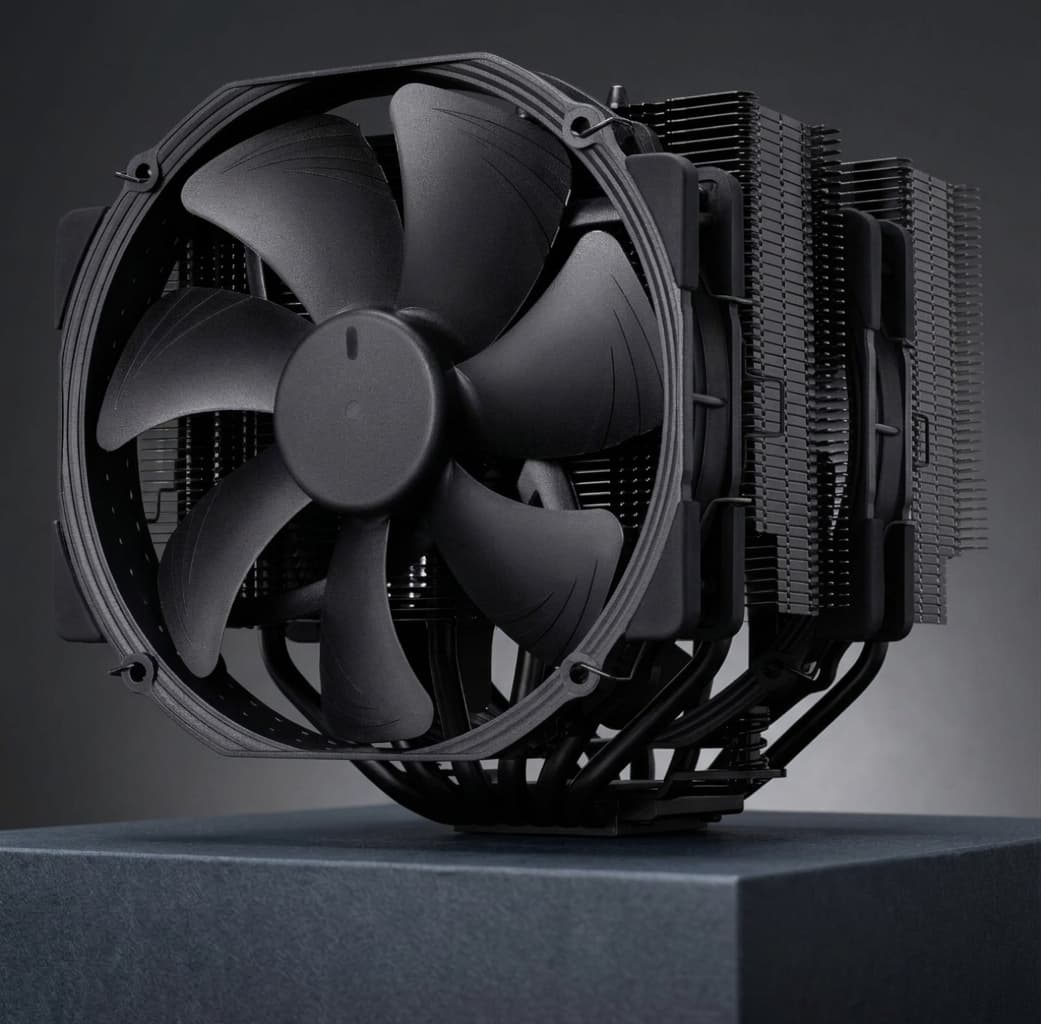
The all-black edition of Noctua’s NH-D15: a 168 mm dual-tower CPU air cooler with six heat pipes, two NF-A15 140 mm PWM fans, NT-H1 thermal paste, and the SecuFirm2 mount for AMD AM5/AM4 and Intel LGA1851/1700/1200/115x. It is built for quiet cooling of high-end CPUs and comes with a 6-year warranty.
The Noctua NH-D15 chromax.black is the all-black version of one of the best-known air coolers ever made. It keeps the original NH-D15's dual-tower heatsink, six heat pipes and two 140 mm NF-A15 fans, but swaps the brown and beige for a black-coated heatsink and black fans. This Noctua NH-D15 chromax.black review covers Noctua's official specifications, what independent testing shows about its cooling and noise, the case and RAM clearance checks to do before you buy, and how it compares with five alternatives, including Noctua's own NH-D15 G2 and a 360 mm AIO liquid cooler. GearNexis has not tested this cooler in-house. The findings below are based on manufacturer documentation and published third-party reviews.
Quick Verdict
If your case has room for a 168 mm cooler and you want strong, quiet air cooling without the pump of a liquid cooler, the NH-D15 chromax.black is still an excellent choice. It is a proven design with a 6-year warranty and a large body of independent reviews behind it. What counts against it today is its age and price. Noctua's newer NH-D15 G2 has more heat pipes and a larger heatsink, and budget dual-tower coolers now get surprisingly close for much less money. Buy it for quality, low noise and an all-black look, not because it is the cheapest way to cool a CPU.
Best for: quiet gaming and workstation builds in mid-tower or larger cases, black-themed builds, and buyers who want a long warranty with no liquid inside. Look elsewhere if: your case can't fit a 168 mm cooler, you need tall RAM and two fans in a smaller case, or you're cooling a CPU that runs at very high sustained power.
Check the current price of the Noctua NH-D15 chromax.black on Amazon
Key Specifications at a Glance
| Specification | Noctua NH-D15 chromax.black (official) |
|---|---|
| Cooler type | Dual-tower CPU air cooler |
| Heat pipes | 6 × 6 mm, copper, nickel-plated, soldered to the fins |
| Fans | 2 × NF-A15 HS-PWM chromax.black, 140 mm, 0–1500 rpm |
| Max airflow / noise per fan | 140.2 m³/h (82.52 CFM) / 24.6 dB(A) |
| Dimensions with fans | 168 × 150 × 161 mm (H × W × D) |
| Weight with fans | 1320 g |
| RAM clearance | 66 mm with one fan; up to 32 mm RAM with both fans in the standard position |
| Sockets (Noctua's list) | AMD AM5, AM4; Intel LGA1954, LGA1851, LGA1700, LGA1200, LGA1151, LGA1150, LGA1155, LGA1156 |
| Thermal paste | Noctua NT-H1 |
| Warranty | 6 years |
Design and Build Quality
The chromax.black edition launched in October 2019 as a cosmetic variant of the NH-D15. The base, heat pipes and fins are nickel-plated, and the whole heatsink is coated black. Noctua says the coating does not affect cooling performance. NikKTech's comparison with the standard NH-D15 measured a 0.6 °C difference, which it treated as within the margin of error. The fans are also black, so there's nothing brown or beige anywhere on the cooler. There's no RGB lighting. For extra color, Noctua sells optional NA-HC3/NA-HC4 heatsink covers and colored anti-vibration pads.
Dual-Tower, Six-Heat-Pipe Heatsink
Six 6 mm heat pipes run from a 38 × 40 mm copper base into two separate aluminum fin stacks with 45 fins each. Noctua says the dual-tower layout gives more surface area, better heat distribution and more efficient airflow than a single tower. The trade-off is size: the cooler is 150 mm wide and 161 mm deep with both fans fitted, and it weighs 1320 g.
Fans, Cooling Approach and Noise
The NH-D15 chromax.black ships with two NF-A15 HS-PWM chromax.black fans. One sits between the towers and the other on the front. Each 4-pin PWM fan is rated for 0–1500 rpm, 140.2 m³/h of airflow, 2.08 mm H₂O of static pressure and 24.6 dB(A) at full speed. The box includes a Y-splitter, so both fans can run from one motherboard header, and two Low-Noise Adaptors that cap fan speed for quieter operation. Noctua's earlier spec sheet lists 1200 rpm and 19.2 dB(A) with the adaptors fitted.
These are manufacturer ratings for one fan, not measurements from inside a PC. Real-world noise depends on your fan curve, case airflow and CPU load. The cooler's appeal comes from pairing large, slow 140 mm fans with a big heatsink: it doesn't need high fan speeds to move heat, so it can stay quiet under typical gaming loads and ramp up only when the CPU is working hard.
Cooling Performance: What Independent Testing Shows
Because the chromax.black edition uses the same heatsink and fans as the original NH-D15, results for the original apply here. In Tom's Hardware's 2024 tests on an Intel Core i7-14700K, the original NH-D15:
- cooled about 230 W with power limits removed, where the CPU reaches its thermal limit even on strong air coolers,
- cooled about 218 W with noise normalized to 38.9 dBA,
- averaged about 66 °C in a 110 W CPU plus 275 W GPU load meant to mimic a moderately CPU-heavy game.
Those figures are derived from Tom's Hardware's Thermalright Assassin X 120 R SE review, which compared that cooler against the NH-D15. They're useful for placing the NH-D15 among other coolers, but they come from one test bench and one CPU. Your temperatures will depend on your processor, case airflow, room temperature and fan settings.
Noctua's own NSPR performance rating, which compares Noctua coolers with one another, gives the NH-D15 a score of 183 and the newer NH-D15 G2 a score of 228. In Noctua's fixed heat-load test, the G2 ran 3.2 °C cooler. Since that comparison is from the manufacturer, read it as a guide rather than an independent result.
Gaming, Productivity and High-Power CPUs
For gaming, the NH-D15 chromax.black has plenty of headroom. Games rarely load every core for long periods, and the test above at a 110 W CPU load stayed well below throttling temperatures. For rendering, compiling and other sustained all-core work, it remains a strong air cooler, but the most power-hungry desktop CPUs can still reach their thermal limits under any air cooler, as Tom's Hardware's unlimited-power test shows. If you plan heavy overclocking or long full-power workloads on a flagship CPU, a 360 mm AIO or the NH-D15 G2 offers more thermal margin.
Installation
The cooler uses Noctua's SecuFirm2 mounting system. Noctua publishes separate installation guides for its Intel and AMD mounting kits, and the box includes NT-H1 thermal paste. In practice, you remove the center fan to reach the two spring-loaded mounting screws, tighten them evenly, and then refit the fans with the included clips. Because of the cooler's size and weight, it's usually easier to install it on the motherboard before the board goes into the case, and before you add RAM if you plan to use tall modules.
Noctua's current specifications list LGA1700, LGA1851 and LGA1954 support. Boxes from earlier production may not include the LGA1700 hardware, so check the box contents if you buy older stock. Noctua offers mounting upgrade kits for older units, and an LGA2011/2066 kit (NM-i20xx) is sold separately.
Compatibility: Case, RAM, Motherboard and Sockets
Case Clearance
At 168 mm tall with fans, the NH-D15 chromax.black needs a case rated for at least 168 mm of CPU cooler clearance. Leave a few millimeters of margin. Many mid-towers clear it, but plenty of compact and slim cases don't.
NH-D15 chromax.black RAM Clearance
This is the most important check. Thanks to its recessed lower fins, the cooler gives 66 mm of RAM clearance in single-fan mode. With both fans in the standard position, Noctua recommends standard-height RAM up to 32 mm. You can raise the front fan to clear taller memory, but that raises the overall height, so it only works in cases with more than 165 mm of cooler clearance. Many RGB and heatspreader-equipped kits are taller than 32 mm, so check your memory's height before you buy.
Motherboard and GPU Clearance
The 150 mm width can overhang the top PCIe slot and VRM heatsinks on some motherboards. Noctua's FAQ notes that the fan clips can come close to a graphics card in the top slot. Use Noctua's online compatibility tools to check your motherboard before you order.
Advantages and Trade-Offs
- Air vs. liquid: there's no pump to fail and no coolant to leak, and the 6-year warranty matches ARCTIC's AIO warranty. A 360 mm AIO, however, moves heat to the radiator, frees space around the socket and avoids RAM clearance issues.
- Cooling vs. size: the large dual-tower heatsink is where its performance comes from, but it limits the cases and RAM it works with.
- Quiet vs. maximum speed: the NF-A15 fans top out at 1500 rpm. That keeps noise low, but some rivals use faster fans to cool more at full speed.
- Premium price vs. value rivals: you pay for Noctua's build quality, accessories and support. Budget dual-towers cost far less for slightly less cooling.
Noctua NH-D15 chromax.black vs. Alternatives
Specifications are from each manufacturer. No shared test covers all six coolers, so this table doesn't name an overall winner.
| Cooler | Type and design | Fans / radiator | Height or clearance | Noise (rated) | Performance evidence | Best for | Main advantage | Main drawback |
|---|---|---|---|---|---|---|---|---|
| Noctua NH-D15 chromax.black (this review) | Air, dual tower, 6 heat pipes | 2 × 140 mm NF-A15, 1500 rpm | 168 mm; 32 mm RAM with two fans | 24.6 dB(A) per fan | About 230 W on an i7-14700K (original NH-D15, Tom's Hardware) | Quiet, all-black high-end air builds | Proven design, 6-year warranty | Bulky; tall-RAM limits; older design |
| Noctua NH-D15 G2 | Air, dual tower, 8 heat pipes | 2 × 140 mm NF-A14x25r G2, 1500 rpm | 168 mm; 1525 g | 24.8 dB(A) per fan | Noctua NSPR 228 vs. 183; 3.2 °C cooler in Noctua's own test | Most cooling from a Noctua air cooler | Larger heatsink, NT-H2 paste, AM5 paste guard | Heavier; costs more. A chromax.black version exists |
| Thermalright Phantom Spirit 120 SE | Air, dual tower, 7 heat pipes | 2 × 120 mm TL-C12B V2, 1500 rpm | 154 mm; 765 g | 25.6 dBA per fan | Not verified in a shared test | Value-focused gaming builds | Lower height and much lower cost | Smaller fans; shorter track record |
| DeepCool AK620 Digital Pro | Air, dual tower, 6 heat pipes, status display | 2 × 120 mm, 500–1750 rpm | 163 mm | Up to about 25 dB(A) (retailer-listed) | Not verified in a shared test | Builds that want a CPU temperature display | Built-in display and RGB | Needs software for the display; check the seller |
| be quiet! Dark Rock Pro 5 | Air, dual tower, 7 heat pipes | 135 mm + 120 mm Silent Wings, speed switch | 168 mm; height-adjustable front fan | Up to 23.3 dB(A) (be quiet! rating) | 270 W TDP (manufacturer rating, not a test) | Noise-focused, all-black builds | Quiet/performance switch; black finish as standard | Same 168 mm height; no independent shared test here |
| ARCTIC Liquid Freezer III Pro 360 A-RGB | 360 mm AIO liquid cooler | 3 × 120 mm P12 Pro A-RGB, 600–3000 rpm, plus VRM fan | 360 mm radiator mount; 63 mm radiator plus fans | Not rated in dB(A) by ARCTIC | Quieter than the NH-D15 in Tom's Hardware's CPU plus GPU test | High-power CPUs and builds with tall RAM | No socket-area or RAM clearance limits | Pump and tubing; needs a 360 mm radiator mount |
Who Should Buy the NH-D15 chromax.black?
- Builders with a case that clears at least 168 mm who want quiet, high-end air cooling.
- Gamers and creators running modern Ryzen or Intel Core CPUs at stock or modest settings.
- Anyone building an all-black system who doesn't want RGB.
- Buyers who'd rather avoid a pump and coolant and value a 6-year warranty.
Who Should Consider Another Cooler?
- Compact case owners: the Phantom Spirit 120 SE is 154 mm tall.
- Tall-RAM users in mid-size cases: a 360 mm AIO avoids socket-area clearance issues entirely.
- Buyers who want the most from Noctua: the NH-D15 G2 is the newer, larger design.
- Tight budgets: value dual-towers cost a fraction of the price.
Is It Good Value?
The NH-D15 chromax.black launched at a suggested price of USD 99.90 and has always cost more than mainstream dual-tower coolers. Amazon pricing changes often and varies by seller, so check the live price before you decide. What you get for the premium: a heatsink with years of consistent review results, two high-quality 140 mm fans, NT-H1 paste, Noctua's mounting support and a 6-year warranty. If the price is close to the NH-D15 G2, the G2 is the better buy for performance. If the gap is large, the chromax.black remains a sensible premium choice, especially for a black build.
Final Verdict
The Noctua NH-D15 chromax.black isn't the newest or cheapest high-end air cooler, but it's still one of the safest choices. It delivers strong, quiet cooling, excellent build quality and a long warranty in a clean all-black design. Before you buy, confirm that your case clears 168 mm and that your RAM is 32 mm or shorter if you'll run both fans. If those checks pass, it's an easy cooler to recommend for quiet gaming and productivity PCs.
View current availability of the Noctua NH-D15 chromax.black on Amazon
Pros
- Proven six-heat-pipe dual-tower heatsink with years of consistent independent review results
- Two 140 mm NF-A15 PWM fans rated at 24.6 dB(A) each, plus Low-Noise Adaptors for quieter operation
- Strong for air cooling: the identical original NH-D15 cooled about 230 W on an i7-14700K in Tom's Hardware's unlimited-power test
- All-black heatsink and fans; Noctua says the coating doesn't affect performance
- Supports AMD AM5/AM4 and Intel LGA1954/1851/1700/1200/115x with the SecuFirm2 mount
- Includes NT-H1 thermal paste, a PWM Y-splitter and a metal case badge
- 6-year manufacturer warranty
- No pump or coolant to wear out or leak
Cons
- 168 mm tall, so it won't fit many compact or slim cases
- RAM is limited to 32 mm with both fans in the standard position
- 150 × 161 mm footprint can crowd the top PCIe slot and VRM heatsinks on some boards
- Heavy at 1320 g with fans
- Older design: Noctua's NH-D15 G2 has eight heat pipes and a higher NSPR rating (228 vs. 183)
- Premium price compared with budget dual-tower coolers
- You have to remove the center fan to reach the mounting screws
- No RGB lighting, if you want it
Spec Sheet
Specifications
General
| Model | NH-D15 chromax.black |
|---|---|
| Cooler Type | Dual-tower CPU air cooler |
| Colour | Black (coated heatsink, black fans) |
| Lighting | None |
| EAN | 9010018000184 |
| UPC | 841501100185 |
Cooling
| Towers | 2 |
|---|---|
| Heat Pipes | 6 × 6 mm |
| Fin Count | 45 |
| Base Size | 38 × 40 mm |
| Heat-Pipe/Fin Interface | Soldered |
| Noctua NSPR Rating | 183 |
Fans
| Model | 2 × NF-A15 HS-PWM chromax.black |
|---|---|
| Size | 140 × 150 × 25 mm (140 mm class) |
| Speed Range | 0–1500 rpm |
| Speed with Low-Noise Adaptor | 1200 rpm (Noctua launch spec) |
| Max Airflow | 140.2 m³/h (82.52 CFM) per fan |
| Max Static Pressure | 2.08 mm H₂O |
| Max Rated Noise | 24.6 dB(A) per fan (19.2 dB(A) with L.N.A., launch spec) |
| Typical Input Power | 1.19 W |
| Connector | 4-pin PWM |
| Bearing | SSO2 |
| MTTF | Over 150,000 hours |
Dimensions
| Height with Fans | 168 mm |
|---|---|
| Width with Fans | 150 mm |
| Depth with Fans | 161 mm |
| Heatsink Only (H × W × D) | 160 × 150 × 135 mm |
| Weight with Fans | 1320 g |
| Weight without Fans | 980 g |
Compatibility
| AMD Sockets | AM5, AM4 |
|---|---|
| Intel Sockets (current spec) | LGA1954, LGA1851, LGA1700, LGA1200, LGA1151, LGA1150, LGA1155, LGA1156 |
| LGA2011/LGA2066 | Requires optional NM-i20xx kit |
| RAM Clearance | 66 mm single fan; up to 32 mm RAM with two fans in standard position |
| Minimum Case Clearance | 168 mm |
| Mounting Hole Pitch | 83 mm |
Materials
| Base | Copper, nickel-plated |
|---|---|
| Heat Pipes | Copper, nickel-plated |
| Fins | Aluminum, nickel-plated |
Package Contents
| Thermal Compound | Noctua NT-H1 |
|---|---|
| Mounting | Black SecuFirm2 mounting kit |
| Accessories | 2 × NA-RC7 Low-Noise Adaptors, NA-YC1 4-pin PWM splitter, metal case badge |
Warranty
| Manufacturer Warranty | 6 years |
|---|
Frequently Asked Questions
Is the Noctua NH-D15 chromax.black worth buying?+
How well does it cool high-performance CPUs?+
Is it good for gaming?+
Is the NH-D15 chromax.black quiet?+
Does the black coating hurt cooling?+
Which CPU sockets does it support?+
Will it fit in my PC case?+
Will it interfere with tall RAM?+
Is it better than a 360 mm liquid cooler?+
What is in the box?+
What warranty does Noctua provide?+
NH-D15 chromax.black or NH-D15 G2?+
As an Amazon Associate we earn from qualifying purchases. See our affiliate disclosure.