
GIGABYTE
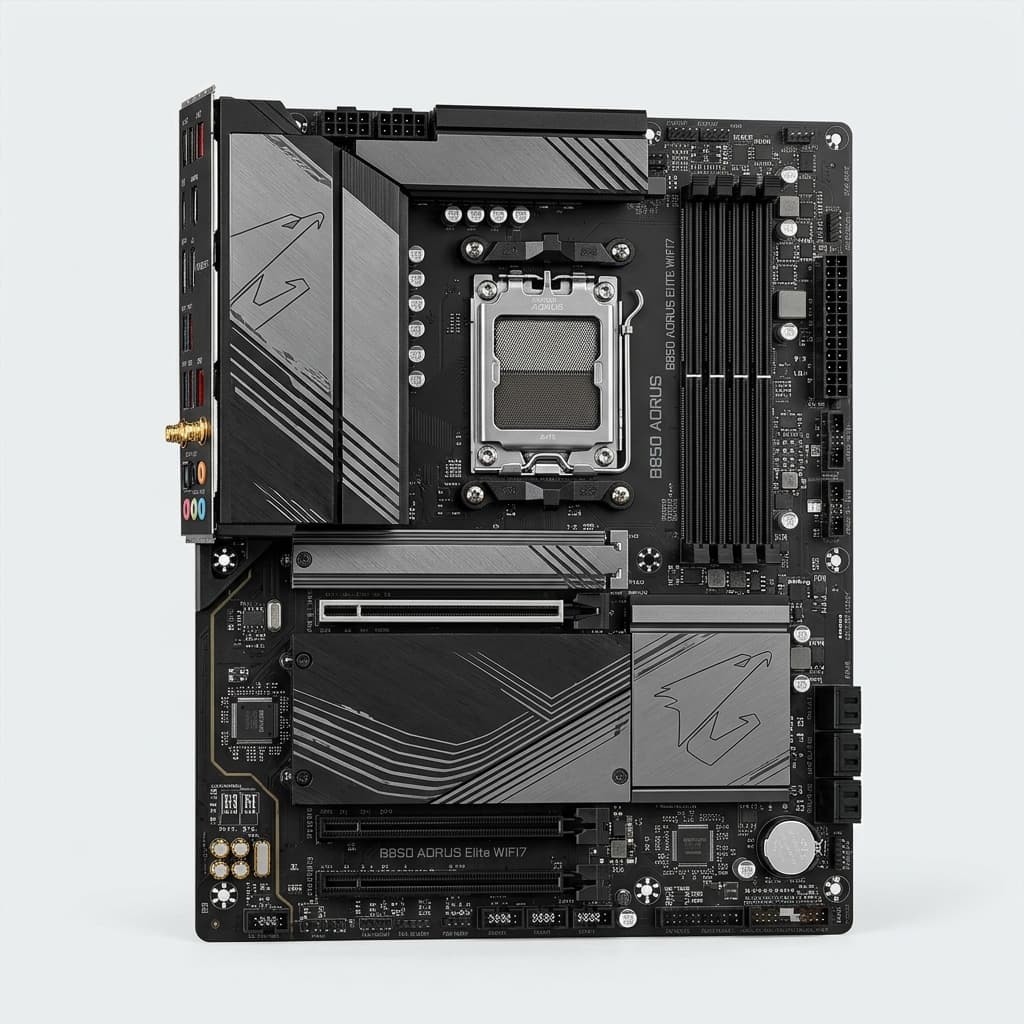
GIGABYTE B850 AORUS Elite WIFI7 AMD AM5 ATX Motherboard
An AM5 ATX board for Ryzen 9000, 8000, and 7000 builders who want Wi-Fi 7, a PCIe 5.0 graphics slot, and a PCIe 5.0 M.2 socket without X870 pricing. Three heatsink-covered M.2 slots, 2.5GbE, and tool-free EZ-Latch hardware make building easy. The main trade-offs are PCIe 3.0 x1 secondary slots and no USB4.
If you are planning a Ryzen 7000, 8000, or 9000 build and want Wi-Fi 7, a PCIe 5.0 graphics slot, and a PCIe 5.0 SSD socket without paying X870 money, the GIGABYTE B850 AORUS Elite WIFI7 deserves a close look. In this review we break down what GIGABYTE actually specifies, where the board saves money, and which rival AM5 boards suit specific builds better.
How we evaluated it: this review draws on GIGABYTE's official specifications, the Amazon listing, and Tom's Hardware's review. GearNexis Official has not physically tested this board, and no benchmark figures here are our own.
Quick Verdict
- Best for: single-GPU AM5 gaming and mainstream creator builds that want modern networking and easy assembly.
- Key strengths: PCIe 5.0 x16 graphics slot and a PCIe 5.0 x4 M.2 socket (with Ryzen 9000/7000), three heatsink-covered M.2 slots, Wi-Fi 7 plus 2.5GbE, tool-free EZ-Latch hardware, and Q-Flash Plus.
- Biggest compromises: the secondary PCIe slots run at PCIe 3.0 x1, there is no USB4, the rear USB-C port is 10Gbps, and the audio codec depends on board revision.
- Consider an alternative if: you want four M.2 slots, faster-than-2.5GbE networking, a 20Gbps rear USB-C port, or extra PCIe 4.0 expansion.
Key Features at a Glance
- AM5, three Ryzen generations: start with a modest CPU and upgrade later within GIGABYTE's CPU support list.
- Four DDR5 slots, up to 256GB: room for large kits, with AMD EXPO and XMP for one-click memory tuning.
- PCIe 5.0 where it matters: the main x16 slot and one M.2 socket support PCIe 5.0 with Ryzen 9000/7000, leaving headroom for future GPUs and Gen5 SSDs.
- Three cooled M.2 slots: one M.2 Thermal Guard Ext. heatsink covers all three, with screwless latches.
- Wi-Fi 7, Bluetooth 5.4, 2.5GbE: modern networking without an add-in card.
- Builder conveniences: PCIe EZ-Latch Plus, M.2 EZ-Latch Plus and Click, WIFI EZ-Plug, EZ Debug LEDs, and a Q-Flash Plus button.
Specifications Overview
| Socket / chipset | AMD AM5 / AMD B850 |
|---|---|
| Form factor | ATX, 30.5 x 24.4 cm |
| Memory | 4 x DDR5 DIMM, up to 256GB, dual channel; up to DDR5-8200 (OC)* |
| Primary PCIe slot | PCIe 5.0 x16 (Ryzen 9000/7000); PCIe 4.0 x8 or x4 (Ryzen 8000)* |
| Other PCIe slots | 2 x PCIe 3.0 x1 (full-length, from chipset) |
| M.2 | 1 x PCIe 5.0 x4 (CPU), 1 x PCIe 4.0 x4 (CPU), 1 x PCIe 4.0 x4 (chipset)* |
| SATA | 4 x SATA 6Gb/s |
| Networking | Realtek 2.5GbE; Realtek RTL8922AE Wi-Fi 7 (up to 160MHz), Bluetooth 5.4 |
| Power design | 14+2+2 phases (advertised) |
| Audio | Rev. 1.0: Realtek codec (model not named by GIGABYTE); Rev. 1.1: Realtek ALC1220 |
*Depends on the CPU, memory configuration, and BIOS.
Design, Build Quality, and Installation
GIGABYTE pairs large VRM heatsinks with a heatpipe and 5 W/mK thermal pads, and covers all three M.2 slots with the M.2 Thermal Guard Ext. heatsink. The primary graphics slot uses a stainless-steel-reinforced PCIe UD Slot for heavy cards.
Assembly is the standout. PCIe EZ-Latch Plus releases the graphics card with a button, M.2 EZ-Latch Plus holds SSDs without screws, M.2 EZ-Latch Click makes the M.2 heatsink screwless, and the WIFI EZ-Plug joins both antenna leads in one connector.
There are six fan/pump headers (CPU fan, CPU fan/pump, three system fans, one system fan/pump), three ARGB Gen2 headers, and one 12V RGB header. An internal HDMI port supports GIGABYTE's Sensor Panel Link displays (needs a CPU with integrated graphics).
CPU and Platform Compatibility
The board supports AMD Ryzen 9000, 8000, and 7000 Series processors on Socket AM5. GIGABYTE's CPU support list sets a minimum BIOS version for each processor, and its BIOS history includes AGESA updates for new CPUs, so check the list before installing a newly launched chip.
Ryzen 8000 APUs have real limits here: the primary slot runs at PCIe 4.0 x8 with Phoenix 1 chips and x4 with Phoenix 2 chips, which also drop the second CPU M.2 slot to PCIe 4.0 x2. PCIe 5.0 graphics and storage need a Ryzen 9000 or 7000 CPU. Support for future processors depends on AMD and GIGABYTE BIOS updates, so we can't promise it.
Memory and Expansion
The four DDR5 slots take non-ECC unbuffered memory, up to 64GB per module and 256GB total. GIGABYTE lists up to DDR5-8200, but anything above DDR5-5200 is overclocked and depends on the CPU's memory controller, the kit, the number of modules, and the BIOS. Tom's Hardware suggests a low-latency DDR5-6000 to 6400 kit for most users; pick one from the QVL.
GIGABYTE also promotes D5 Bionic Corsa memory tuning and a BIOS "X3D Turbo Mode" that it says can lift gaming performance by up to 18%, depending on the game. That is GIGABYTE's claim, not ours.
Expansion is the main trade-off: the two full-length slots below the main slot run at PCIe 3.0 x1. That suits a Wi-Fi, sound, or modest capture card, but not a second GPU or fast NVMe adapter.
Storage Options
- M2A_CPU: PCIe 5.0 x4 with Ryzen 9000/7000 (PCIe 4.0 with Ryzen 8000).
- M2B_CPU: PCIe 4.0 x4 (x2 with Phoenix 2-based Ryzen 8000 chips).
- M2C_SB: PCIe 4.0 x4 through the B850 chipset.
All three slots take 2280 to 25110 drives, and there are four SATA 6Gb/s ports. NVMe RAID 0/1/10 is supported (RAID 5 with Ryzen 9000 only), plus SATA RAID 0/1/10. GIGABYTE lists no M.2-to-SATA sharing, but check the manual before planning a dense build.
Gamers can easily fit a boot drive and a game drive, and creators get a fast scratch slot with room for two more NVMe drives. If you want four or more M.2 drives, see the rivals below.
Connectivity and Networking
The Realtek RTL8922AE module supports Wi-Fi 7 on 2.4, 5, and 6 GHz with up to 160MHz channels, plus Bluetooth 5.4. Real speeds depend on your router, distance, interference, and regional 6 GHz rules. GIGABYTE says Wi-Fi 7 features need Windows 11; there is no Windows 10 driver. Wired networking is Realtek 2.5GbE.
The rear panel has one 10Gbps USB-C, two 10Gbps USB-A, five 5Gbps USB-A, four USB 2.0, DisplayPort (for CPUs with integrated graphics), two audio jacks, optical S/PDIF, and the Q-Flash Plus button. Inside are a 20Gbps USB-C front-panel header, a 5Gbps header, and two USB 2.0 headers. There is no USB4.
Power Delivery and Thermal Design
GIGABYTE advertises a "Digital Twin" 14+2+2 design: 14 Vcore phases (7+7 in parallel) and two SoC phases using 60A DrMOS, plus two miscellaneous phases, fed by 8-pin and 4-pin EPS connectors. Tom's Hardware reported 55A stages on its sample and said the VRM handled Ryzen 9 9900X and 9950X CPUs. Phase count alone doesn't guarantee CPU performance; the CPU, cooling, and BIOS settings matter more.
Gaming and Productivity Suitability
Your frame rate comes from the GPU and CPU, not the motherboard. What this board provides is a solid base: a full-bandwidth PCIe 5.0 graphics slot, power delivery that independent testing found capable with Ryzen 9 chips, and fast storage. That suits gaming builds around chips like the Ryzen 7 9800X3D, and single-GPU streaming or editing rigs. Workstations with several high-bandwidth cards will hit the x1 slot limits. See how much a CPU matters for gaming FPS.
BIOS, Setup, and Troubleshooting
- Q-Flash Plus: update the BIOS from a USB drive with the rear button, which helps when a new CPU needs a newer BIOS.
- EZ Debug Zone: status LEDs (four, per Tom's Hardware) plus onboard power and reset buttons help pinpoint boot failures.
- BIOS tools: Q-Flash, Q-Flash Auto Scan, Smart Backup, multiple themes, AIO fan control, and Smart Fan 6.
- Software: GIGABYTE Control Center, including RGB Fusion.
Setup tips: update the BIOS before installing a recently released CPU, enable EXPO only after a successful boot at defaults, and install the Wi-Fi 7 driver on Windows 11.
Advantages and Limitations
Strengths: a PCIe 5.0 graphics slot (optional on B850), Wi-Fi 7, three cooled M.2 slots, and tool-free assembly. Limitations: PCIe 3.0 x1 secondary slots, no USB4, a 10Gbps rear USB-C port, and revision-dependent audio. See the Pros and Cons lists for details.
B850 AORUS Elite WIFI7 vs. Competing AM5 Motherboards
This comparison uses manufacturer specifications and is not a benchmark test. All five are B850 / AM5 boards supporting Ryzen 9000/8000/7000. "Not verified" means we couldn't confirm the detail officially; current prices could not be verified for any of them.
| Feature | B850 AORUS Elite WIFI7 | MSI MAG B850 Tomahawk MAX WIFI | ASUS TUF Gaming B850-PLUS WIFI | ASRock B850 Steel Legend WiFi | GIGABYTE B850 AORUS Elite WIFI7 ICE |
|---|---|---|---|---|---|
| Memory | 4 x DDR5, 256GB, 8200 (OC) | 4 x DDR5, 256GB, 8400+ (OC) | 4 x DDR5, 256GB, 8000+ (OC) | 4 x DDR5, 8000+ (OC) | Same as main board |
| Primary GPU slot | PCIe 5.0 x16 | PCIe 5.0 x16 | PCIe 5.0 x16 | PCIe 5.0 x16 | PCIe 5.0 x16 |
| Extra PCIe | 2 x PCIe 3.0 x1 | PCIe 3.0 x1, PCIe 4.0 x4 (x2 if M2_3 used) | PCIe 4.0 x4 (shared with M.2_3), 2 x PCIe 4.0 x1 | 1 x PCIe 4.0 x16 slot (lanes not verified) | Same as main board |
| M.2 slots | 3: 1 x Gen5 x4, 2 x Gen4 x4 | 4: 2 x Gen5 x4, 1 x Gen4 x4, 1 x Gen4 x2 | 3: 1 x Gen5 x4, 2 x Gen4 x4 | 4: 1 x Gen5 x4, 3 x Gen4 x4 | Same as main board |
| Wi-Fi / Ethernet | Wi-Fi 7 (160MHz), 2.5GbE | Wi-Fi 7 (320MHz), 5GbE | Wi-Fi 7 (160MHz), 2.5GbE | Wi-Fi 7, 2.5GbE | Wi-Fi 7 (160MHz), 2.5GbE |
| USB-C | Rear 10Gbps; front 20Gbps header | Rear 3 x 10Gbps; front 20Gbps header | Rear 20Gbps; front 10Gbps header | Rear 2 x 10Gbps; front 20Gbps header | Same as main board |
| Power (advertised) | 14+2+2, 60A DrMOS | 14-phase Duet Rail, 80A SPS | 14+2+1, 80A DrMOS (listing) | 14+2+1, 80A Dr.MOS | Same as main board |
| Audio codec | Revision-dependent (ALC1220 on rev. 1.1) | ALC4080 | ALC1220P | ALC4082 | Revision-dependent |
| Recovery / debug | Q-Flash Plus, debug LEDs | Flash BIOS button, EZ Debug LEDs | BIOS FlashBack, Q-LED | BIOS Flashback; LEDs not verified | Q-Flash Plus |
| Fan headers | 6 | 8 | 7 | Not verified | 6 |
| Warranty | 5 years advertised on Amazon; confirm with GIGABYTE | Not verified | Not verified | Not verified | Not verified |
| Best for | Easy-to-build Wi-Fi 7 gaming PCs | Maximum storage and networking | Faster rear USB-C, extra x4 slot | Four M.2 slots at Steel Legend level | White-themed builds |
| Main trade-off | x1 slots, no USB4 | Higher-tier spec; compare current prices | Lane sharing on x4 slot | Lane details not verified | Same limits as main board |
Which Alternative Fits Which Builder?
- MSI MAG B850 Tomahawk MAX WIFI: best for storage-heavy builds, with four M.2 slots (two PCIe 5.0), 5GbE, 320MHz Wi-Fi 7, and more fan headers.
- ASUS TUF Gaming B850-PLUS WIFI: choose it for a 20Gbps rear USB-C port and a PCIe 4.0 x4 slot (disabled when M.2_3 is used).
- ASRock B850 Steel Legend WiFi: a good fit for four M.2 slots, an M.2 bottom heatsink, and ALC4082 audio.
- GIGABYTE B850 AORUS Elite WIFI7 ICE: identical specs per GIGABYTE, in white. Choose it for looks, not features.
Who Should Buy It?
- AM5 gamers with one graphics card who want PCIe 5.0 for future GPUs and a Gen5 SSD.
- Builders who value tool-free GPU and M.2 installation and a simple Wi-Fi antenna.
- Anyone who needs Wi-Fi 7 and 2.5GbE without paying for X870.
- Upgraders who want BIOS recovery through Q-Flash Plus.
Who Should Skip It?
- Builders who need USB4 or 40Gbps USB; look at X870-class boards.
- Users with several high-bandwidth add-in cards, since the extra slots are PCIe 3.0 x1.
- Systems that need four or more M.2 drives; consider the MSI or ASRock boards above.
- Small-form-factor builders; see our motherboard reviews for smaller boards.
Buying Advice Checklist
- CPU: check your Ryzen model's minimum BIOS on GIGABYTE's support list. See our CPU reviews.
- Case: confirm ATX (30.5 x 24.4 cm) support. See our PC case reviews.
- Memory: pick a DDR5 kit from the QVL; two modules is the easiest path to EXPO speeds. See our RAM section.
- SSDs: put your fastest drive in M2A_CPU. See our SSD guides.
- GPU: check card length and slot spacing. See our GPU reviews.
- Wi-Fi: Wi-Fi 7 features need a Wi-Fi 7 router and Windows 11.
- Warranty and cost: confirm warranty terms with GIGABYTE, and budget for a power supply, CPU cooler, and memory.
Final Verdict: Is It Worth It?
The GIGABYTE B850 AORUS Elite WIFI7 is a well-balanced B850 board for builders who want the important modern features: a PCIe 5.0 graphics slot, a PCIe 5.0 SSD socket, Wi-Fi 7, and genuinely helpful tool-free hardware, all without stepping up to X870. Tom's Hardware found its performance and VRM solid. The compromises (x1 secondary slots, no USB4, a 10Gbps rear USB-C port, and revision-dependent audio) are manageable for single-GPU builds. If they don't affect yours, it is a sensible AM5 foundation. Check the latest price and availability of the GIGABYTE B850 AORUS Elite WIFI7 on Amazon.
Pros
- PCIe 5.0 x16 primary graphics slot with Ryzen 9000/7000 CPUs. B850 makes this optional, so not every B850 board has one.
- Three M.2 slots (one PCIe 5.0 x4, two PCIe 4.0 x4), all covered by heatsinks and able to fit drives up to 110mm (25110).
- Wi-Fi 7 (2.4/5/6 GHz) with Bluetooth 5.4 and 2.5GbE LAN built in, plus a single-connector WIFI EZ-Plug antenna.
- Tool-free assembly features: PCIe EZ-Latch Plus GPU release, screwless M.2 EZ-Latch Plus, and the M.2 EZ-Latch Click heatsink.
- 14+2+2 power design with heatpipe-linked VRM heatsinks; Tom’s Hardware reported it handled Ryzen 9 9900X and 9950X CPUs.
- Q-Flash Plus rear button for BIOS updates, plus EZ Debug status LEDs and onboard power/reset buttons.
- Plenty of USB: 12 rear ports plus an internal 20Gbps USB-C front-panel header.
- Up to 256GB of DDR5 across four DIMMs, with AMD EXPO and XMP profile support.
Cons
- The two secondary full-length PCIe slots run at PCIe 3.0 x1, which limits high-bandwidth add-in cards.
- No USB4 or 40Gbps ports, and the only rear USB-C port is 10Gbps.
- Wi-Fi 7 is limited to 160MHz channels (no 320MHz), and GIGABYTE says Wi-Fi 7 features require Windows 11 with no Windows 10 driver.
- The audio codec depends on revision: GIGABYTE names the ALC1220 only for rev. 1.1, and Tom’s Hardware called its sample’s audio basic.
- Three M.2 slots, compared with four on the MSI MAG B850 Tomahawk MAX WIFI and ASRock B850 Steel Legend WiFi.
- The only rear video output is DisplayPort; the HDMI port is internal and meant for Sensor Panel Link.
Spec Sheet
Specifications
Group
| Label | Value |
|---|
General
| Model | B850 AORUS ELITE WIFI7 (Rev. 1.x) |
|---|---|
| Form Factor | ATX, 30.5 cm x 24.4 cm |
CPU
| Socket | AMD Socket AM5 |
|---|---|
| Supported Processors | AMD Ryzen 9000, 8000, and 7000 Series (see GIGABYTE CPU support list for BIOS requirements) |
Chipset
| Chipset | AMD B850 |
|---|
Memory
| Slots | 4 x DDR5 DIMM |
|---|---|
| Maximum Capacity | 256 GB (64 GB per DIMM) |
| Channel Architecture | Dual channel |
| Supported Speeds | DDR5-4400/4800/5200 native; up to DDR5-8200 (O.C.), depending on CPU, memory configuration, and BIOS |
| Module Type | Non-ECC unbuffered DIMM (1Rx8/2Rx8/1Rx16) |
| Profiles | AMD EXPO, Intel XMP |
Expansion
| PCIEX16 (CPU) | PCIe 5.0 x16 (Ryzen 9000/7000); PCIe 4.0 x8 (Ryzen 8000 Phoenix 1); PCIe 4.0 x4 (Ryzen 8000 Phoenix 2) |
|---|---|
| PCIEX1_1 / PCIEX1_2 (Chipset) | 2 x full-length slots, PCIe 3.0 x1 |
Storage
| M2A_CPU | PCIe 5.0 x4/x2 (Ryzen 9000/7000); PCIe 4.0 x4/x2 (Ryzen 8000); 2280/2580/22110/25110 |
|---|---|
| M2B_CPU | PCIe 4.0 x4/x2 (Ryzen 9000/7000 and Phoenix 1); PCIe 4.0 x2 (Phoenix 2); 2280/2580/22110/25110 |
| M2C_SB (Chipset) | PCIe 4.0 x4/x2; 2280/2580/22110/25110 |
| SATA | 4 x SATA 6Gb/s |
| NVMe RAID | RAID 0/1/10; RAID 5 with Ryzen 9000 only |
| SATA RAID | RAID 0/1/10 |
Graphics
| Rear Output | 1 x DisplayPort 1.4, up to 3840x2160 @ 144 Hz (requires CPU with integrated graphics) |
|---|---|
| Internal Output | 1 x internal HDMI 1.4, up to 1920x1080 @ 30 Hz (Sensor Panel Link) |
Networking
| Ethernet | Realtek 2.5GbE |
|---|---|
| Wireless | Realtek Wi-Fi 7 RTL8922AE, 802.11be, 2.4/5/6 GHz, up to 160 MHz, 2T2R |
| Bluetooth | Bluetooth 5.4 |
| Wi-Fi OS Note | Wi-Fi 7 features require Windows 11 (no Windows 10 driver); 6 GHz availability varies by country |
USB
| Rear | 1 x USB-C 10Gbps (USB 3.2 Gen 2), 2 x USB-A 10Gbps, 5 x USB-A 5Gbps, 4 x USB 2.0 |
|---|---|
| Internal | 1 x USB-C header 20Gbps (USB 3.2 Gen 2x2), 1 x USB 3.2 Gen 1 header (2 ports), 2 x USB 2.0 headers (4 ports) |
Audio
| Codec (Rev. 1.0) | Realtek audio codec (model not specified by GIGABYTE) |
|---|---|
| Codec (Rev. 1.1) | Realtek ALC1220, DSD support on rear line out |
| Channels / Outputs | 2/4/5.1/7.1-channel; 2 x audio jacks; optical S/PDIF Out |
Power Delivery
| Phase Design | 14+2+2 (Vcore 7+7 twin parallel; 60A DrMOS for Vcore and SOC; MISC phases Ppak) — manufacturer-advertised |
|---|---|
| CPU Power Connectors | 1 x 8-pin + 1 x 4-pin ATX 12V |
Cooling
| Heatsinks | VRM Thermal Armor Advanced with heatpipe; M.2 Thermal Guard Ext. covering 3 x M.2 |
|---|---|
| Fan/Pump Headers | 1 x CPU fan, 1 x CPU fan/pump, 3 x system fan, 1 x system fan/pump |
RGB
| Headers | 3 x addressable RGB Gen2, 1 x RGB |
|---|
Installation
| DIY Features | PCIe EZ-Latch Plus, M.2 EZ-Latch Plus, M.2 EZ-Latch Click, WIFI EZ-Plug, PCIe UD Slot |
|---|
Rear I/O
| Other | Q-Flash Plus button, 2 x antenna connectors, RJ-45 |
|---|
Internal I/O
| Buttons | Power button, reset button; reset and Clear CMOS jumpers |
|---|---|
| TPM | TPM header (GC-TPM2.0 SPI V2 module only) |
BIOS
| Firmware | 1 x 256 Mbit flash, AMI UEFI BIOS |
|---|---|
| Features | Q-Flash, Q-Flash Plus, Smart Backup |
Software
| Utilities | GIGABYTE Control Center (GCC); Norton Internet Security (OEM) bundled |
|---|
Operating System
| Support | Windows 11 64-bit |
|---|
Warranty
| Coverage | 5 years advertised on the Amazon listing title; confirm with GIGABYTE for your region |
|---|
Frequently Asked Questions
Is this motherboard compatible with Ryzen 9000 processors?+
Does this motherboard support DDR5 memory?+
How many M.2 SSDs can it hold?+
Does it have PCIe 5.0 for both the graphics card and an SSD?+
Does the motherboard support Wi-Fi 7?+
Is it suitable for a high-end gaming PC?+
What should I check before installing a Ryzen 8000 processor?+
How can I confirm the warranty and BIOS requirements?+
As an Amazon Associate we earn from qualifying purchases. See our affiliate disclosure.