
ASUS
ASUS ROG Strix B850-A Gaming WiFi AMD AM5 B850 ATX Motherboard
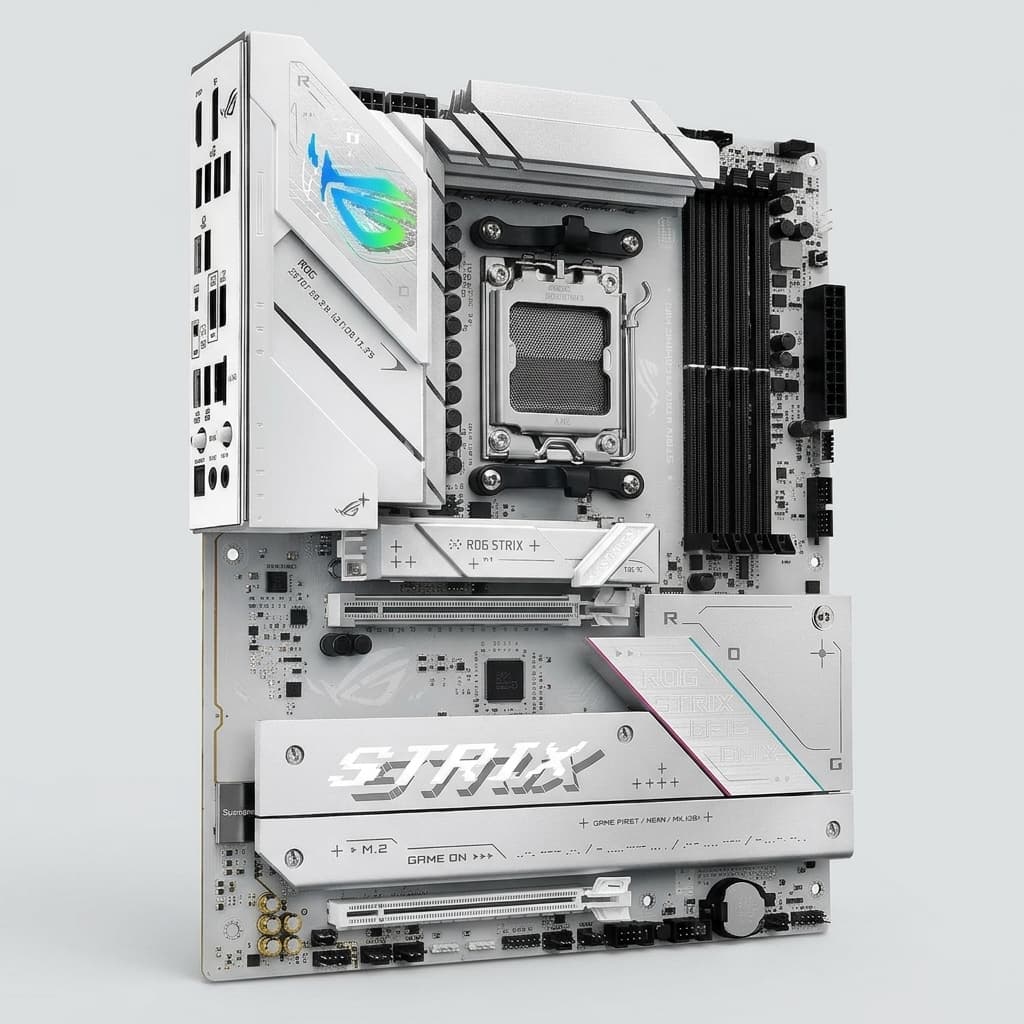
The ASUS ROG Strix B850-A Gaming WiFi is an AM5 ATX motherboard designed for modern AMD Ryzen gaming and productivity PCs. It combines DDR5 memory support, Wi-Fi 7, four M.2 slots, PCIe 5.0 connectivity, 2.5Gb Ethernet, and a distinctive white-and-silver design. Its extensive storage options and DIY-friendly features make it worth considering for builders who want a versatile, modern motherboard.
ASUS ROG Strix B850-A Gaming WiFi Review: Is It Worth Buying?
The ASUS ROG Strix B850-A Gaming WiFi is an AM5 ATX motherboard designed for builders who want modern AMD Ryzen compatibility, extensive NVMe storage, fast networking, and a distinctive white-and-silver aesthetic. With support for compatible Ryzen 7000, 8000, and 9000 Series desktop processors, DDR5 memory, Wi-Fi 7, and PCIe 5.0, it offers a flexible foundation for a new gaming PC or productivity-focused desktop.
Its main highlights include four M.2 slots, a 14+2+2 power-stage design, a primary PCIe 5.0 x16 graphics slot, USB Type-C connectivity with speeds up to 20Gbps, and installation conveniences such as M.2 Q-Latch, PCIe Slot Q-Release Slim, and BIOS FlashBack.
However, specifications alone do not determine whether a motherboard is worth purchasing. CPU compatibility, expansion-slot sharing, SATA requirements, case compatibility, and the price of competing B850 motherboards all deserve consideration before buying.
Quick Verdict
The ASUS ROG Strix B850-A Gaming WiFi is worth considering for builders who want four M.2 connectors, modern connectivity, and a white-themed AM5 platform.
- Best for: White-themed gaming PCs, Ryzen-based builds, and users who need multiple NVMe SSDs.
- Main strengths: Four M.2 slots, Wi-Fi 7, PCIe 5.0 graphics support, DDR5, and useful installation features.
- Main limitation: Two SATA ports and a bandwidth-sharing restriction involving M.2_3 and the secondary chipset-connected PCIe expansion slot.
- Buying advice: Compare its current price and exact features with competing B850 motherboards before deciding.
Key Features
- AMD AM5 socket: Supports compatible Ryzen 7000, 8000, and 9000 Series desktop processors.
- DDR5 memory: Four DIMM slots and support for up to 256GB, according to ASUS.
- 14+2+2 power stages: A substantial power-delivery design for compatible Ryzen processors.
- Four M.2 slots: Flexible NVMe storage expansion, with supported modes dependent on the CPU and slot configuration.
- PCIe 5.0 graphics: A primary PCIe 5.0 x16 slot with SafeSlot construction.
- Wi-Fi 7 and 2.5Gb Ethernet: Modern wireless and wired networking options.
- USB Type-C: Rear USB 20Gbps Type-C and additional high-speed USB connectivity.
- DIY features: M.2 Q-Latch, Q-Release mechanisms, Q-LED, BIOS FlashBack, and Clear CMOS.
Design and Build Quality
The white-and-silver appearance of the ASUS ROG Strix B850-A Gaming WiFi makes it particularly attractive for white PC builds. Its heatsinks, contrasting accents, and ROG styling can complement a white case, matching graphics card, and coordinated cooling hardware.
The board includes cooling hardware for its voltage-regulator area and M.2 storage. Actual temperatures depend on the CPU, case airflow, workload, ambient temperature, and other components; the presence of heatsinks alone does not guarantee a particular thermal result.
ASUS also includes a pre-mounted I/O shield and installation-oriented features designed to simplify assembly. PCIe Slot Q-Release Slim helps with graphics-card removal, while M.2 Q-Latch makes supported SSD installations more convenient.
CPU Compatibility and AM5 Platform
The ASUS ROG Strix B850-A Gaming WiFi uses the AMD AM5 socket and supports compatible Ryzen 7000, 8000, and 9000 Series desktop processors. Check ASUS's CPU support list and BIOS requirements for your exact processor before assembly.
Processor selection affects some expansion capabilities. In particular, the operating mode of the primary graphics slot and the available bandwidth of certain M.2 connections can differ between processor families.
This makes checking the official specifications important if you are planning a high-end graphics card, multiple SSDs, or a future CPU upgrade.
DDR5 Memory and AEMP
The motherboard provides four DDR5 DIMM slots and supports up to 256GB of memory according to ASUS's published specifications. It supports AMD EXPO profiles and ASUS Enhanced Memory Profile (AEMP), which can help simplify memory configuration with compatible modules.
ASUS advertises memory overclocking speeds exceeding 8000 MT/s under supported configurations. These speeds are not guaranteed across all CPUs, BIOS versions, memory kits, and DIMM arrangements. Check the memory compatibility list and choose a kit suited to your budget and workload.
Four M.2 Slots and Storage Expansion
Four M.2 connectors are one of the major advantages of the ASUS ROG Strix B850-A Gaming WiFi. This configuration gives users room for multiple NVMe SSDs without relying exclusively on conventional SATA storage.
One M.2 slot supports PCIe 5.0 x4 operation with compatible Ryzen 7000 and 9000 Series processors. The other M.2 slots have their own interface and bandwidth limitations, which should be checked in the official manual.
The motherboard provides two SATA 6Gb/s ports. This may be sufficient for a modern SSD-focused gaming build, but users planning to connect several existing SATA SSDs and hard drives should consider the limitation.
Important: M.2_3 shares bandwidth with the secondary chipset-connected PCIe 4.0 x16-length expansion slot. When that expansion slot is operating, M.2_3 is disabled. Check the manual before planning a build that uses both connections.
PCIe 5.0 Graphics Support
The primary graphics slot supports PCIe 5.0 x16 operation with compatible Ryzen 7000 and 9000 Series processors. Ryzen 8000 Series processors can provide reduced operating modes depending on the exact CPU model.
PCIe 5.0 support does not guarantee higher gaming frame rates by itself. Real-world gaming performance depends primarily on the graphics card, processor, memory, resolution, software, and workload.
Wi-Fi 7, Ethernet, and USB Connectivity
The motherboard includes Wi-Fi 7 wireless networking, Bluetooth, and Intel 2.5Gb Ethernet. Wi-Fi 7 can offer advanced wireless capabilities when paired with compatible equipment, but actual performance depends on router support, interference, distance, operating-system capabilities, and local regulations.
Its rear I/O includes a USB 20Gbps Type-C port, a USB 10Gbps Type-C port, and additional USB connectivity. A front-panel USB 10Gbps Type-C header is also available for compatible cases.
This is useful for external SSDs, modern peripherals, and other high-speed accessories. Before buying, check whether your case provides the front-panel connectors you intend to use.
Power Delivery and Cooling
ASUS specifies a 14+2+2 power-stage design rated for up to 80A per stage, alongside ProCool power connectors and heatsinks for the voltage-regulator area.
Power-stage counts should not be treated as a direct measurement of CPU performance. Processor power limits, firmware, cooling, and workload all affect sustained performance. Pair the motherboard with an appropriate CPU cooler and a well-ventilated case.
BIOS and DIY Features
BIOS FlashBack, Clear CMOS, Q-LED indicators, a pre-mounted I/O shield, and ASUS Q-Design features can simplify assembly and troubleshooting.
BIOS FlashBack supports a documented firmware-update procedure that can be useful when the installed BIOS does not support a particular processor. Follow ASUS's instructions for USB formatting, file naming, and the designated port.
ASUS also advertises AI Advisor and AI Networking II features. Their functionality depends on supported software and configuration, and they should not be regarded as a guarantee of better performance.
Gaming and Productivity Use
For gaming, this motherboard offers a modern AM5 platform, DDR5 memory support, high-speed storage, and contemporary networking. It can support a wide range of compatible Ryzen gaming configurations.
For productivity, four M.2 connectors can accommodate several drives for applications, project files, and media libraries. The high-speed USB-C connection is also useful with compatible external storage devices.
Users planning complex workstation configurations should carefully assess the two SATA ports, available expansion slots, and bandwidth-sharing rules before purchasing.
Competitor Comparison: Four Alternatives to Consider
The following alternatives are worth comparing before purchasing the ASUS ROG Strix B850-A Gaming WiFi.
| Motherboard | Comparison focus |
|---|---|
| ASUS ROG Strix B850-A Gaming WiFi | White styling, four M.2 slots, Wi-Fi 7, and DIY features |
| MSI MAG B850 Tomahawk MAX WIFI | Alternative B850 feature set, connectivity, and expansion |
| GIGABYTE B850 AORUS Elite WIFI7 | Alternative B850 motherboard with Wi-Fi 7 and ATX design |
| ASRock B850 Steel Legend WiFi | Alternative styling, storage, and networking options |
| ASUS ROG Strix B850-F Gaming WiFi | Alternative within the ROG Strix B850 family |
These are comparison candidates, not a tested performance ranking. Check each board's specifications, current price, warranty terms, and availability before buying.
ASUS ROG Strix B850-A vs MSI MAG B850 Tomahawk MAX WIFI
Compare the MSI MAG B850 Tomahawk MAX WIFI for its exact memory support, M.2 layout, rear I/O, networking, BIOS features, and current price. The ASUS board's white aesthetic and four M.2 connectors may suit certain builds, but the better purchase depends on the verified differences and your component requirements.
ASUS ROG Strix B850-A vs GIGABYTE B850 AORUS Elite WIFI7
The GIGABYTE B850 AORUS Elite WIFI7 is another relevant AM5 option. Compare the usable M.2 configuration, SATA ports, expansion bandwidth, USB connectivity, networking, and installation features. Choose according to the features you will actually use and the current price of each model.
ASUS ROG Strix B850-A vs ASRock B850 Steel Legend WiFi
The ASRock B850 Steel Legend WiFi offers another design and feature set to consider. Compare the storage layout, wireless capabilities, memory compatibility, rear connectivity, and warranty documentation before deciding.
ASUS ROG Strix B850-A vs ASUS ROG Strix B850-F Gaming WiFi
The ASUS ROG Strix B850-F Gaming WiFi provides a useful within-brand comparison. Do not assume that the two ROG Strix models have identical connectivity or expansion capabilities. Review the official specifications and compare their current prices against your requirements.
Who Should Buy This Motherboard?
- Builders creating a white or silver gaming PC.
- Users choosing a compatible Ryzen 7000, 8000, or 9000 Series processor.
- Buyers who want four M.2 connectors for NVMe storage.
- Users who value Wi-Fi 7, 2.5Gb Ethernet, and USB-C connectivity.
- Builders who appreciate BIOS troubleshooting and convenient installation features.
Who Should Consider Another Motherboard?
- Users who need more than two SATA-connected drives.
- Builders whose expansion-card setup requires both the secondary PCIe slot and M.2_3.
- Buyers who do not need four M.2 slots or Wi-Fi 7 and prefer a less expensive motherboard.
- Workstation users who need additional expansion slots or specialized connectivity.
- Anyone who finds a competing motherboard offering the features they need at a better price.
Buying Advice
- Confirm CPU compatibility and BIOS requirements.
- Choose a supported DDR5 memory kit.
- Plan around four M.2 slots and two SATA ports.
- Check case compatibility for the ATX form factor.
- Verify processor-dependent PCIe modes and M.2 sharing.
- Confirm Wi-Fi compatibility with your router and operating system.
- Compare current prices and the features of competing B850 motherboards.
- Check the seller's return policy and the warranty applicable to your region.
Final Verdict
The ASUS ROG Strix B850-A Gaming WiFi is a feature-rich AM5 motherboard for builders who want four M.2 connectors, DDR5 memory, Wi-Fi 7, PCIe 5.0 graphics support, and a distinctive white-and-silver appearance.
Its main compromises are the two SATA ports and the shared bandwidth between M.2_3 and the secondary chipset-connected PCIe expansion slot. Buyers should also check CPU-specific capabilities and compare current pricing against competing boards.
Bottom line: Consider this motherboard if its storage options, connectivity, aesthetics, and DIY features match your planned build. Verify compatibility and current pricing before buying.
Pros
- Supports compatible AMD Ryzen 7000, 8000, and 9000 Series processors.
- Four M.2 connectors provide flexible NVMe storage expansion.
- Wi-Fi 7 and 2.5Gb Ethernet offer modern networking.
- Primary PCIe 5.0 graphics slot with a convenient release mechanism.
- USB 20Gbps Type-C connectivity.
- Four DDR5 DIMM slots and support for up to 256GB of memory.
- BIOS FlashBack, Q-LED, Clear CMOS, and DIY installation features.
- White-and-silver styling suits coordinated white PC builds.
Cons
- Two SATA ports may be limiting for users with several SATA drives.
- M.2_3 shares bandwidth with the secondary chipset-connected PCIe expansion slot.
- PCIe and M.2 operating modes depend on the installed CPU.
- High-speed memory overclocking is not guaranteed for every configuration.
- Value depends on current pricing and competing B850 alternatives.
Spec Sheet
Specifications
General
| Brand | ASUS |
|---|---|
| Model | ROG Strix B850-A Gaming WiFi |
Platform
| Chipset | AMD B850 |
|---|---|
| Socket | AMD AM5 |
| CPU Compatibility | Compatible Ryzen 7000, 8000, and 9000 Series desktop processors; check support list |
Form Factor
| Size | ATX, 30.5 × 24.4 cm |
|---|
Memory
| Type | DDR5 |
|---|---|
| DIMM Slots | 4 |
| Maximum Capacity | 256GB |
| Advertised Overclocked Speed | 8000+ MT/s, configuration-dependent |
| Profiles | AMD EXPO and ASUS AEMP |
Expansion
| Primary Graphics Slot | PCIe 5.0 x16, CPU-dependent mode |
|---|---|
| Secondary Slot | PCIe 4.0 x16-length, up to x4 |
Storage
| M.2 Slots | 4 |
|---|---|
| PCIe 5.0 M.2 | 1 slot, processor-dependent |
| SATA | 2 × SATA 6Gb/s |
Networking
| Wireless | Wi-Fi 7 |
|---|---|
| Ethernet | Intel 2.5Gb Ethernet |
USB
| Rear Type-C | USB 20Gbps and USB 10Gbps |
|---|---|
| Front Type-C | USB 10Gbps header |
Audio
| Codec | ROG SupremeFX ALC4080 |
|---|
Power
| Power Stages | 14+2+2, up to 80A per stage per ASUS |
|---|
DIY
| Features | BIOS FlashBack, Clear CMOS, Q-LED |
|---|---|
| Installation | M.2 Q-Latch, PCIe Slot Q-Release Slim, pre-mounted I/O shield |
RGB
| Lighting | Aura Sync, addressable Gen 2 RGB headers |
|---|
Operating System
| Support | Windows 11 |
|---|
Frequently Asked Questions
Is the ASUS ROG Strix B850-A Gaming WiFi compatible with Ryzen 9000 processors?+
How many M.2 SSDs does the ASUS ROG Strix B850-A Gaming WiFi support?+
Does the ASUS ROG Strix B850-A Gaming WiFi support DDR5?+
Does the ASUS ROG Strix B850-A Gaming WiFi have Wi-Fi 7?+
Does the ASUS ROG Strix B850-A Gaming WiFi support PCIe 5.0 graphics cards?+
Is the ASUS ROG Strix B850-A Gaming WiFi suitable for gaming?+
How many SATA drives can it support?+
Does it require a BIOS update?+
As an Amazon Associate we earn from qualifying purchases. See our affiliate disclosure.