
ARCTIC
ARCTIC Liquid Freezer III Pro 360 A-RGB - AIO CPU Cooler, Water Cooling
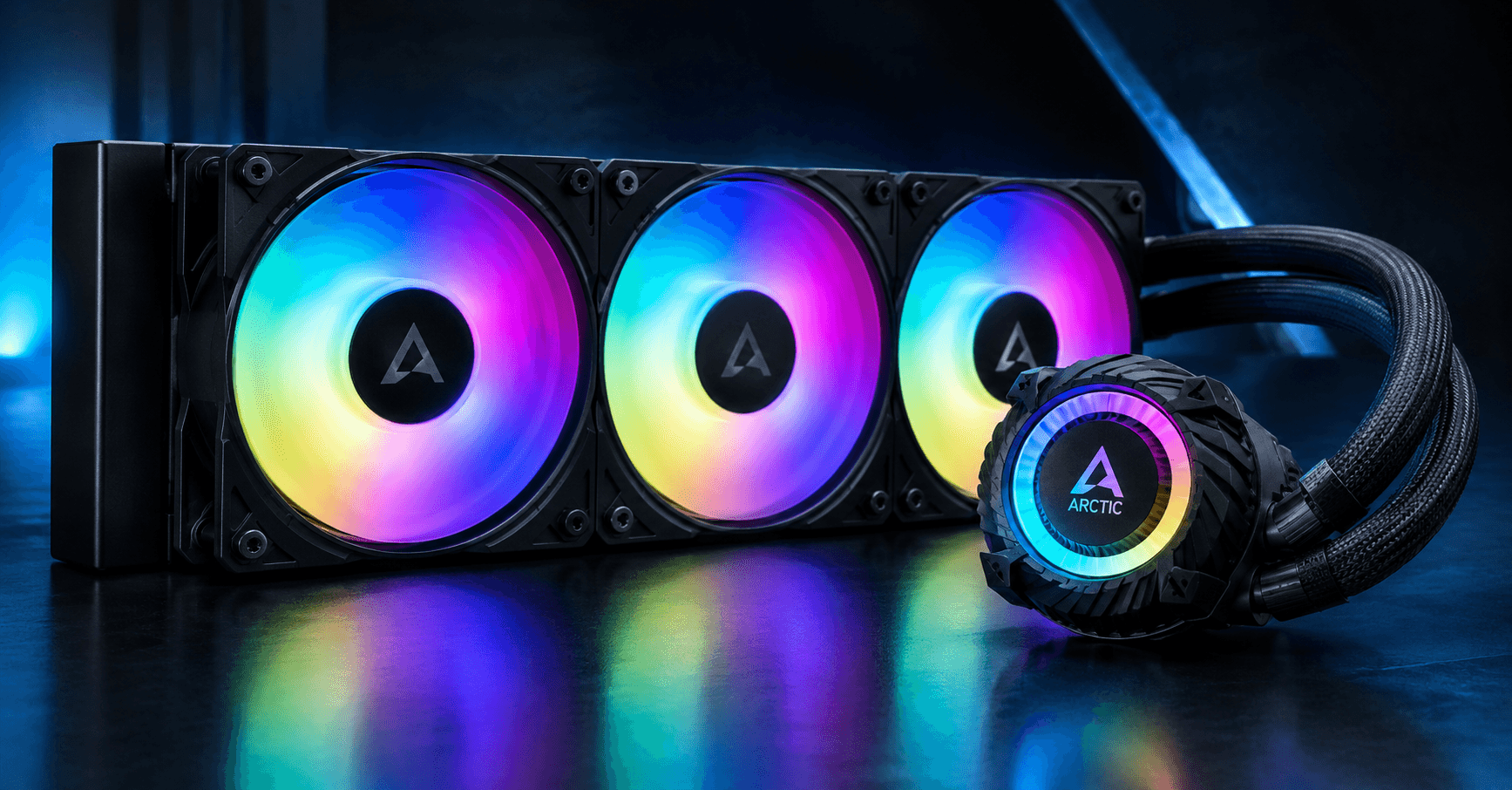
A 360 mm AIO liquid cooler with a thick 38 mm aluminum radiator, three pre-installed P12 Pro A-RGB fans (600–3000 rpm), and an integrated 60 mm VRM fan. It adds offset mounting for Intel and AMD, an Intel contact frame, and MX-6 thermal paste. Built for AM5, AM4, LGA1851, and LGA1700 builders running demanding CPUs who have case room for a thick radiator.
As an Amazon Associate I earn from qualifying purchases.
ARCTIC Liquid Freezer III Pro 360 A-RGB Review: Quick Verdict
This ARCTIC Liquid Freezer III Pro 360 A-RGB review is for buyers who want a 360 mm all-in-one liquid cooler with plenty of fan headroom and no proprietary lighting hub. The Pro version keeps the thick 38 mm radiator and integrated VRM fan from the standard Liquid Freezer III. It adds three new P12 Pro A-RGB fans, which ARCTIC rates for much higher speed, airflow, and static pressure than the older fans. It also supports offset mounting on both Intel and AMD sockets.
It's a strong fit for most AM5, AM4, LGA1851, and LGA1700 builds, as long as your case has room for a thick 360 mm radiator. The main compromises are case fit, a bulky pump block near the M.2 area, and a design focused on cooling rather than a display or premium software. This review is based on ARCTIC's official specifications and documentation, not hands-on testing.
Check the ARCTIC Liquid Freezer III Pro 360 A-RGB on Amazon
What Is the ARCTIC Liquid Freezer III Pro 360 A-RGB?
The Liquid Freezer III Pro 360 A-RGB (ARCTIC part number ACFRE00184A for the black version) is a 360 mm AIO cooler. It combines a pump block on a copper cold plate, an aluminum radiator, and three pre-installed 120 mm fans. ARCTIC announced the Pro 360 series in March 2025 as an update to the Liquid Freezer III. Black and white versions are sold. The ASIN covered here, B0DLWFCVSD, is the black A-RGB model.
The model names are similar, so here's how the Pro A-RGB compares with the standard model, based on ARCTIC's own spec pages:
| Spec | Liquid Freezer III Pro 360 A-RGB | Liquid Freezer III 360 A-RGB |
|---|---|---|
| Radiator fans | 3x P12 Pro A-RGB | 3x P12 PWM PST A-RGB |
| Fan speed | 600–3000 rpm | 200–2000 rpm |
| Max airflow (per fan) | 77 CFM | 48.82 CFM |
| Static pressure (per fan) | 6.9 mmH2O | 1.85 mmH2O |
| Fan current (per fan) | 0.33 A | 0.11 A |
| Radiator | 398 x 120 x 38 mm, aluminum | 398 x 120 x 38 mm, aluminum |
| Pump | 800–2800 rpm | 800–2800 rpm |
| Weight | 2005 g | 1870 g |
| Warranty | 6 years | 6 years |
The radiator, pump speed range, tubing, and warranty are essentially the same. The biggest difference is the fans. If you mainly care about low-speed acoustics and don't need extra fan headroom, the standard model may still be enough.
Key Specifications
- Radiator: 360 mm class, aluminum, 398 x 120 x 38 mm
- Fans: 3x P12 Pro A-RGB, 600–3000 rpm, fluid dynamic bearing, 4-pin PWM
- Pump: 800–2800 rpm, PWM controlled
- Cold plate: copper with micro-skived fins
- VRM fan: integrated 60 mm fan, 400–2500 rpm, PWM controlled
- Tubing: 450 mm reinforced EPDM with braided sleeve
- Lighting: 12 A-RGB Gen2 LEDs on the pump block, 12 A-RGB LEDs per fan, standard 3-pin 5 V A-RGB
- Sockets: Intel LGA1851, LGA1700; AMD AM5, AM4
- Included: ARCTIC MX-6 thermal paste (0.8 g), Intel contact frame
- Warranty: 6 years (manufacturer)
Cooling Design and Radiator Construction
ARCTIC uses a 38 mm thick radiator, while many 360 mm AIOs use radiators around 27 mm thick. A thicker radiator offers more fin surface area and holds more coolant. ARCTIC says that extra volume helps absorb short temperature spikes. The trade-off is space: with 25 mm fans attached, the radiator and fan stack is about 63 mm deep. ARCTIC explicitly states that the cooler needs at least 63 mm of clearance.
The cold plate is copper with micro-skived fins. The tubing is 450 mm long, made of reinforced EPDM rubber, with a braided outer sleeve. That length is common for 360 mm AIOs and should reach top- or front-mounted radiators in most mid-tower cases. Check the routing distance in larger full-tower cases before buying.
P12 Pro A-RGB Fans and Lighting
The P12 Pro A-RGB is the main hardware change in the Pro model. ARCTIC rates each fan at 600–3000 rpm, 77 CFM, and 6.9 mmH2O of static pressure. Static pressure matters on a dense, thick radiator, where fans have to push air through tightly packed fins. ARCTIC says the P12 Pro is quieter than the older P12 at low speeds while offering more headroom under load. Treat that as a manufacturer claim, because noise and cooling depend on your fan curve, case, and room temperature.
Lighting uses standard addressable RGB (A-RGB) over a 3-pin 5 V connector. You can control it from a compatible motherboard header without buying a separate controller. The fans have 12 A-RGB LEDs each, and the pump block has 12 A-RGB Gen2 LEDs. Make sure your motherboard has a 3-pin 5 V A-RGB header, not a 4-pin 12 V RGB header. A 3-pin 5 V A-RGB cable must not be connected to a 4-pin 12 V RGB header.
Integrated VRM Fan and Offset Mounting
A small 60 mm fan in the pump block blows air over the motherboard's voltage regulator (VRM) area around the socket. An AIO removes the airflow that a tower air cooler would normally provide in that area, so the fan offsets some of that loss. It runs at 400–2500 rpm under PWM control. It's most useful with high-power CPUs on boards with modest VRM heatsinks or in cases with weak top airflow.
The Pro model supports offset mounting on both Intel and AMD. The cold plate's center is shifted toward the CPU's typical hotspot rather than the geometric center of the heat spreader. On AM4, ARCTIC notes that part of the heat spreader will remain visible after installation. That's intentional and not a mounting mistake.
For Intel LGA1851 and LGA1700, ARCTIC includes a contact frame that replaces the stock independent loading mechanism (ILM). The frame is designed to spread clamping pressure more evenly. Keep the original ILM parts, because ARCTIC notes that they must be reinstalled before you return a motherboard for service or warranty.
Cooling Performance: Realistic Expectations
We haven't run our own thermal tests, and this review doesn't present outside benchmarks as our own. In general terms, a well-designed 360 mm AIO with high-pressure fans offers more thermal headroom than most single-tower air coolers and many 240 mm or 280 mm AIOs. How much that helps depends on the CPU and workload:
- Gaming: Most games produce uneven, moderate CPU loads. Mid-range CPUs such as a Ryzen 5 or Core Ultra 5 rarely need a 360 mm AIO for gaming alone, but the extra capacity can let fans spin slower and quieter.
- Productivity and multitasking: Code compiling, large spreadsheets, and streaming while gaming create longer bursts where radiator capacity starts to matter.
- Rendering and sustained all-core loads: Blender, Cinebench-style loops, video encoding, and simulation work keep a CPU at its power limit for minutes or hours. High-core-count chips such as the Ryzen 9 9950X or Core Ultra 9 285K benefit most from a large radiator.
Every cooler has limits. Modern CPUs boost until they hit temperature or power limits, so a bigger cooler often results in higher sustained clocks rather than dramatically lower temperatures. Motherboard power settings such as PBO or unlocked Intel power limits have a large effect on results.
Noise and Fan Control
ARCTIC gives you two wiring options. The all-in-one cable uses a single 4-pin PWM header to control the pump, VRM fan, and radiator fans together, and it reports pump speed. The splitter option uses three 4-pin headers so you can control and monitor the pump, VRM fan, and radiator fans separately. The fan cables run inside the tube sleeving, which leaves one visible cable bundle at the motherboard.
ARCTIC says to set these headers to PWM mode rather than DC mode in the BIOS. Because the fans can reach 3000 rpm, they can get loud at full speed. A sensible fan curve matters more here than on lower-speed fans. ARCTIC's installation guide also warns that mounting the radiator above the pump with its ports at the top can lead to bubbling noise. Follow the orientation diagrams in the manual.
CPU Socket Compatibility and Installation
Officially supported sockets are Intel LGA1851 and LGA1700, plus AMD AM5 and AM4. Older Intel LGA1200 and LGA115x platforms, and HEDT sockets such as Threadripper, aren't listed for this model.
Installation requires a PH2 Phillips screwdriver. On Intel, it also requires a T20 Torx driver, which is included. The fans come pre-mounted and pre-wired. The installation steps:
- Connect the PWM cable to the pump block before mounting it.
- Apply MX-6 thermal paste in a cross pattern. ARCTIC says the cold plate spreads it during mounting.
- On Intel, fit the contact frame. Center the CPU in the frame cutout on LGA1851, or align it to the top edge on LGA1700.
- Tighten the mounting screws gradually and alternately.
Maintenance is minimal: dust the radiator and fans periodically. Like any sealed AIO, it isn't designed to be refilled.
Case Clearance and Motherboard Considerations
- Radiator mount: Your case needs a 360 mm (3x 120 mm) mounting position in the top, front, or side.
- Depth: Allow at least 63 mm for the radiator and fans. In top-mount setups, also check clearance over tall RAM and the motherboard's VRM heatsinks.
- Length: The radiator is 398 mm long, so check front-mount clearance against GPU length and drive cages.
- M.2 heatsinks: ARCTIC warns that some motherboards with oversized M.2_1 SSD heatsinks may interfere with the pump block. For affected boards, ARCTIC offers a compatible M.2 cooler free of charge. Check ARCTIC's Liquid Freezer III Pro compatibility list for your board.
- Headers: You'll need one 4-pin PWM header (or three with the splitter option) and one 3-pin 5 V A-RGB header for lighting control.
Competitor Comparison
The comparison below uses manufacturer-listed specifications. It doesn't rank coolers by temperature or noise, because reliable comparisons require the same test bench, CPU, and fan settings.
| Cooler | Radiator | Fans | RGB / display | Pump / design | Sockets | Warranty | Main advantage | Main trade-off | Best for |
|---|---|---|---|---|---|---|---|---|---|
| ARCTIC Liquid Freezer III Pro 360 A-RGB | 360 mm, 38 mm thick | 3x P12 Pro A-RGB, 600–3000 rpm | A-RGB on pump and fans; no screen | 800–2800 rpm pump, VRM fan, offset mount | LGA1851/1700, AM5/AM4 | 6 years | Thick radiator, VRM fan, high-pressure fans | Needs 63 mm depth; plain styling | Performance-focused builds with good case clearance |
| ARCTIC Liquid Freezer III 360 A-RGB | 360 mm, 38 mm thick | 3x P12 PWM PST A-RGB, 200–2000 rpm | A-RGB; no screen | 800–2800 rpm pump, VRM fan | LGA1851/1700, AM5/AM4 | 6 years | Same radiator with lower-speed fans | Less fan headroom than the Pro | Buyers who prioritize low fan speeds |
| Corsair iCUE LINK TITAN 360 RX RGB | 360 mm, 27 mm thick | 3x RX120 RGB, 300–2100 rpm | RGB; swappable CapSwap pump modules (sold separately) | FlowDrive engine, three-phase motor | LGA1851/1700, AM5/AM4 | 6 years | iCUE LINK ecosystem, single-cable fan chain | Requires iCUE LINK; fans don't use motherboard PWM | Builders already using Corsair iCUE LINK |
| NZXT Kraken Elite 360 RGB | 360 mm, 27 mm thick | F360 RGB Core array, 500–2400 rpm | 2.72-inch 640x640 IPS LCD plus RGB | 1200–2800 rpm pump | LGA1851/1700/1200/115x, AM5/AM4 | 6 years | Customizable LCD and polished software | Relies on NZXT CAM for screen and lighting | Showcase builds where the pump display matters |
| Lian Li Galahad II Trinity Performance 360 | 360 mm, 32 mm thick | 3x 120 mm LCP fans, up to 3000 rpm (H mode) | RGB pump cap rings; fans unlit by default | Pump up to 4200 rpm | LGA1851/1700/1200/115x, AM5/AM4 | 6 years | High-speed pump and fans | Fan RGB needs a separate kit | Builders who want high fan and pump speeds |
Choosing between them: The ARCTIC Pro and the Lian Li model are the most performance-focused choices. The NZXT is the aesthetics-first option because of its LCD. The Corsair makes the most sense if your case is already built around iCUE LINK. All four list a 6-year warranty, so the main differences are case fit, software, and lighting style.
Who Should Buy It, and Who Should Look Elsewhere?
Good fit if you:
- Run a high-core-count AM5, AM4, LGA1851, or LGA1700 CPU under sustained loads.
- Want lighting through standard motherboard A-RGB with no extra hub or proprietary software.
- Value a long warranty and extra VRM airflow around the socket.
- Have a case with a 360 mm mount and at least 63 mm of radiator-plus-fan depth.
Consider alternatives if you:
- Use a compact or slim case that only supports 27 mm radiators or 240 mm/280 mm mounts.
- Want a pump-top LCD screen. The NZXT Kraken Elite is built around one.
- Prefer to avoid any liquid in your PC. A large dual-tower air cooler is simpler and has no pump to fail.
- Run a lower-power gaming CPU, where a quality air cooler is often enough.
Final Verdict
On paper, the ARCTIC Liquid Freezer III Pro 360 A-RGB has the features that matter most for sustained cooling. It has a thick 38 mm radiator, high-pressure P12 Pro fans, a VRM fan, offset mounting, an Intel contact frame, included MX-6 paste, and a 6-year warranty. Its weak points are practical: it needs more depth than slimmer AIOs, can conflict with some large M.2 heatsinks, and offers no display or premium software. If your case and motherboard pass the clearance checks above, it's a sensible, performance-focused 360 mm AIO for US builders.
Pros
- Thick 38 mm aluminum radiator, deeper than the 27 mm radiators common on 360 mm AIOs
- Three pre-installed P12 Pro A-RGB fans rated 600–3000 rpm, 77 CFM, and 6.9 mmH2O each
- Integrated 60 mm PWM VRM fan adds airflow over the motherboard's voltage regulators
- Native offset mounting for both Intel and AMD shifts the cold plate toward the CPU hotspot
- Includes an Intel LGA1851/LGA1700 contact frame and 0.8 g of MX-6 thermal paste
- Flexible control: one PWM header for everything, or three headers for separate pump, VRM fan, and radiator fan control
- Standard 3-pin 5 V A-RGB lighting with no proprietary hub or software required
- Fan cables run inside the tube sleeving for a cleaner build
- Six-year manufacturer warranty
Cons
- Requires at least 63 mm of radiator-plus-fan depth, more than many 27 mm AIOs
- The 398 mm radiator length can conflict with front-mounted GPUs or drive cages
- Some motherboards with oversized M.2_1 SSD heatsinks are incompatible without ARCTIC's replacement M.2 cooler
- Supports only LGA1851, LGA1700, AM5, and AM4, with no LGA1200/115x or Threadripper support
- 3000 rpm fans can be loud at full speed, so a tuned fan curve is recommended
- No pump-top display and no dedicated lighting software, unlike premium rivals
- The Intel contact frame replaces the stock ILM, which must be kept and reinstalled before an RMA
- More installation steps and failure points than a tower air cooler, and the sealed loop cannot be refilled
Spec Sheet
Specifications
General
| Model | Liquid Freezer III Pro 360 A-RGB (Black) |
|---|---|
| ARCTIC Part Number | ACFRE00184A |
| EAN | 4895265000256 |
| UPC | 840033402934 |
| Cooler Type | All-in-one liquid CPU cooler |
| Total Weight | 2005 g |
| Operating Ambient Temperature | 0–40 °C |
Pump
| Speed | 800–2800 rpm (PWM controlled) |
|---|---|
| Power | 0.35 A at 12 V DC |
| Cold Plate | Copper, micro-skived fins |
| Tube Length | 450 mm |
| Tube Diameter | 12.4 mm outer, 6.0 mm inner |
| Tubing | Reinforced EPDM with braided sleeve |
Radiator
| Size | 360 mm (3x 120 mm) |
|---|---|
| Dimensions | 398 x 120 x 38 mm (L x W x H) |
| Material | Aluminum |
| Minimum Clearance (radiator + fans) | 63 mm |
Fans
| Model | ARCTIC P12 Pro A-RGB |
|---|---|
| Count | 3 (pre-installed) |
| Speed | 600–3000 rpm |
| Airflow | 77 CFM (131 m³/h) per fan |
| Static Pressure | 6.9 mmH2O |
| Bearing | Fluid dynamic bearing |
| Power | 0.33 A at 12 V DC per fan |
| Connector | 4-pin PWM |
| VRM Fan | Integrated 60 mm, 400–2500 rpm (PWM controlled), 0.05 A at 12 V DC |
Lighting
| Type | A-RGB (addressable), 5 V |
|---|---|
| Pump Block LEDs | 12x A-RGB Gen2 LEDs, 0.40 A at 5 V DC |
| Fan LEDs | 12x A-RGB LEDs per fan, 0.40 A at 5 V DC |
| Connector | 3-pin A-RGB plug plus 3-pin socket for daisy-chaining |
Compatibility
| Intel Sockets | LGA1851, LGA1700 |
|---|---|
| AMD Sockets | AM5, AM4 |
| Motherboard Note | Oversized M.2_1 heatsinks may interfere; ARCTIC offers a free compatible M.2 cooler for affected boards |
Installation
| Thermal Paste | ARCTIC MX-6, 0.8 g (included) |
|---|---|
| Intel Mounting | Contact frame included (replaces ILM) |
| Offset Mounting | Native on Intel and AMD |
| Control Options | Single 4-pin PWM all-in-one cable, or splitter for 3 separate 4-pin headers |
| Tools | PH2 Phillips; T20 Torx (included) for Intel |
Warranty
| Manufacturer Warranty | 6 years |
|---|
Frequently Asked Questions
Is the ARCTIC Liquid Freezer III Pro 360 A-RGB compatible with AM5 and Intel LGA1851 or LGA1700?+
Will a 360 mm radiator fit in my PC case?+
What is the difference between the Liquid Freezer III Pro and the standard Liquid Freezer III?+
Does it come with fans and thermal paste?+
What does the integrated VRM fan do?+
Can the pump, radiator fans, and VRM fan be controlled separately?+
Will the A-RGB lighting work with my motherboard?+
Is it suitable for high-power CPUs and sustained workloads?+
As an Amazon Associate we earn from qualifying purchases. See our affiliate disclosure.