
G.SKILL
G.SKILL Flare X5 32GB DDR5-6000 CL36 Desktop Memory (2×16GB)
The G.SKILL Flare X5 32GB DDR5-6000 CL36 is a dual-channel desktop memory kit featuring two 16GB modules, AMD EXPO and Intel XMP 3.0 support, a minimalist matte-black design, and rated timings of 36-36-36-96 at 1.35V. Discover its specifications, compatibility, performance considerations, and how it compares with competing DDR5 memory kits.
G.SKILL Flare X5 32GB DDR5-6000 CL36 Review: Is It Worth Buying?
As an Amazon Associate I earn from qualifying purchases. GearNexis is not affiliated with G.SKILL. See our affiliate disclosure.
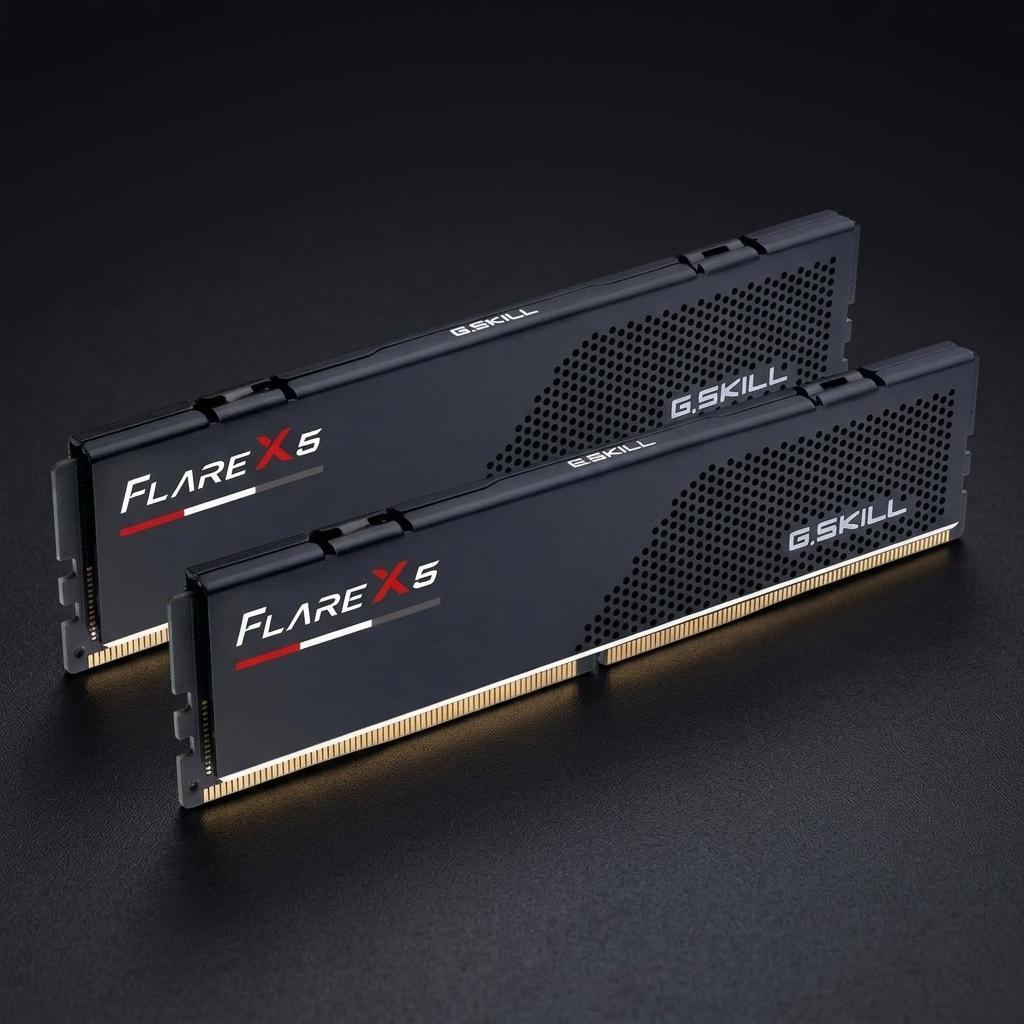
The G.SKILL Flare X5 32GB DDR5-6000 CL36 (model F5-6000J3636F16GX2-FX5) is a 2×16GB DDR5 desktop kit rated for 6000 MT/s at 36-36-36-96 and 1.35V, with AMD EXPO and Intel XMP 3.0 profiles. It has a matte-black heat spreader, no RGB, and a 33mm low-profile height. G.SKILL launched the series in September 2022 alongside AMD's AM5 platform.
Below we explain what the specs mean, how to reach the rated speed, which builds it suits, and how it compares with kits from CORSAIR, Kingston, TEAMGROUP, and Crucial. GearNexis has not physically tested this kit; this review is based on official specifications and editorial analysis, and we publish no benchmark figures.
G.SKILL Flare X5 32GB DDR5-6000 — Quick Verdict
The G.SKILL Flare X5 32GB DDR5-6000 CL36 is a sensible, no-frills kit for AM5 and compatible Intel DDR5 builds. DDR5-6000 is a common Ryzen target, 32GB suits modern gaming and multitasking, and the 33mm height eases cooler clearance. Its weakness is latency: CL30 kits at the same speed are slightly quicker.
- Strengths: 2×16GB dual channel, DDR5-6000, EXPO + XMP 3.0, 33mm height, minimalist look, limited lifetime warranty.
- Limitations: CL36 timings, profile must be enabled in BIOS, rated speed depends on CPU and motherboard, no RGB.
- Best for: AM5 gamers, air-cooled and small-form-factor builds, no-RGB setups.
- Recommendation: A good buy when priced like other CL36 kits; if a CL30 kit costs about the same, pick the CL30 kit.
G.SKILL Flare X5 Specifications
| Specification | Value |
|---|---|
| Model | F5-6000J3636F16GX2-FX5 |
| Capacity | 32GB (2×16GB), DDR5 desktop U-DIMM |
| Rated speed (EXPO/XMP) | Up to 6000 MT/s |
| Rated timings (EXPO/XMP) | 36-36-36-96 |
| Rated voltage (EXPO/XMP) | 1.35V |
| Default SPD speed / voltage | 4800 MT/s / 1.10V |
| Profiles | AMD EXPO, Intel XMP 3.0 |
| ECC / buffering | Non-ECC, unbuffered |
| Color / RGB | Matte black / No |
| Height | 33mm |
| Warranty | Limited lifetime |
Source: G.SKILL official specifications. Other Flare X5 kits (such as 6000 CL30 or 5600) use different model numbers.
Design and Build Quality
Each module has a matte-black aluminum heat spreader with a simple angular design and no lighting. At 33mm tall, it is only slightly taller than a bare DDR5 module, which helps under large dual-tower air coolers that overhang the first DIMM slot. No RAM height guarantees clearance with every cooler, so check your cooler's memory clearance. See our air vs liquid cooling guide and CPU cooler reviews.
The no-RGB design means no lighting software or extra cables, and it suits windowless cases and blacked-out builds. If you want synchronized lighting, see the RGB options in the comparison below.
DDR5-6000 Speed and CL36 Latency Explained
DDR5-6000 means 6,000 million transfers per second (MT/s). DDR memory transfers twice per clock, so the real clock is 3000 MHz, which is why MT/s is the correct unit even though many listings say "6000MHz."
CL36 is the CAS latency: the clock cycles between a read command and the first data. The other numbers (tRCD, tRP, tRAS) are row timings. To compare kits, use: latency (ns) = CL × 2000 ÷ MT/s.
| Configuration | CAS latency |
|---|---|
| DDR5-4800 CL40 (typical default) | 16.7 ns |
| DDR5-6000 CL36 (this kit) | 12.0 ns |
| DDR5-6000 CL30 | 10.0 ns |
CL30 is about 2 ns quicker on paper. Real-world latency also depends on secondary timings, the CPU memory controller, and on Ryzen the Infinity Fabric, so the gap is real but modest. It shows most in CPU-limited, high-refresh gaming and shrinks when the GPU is the bottleneck. Our view: CL36 is fine for most gaming PCs, and CL30 is worth a small premium, not a large one.
Capacity decides whether your workload fits in RAM; speed and timings set bandwidth and latency; the CPU memory controller and motherboard decide what runs stably. Many Ryzen 7000/9000 systems run DDR5-6000 with memory and controller clocks synchronized 1:1, but results vary by chip.
AMD EXPO and Intel XMP 3.0 Support
AMD EXPO is AMD's one-click DDR5 memory profile; on AM5 boards it loads the kit's 6000 MT/s, 36-36-36-96, 1.35V settings. Intel XMP 3.0 does the same on compatible Intel DDR5 boards. Flare X5 is marketed mainly for AMD, so Intel users should check the G.SKILL QVL, especially on newer platforms.
Out of the box the kit runs its JEDEC default of 4800 MT/s at 1.10V. This is normal. G.SKILL notes the rated speed requires BIOS adjustment, counts as overclocking, and depends on your CPU and motherboard.
- Update the BIOS to a current stable version.
- Open BIOS (usually Delete or F2) and find the EXPO, XMP, or DOCP setting.
- Select the DDR5-6000 profile, save, and reboot. The first AM5 boot may take longer while memory trains.
- Confirm the speed in BIOS or a system info tool. Task Manager may show 6000 MT/s or 3000 MHz.
Gaming and Productivity Use Cases
We have not benchmarked this kit, so these notes are based on capacity and general DDR5 behavior.
- Gaming: 32GB dual-channel DDR5-6000 is well balanced. With a CPU like the Ryzen 7 9800X3D, the GPU usually limits performance, not this memory.
- Gaming + multitasking / streaming: 32GB leaves room for OBS, Discord, and browsers alongside a game.
- Photo editing: Fine for typical Lightroom and Photoshop work.
- Video editing: Workable for 1080p and many 4K projects; heavy 4K/8K work often needs 64GB. See our video editing CPU guide.
- Everyday productivity: More than enough.
- Heavy multitasking / VMs: Consider a 64GB or larger kit.
Compatibility and Installation
- DDR5 desktop boards only. It will not fit DDR4 slots (different key notch) or laptops.
- Platforms: AMD AM5 and Intel DDR5 boards such as LGA1700. See AM5 vs LGA1700.
- Slots: On four-slot boards, use the 2nd and 4th slots (usually A2/B2). Check your manual.
- QVL: Check G.SKILL's and your board maker's QVL. Listing improves the odds but does not guarantee every CPU.
- CPU limits: Some memory controllers may need a BIOS update, small voltage tweak, or lower speed.
- Don't mix kits: G.SKILL warns mixing kits can cause instability. Buy one kit with the total capacity you need.
Checklist: ☐ DDR5 desktop board ☐ QVL checked ☐ BIOS updated ☐ 33mm cooler clearance ☐ correct slots ☐ EXPO/XMP enabled ☐ no mixed kits.
See our gaming PC build guide, AMD Ryzen compatibility guide, MSI MAG B650 Tomahawk WiFi review, GIGABYTE B850 AORUS Elite WiFi7 review, and motherboard reviews.
G.SKILL Flare X5 vs Competitors
Specs come from manufacturer pages (G.SKILL, CORSAIR) and cross-checked retailer listings (Kingston, TEAMGROUP, Crucial). Confirm the part number before buying.
| Feature | G.SKILL Flare X5 32GB DDR5-6000 CL36 | CORSAIR Vengeance DDR5 32GB (2×16GB) 6000MHz | Kingston FURY Beast DDR5 32GB (2×16GB) 6000MT/s | TEAMGROUP T-Create Expert DDR5 32GB (2×16GB) 6000MHz | Crucial Pro Overclocking DDR5 32GB (2×16GB) 6000MT/s |
|---|---|---|---|---|---|
| Part number | F5-6000J3636F16GX2-FX5 | CMK32GX5M2B6000Z30 | KF560C36BBEK2-32 | CTCED532G6000HC30DC01 | CP2K16G60C36U5B |
| Capacity / speed | 32GB / 6000 MT/s | 32GB / 6000 MT/s | 32GB / 6000 MT/s | 32GB / 6000 MT/s | 32GB / 6000 MT/s |
| CAS latency | CL36 | CL30 | CL36 | CL30 | CL36 |
| Timings | 36-36-36-96 | 30-36-36-76 (retail listing) | CL36 (see Kingston datasheet) | 30-36-36-76 | 36-38-38-80 |
| Voltage | 1.35V | 1.40V | 1.35V | 1.35V | 1.35V |
| EXPO / XMP | Yes / 3.0 | Yes / Yes | Yes / Yes | Yes / 3.0 | Yes / 3.0 |
| RGB | No | No | No | No | No |
| Height | 33mm | Low profile | Not verified | ~32mm (retail) | Not verified |
| Main advantage | Verified 33mm, minimalist | CL30, iCUE | Near-identical spec | CL30, very low profile | Clean design |
| Best for | Air-cooled / SFF AM5 | Latency-focused builds | Kingston fans | CL30 without RGB | Crucial buyers, while stock lasts |
G.SKILL Flare X5 vs CORSAIR Vengeance DDR5
The CORSAIR Vengeance DDR5 32GB (2×16GB) 6000MHz we compared is the CL30 version (CMK32GX5M2B6000Z30, 1.40V, EXPO + XMP). It has lower latency and iCUE support; the Flare X5 uses a lower 1.35V and has a confirmed 33mm height. CORSAIR also sells a CL36 version, so check the SKU. Read our CORSAIR Vengeance DDR5 review.
G.SKILL Flare X5 vs Kingston FURY Beast
The Kingston FURY Beast DDR5 32GB (2×16GB) 6000MT/s is the closest match: CL36, 1.35V, black, no RGB, EXPO and XMP. The choice comes down to price, height, and brand. Kingston also sells an RGB version.
G.SKILL Flare X5 vs TEAMGROUP T-Create Expert
The TEAMGROUP T-Create Expert DDR5 32GB (2×16GB) 6000MHz is the toughest rival, with CL30-36-36-76 at 1.35V, a very low profile, and no RGB. At a similar price it is the better-specified kit; the Flare X5 wins when cheaper or easier to find.
G.SKILL Flare X5 vs Crucial Pro
The standard Crucial Pro 32GB kit is DDR5-5600, so we compared the Crucial Pro Overclocking DDR5 32GB (2×16GB) 6000MT/s (CP2K16G60C36U5B, CL36-38-38-80, 1.35V, EXPO + XMP 3.0). Its secondary timings are slightly looser. Micron announced in December 2025 that it is exiting the Crucial consumer business, so stock may be limited, though Micron says warranty support continues.
Which kit fits which buyer?
- AMD builds: All five support EXPO; the CORSAIR and TEAMGROUP CL30 kits have the tightest timings.
- Minimalist look: Flare X5 and T-Create Expert.
- Lowest latency: CORSAIR Vengeance CL30 and T-Create Expert CL30.
- RGB builds: None of these have RGB. See our T-FORCE Delta RGB DDR5 review or Vengeance RGB RS DDR5 review.
- Verdict: The Flare X5 is a sensible pick for tight cooler clearance at a CL36 price, but check CL30 prices first.
Who Should Buy the G.SKILL Flare X5 32GB DDR5-6000?
- AM5 gamers with Ryzen 7000 or 9000 CPUs who want a simple EXPO kit.
- Owners of large air coolers such as the Noctua NH-D15 chromax.black.
- Small-form-factor, minimalist, and no-RGB builds.
- Upgraders moving to DDR5 who want 32GB without premium pricing.
Who Should Avoid It?
- RGB fans.
- Latency-focused enthusiasts who should consider a CL30 kit.
- Heavy creators or VM users who need a single 64GB+ kit.
- DDR4 system owners, and anyone needing ECC memory.
- Anyone planning to add a second kit later.
Final Verdict — Is G.SKILL Flare X5 32GB DDR5-6000 Worth It?
The G.SKILL Flare X5 32GB DDR5-6000 CL36 is a solid mainstream kit: the capacity most gamers need, the speed AM5 builders target, EXPO and XMP 3.0 profiles, and a 33mm low-profile design. It is not the latency leader, since CL30 kits at 6000 MT/s are quicker, and like any DDR5 kit it needs EXPO or XMP enabled, with results depending on your CPU and board.
If you want low-profile, no-frills 32GB DDR5-6000 for an AM5 or compatible Intel build, it is a sensible choice. Check the current price of the G.SKILL Flare X5 32GB DDR5-6000 CL36 and compare it with CL30 options. Browse more RAM reviews, buying guides, and comparisons.
Pros
- 32GB in a matched 2×16GB dual-channel kit
- Rated for DDR5-6000, a common target speed for AMD AM5 builds
- Supports both AMD EXPO and Intel XMP 3.0 profiles
- 33mm low-profile height helps with large air coolers and compact cases
- Understated matte-black design with no lighting software required
- Moderate 1.35V profile voltage
- Limited lifetime warranty from G.SKILL
Cons
- CL36 is looser than CL30 kits available at the same 6000 MT/s speed
- Runs at 4800 MT/s until EXPO or XMP is enabled in BIOS
- Rated speed depends on the CPU memory controller, motherboard, and BIOS
- No RGB lighting for builders who want an illuminated theme
- 2×16GB may be limiting for heavy video editing or virtualization
Spec Sheet
Specifications
General
| Brand | G.SKILL |
|---|---|
| Series | Flare X5 |
| Model | F5-6000J3636F16GX2-FX5 |
Memory
| Capacity | 32GB |
|---|---|
| Configuration | 2×16GB |
| Type | DDR5 |
| Form Factor | Desktop U-DIMM |
| Rated Speed | Up to 6000 MT/s (EXPO/XMP) |
| Tested Timings | 36-36-36-96 |
| CAS Latency | CL36 |
| Tested Voltage | 1.35V |
| Default SPD Speed | 4800 MT/s |
| Default SPD Voltage | 1.10V |
Compatibility
| AMD EXPO | Yes |
|---|---|
| Intel XMP 3.0 | Yes |
| ECC | Non-ECC |
| Registered | Unbuffered |
Design
| Color | Matte Black |
|---|---|
| RGB | No |
| Module Height | 33mm |
Warranty
| Warranty | Limited Lifetime |
|---|
Frequently Asked Questions
Is G.SKILL Flare X5 32GB DDR5-6000 good for gaming?+
Is DDR5-6000 CL36 fast enough for modern gaming PCs?+
Does G.SKILL Flare X5 support AMD EXPO?+
Does G.SKILL Flare X5 support Intel XMP 3.0?+
Why does my G.SKILL Flare X5 RAM run at 4800 MT/s instead of 6000 MT/s?+
Is G.SKILL Flare X5 compatible with AMD Ryzen AM5 processors?+
Can I use G.SKILL Flare X5 with an Intel DDR5 motherboard?+
Is CL36 worse than CL30 DDR5 RAM?+
Does G.SKILL Flare X5 have RGB lighting?+
Is 32GB DDR5 RAM enough for gaming and multitasking?+
Can I mix G.SKILL Flare X5 with another RAM kit?+
What motherboard should I use with G.SKILL Flare X5?+
As an Amazon Associate we earn from qualifying purchases. See our affiliate disclosure.