
MSI
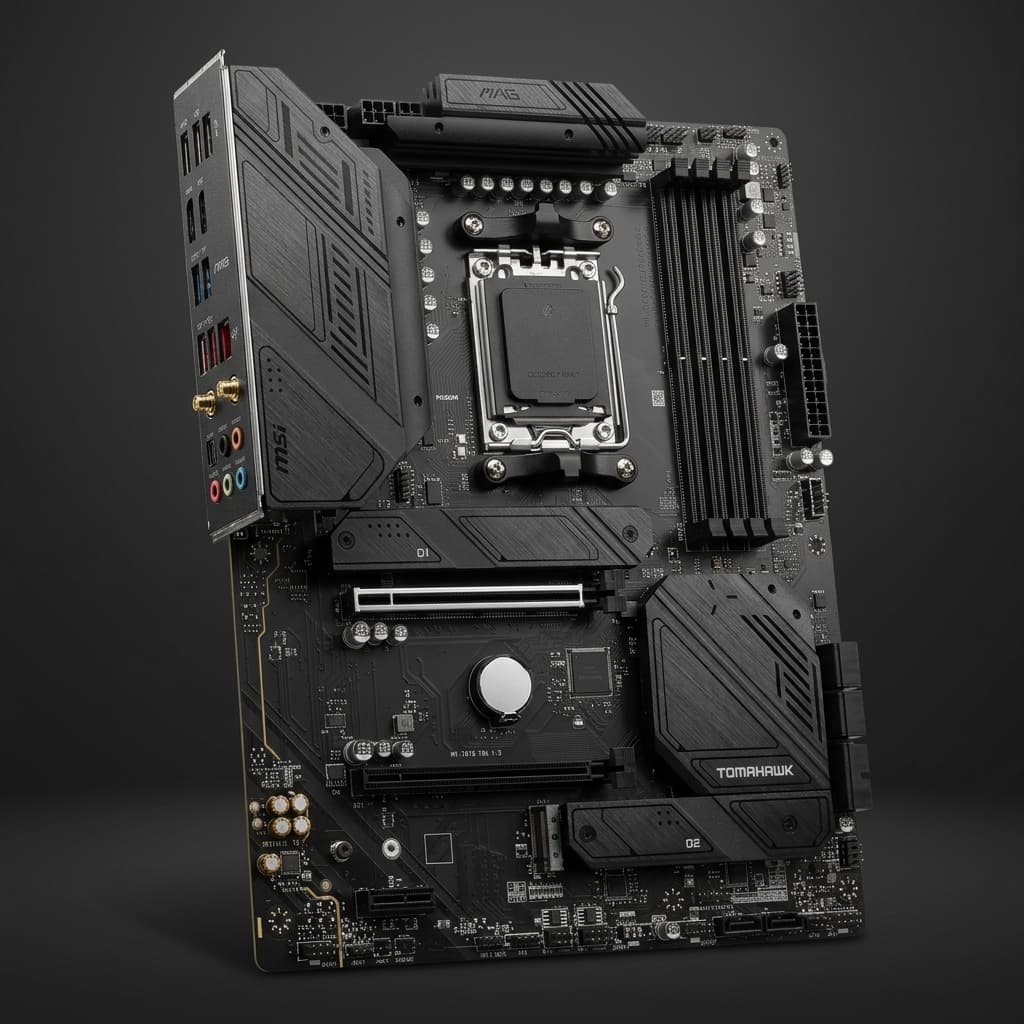
MSI MAG B650 Tomahawk WiFi
The MSI MAG B650 Tomahawk WiFi is a full-size ATX motherboard for AMD’s AM5 platform. Built on the B650 chipset, it supports Ryzen 9000, 8000, and 7000 CPUs and up to 256GB of DDR5. It adds three PCIe 4.0 M.2 slots, six SATA ports, Wi-Fi 6E, and 2.5Gb Ethernet. That makes it a practical pick for Ryzen gaming and storage-heavy builds.
Introduction
This MSI MAG B650 Tomahawk WiFi review covers one of the most frequently recommended mid-range AM5 boards: the MSI MAG B650 Tomahawk WiFi. It is a full-size ATX motherboard built on AMD's B650 chipset, with the AM5 socket for Ryzen 9000, 8000, and 7000 processors, four DDR5 slots, three PCIe 4.0 M.2 slots, six SATA ports, Wi-Fi 6E, and 2.5Gb Ethernet.
It skips PCIe 5.0 and flashy styling. Instead, it offers strong power delivery for its class, plenty of storage connections, eight fan headers, a 20Gbps USB-C port, and a BIOS flash button. If you're building a Ryzen gaming PC and don't want to pay for X670E or X870E features you won't use, it belongs on your shortlist.
MSI MAG B650 Tomahawk WiFi: Key Specifications
These specifications come from MSI's official specification page.
| Specification | Details |
|---|---|
| Socket / chipset | AMD AM5 / AMD B650 |
| Supported CPUs | Ryzen 9000, 8000, 7000 desktop (BIOS-dependent) |
| Form factor | ATX, 12 × 9.6 in (304.8 × 243.84 mm) |
| Memory | 4 × DDR5 DIMM, dual-channel, up to 256GB |
| Memory speed | DDR5-4800 JEDEC; up to 7600+ MT/s OC |
| AMD EXPO | Yes |
| PCIe slots | PCIe 4.0 x16 (CPU); x16-size PCIe 4.0 x2 (chipset); PCIe 3.0 x1 |
| M.2 | 3 × PCIe 4.0 x4 (two CPU, one chipset) |
| SATA | 6 × 6Gb/s |
| Ethernet | Realtek RTL8125BG 2.5Gbps |
| Wi-Fi / Bluetooth | Wi-Fi 6E / Bluetooth 5.3 |
| Rear USB | 1 × 20Gbps Type-C, 3 × 10Gbps Type-A, 4 × 5Gbps Type-A, 2 × USB 2.0 |
| Front USB headers | 1 × 10Gbps Type-C, 2 × 5Gbps, 4 × USB 2.0 |
| HDMI / DisplayPort | HDMI 2.1 (4K 60Hz) / DP 1.4 (8K 60Hz), iGPU required |
| Audio | Realtek ALC4080, 7.1-channel, optical S/PDIF |
| Fan headers | 1 × CPU, 1 × pump, 6 × system |
| RGB headers | 2 × ARGB V2 (5V), 2 × RGB (12V) |
| BIOS Flash Button | Yes (rear I/O) |
| Rear I/O | HDMI, DP, 10 USB, 2.5G LAN, Wi-Fi antennas, audio jacks, S/PDIF, Flash BIOS Button |
Note: MSI's 7600+ MT/s figure applies only to one single-rank module per channel. Real-world memory speeds depend on the CPU, the memory kit, the module configuration, and the BIOS version.
Design and Build Quality
The Tomahawk uses the dark, understated MAG styling: a black PCB and dark grey heatsinks with no meaningful onboard RGB. It fits almost any color scheme. MSI specifies a 6-layer, 2oz-copper PCB, an Extended Heatsink over the VRM with 7W/mK thermal pads, M.2 Shield Frozr heatsinks with tool-free EZ M.2 clips, a reinforced "Steel Armor" GPU slot, and a pre-installed I/O shield.
The standard ATX dimensions suit any ATX mid-tower. Eight 4-pin fan headers, including a pump header rated up to 3A, can drive a radiator and a full set of case fans without a hub.
CPU Compatibility: Ryzen 9000, 8000, and 7000
- Ryzen 7000: This was the board's launch generation, so every BIOS version supports these chips.
- Ryzen 8000: These need an updated BIOS. Their reduced PCIe lanes affect the GPU slot and M.2 slots (see below).
- Ryzen 9000: These need a newer BIOS. Older stock may not boot them out of the box.
Before you buy, check your exact CPU against MSI's CPU support list. The Flash BIOS Button updates firmware from a USB drive with only the power supply connected, with no CPU or memory installed. AMD has said it plans to support AM5 across multiple CPU generations, which keeps future upgrades possible.
VRM and Power Delivery
MSI uses a 14+2+1 "Duet Rail" design: 14 Vcore phases with 80A smart power stages, 2 SoC phases, and 1 auxiliary phase, all under digital PWM control and fed by two 8-pin connectors.
Phase counts don't tell the whole story. Advertised phases are often doubled from fewer controller channels, and an 80A rating is a component maximum, not the CPU's actual draw. Sustained stability depends on heatsink mass, airflow, and the CPU's power limits. On paper, this VRM is generous for Ryzen 5 and Ryzen 7 gaming chips, including X3D models, and suitable for Ryzen 9 workloads in a case with decent airflow. GearNexis hasn't taken its own temperature measurements, so check independent testing before heavy overclocking.
DDR5 Memory Support
The board has four DDR5 slots supporting up to 256GB in dual-channel mode, with AMD EXPO. JEDEC speed is DDR5-4800, so anything faster, including a typical DDR5-6000 EXPO kit, is an overclock. MSI's rated maximum drops to 6400+ MT/s for dual-rank or four-module setups and to 5400+ MT/s for four dual-rank modules.
For gaming, a 2 × 16GB or 2 × 32GB DDR5-6000 CL30 EXPO kit is the safe target. Two modules run faster than four. Expect a long first boot while the board trains the DDR5; that is normal. Browse our RAM reviews for kit options.
Storage: Three M.2 Slots and Six SATA Ports
| Slot | Source | Interface | Sizes |
|---|---|---|---|
| M2_1 | CPU | PCIe 4.0 x4 (64Gb/s) | 2280 / 22110 |
| M2_2 | CPU | PCIe 4.0 x4; unavailable with Ryzen 8500/8300 | 2260 / 2280 |
| M2_3 | Chipset | PCIe 4.0 x4; x2 when PCI_E2 is used | 2260 / 2280 |
Bandwidth sharing: MSI documents that M2_3 and PCI_E2 share lanes, so both run at x2 when populated. A PCIe 4.0 x2 link still provides about 4GB/s, which is fine for a game library but halves the potential of a fast Gen 4 SSD.
Ryzen 8000 caveat: Ryzen 8500 and 8300 series CPUs disable M2_2, leaving two M.2 slots. Ryzen 9000 and 7000 CPUs enable all three.
There is no PCIe 5.0 M.2 slot. The six SATA ports, which support RAID 0/1/10 except on SATA_A1/A2, handle bulk drives. For help choosing drives, see our NVMe SSD buying guide.
GPU Expansion and PCIe Support
The primary slot is CPU-wired PCIe 4.0 x16, enough for every current graphics card, and PCIe 5.0 makes a negligible gaming difference today. A physical x16 slot isn't always 16 lanes electrically: the second x16-size slot (PCI_E2) runs PCIe 4.0 x2 from the chipset, so it suits capture or network cards, not a second GPU. A third slot is PCIe 3.0 x1.
The primary slot's lane count also depends on the CPU: x16 with Ryzen 9000/7000, x8 with Ryzen 8700/8600/8400 series chips, and x4 with Ryzen 8500/8300 series chips. A high-end GPU on an x4 link can lose performance.
Networking and Connectivity
The Realtek 2.5GbE controller is more than enough for gaming and NAS transfers. Wi-Fi 6E supports 160MHz channels on 2.4, 5, and 6GHz. The 6GHz band requires a Wi-Fi 6E router, Windows 11, and local regulatory approval. MSI's spec page lists Bluetooth 5.3, though one overview section still says 5.2.
The rear panel offers ten USB ports, including a 20Gbps Type-C port for fast external SSDs and three 10Gbps Type-A ports. Internal headers add a 10Gbps front Type-C port. HDMI 2.1 and DisplayPort 1.4 work only with a CPU that has integrated graphics; with an F-series chip, use a dedicated graphics card.
Gaming and Everyday Performance
A motherboard doesn't raise frame rates by itself. Gaming performance comes from the CPU, GPU, memory, and cooling. The Tomahawk lets those parts run as intended, with a full Gen 4 x16 slot, two CPU-attached SSD slots, EXPO support, a robust VRM, and ample fan control. See our gaming PC build guide.
BIOS, Installation, and Setup
MSI's Click BIOS 5 offers EZ and Advanced modes, including PBO thermal profiles and Config TDP. Tips for new AM5 builders:
- Update the BIOS first, especially for Ryzen 9000, using the Flash BIOS Button and a FAT32 USB drive.
- Install the CPU by aligning the triangle marker, and avoid touching the socket contacts.
- Use slots A2 and B2 for two DIMMs (confirm in the manual), then enable EXPO after the first boot.
- Put your boot SSD in M2_1. Skip M2_3 if you need PCI_E2.
- Connect the AIO pump to the pump header, then set fan curves. The EZ Debug LEDs show where a boot failure stops.
MSI Center adds Mystic Light RGB control and driver updates, but it's optional.
Pros and Cons
Pros
- Supports Ryzen 9000, 8000, and 7000 on AM5
- 14+2+1 VRM with 80A stages
- Three Gen 4 M.2 slots plus six SATA ports
- Wi-Fi 6E, Bluetooth 5.3, 2.5GbE
- 20Gbps rear USB-C and a 10Gbps front Type-C header
- Eight fan headers and a Flash BIOS Button
Cons
- No PCIe 5.0 for the GPU slot or M.2
- M2_3 and PCI_E2 drop to x2 when both are used
- Ryzen 8500/8300 disable M2_2 and limit the GPU slot to x4
- B650 has fewer lanes and USB ports than X670E/X870E
MSI MAG B650 Tomahawk WiFi vs Competitors
| Feature | MSI MAG B650 Tomahawk WiFi | ASUS TUF Gaming B650-PLUS WiFi | ASUS ROG Strix B650-A Gaming WiFi | GIGABYTE B650 AORUS Elite AX | ASRock B650 Steel Legend WiFi |
|---|---|---|---|---|---|
| Socket / chipset | AM5 / B650 | AM5 / B650 | AM5 / B650 | AM5 / B650 | AM5 / B650 |
| Form factor | ATX | ATX | ATX | ATX | ATX |
| Memory | 4 × DDR5, 256GB, 7600+ OC | 4 × DDR5, 256GB, 7600+ OC | 4 × DDR5, 192GB, 7600+ OC | 4 × DDR5, 256GB, 8000 OC | 4 × DDR5, 256GB, 7200+ OC |
| M.2 / SATA | 3 × Gen4 / 6 | Gen5 + 2 × Gen4 / 4 | Gen5 + 2 × Gen4 / 4 | Gen5 + 2 × Gen4 / 4 | Gen5 + 2 × Gen4 / 4 |
| PCIe (GPU slot) | 4.0 x16 | 4.0 x16 | 4.0 x16 | 4.0 x16 | 5.0 x16 |
| Wi-Fi | 6E, BT 5.3 | 6, BT 5.2 | 6E, BT 5.2 | 6E, BT 5.2/5.3 (by revision) | 6E, BT 5.2 |
| Ethernet | Realtek 2.5G | Realtek 2.5G | Intel 2.5G | Realtek 2.5G | Realtek 2.5G |
| USB Type-C | Rear 20G; front 10G | Rear 20G + 10G; front 5G | Rear 20G + 10G; front 10G | Rear 10G; front 20G | Rear 20G; front 5G |
| Special features | 8 fan headers, Flash BIOS | BIOS FlashBack, USB4 header | BIOS FlashBack, SupremeFX ALC4080 | Q-Flash Plus, 22110 M.2 support | BIOS Flashback, 8-layer PCB |
Data comes from each manufacturer's official spec page. All five boards have CPU-dependent lane rules.
- Storage: The Tomahawk is the only board here with six SATA ports. Every rival adds a Gen 5 M.2 slot with Ryzen 7000/9000.
- Connectivity: The ASUS ROG Strix B650-A Gaming WiFi pairs Intel 2.5GbE with Wi-Fi 6E and two rear USB-C ports. Read our ROG Strix B650-A review.
- White builds: None of these is all-white, but the ASRock B650 Steel Legend WiFi's silver styling suits light builds better. Check the photos before you buy.
- Balance: The Tomahawk combines VRM strength, fan control, storage, and networking with few weak spots.
- Budget: The ASUS TUF Gaming B650-PLUS WiFi and GIGABYTE B650 AORUS Elite AX are often value picks. Prices change, so compare current listings. Note that the TUF has Wi-Fi 6, not 6E.
- Expansion: The Steel Legend's Gen 5 GPU slot and Gen 5 M.2 slot offer the most headroom.
Who Should Buy the MSI MAG B650 Tomahawk WiFi?
- AM5 gamers who want a full x16 slot, a strong VRM, and good cooling support at a B650 price.
- Ryzen 9000/7000 owners, who get all three M.2 slots. Ryzen 8700G/8600G users are fine if they accept the x8 GPU link.
- DDR5 builders targeting a 6000 MT/s EXPO kit.
- Storage-heavy users who want three NVMe drives plus SATA drives.
- Users who need Wi-Fi 6E and 2.5GbE and full-ATX builders who need eight fan headers.
Who Should Avoid It?
- PCIe 5.0 buyers: Consider the Steel Legend or a B850 board such as the GIGABYTE B850 AORUS Elite WIFI7.
- Small-form-factor builders: Choose a micro-ATX or Mini-ITX board.
- Tight budgets: A cheaper B650 board will game just as well if you don't need the extras.
- Users with multiple high-bandwidth cards: The secondary slot is only x2.
- AM4 owners: AM5 requires a new CPU and DDR5. See our best B550 motherboards guide.
Final Verdict
The MSI MAG B650 Tomahawk WiFi is a well-rounded B650 board. Its strengths are 14+2+1 power delivery, six SATA ports plus three Gen 4 M.2 slots, eight fan headers, Wi-Fi 6E, and CPU-less BIOS flashing. Its limits are the lack of PCIe 5.0 and the lane compromises on M2_3, PCI_E2, and some Ryzen 8000 chips. All four rivals offer Gen 5 M.2, but none matches its SATA count, and few match its fan control. For a practical Ryzen gaming build, it is easy to recommend.
Ready to build? Check the current price of the MSI MAG B650 Tomahawk WiFi on Amazon, and compare it with the alternatives above.
Pros
- Supports AMD Ryzen 9000, 8000, and 7000 desktop CPUs on AM5 (BIOS-dependent)
- 14+2+1 power delivery with 80A smart power stages and dual 8-pin CPU power
- Three PCIe 4.0 x4 M.2 slots, two of them wired to the CPU
- Six SATA 6Gb/s ports, more than every competitor compared
- Wi-Fi 6E, Bluetooth 5.3, and Realtek 2.5Gb Ethernet
- Rear 20Gbps USB 3.2 Gen 2x2 Type-C plus a front 10Gbps Type-C header
- Eight 4-pin fan headers, including a dedicated pump header
- Flash BIOS Button updates firmware without a CPU or memory installed
Cons
- No PCIe 5.0 support for the graphics slot or M.2 storage
- M2_3 and PCI_E2 share bandwidth and both drop to x2 when populated
- Ryzen 8500/8300 series CPUs make M2_2 unavailable and run the GPU slot at x4
- The secondary x16-length slot is only PCIe 4.0 x2 electrically
- The B650 chipset has fewer lanes and USB resources than X670E/X870E
Spec Sheet
Specifications
General
| Model | MAG B650 TOMAHAWK WIFI |
|---|---|
| Brand / Series | MSI / MAG |
| Form Factor | ATX |
CPU
| Socket | AMD AM5 |
|---|---|
| Supported Processors | AMD Ryzen 9000 / 8000 / 7000 Series desktop processors (BIOS-dependent) |
| Power Delivery | 14+2+1 phases (Duet Rail), 80A SPS for Vcore, digital PWM |
| CPU Power Connectors | 2 × 8-pin |
Chipset
| Chipset | AMD B650 |
|---|
Memory
| Type | DDR5, non-ECC, unbuffered |
|---|---|
| Slots | 4 × DIMM |
| Channel | Dual-channel |
| Max Capacity | 256GB |
| JEDEC Speed | 4800 MT/s |
| Max OC Speed | 7600+ MT/s (1DPC 1R); 6400+ (1DPC 2R / 2DPC 1R); 5400+ (2DPC 2R) |
| Profiles | AMD EXPO |
Expansion Slots
| PCI_E1 | PCIe 4.0 x16 (CPU); x16 with Ryzen 9000/7000, x8 with Ryzen 8700/8600/8400, x4 with Ryzen 8500/8300 |
|---|---|
| PCI_E2 | x16 physical, PCIe 4.0 up to x2 (chipset); shares bandwidth with M2_3 |
| PCI_E3 | PCIe 3.0 x1 (chipset) |
| Reinforcement | Steel Armor (primary slot) |
Storage
| M2_1 | PCIe 4.0 x4 (CPU), 2280/22110 |
|---|---|
| M2_2 | PCIe 4.0 x4 (CPU), 2260/2280; unavailable with Ryzen 8500/8300 series |
| M2_3 | PCIe 4.0 x4 (chipset), 2260/2280; x2 when PCI_E2 is populated |
| SATA | 6 × SATA 6Gb/s |
| RAID | SATA RAID 0/1/10 (SATA_A1/A2 excluded); NVMe RAID 0/1 |
Networking
| Ethernet | Realtek RTL8125BG 2.5Gbps |
|---|---|
| Wi-Fi | Wi-Fi 6E (802.11ax), pre-installed M.2 Key-E module, MU-MIMO, up to 160MHz, 2.4/5/6GHz |
| Bluetooth | 5.3 |
USB
| Rear | 1 × 20Gbps Type-C; 3 × 10Gbps Type-A; 4 × 5Gbps Type-A; 2 × USB 2.0 |
|---|---|
| Front (via headers) | 1 × 10Gbps Type-C; 2 × 5Gbps Type-A; 4 × USB 2.0 |
Audio
| Codec | Realtek ALC4080 (Audio Boost 5) |
|---|---|
| Channels | 7.1-channel; up to 32-bit/384kHz front-panel playback |
| Digital Out | Optical S/PDIF |
Rear I/O
| Video | 1 × HDMI 2.1 (4K 60Hz), 1 × DisplayPort 1.4 (8K 60Hz); integrated-graphics CPU required |
|---|---|
| Other | Flash BIOS Button, 2.5G LAN, Wi-Fi/BT antenna connectors, HD audio jacks, optical S/PDIF |
| I/O Shield | Pre-installed |
Internal Connectors
| Power | 1 × 24-pin ATX, 2 × 8-pin CPU |
|---|---|
| USB Headers | 1 × 10Gbps Type-C, 1 × 5Gbps (2 ports), 2 × USB 2.0 (4 ports) |
| Other | 2 × front panel (JFP), chassis intrusion (JCI), front audio (JAUD), JDASH tuning controller, TPM 2.0 header |
Cooling
| Fan Headers | 1 × CPU, 1 × pump (up to 3A), 6 × system |
|---|---|
| Heatsinks | Extended VRM heatsink, 7W/mK MOSFET pads + choke pads, M.2 Shield Frozr |
RGB and Lighting
| Headers | 2 × ARGB V2 (5V), 2 × RGB (12V) |
|---|---|
| Software | MSI Mystic Light |
Operating System
| Supported | Windows 11 64-bit, Windows 10 64-bit |
|---|
Physical Dimensions
| Size | 304.8 × 243.84 mm (12 × 9.6 in) |
|---|---|
| PCB | 6-layer, 2oz copper |
Frequently Asked Questions
Is the MSI MAG B650 Tomahawk WiFi compatible with Ryzen 9000 processors?+
Does the MSI MAG B650 Tomahawk support Ryzen 8000 processors?+
Is the MSI MAG B650 Tomahawk compatible with Ryzen 7000 CPUs?+
How much DDR5 RAM does the MSI MAG B650 Tomahawk support?+
How many M.2 SSD slots does this motherboard have?+
Does the MSI MAG B650 Tomahawk support PCIe 5.0?+
Does it support Wi-Fi 6E?+
Does it have Bluetooth 5.3?+
Does it have 2.5Gb Ethernet?+
What is the difference between the MSI MAG B650 Tomahawk and ASUS TUF B650-PLUS WiFi?+
Is the MSI MAG B650 Tomahawk good for gaming?+
Is the MSI MAG B650 Tomahawk WiFi worth buying?+
As an Amazon Associate we earn from qualifying purchases. See our affiliate disclosure.