
ASUS
ASUS ROG Strix B650-A Gaming WiFi
The ASUS ROG Strix B650-A Gaming WiFi is a white-and-silver ATX motherboard for AMD’s AM5 platform, supporting Ryzen 7000, 8000 and 9000 CPUs with the right BIOS. It pairs DDR5 and AMD EXPO support with three heatsinked M.2 slots (one PCIe 5.0), Wi-Fi 6E, Intel 2.5Gb Ethernet and 20Gbps USB-C, making it a strong fit for light-themed gaming builds.
Introduction: What Is the ASUS ROG Strix B650-A Gaming WiFi?
This ASUS ROG Strix B650-A Gaming WiFi review looks at one of the most popular light-themed AM5 boards. The ASUS ROG Strix B650-A Gaming WiFi is an ATX motherboard built on AMD's B650 chipset for the AM5 socket. It runs DDR5 memory only and supports Ryzen 7000, 8000 and 9000 desktop processors, with BIOS caveats covered below.
It sits in the middle of ASUS's B650 range, above the TUF Gaming line and below the X670E boards. You get a 12+2+1 power design, three M.2 slots (one of them PCIe 5.0), Wi-Fi 6E, Intel 2.5Gb Ethernet, a 20Gbps USB-C port and a white-and-silver finish that is hard to find on AM5. It is aimed at gamers and builders who want a capable board without paying X670E prices.
GearNexis has not bench-tested this board; this review is based on ASUS's official specifications and documentation.
ASUS ROG Strix B650-A Gaming WiFi: Key Specifications
All values come from ASUS's official specification page.
| Specification | Details |
|---|---|
| CPU socket | AMD AM5 (LGA 1718) |
| Chipset | AMD B650 |
| Supported CPUs | Ryzen 9000, 8000 and 7000 desktop (see CPU support list) |
| Form factor | ATX, 30.5 x 24.4 cm (12 x 9.6 in) |
| Memory | 4 x DDR5 DIMM, dual channel, up to 192GB, unbuffered ECC and non-ECC |
| Memory speeds | 4800, 5000, 5200 native; up to 7600+ MT/s (OC); AMD EXPO |
| PCIe slots | 1 x PCIe 4.0 x16 (CPU); 1 x PCIe 4.0 x16 (x4 mode, chipset); 2 x PCIe 4.0 x1 |
| M.2 | M.2_1 PCIe 5.0 x4; M.2_2 PCIe 4.0 x4; M.2_3 PCIe 4.0 x4 (chipset) |
| SATA | 4 x SATA 6Gb/s, RAID 0/1/10 |
| Ethernet | Intel 2.5Gb with ASUS LANGuard |
| Wireless | Wi-Fi 6E 2x2, Bluetooth 5.2 |
| Rear USB | 1 x USB 3.2 Gen 2x2 Type-C; 4 x USB 3.2 Gen 2 (3 Type-A, 1 Type-C); 4 x USB 2.0 |
| Front USB | 1 x USB 3.2 Gen 2 Type-C header; 1 x USB 3.2 Gen 1 header (2 ports); 2 x USB 2.0 headers (4 ports) |
| Video out | HDMI 2.1, DisplayPort 1.4 (needs a CPU with integrated graphics) |
| Audio | ROG SupremeFX ALC4080, Savitech SV3H712 amp, S/PDIF header |
| Fan headers | CPU, CPU_OPT, AIO pump, 4 x chassis (all 4-pin) |
| RGB | 3 x addressable Gen 2 headers, 1 x Aura RGB header |
| Power delivery | 12+2+1 power stages rated 60A, 8-pin + 4-pin CPU power |
| Extras | BIOS FlashBack, Q-LED, M.2 Q-Latch, PCIe Slot Q-Release, Thunderbolt (USB4) header |
The 7600+ MT/s figure is an overclocked (OC) rating. AMD's standard JEDEC speed is DDR5-5200 for Ryzen 7000 and DDR5-5600 for Ryzen 9000. What you actually reach depends on your CPU's memory controller, the BIOS version, the number of DIMMs and the memory kit.
Design and Build Quality
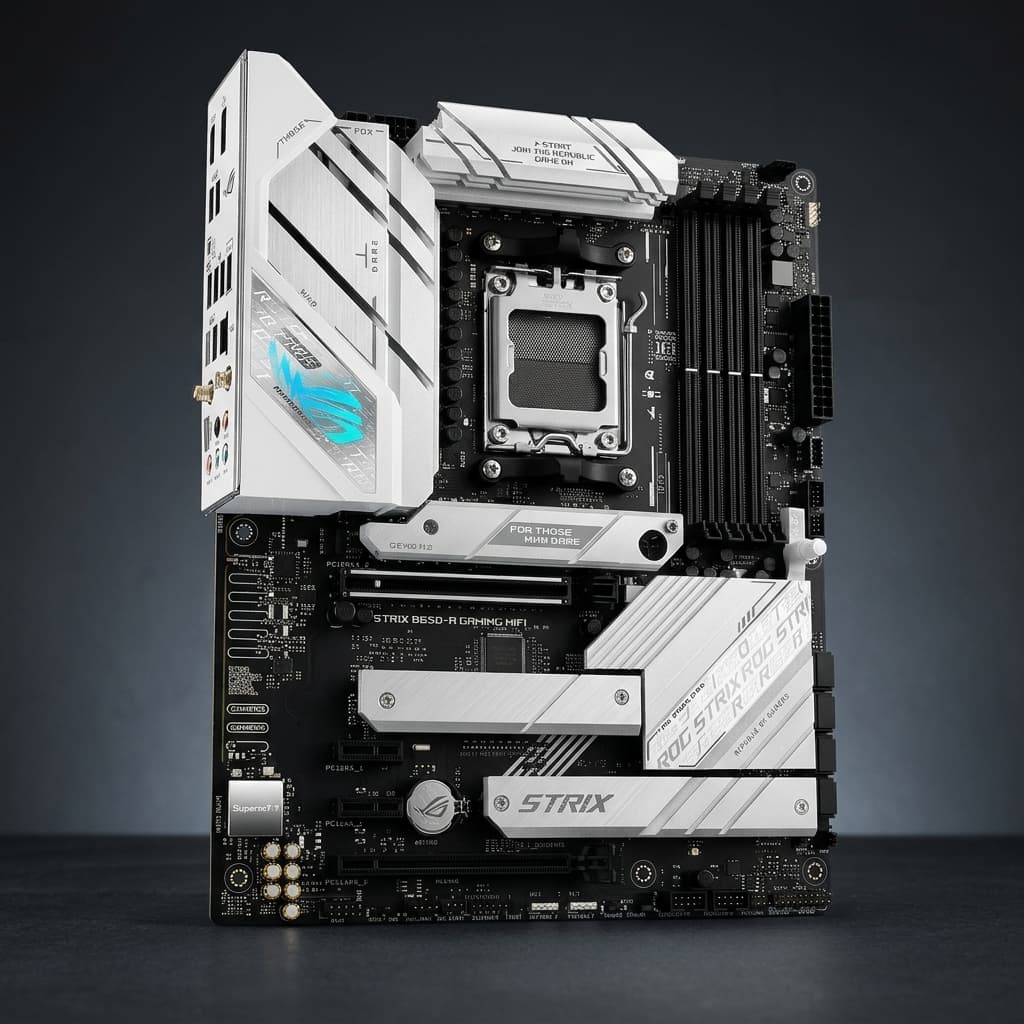
The B650-A uses silver and white heatsinks on a black PCB, with ROG Strix graphics and a small RGB-lit area. That makes it one of the few mainstream AM5 boards that suits a white or silver build without needing extra covers. The black PCB still shows, so the look is two-tone.
Cooling covers the important parts. Two VRM heatsinks, one running under the I/O shroud, sit on high-conductivity thermal pads. All three M.2 slots get heatsinks, and the chipset has its own. ASUS lists a six-layer PCB.
If you are planning a white build, keep a few things in mind:
- GPU: a large card will cover the middle of the board. A white or silver card keeps the look consistent.
- CPU cooler: large air coolers can hide the VRM heatsinks. Check RAM clearance with tall heat spreaders.
- Lighting: the three ARGB Gen 2 headers and Aura Sync make it easy to match fans and strips.
CPU Compatibility and AM5 Platform
AM5 is AMD's current desktop socket. ASUS lists support for Ryzen 7000, 8000 and 9000 desktop processors, but support depends on the BIOS version:
- Ryzen 7000 works with the board's launch BIOS, since the board shipped alongside these chips in 2022.
- Ryzen 8000 (8000G APUs) and Ryzen 9000 need a newer BIOS. A board that sat on a shelf for a while may arrive with older firmware.
- Newer chips such as the Ryzen 7 9800X3D and Ryzen 9 9950X3D each have their own minimum BIOS version. Check the ASUS CPU support list for your exact processor before you buy.
The board's BIOS FlashBack button lets you update the firmware from a USB drive without a CPU, memory or GPU installed. Ryzen 8000 APUs also have fewer PCIe lanes, so the main x16 slot runs at x8 or x4 and M.2_1 drops to PCIe 4.0 with these chips.
AMD has said it will support AM5 for several years, but that doesn't guarantee every future Ryzen will run on this board. Future support depends on BIOS updates from ASUS.
Power Delivery and VRM Performance
The VRM converts 12V from the power supply into the low, stable voltages the CPU needs. ASUS gives the B650-A a 12+2+1 layout, with 12 stages for the CPU cores, 2 for the SoC and 1 for miscellaneous rails. Each stage is rated for 60A. Power comes in through an 8-pin and a 4-pin CPU connector.
Stage count is only part of the story: stage rating, controller, PCB layers, heatsink mass and airflow matter more. On paper, 12 x 60A is a solid B650 configuration that comfortably suits Ryzen 5 and Ryzen 7 chips.
For 16-core chips under long all-core loads, give the VRM area good airflow, especially with an AIO. We haven't measured VRM temperatures. Boards such as the MSI Tomahawk and ASRock Steel Legend list higher-rated 80A stages if heavy overclocking is your priority.
DDR5 Memory Support
The four DIMM slots run in dual channel and accept up to 192GB of DDR5. ASUS supports AMD EXPO profiles and adds its OptiMem II trace design for memory signal quality.
For most AM5 gaming builds, a 2 x 16GB or 2 x 32GB DDR5-6000 EXPO kit is the practical target. Things to know:
- Two DIMMs run faster than four.
- Check the ASUS memory QVL for a tested kit.
- The first boot can take a minute or more while memory trains. Don't power off.
- Enable EXPO in BIOS after the first successful boot.
Storage and M.2 Expansion
The three M.2 slots are not identical:
| Slot | Source | Interface | Lengths |
|---|---|---|---|
| M.2_1 | CPU | PCIe 5.0 x4 (Ryzen 7000/9000); PCIe 4.0 x4 (Ryzen 8000) | 2242-2280 |
| M.2_2 | CPU | PCIe 4.0 x4 (x4/x2 with Ryzen 8000) | 2242-2280 |
| M.2_3 | B650 chipset | PCIe 4.0 x4 | 2242-22110 |
Every slot has a heatsink, and M.2 Q-Latch means no tiny screws. One lane-sharing rule matters: using M.2_3 in PCIe mode disables the second (chipset) x16 slot. Four SATA ports and AMD RAIDXpert2 support for RAID 0/1/10 handle hard drives and older SSDs.
PCIe Expansion and GPU Compatibility
The main x16 slot connects to the CPU and runs at PCIe 4.0 x16. It is not PCIe 5.0 (the main difference from B650E boards), but current GeForce and Radeon cards work fine in it.
The second slot is physically x16 but electrically x4 from the chipset. That suits a capture card or network card, not a second GPU.
Networking and Connectivity
- Wi-Fi 6E: a 2x2 module that supports 2.4, 5 and 6GHz. The 6GHz band only works where local regulations allow it, needs Windows 11 and a 6E router, and has shorter range through walls.
- Bluetooth 5.2 for controllers and headsets.
- Intel 2.5Gb Ethernet: faster than gigabit for local transfers and NAS use.
- USB: nine rear ports, including a 20Gbps USB 3.2 Gen 2x2 Type-C and a 10Gbps Type-C. The front USB-C header runs at 10Gbps.
- Audio: ALC4080 SupremeFX with a Savitech amp suits most headphones.
Gaming and Everyday Performance
A motherboard does not raise frame rates by itself; gaming performance comes mainly from the CPU, GPU, memory and cooling. The board's job is stable power, rated memory speeds and no bottlenecks in storage or networking.
On paper, the B650-A does that well: X3D support with the right BIOS, full PCIe 4.0 x16 graphics, DDR5 EXPO and three NVMe slots. Paired with a Ryzen 7 9800X3D, DDR5-6000 and a modern GPU, the board won't be the limiting factor.
BIOS and Installation Experience
ASUS's UEFI BIOS has an EZ Mode for basics and an Advanced Mode for detailed tuning. It includes EZ Flash 3, Q-Fan control and Secure Erase. Tips for first-time AM5 builders:
- Update the BIOS first with FlashBack if you're using a Ryzen 8000 or 9000 chip.
- Install RAM in the slots ASUS recommends for two DIMMs (see the manual), then expect a long first boot.
- Use M.2_1 for your fastest SSD, and remember M.2_3's lane-sharing rule.
- Connect fans: cooler to CPU_FAN, pump to AIO_PUMP, case fans to chassis headers.
- Configure RGB in Armoury Crate, which also handles drivers, Aura Sync and Fan Xpert 4.
Competitor Comparison
Here's how the B650-A compares with four popular B650 boards. Competitor details come from manufacturer listings and independent reviews; some boards have several revisions, so check the exact version you buy.
| Feature | ASUS ROG Strix B650-A | MSI MAG B650 Tomahawk WiFi | GIGABYTE B650 AORUS Elite AX | ASRock B650 Steel Legend WiFi | ASUS TUF B650-PLUS WiFi |
|---|---|---|---|---|---|
| CPU Socket | AM5 | AM5 | AM5 | AM5 | AM5 |
| Chipset | B650 | B650 | B650 | B650 | B650 |
| Form Factor | ATX | ATX | ATX | ATX | ATX |
| Memory | 4 x DDR5 | 4 x DDR5 | 4 x DDR5 | 4 x DDR5 | 4 x DDR5 |
| M.2 Slots | 3 (1 x Gen5, 2 x Gen4) | 3 (all Gen4) | 3 (listing advertises a Gen5 M.2) | 3 (1 x Gen5, 2 x Gen4) | 3 (1 x Gen5, 2 x Gen4) |
| PCIe Support | PCIe 4.0 x16 GPU; PCIe 5.0 M.2 | PCIe 4.0 x16 GPU; no PCIe 5.0 | PCIe 4.0 x16 GPU | PCIe 5.0 x16 GPU; PCIe 5.0 M.2 | PCIe 4.0 x16 GPU; PCIe 5.0 M.2 |
| Wi-Fi | Wi-Fi 6E, BT 5.2 | Wi-Fi 6E, BT 5.2 | Wi-Fi 6E | Wi-Fi 6E, BT 5.2 | Wi-Fi 6, BT 5.2 |
| Ethernet | Intel 2.5Gb | Realtek 2.5Gb | 2.5GbE | Realtek 2.5Gb | Realtek 2.5Gb |
| USB Type-C | Rear 20Gbps + 10Gbps; front 10Gbps | Rear 20Gbps; front 10Gbps | Rear 10Gbps; front header | Rear 20Gbps; front 5Gbps | Rear 20Gbps + 10Gbps; front 5Gbps |
| Special Features | White/silver, 12+2+1 60A, FlashBack | 14+2+1 80A, 6 SATA, Flash BIOS button | 14+2+1, Q-Flash Plus, EZ-Latch | 14+2+1 80A, BIOS Flashback | 14 power stages, FlashBack, USB4 header support |
B650 Motherboard Comparison: Which Board Fits Your Build?
- White-themed builds: the ROG Strix B650-A is the clear pick of this group. The Tomahawk, AORUS Elite AX and TUF are dark boards.
- Most connectivity: the Strix offers three rear/front USB-C options, Intel 2.5Gb and Wi-Fi 6E. The TUF has similar USB but only Wi-Fi 6.
- Multiple M.2 drives: all five boards have three M.2 slots. The Strix, TUF and Steel Legend include a PCIe 5.0 slot; the Tomahawk is all PCIe 4.0.
- Best feature balance: the Steel Legend stands out with PCIe 5.0 for both the GPU and an SSD. The Tomahawk offers stronger VRM ratings and six SATA ports.
- Budget: the TUF and AORUS Elite AX usually cover the essentials for less. Prices change often, so compare current listings.
Who Should Buy the ASUS ROG Strix B650-A Gaming WiFi?
- AM5 builders using Ryzen 7000, 8000 or 9000 CPUs that the CPU support list confirms
- Gamers who want a dependable board without paying for X670E features
- Builders planning a white or silver PC
- Anyone running two or three NVMe SSDs
- Users who want Wi-Fi 6E and 2.5Gb Ethernet built in
Who Should Avoid It?
- Buyers who want a PCIe 5.0 graphics slot (consider the Steel Legend or a B650E board)
- Users who need more than four SATA ports or many PCIe add-in cards
- Budget builders who don't care about appearance; a TUF or Tomahawk usually costs less
- Small form factor builders who need micro-ATX or mini-ITX
- AM4 owners who want to reuse a Ryzen 5000 CPU or DDR4 memory; AM5 needs a new CPU and DDR5
Final Verdict
The ASUS ROG Strix B650-A Gaming WiFi is a well-rounded AM5 board. Its strongest points are its white-and-silver design, a PCIe 5.0 M.2 slot, three heatsinked M.2 slots, Intel 2.5Gb Ethernet, Wi-Fi 6E and good USB-C options. BIOS FlashBack makes Ryzen 9000 upgrades straightforward.
The trade-offs: a PCIe 4.0 graphics slot, lane sharing on M.2_3, only four SATA ports and usually higher prices than the TUF B650-PLUS WiFi or MSI Tomahawk. If appearance doesn't matter to you, those boards cover similar ground. If you want PCIe 5.0 graphics, look at the ASRock Steel Legend.
For a white or silver AM5 gaming PC, it's one of the strongest B650 choices available. Check the current price of the ASUS ROG Strix B650-A Gaming WiFi on Amazon and compare it with the alternatives above before you buy.
Pros
- White-and-silver heatsinks suit white and silver PC builds
- PCIe 5.0 M.2 slot plus two PCIe 4.0 M.2 slots, all with heatsinks
- Wi-Fi 6E, Bluetooth 5.2 and Intel 2.5Gb Ethernet built in
- 20Gbps USB 3.2 Gen 2x2 rear Type-C and a 10Gbps front USB-C header
- 12+2+1 power stages rated at 60A each
- BIOS FlashBack simplifies Ryzen 8000/9000 BIOS updates
- Tool-free M.2 Q-Latch, PCIe Slot Q-Release and Q-LED diagnostics
Cons
- Main graphics slot is PCIe 4.0, not PCIe 5.0
- Using M.2_3 in PCIe mode disables the second (chipset) x16 slot
- Only four SATA ports
- Power stages rated lower (60A) than some rivals’ 80A stages
- Usually costs more than the TUF B650-PLUS WiFi and MSI Tomahawk
- Black PCB, so it is not a fully white board
Spec Sheet
Specifications
General
| Model | ROG STRIX B650-A GAMING WIFI |
|---|---|
| Product Family | ASUS ROG Strix |
| Release Year | 2022 |
CPU
| Socket | AMD AM5 (LGA 1718) |
|---|---|
| Supported Processors | AMD Ryzen 9000, 8000 and 7000 Series desktop (check ASUS CPU support list) |
| BIOS Note | Ryzen 8000 and 9000 require a newer BIOS than the launch firmware |
| Power Delivery | 12+2+1 power stages, 60A rated |
| CPU Power Connectors | 1 x 8-pin, 1 x 4-pin |
Chipset
| Chipset | AMD B650 |
|---|
Memory
| Type | DDR5 |
|---|---|
| Slots | 4 x DIMM |
| Maximum Capacity | 192GB (per ASUS spec page) |
| Channel | Dual channel |
| Native Speeds | 4800, 5000, 5200 MT/s |
| Overclocked Speeds | Up to 7600+ MT/s (OC) |
| ECC | Unbuffered ECC and non-ECC |
| Profiles | AMD EXPO |
| Other | ASUS OptiMem II |
Expansion Slots
| PCIEX16_1 (CPU) | PCIe 4.0 x16 (x8/x4 with Ryzen 8000) |
|---|---|
| PCIEX16_2 (Chipset) | PCIe 4.0 x16 slot, x4 mode (disabled when M.2_3 is in PCIe mode) |
| PCIe x1 | 2 x PCIe 4.0 x1 (chipset) |
Storage
| M.2_1 (CPU) | PCIe 5.0 x4 (PCIe 4.0 x4 with Ryzen 8000), 2242/2260/2280 |
|---|---|
| M.2_2 (CPU) | PCIe 4.0 x4 (x4/x2 with Ryzen 8000), 2242/2260/2280 |
| M.2_3 (Chipset) | PCIe 4.0 x4, 2242/2260/2280/22110 |
| M.2 Heatsinks | Heatsinks on all three M.2 slots, M.2 Q-Latch |
| SATA | 4 x SATA 6Gb/s |
| RAID | NVMe and SATA RAID 0/1/10 (AMD RAIDXpert2) |
Networking
| Ethernet | Intel 2.5Gb with ASUS LANGuard |
|---|---|
| Wi-Fi | Wi-Fi 6E, 2x2, 802.11ax (6GHz subject to local regulations; requires Windows 11) |
| Bluetooth | Bluetooth 5.2 |
USB
| Rear USB 3.2 Gen 2x2 | 1 x Type-C (20Gbps) |
|---|---|
| Rear USB 3.2 Gen 2 | 4 x (3 x Type-A, 1 x Type-C) |
| Rear USB 2.0 | 4 x Type-A |
| Front USB 3.2 Gen 2 | 1 x Type-C header |
| Front USB 3.2 Gen 1 | 1 x header (2 ports) |
| Front USB 2.0 | 2 x headers (4 ports) |
Audio
| Codec | ROG SupremeFX 7.1, Realtek ALC4080 |
|---|---|
| Amplifier | Savitech SV3H712 |
| Specs | 120dB SNR playback, 113dB SNR recording, up to 32-bit/384kHz |
Internal Connectors
| Fan Headers | CPU, CPU_OPT, AIO pump, 4 x chassis (all 4-pin) |
|---|---|
| Other | Thunderbolt (USB4) header, S/PDIF out, front-panel audio, chassis intrusion, thermal sensor, Clear CMOS, COM debug |
Rear I/O
| Video Outputs | 1 x HDMI 2.1, 1 x DisplayPort 1.4 (requires CPU with integrated graphics) |
|---|---|
| Other | 2.5Gb LAN, Wi-Fi antenna ports, 5 audio jacks, BIOS FlashBack button |
Cooling
| Heatsinks | 2 VRM heatsinks, 3 M.2 heatsinks, chipset heatsink |
|---|---|
| PCB | 6-layer |
RGB and Lighting
| Headers | 3 x Addressable Gen 2, 1 x Aura RGB |
|---|---|
| Software | Aura Sync, Aura Creator (Armoury Crate) |
Operating System and Software
| OS Support | Windows 10 64-bit, Windows 11 64-bit |
|---|---|
| BIOS | 256Mb flash ROM, UEFI AMI BIOS, EZ Flash 3, CrashFree BIOS 3 |
| Software | Armoury Crate, AI Suite 3, GameFirst VI, Sonic Studio III |
Physical Dimensions
| Form Factor | ATX |
|---|---|
| Dimensions | 30.5 x 24.4 cm (12 x 9.6 in) |
Frequently Asked Questions
Is the ASUS ROG Strix B650-A Gaming WiFi compatible with Ryzen 9000 processors?+
Does the ASUS ROG Strix B650-A support Ryzen 8000 processors?+
Does this motherboard support Ryzen 7000 CPUs?+
Does the ASUS ROG Strix B650-A support DDR5 memory?+
How many M.2 SSDs can be installed?+
Does the ASUS ROG Strix B650-A support PCIe 5.0?+
Does this motherboard have Wi-Fi 6E?+
Does it have 2.5Gb Ethernet?+
Is the ASUS ROG Strix B650-A good for gaming?+
What is the difference between the ASUS ROG Strix B650-A and MSI MAG B650 Tomahawk WiFi?+
Does the motherboard support AMD EXPO?+
Is the ASUS ROG Strix B650-A worth buying?+
As an Amazon Associate we earn from qualifying purchases. See our affiliate disclosure.