
CORSAIR
CORSAIR Vengeance RGB RS DDR5 32GB (2×16GB) 6000MHz CL36 Grey
A 32GB (2×16GB) DDR5-6000 CL36 desktop memory kit with CL36-44-44-96 timings at 1.35V. It supports both AMD EXPO and Intel XMP 3.0, so it works with AM5 Ryzen and Intel DDR5 builds. It has iCUE-controlled RGB lighting, a grey aluminum heat spreader and a limited lifetime warranty.
CORSAIR Vengeance RGB RS DDR5 32GB 6000MHz Review: Introduction
If you're building a new AM5 or Intel DDR5 gaming PC, 32GB of DDR5-6000 is one of the most common memory choices. The CORSAIR Vengeance RGB RS DDR5 32GB RAM (model CMG32GX5M2E6000Z36) delivers exactly that: two 16GB modules rated at 6000 MT/s with CL36-44-44-96 timings at 1.35V, both AMD EXPO and Intel XMP 3.0 profiles, a grey aluminum heat spreader and RGB lighting.
Is it worth buying? For most gamers and everyday creators, yes. It offers the capacity and speed most modern DDR5 builds target, works with both AMD and Intel profiles, and carries a limited lifetime warranty. Its main trade-off is latency: CL36 with tRCD/tRP of 44 is looser than the CL30 DDR5-6000 kits it competes with, so enthusiasts chasing the tightest timings have better-specced options.
Quick Verdict
- What it offers: 32GB (2×16GB) of DDR5-6000 CL36 desktop memory with EXPO and XMP 3.0, RGB lighting and a grey aluminum heat spreader.
- Key advantages: The 6000 MT/s speed suits current AM5 Ryzen and Intel DDR5 platforms, it has both memory profiles, the matched kit runs in dual-channel mode, lighting works with iCUE and motherboard RGB software, and the warranty is lifetime.
- Limitations: CL36-44-44 timings are looser than CL30 kits at the same speed. It needs a DDR5 motherboard. Rated speed requires enabling EXPO or XMP in the BIOS.
- Best for: Gamers and creators building a DDR5 PC who want 32GB, RGB and a grey or neutral color scheme.
- Check first: Your motherboard must have DDR5 slots. Check its memory QVL and BIOS version, and confirm your CPU cooler leaves room for the modules.
CORSAIR Vengeance RGB RS DDR5 Specifications
| Specification | Details |
|---|---|
| Model | CMG32GX5M2E6000Z36 |
| Series | Vengeance RGB RS DDR5 |
| Capacity / kit | 32GB (2×16GB) |
| Memory type / format | DDR5 desktop UDIMM, 288-pin |
| Tested speed (EXPO/XMP) | 6000 MT/s (PC5-48000) |
| Tested timings | 36-44-44-96 (CL36) |
| Tested voltage | 1.35V |
| Default SPD speed | 4800 MT/s |
| SPD latency / voltage | CL40 / 1.1V |
| Profiles | AMD EXPO and Intel XMP 3.0 |
| PMIC | Overclock PMIC |
| Heat spreader / color | Aluminum / Grey |
| Lighting | RGB, CORSAIR iCUE |
| Platforms (CORSAIR) | AMD 600 and 800 Series; Intel 600, 700 and 800 Series (DDR5 boards) |
| Warranty | Limited lifetime (regional terms apply) |
The "tested" values are what the kit runs at once you enable EXPO or XMP. Without a profile, it boots at the JEDEC SPD default of 4800 MT/s CL40 at 1.1V.
Design and Build Quality
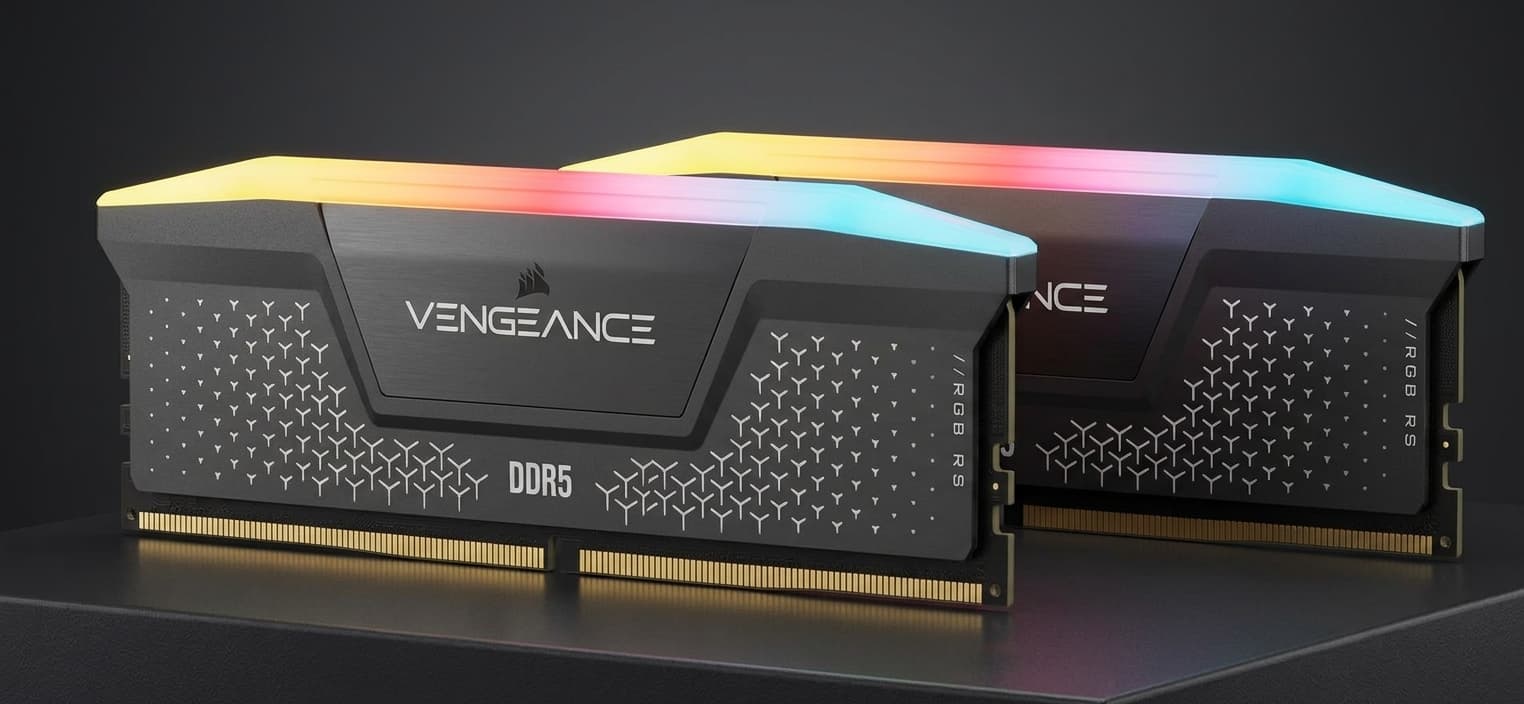
CORSAIR uses a solid aluminum heat spreader with dual-tone styling, here in grey, topped by an RGB light bar. Grey sits between all-black and all-white builds, so it fits neutral, silver or mixed-color themes. CORSAIR also says the kit uses hand-sorted, tightly screened memory chips and a custom performance PCB, with onboard voltage regulation (PMIC) for overclocking.
Installation is standard desktop DIMM work: two modules go into the slots your motherboard manual recommends for two-DIMM operation, usually A2 and B2. CORSAIR doesn't list a module height on the product page, so check RAM clearance before pairing it with a large dual-tower air cooler such as the Noctua NH-D15 chromax.black, whose front fan can overhang the DIMM slots. AIO liquid coolers and most single-tower coolers avoid this issue.
32GB Capacity: Is 2×16GB Enough?
For most people building today, 32GB is the practical sweet spot:
- Modern gaming: 32GB gives headroom over 16GB for large open-world games, mods and background apps.
- Gaming while multitasking or streaming: Discord, a browser, OBS and launchers can run alongside a game without much memory pressure.
- Photo editing and 1080p/1440p video editing: Comfortable for most hobbyist and semi-pro projects.
- Productivity and heavy browsing: Dozens of tabs, office apps and communication tools fit easily.
- Heavy 4K/8K editing, large VMs or big datasets: Consider 64GB instead (CORSAIR also sells this series in 2×32GB).
A matched 2×16GB kit runs in dual-channel mode on mainstream platforms. Two modules are also usually easier for the memory controller to run at high speed than four. A single 1×32GB stick would run single-channel and lose much of DDR5's bandwidth. Capacity alone doesn't set FPS or application performance; your CPU and GPU matter more.
DDR5-6000 Speed Explained
"6000MHz" is the marketing label. The accurate unit is 6000 MT/s (megatransfers per second), because DDR memory transfers data twice per clock cycle. PC5-48000 describes peak bandwidth per module: 6000 MT/s × 8 bytes ≈ 48,000 MB/s. In dual-channel mode, that's a theoretical peak of about 96 GB/s.
DDR5 differs from DDR4 in several ways: higher base speeds (DDR5 starts at 4800 MT/s), two independent 32-bit subchannels per module, on-module power management (PMIC) and a different notch position, so the two aren't interchangeable. Faster memory helps most in CPU-limited scenarios such as high-refresh gaming, compiling and some creative workloads. The speed you actually get depends on your CPU's memory controller, motherboard and BIOS.
CL36-44-44-96 Latency Explained
The four numbers are primary timings measured in clock cycles:
- CL36 (CAS latency): cycles between a read command and the first data returning.
- 44 (tRCD): cycles to open a row before a column can be read.
- 44 (tRP): cycles to close a row before opening another.
- 96 (tRAS): the minimum time a row must stay open.
Latency must be read alongside frequency. True CAS latency in nanoseconds is roughly CL × 2000 ÷ MT/s, so DDR5-6000 CL36 works out to about 12ns, CL32 to about 10.7ns and CL30 to 10ns. CL30 kits are measurably tighter on paper, and tRCD/tRP matter too. Real-world differences are often modest and vary by game, CPU and platform, especially on CPUs with large caches. CL36 is a mainstream timing, not a weakness, but it isn't the tightest DDR5-6000 option.
AMD EXPO and Intel XMP 3.0
EXPO (AMD) and XMP 3.0 (Intel) are profiles stored on the modules that tell the motherboard which speed, timings and voltage to apply. Because this kit carries both, it isn't tied to one CPU brand. A general setup guide:
- Install the two modules in the motherboard-recommended slots.
- Enter the BIOS/UEFI (usually Delete or F2 at boot).
- Find the memory profile setting.
- Select EXPO on AMD or XMP on Intel.
- Save changes and restart. The first boot may take longer while memory training runs.
- Check the speed and timings in the BIOS or a tool such as CPU-Z.
BIOS names vary by brand. ASUS shows EXPO/XMP under AI Overclock Tuner, MSI and ASRock use names like "A-XMP" or "EXPO", and GIGABYTE lists both under its memory settings. CORSAIR notes that tested speeds require BIOS adjustment and that maximum performance depends on the motherboard and CPU, so a 6000 MT/s profile may not be stable on every combination.
AMD Ryzen Compatibility
CORSAIR lists AMD 600 and 800 Series chipsets: AM5 boards such as B650, X670, B850 and X870. That covers Ryzen 7000 and Ryzen 9000 processors such as the Ryzen 5 9600X, Ryzen 7 9800X3D and Ryzen 9 9900X. DDR5-6000 is widely considered the practical target for AM5, because it usually lets the memory controller run in a 1:1 ratio with the memory clock. That depends on the individual CPU, though.
- Enable EXPO to reach 6000 MT/s, since JEDEC default is 4800 MT/s.
- Check your board's QVL and update the BIOS. Newer AGESA releases often improve memory compatibility and training.
- First-boot memory training on AM5 can take a minute or more. That's normal.
- If the system is unstable, try an updated BIOS or step down to a lower speed.
This kit won't work in AM4 boards (B550, X570), which are DDR4-only. See our AMD Ryzen motherboard compatibility guide.
Intel Platform Compatibility
CORSAIR lists Intel 600, 700 and 800 Series chipsets. That includes 12th, 13th and 14th Gen Core processors on DDR5 LGA1700 boards and Core Ultra 200S on LGA1851. The key detail is that many Intel 600 and 700 Series boards were sold in separate DDR4 and DDR5 versions. A "B760" or "Z790" name doesn't guarantee DDR5, so check the exact model (many DDR4 variants carry "D4" in the name). Intel 800 Series boards are DDR5.
Enable XMP in the BIOS to run at 6000 MT/s. The speed you can hold depends on the CPU's memory controller and the board's memory layout. For background, read AM5 vs LGA1700 explained.
RGB Lighting and CORSAIR iCUE
CORSAIR describes the kit as having dynamic multi-zone RGB, controlled through CORSAIR iCUE, with preset effects such as Color Shift, Rain, Watercolor, Rainbow Wave and Spiral Rainbow. CORSAIR doesn't publish an exact zone or LED count for this model. iCUE lets you sync the RAM with other CORSAIR fans, coolers and peripherals, which helps when theming a build. Many motherboards' RGB software can also control CORSAIR memory, but support varies by board and software version. If you prefer one control app, check that your motherboard software supports it. If you run several RGB apps at once, they can conflict.
Gaming and Productivity Suitability
The kit suits mainstream and high-end DDR5 gaming PCs, high-refresh builds, streaming setups, content creation and heavy multitasking. DDR5-6000 helps most when the CPU is the bottleneck, such as high-FPS esports at 1080p. At 1440p and 4K, the GPU usually decides the frame rate. Real results depend on your CPU, GPU, motherboard, BIOS, game, software and memory settings, so treat memory as one part of a balanced build. Our gaming PC build guide covers how the parts fit together.
CORSAIR Vengeance RGB RS vs Competitors
| RAM Kit | Capacity | Speed | CAS | Timings | Voltage | EXPO | XMP | RGB | Key Difference |
|---|---|---|---|---|---|---|---|---|---|
| CORSAIR Vengeance RGB RS DDR5 32GB (CMG32GX5M2E6000Z36) | 2×16GB | 6000 | CL36 | 36-44-44-96 | 1.35V | Yes | 3.0 | iCUE | Grey finish, dual profile |
| Kingston FURY Beast RGB DDR5 32GB (KF560C36BBEAK2-32) | 2×16GB | 6000 | CL36 | 36-38-38 | 1.35V | Yes | Separate SKU | Infrared Sync | Tighter tRCD/tRP |
| G.SKILL Trident Z5 Neo RGB DDR5 32GB (F5-6000J3038F16GX2-TZ5NR) | 2×16GB | 6000 | CL30 | 30-38-38-96 | 1.35V | Yes | 3.0 | Light bar | Lowest CAS, AMD-focused |
| TEAMGROUP T-Force Delta RGB DDR5 32GB (FF3D532G6000HC30DC01) | 2×16GB | 6000 | CL30 | 30-36-36-76 | 1.35V | Not verified | 3.0 | Wide-angle | Tightest listed timings |
| ADATA XPG LANCER RGB DDR5 32GB (AX5U6000C4016G-DCLARBK) | 2×16GB | 6000 | CL40 | 40-40-40 | 1.35V | Not listed | 3.0 | Yes | Loosest CAS, Intel-focused |
Competitor specs come from the exact part numbers' Amazon and retailer listings. Variants differ by color and profile, so confirm the part number on the listing before buying.
CORSAIR Vengeance RGB RS vs Kingston FURY Beast RGB
Both are DDR5-6000 CL36 at 1.35V, but the Kingston FURY Beast RGB DDR5 32GB lists tighter 36-38-38 secondary timings versus CORSAIR's 44-44. Kingston sells EXPO and XMP 3.0 versions under different part numbers, while the CORSAIR kit carries both profiles on one SKU. Kingston's Infrared Sync keeps the modules' lighting in step. Pick Kingston for slightly tighter timings, or CORSAIR for dual profiles, iCUE and the grey finish.
CORSAIR Vengeance RGB RS vs G.SKILL Trident Z5 Neo RGB
The G.SKILL Trident Z5 Neo RGB DDR5 32GB is rated CL30-38-38-96 at the same 1.35V, so it has clearly tighter timings and supports EXPO and XMP 3.0. The Neo series was built with AM5 in mind. It's the stronger spec-sheet pick for Ryzen enthusiasts; the CORSAIR kit appeals more to buyers using iCUE or wanting grey.
CORSAIR Vengeance RGB RS vs TEAMGROUP T-Force Delta RGB
The CL30 TEAMGROUP T-Force Delta RGB DDR5 32GB lists 30-36-36-76 at 1.35V, the tightest primary timings in this group. It's listed with XMP 3.0; we couldn't confirm EXPO for this part number. Its angular wide-angle light bar looks quite different. AMD buyers should confirm EXPO support or QVL listing first.
CORSAIR Vengeance RGB RS vs ADATA XPG LANCER RGB
The ADATA XPG LANCER RGB DDR5 32GB is rated CL40-40-40 with Intel XMP 3.0. Its CAS latency is looser than CORSAIR's, though its tRCD/tRP of 40 are tighter than CORSAIR's 44. The Amazon listing doesn't mention EXPO, so the CORSAIR kit is the safer choice for AM5 buyers who want a one-click profile.
Who Should Buy This RAM?
- Gamers building a new DDR5 PC who want 32GB at the popular 6000 MT/s speed.
- AM5 Ryzen 7000/9000 owners using EXPO, and Intel DDR5 owners using XMP 3.0.
- Builders who might switch platforms later and want both profiles on one kit.
- CORSAIR iCUE users and anyone wanting grey RGB memory for a themed build.
Ready to build? Check the current price and availability of the CORSAIR Vengeance RGB RS DDR5 32GB 6000MHz CL36 on Amazon.
Who Should Avoid It?
- DDR4 motherboard owners: AM4 and DDR4 Intel boards can't use DDR5.
- Users needing more than 32GB: Choose a 2×32GB kit instead.
- Minimalist builders: A non-RGB kit avoids lighting and software.
- Latency-focused enthusiasts: Verified CL30 kits such as the G.SKILL and TEAMGROUP options above have tighter timings.
- Buyers whose board can't run DDR5-6000: Check the QVL and supported speeds first.
Final Verdict
The CORSAIR Vengeance RGB RS DDR5 32GB 6000MHz CL36 kit offers the core specs most current DDR5 builds need. You get 32GB in a dual-channel 2×16GB kit, 6000 MT/s with CL36-44-44-96 at 1.35V, and both EXPO and XMP 3.0. It adds iCUE-controlled RGB, an aluminum grey heat spreader and a limited lifetime warranty. Its main limitation is timings: CL30 rivals at the same speed are tighter on paper, though the real-world gap is often small. If those specs fit your build and your DDR5 motherboard supports them, it's a sensible, flexible choice.
Check the CORSAIR Vengeance RGB RS DDR5 32GB RAM on Amazon. Browse more memory in our RAM category or find a board in motherboards.
Pros
- 32GB capacity suits gaming, streaming and most content creation.
- Matched 2×16GB kit for dual-channel operation.
- DDR5-6000 is the speed most AM5 builds target and works well on Intel DDR5 boards.
- Both AMD EXPO and Intel XMP 3.0 profiles on one kit.
- Mainstream CL36 timing at a moderate 1.35V.
- Overclock PMIC for onboard voltage regulation.
- Solid aluminum heat spreader in a grey dual-tone finish.
- RGB lighting controllable through CORSAIR iCUE, with preset effects.
- Limited lifetime warranty.
Cons
- Requires a DDR5 motherboard. It won't work on AM4 or DDR4 Intel boards.
- Runs at 4800 MT/s CL40 until you enable EXPO or XMP in the BIOS.
- CL36-44-44-96 is looser than DDR5-6000 CL30 rivals.
- 6000 MT/s stability depends on the CPU memory controller, motherboard and BIOS.
- CORSAIR doesn't list a module height, so check cooler clearance yourself.
- RGB and iCUE software may be unnecessary in minimalist builds.
Spec Sheet
Specifications
General
| Brand | CORSAIR |
|---|---|
| Series | Vengeance RGB RS DDR5 |
| Model | CMG32GX5M2E6000Z36 |
| ASIN | B0GGJ79NR3 |
Memory
| Capacity | 32GB |
|---|---|
| Kit Configuration | 2×16GB |
| Memory Type | DDR5 |
| Form Factor | Desktop UDIMM |
Performance
| Tested Speed | 6000 MT/s |
|---|---|
| Speed Rating | PC5-48000 (DDR5-6000) |
| SPD Speed | 4800 MT/s |
| Memory Profiles | AMD EXPO, Intel XMP 3.0 |
| Note | Tested speed requires enabling EXPO or XMP; maximum performance depends on the motherboard and CPU |
Timings
| Tested Timings | 36-44-44-96 |
|---|---|
| CAS Latency | CL36 |
| SPD Latency | CL40 |
Voltage
| Tested Voltage | 1.35V |
|---|---|
| SPD Voltage | 1.1V |
| PMIC | Overclock PMIC |
Lighting
| Lighting | RGB |
|---|---|
| Control | CORSAIR iCUE; supported motherboard lighting software |
| Presets | Color Shift, Rain, Watercolor, Rainbow Wave, Spiral Rainbow |
Physical Design
| Heat Spreader | Aluminum, dual-tone |
|---|---|
| Color | Grey |
| Pin Count | 288-pin |
Compatibility
| Chipsets (CORSAIR) | AMD 600 Series, AMD 800 Series, Intel 600 Series, Intel 700 Series, Intel 800 Series |
|---|---|
| Requirement | DDR5 DIMM slots; not compatible with DDR4 motherboards |
| Note | Check the motherboard QVL and BIOS version; Intel 600/700 boards exist in DDR4 and DDR5 variants |
Warranty
| Warranty | Limited lifetime (subject to CORSAIR regional terms) |
|---|
Frequently Asked Questions
Is CORSAIR Vengeance RGB RS DDR5 32GB good for gaming?+
Is DDR5-6000 CL36 good for gaming?+
Does this RAM support AMD EXPO?+
Does it support Intel XMP 3.0?+
Is this RAM compatible with Ryzen 7000 processors?+
Is it compatible with Ryzen 9000 processors?+
Does it work with Intel DDR5 motherboards?+
Can I use this memory on a DDR4 motherboard?+
What does CL36-44-44-96 mean?+
Does the RAM require BIOS configuration?+
Can I control the RGB lighting with CORSAIR iCUE?+
Is 32GB enough for gaming and content creation?+
As an Amazon Associate we earn from qualifying purchases. See our affiliate disclosure.