
GIGABYTE
GIGABYTE X870 AORUS Elite WIFI7
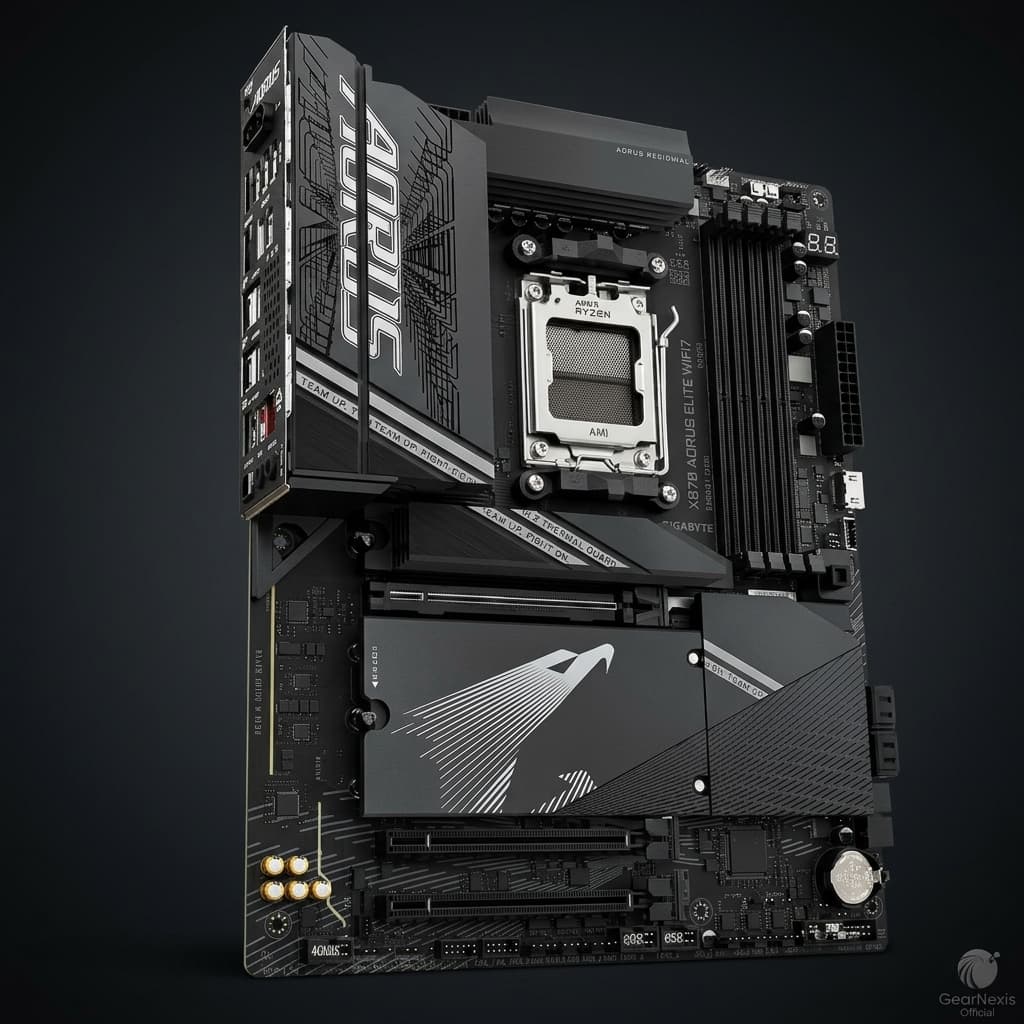
An AMD X870 ATX motherboard for AM5 Ryzen 9000, 8000 and 7000 CPUs. It has a twin 16+2+2 digital VRM, four DDR5 slots (up to 256GB, EXPO and XMP), a PCIe 5.0 x16 graphics slot and four M.2 slots, three of them PCIe 5.0. It adds Wi-Fi 7, dual USB4, Realtek 2.5GbE and EZ-Latch tool-free GPU and SSD installation. A well-rounded choice for Ryzen 9000 gaming builds.
GIGABYTE X870 AORUS Elite WIFI7 Review: Introduction
The GIGABYTE X870 AORUS Elite WIFI7 is an upper-mainstream X870 gaming motherboard for AMD's AM5 platform. It's aimed at builders who want an AM5 motherboard for Ryzen 9000 with modern connectivity but don't need flagship X870E pricing. Its strongest selling point is storage: three of its four M.2 slots support PCIe 5.0, which is more than most X870 boards offer. Dual USB4, Wi-Fi 7, a twin 16+2+2 VRM and tool-free EZ-Latch hardware round out the package.
No board is the best X870 motherboard for everyone, so this review covers what each feature means for a build, the lane-sharing rule to plan around, and who should buy something else.
GIGABYTE X870 AORUS Elite WIFI7 Overview
X870 is AMD's single-chipset AM5 platform. AMD requires every X870 board to include USB4 and PCIe 5.0 for graphics and NVMe storage. X870E adds a second chipset chip for more downstream lanes, but this board is X870, not X870E. The GIGABYTE X870 AORUS Elite WIFI7 sits in the middle of GIGABYTE's AORUS line, below its X870E models.
- Power delivery: Twin 16+2+2 phases with 60A DrMOS for VCORE and SoC.
- Memory: Four DDR5 slots, up to 256GB, rated to DDR5-8200 (OC), with EXPO and XMP.
- Storage: Four M.2 slots (three PCIe 5.0 from the CPU, one PCIe 4.0 from the chipset) and four SATA ports.
- Expansion: A reinforced PCIe 5.0 x16 graphics slot plus PCIe 4.0 x4 and PCIe 3.0 x2 slots.
- Connectivity: Wi-Fi 7, Bluetooth 5.4, Realtek 2.5GbE and two USB4 Type-C ports.
- DIY features: PCIe and M.2 EZ-Latch Plus, M.2 EZ-Latch Click heatsinks, WIFI EZ-Plug and Q-Flash Plus.
Key Specifications
| Specification | Details |
|---|---|
| Socket / chipset | AMD AM5 / AMD X870 |
| CPU support | Ryzen 9000, 8000 and 7000 Series |
| Form factor | ATX, 30.5 x 24.4 cm |
| VRM | Twin 16+2+2 digital; 60A DrMOS (VCORE, SoC) |
| Memory | 4 x DDR5, up to 256GB; up to 8200 MT/s (OC) |
| PCIe | PCIe 5.0 x16 (CPU); PCIe 4.0 x4 and 3.0 x2 (chipset) |
| M.2 | 3 x PCIe 5.0 x4 (CPU), 1 x PCIe 4.0 x4 (chipset) |
| SATA | 4 x 6Gb/s |
| Networking | Wi-Fi 7 (160MHz), Bluetooth 5.4, Realtek 2.5GbE |
| Rear USB | 2 x USB4 Type-C, 2 x 10Gbps, 4 x 5Gbps, 4 x USB 2.0 |
| Video / audio | HDMI, DP via USB4; Realtek ALC1220, optical S/PDIF |
Design and Build Quality
The board uses a standard ATX layout on a six-layer PCB, which GIGABYTE describes as server-grade with 2X copper. Styling is the familiar dark AORUS look with large VRM heatsinks. GIGABYTE calls them VRM Thermal Armor Advanced. All four M.2 slots are covered by M.2 Thermal Guard heatsinks.
The primary PCIe slot is GIGABYTE's PCIe UD Slot X, a one-piece reinforced slot anchored to a metal backplate, which helps with heavy graphics cards. Two 8-pin CPU power connectors feed the VRM. The rear panel has a Q-Flash Plus button, and the Wi-Fi antennas attach through a single EZ-Plug connector.
Power Delivery: Twin 16+2+2 Digital VRM
"16+2+2" means 16 phases feed the CPU cores (VCORE), 2 feed the SoC (memory controller and Infinity Fabric), and 2 MISC phases power auxiliary rails. GIGABYTE lists 60A DrMOS power stages for VCORE and SoC, and its footnote describes the core layout as an 8+8 parallel design ("twin" phases). DrMOS combines the driver and MOSFETs in one package for better efficiency and lower heat.
Phase count alone doesn't decide performance. The VRM gives stable power and thermal headroom, so a 16-core Ryzen 9 can hold boost clocks under sustained all-core loads. Actual results still depend on BIOS power limits, case airflow and CPU cooling. For a Ryzen 7 9800X3D or Ryzen 5 build, this VRM is more than enough. Ryzen 9 owners running long renders or Precision Boost Overdrive also have reasonable headroom. Overclocking AMD processors can void AMD's CPU warranty.
CPU Compatibility and AM5 Support
The board supports Ryzen 9000, 8000 and 7000 Series processors on AM5. Features vary by CPU:
- Ryzen 9000 and 7000: PCIe 5.0 x16 graphics and all three PCIe 5.0 M.2 slots.
- Ryzen 8000 (Phoenix 1): Graphics slot runs PCIe 4.0 x8; M2A_CPU runs PCIe 4.0.
- Ryzen 8000 (Phoenix 2): Graphics slot runs PCIe 4.0 x4; M2A_CPU runs PCIe 4.0.
- All Ryzen 8000: M2B_CPU and M2C_CPU are unavailable.
Before buying, check GIGABYTE's CPU support list on the board's Support tab to find the minimum BIOS version for your CPU. Q-Flash Plus can update the BIOS from a USB drive without a CPU or memory installed. For help picking a processor, see our AMD Ryzen CPU and motherboard compatibility guide, the Ryzen 7 9800X3D review and the Ryzen 9 9900X review.
DDR5 Memory and AMD EXPO
Four DDR5 slots run in dual-channel mode and support up to 256GB (64GB per DIMM) of non-ECC unbuffered memory. GIGABYTE advertises overclocked speeds up to DDR5-8200 MT/s, with EXPO and Intel XMP profile support.
The 8200 MT/s figure is a ceiling, not a promise. It depends on the CPU's memory controller, the kit, the BIOS and the number of modules, and four DIMMs typically run slower than two. GIGABYTE says to check its Memory Support List. For most Ryzen gaming builds, a 2x16GB or 2x32GB DDR5-6000 EXPO kit is the practical choice. Browse our DDR5 memory section.
PCIe 5.0 and Graphics Card Compatibility
The primary PCIEX16 slot is wired to the CPU and runs PCIe 5.0 x16 with Ryzen 9000/7000. Two more full-length slots hang off the chipset: PCIEX4 (PCIe 4.0 x4) and PCIEX2 (PCIe 3.0 x2). They're fine for a capture card, network card or SSD adapter, but not for a second GPU. PCIe EZ-Latch Plus releases the graphics card with one click, so you don't need to reach behind a large cooler.
The M.2 and graphics lane-sharing rule
This is the most important detail on the board. M2B_CPU and M2C_CPU share bandwidth with the PCIEX16 slot. With Ryzen 9000/7000, installing an SSD in either slot drops the graphics slot to x8. Separately, a drive in M2D_SB disables the PCIEX4 slot.
How much does x8 matter? PCIe 5.0 x8 offers the same bandwidth as PCIe 4.0 x16, and current GPUs are PCIe 5.0 or 4.0 cards. The gaming difference is usually small, but it depends on the GPU and workload. A PCIe 4.0 card drops to PCIe 4.0 x8, and cards with limited VRAM can be more sensitive to that. To keep the GPU at full x16, use M2A_CPU and M2D_SB first.
Four M.2 Slots and Storage Expansion
| Slot | Source | Interface (Ryzen 9000/7000) | Notes |
|---|---|---|---|
| M2A_CPU | CPU | PCIe 5.0 x4 | Up to 25110; PCIe 4.0 with Ryzen 8000 |
| M2B_CPU | CPU | PCIe 5.0 x4 | Up to 22110; GPU slot to x8; off with Ryzen 8000 |
| M2C_CPU | CPU | PCIe 5.0 x4 | Up to 22110; GPU slot to x8; off with Ryzen 8000 |
| M2D_SB | Chipset | PCIe 4.0 x4 | Up to 22110; disables PCIEX4 |
Only three slots support PCIe 5.0, and only with Ryzen 9000/7000. A sensible plan: put your boot drive in M2A_CPU and a second drive in M2D_SB. Use M2B or M2C only when you need a third or fourth NVMe drive and accept the x8 graphics link. M.2 EZ-Latch Plus holds SSDs without screws, and EZ-Latch Click heatsinks lift off without tools. Four SATA 6Gb/s ports cover hard drives and older SSDs. NVMe RAID 0/1/10 is supported (RAID 5 only with Ryzen 9000), as is SATA RAID 0/1/10. Our NVMe SSD buying guide explains when PCIe 5.0 drives are worth it.
Wi-Fi 7, Bluetooth 5.4 and 2.5GbE LAN
The Wi-Fi 7 module is 2x2, works on 2.4, 5 and 6GHz, and supports 160MHz channels. That is narrower than the 320MHz maximum some rival boards list. The module depends on PCB revision: GIGABYTE lists a MediaTek MT7925 on rev 1.0 and a Realtek RTL8922AE on rev 1.1 and rev 1.2. Both include Bluetooth 5.4, though GIGABYTE notes the Bluetooth version can change with updates. Amazon doesn't say which revision ships, so check the box if the chipset matters to you.
To get Wi-Fi 7 features, you need Windows 11 24H2 (GIGABYTE says "SV3") and a Wi-Fi 7 router. There is no Windows 10 driver, and 6GHz availability varies by country. Real-world speeds will be lower than the theoretical maximum and depend on distance, walls and interference.
The wired port is Realtek 2.5GbE. That's plenty for internet connections up to 2.5Gbps and faster than gigabit for transfers to a NAS, but it needs 2.5GbE-capable network gear to exceed gigabit speeds.
Dual USB4 and Connectivity
Rear I/O: two USB4 Type-C ports (ASMedia controller, 40Gbps), two red USB 3.2 Gen 2 Type-A (10Gbps), four USB 3.2 Gen 1 (5Gbps), four USB 2.0, HDMI, 2.5GbE, two antenna connectors, optical S/PDIF and two audio jacks. With a CPU that has integrated graphics, the USB4 ports carry DisplayPort 1.4 video up to 3840x2160 at 240Hz, and HDMI 2.1 supports up to 4096x2160 at 60Hz. The board can drive up to four displays at once.
Internal headers (need matching case connectors): one USB Type-C header with USB 3.2 Gen 2x2 (20Gbps), one USB 3.2 Gen 1 header (two ports) and two USB 2.0 headers (four ports). There's also an internal HDMI port, called Sensor Panel Link, for small in-case displays (1080p at 30Hz).
Audio uses a Realtek ALC1220 codec with 7.1-channel support, and the rear line-out supports DSD. It's capable onboard audio, though rivals with ALC4080 or ALC4082 codecs are a newer generation.
Cooling and EZ-Latch Features
- VRM Thermal Armor Advanced: Finned VRM heatsinks.
- M.2 Thermal Guard: Heatsinks cover all four M.2 slots, with an M.2 backplate.
- EZ-Latch Plus and EZ-Latch Click: Tool-free GPU release, SSD mounting and heatsink removal.
- Fan headers: One CPU fan, one CPU fan/pump, four system fan and two system fan/pump headers, controlled by Smart Fan 6.
- Monitoring: Two temperature sensor headers, a noise detection header and flow-rate detection.
- Recovery: Q-Flash Plus button, onboard power and reset buttons, and a Clear CMOS jumper (not a button).
- Lighting: Three ARGB Gen2 headers and one 12V RGB header.
These save time when swapping SSDs or pulling a GPU from a crowded case. For cooling a Ryzen 9, consider the Arctic Liquid Freezer III Pro 360 or Noctua NH-D15 chromax.black.
Gaming and Productivity Suitability
A motherboard doesn't set your frame rate. Gaming performance depends mainly on the CPU, GPU, memory, cooling, software and settings. What this board provides is a stable, well-connected platform:
- High-end and Ryzen 9000 gaming: A strong base for a Ryzen 7 9800X3D and a modern GPU.
- Content creation and video editing: Separate NVMe drives for projects, cache and exports, plus USB4 for fast external SSDs. A Ryzen 9 9950X3D pairs well.
- Streaming: The PCIe 4.0 x4 slot fits a capture card, as long as M2D_SB stays empty.
- Productivity and enthusiast builds: Good for single-GPU systems; multi-GPU work needs a board with two CPU-connected x16 slots.
Planning a full system? See our gaming PC build guide.
Warranty and Long-Term Ownership
The Amazon US listing advertises a five-year warranty. GIGABYTE's official product and specification pages don't list a warranty length for this model. GIGABYTE's US warranty policy says extended warranty coverage for eligible products requires registration within 30 days of purchase from GIGABYTE or an authorized reseller, with a valid proof of purchase. GIGABYTE also says terms vary by region and that coverage runs from the purchase date.
In practice: buy from an authorized seller, keep the receipt, and register promptly on GIGABYTE's site. If you buy from the Amazon US listing but live outside the US, check your local GIGABYTE office's terms before relying on five years of coverage. GIGABYTE's online warranty check uses the serial number.
Competitor Comparison
All five boards use the X870 chipset, the ATX form factor, four DDR5 slots (up to 256GB), a PCIe 5.0 x16 graphics slot, two rear USB4 ports and Wi-Fi 7.
| Board | VRM | M.2 (Gen5) | SATA | Wi-Fi 7 | LAN | Rear USB | Best for |
|---|---|---|---|---|---|---|---|
| GIGABYTE X870 AORUS Elite WIFI7 | 16+2+2, 60A | 4 (3) | 4 | 160MHz | 2.5GbE | 12 | Gen5 storage, EZ-Latch |
| ASUS TUF Gaming X870-PLUS WiFi | 16+2+1, 80A | 4 (2) | 2 | 160MHz | 2.5GbE | 10 | Simple, durable builds |
| MSI MAG X870 Tomahawk WiFi | 14+2+1, 80A | 4 (2) | 4 | 320MHz | 5GbE | 12 | Faster LAN, GPU stays x16 |
| ASUS ROG Strix X870-F Gaming WiFi | 16+2+2, 110A | 4 (2) | 2 | 320MHz | Intel 2.5GbE | 12 | Premium VRM, audio |
| ASRock X870 Steel Legend WiFi | 14+2+1, 80A | 3 (1) | 4 | 160MHz | 2.5GbE | 11 | Fewer drives, more SATA |
Prices change often, so compare current listings.
vs ASUS TUF Gaming X870-PLUS WiFi
The ASUS TUF Gaming X870-PLUS WiFi has 16+2+1 80A power stages, an eight-layer PCB and ASUS Q-Release hardware. It has two Gen5 M.2 slots instead of three, just two SATA ports and 10 rear USB ports. Choose the TUF if you prefer ASUS's BIOS and need fewer drives; choose GIGABYTE for the third Gen5 slot and more SATA.
vs MSI MAG X870 Tomahawk WiFi
The MSI MAG X870 Tomahawk WiFi adds Realtek 5GbE, 320MHz Wi-Fi 7, an ALC4080 codec and memory rated to 8400+ MT/s. Its sharing works differently: a drive in M2_2 splits PCIe 5.0 bandwidth with the USB4 ports instead of the GPU. Choose MSI for faster networking and a GPU that stays at x16; choose GIGABYTE for three Gen5 M.2 slots.
vs ASUS ROG Strix X870-F Gaming WiFi
The ASUS ROG Strix X870-F Gaming WiFi is the premium pick, with 16+2+2 stages rated 110A (80A MISC), SupremeFX ALC4080 audio, Intel 2.5GbE and 320MHz Wi-Fi 7. It uses the same x8 graphics rule for M.2_2, has two Gen5 slots and offers only two SATA ports. Choose the Strix for heavier tuning and ROG features; choose GIGABYTE for more Gen5 storage and SATA.
vs ASRock X870 Steel Legend WiFi
The ASRock X870 Steel Legend WiFi has a 14+2+1 80A VRM, ALC4082 audio and a white-and-silver design. It has three M.2 slots with one Gen5, and its four SATA ports run through an ASMedia controller. Choose ASRock for a simpler build with fewer NVMe drives; choose GIGABYTE for storage expansion.
Who Should Buy the GIGABYTE X870 AORUS Elite WIFI7?
The GIGABYTE X870 AORUS Elite WIFI7 suits:
- Ryzen 9000 builders who want a modern AM5 platform with room to upgrade.
- Gamers who want PCIe 5.0 for graphics and storage.
- Users with three or more NVMe drives, especially PCIe 5.0 SSDs.
- Owners of USB4 docks, external SSDs or USB-C displays.
- Builders who want Wi-Fi 7 without a separate adapter.
- Anyone who values tool-free GPU and SSD installation.
Who Should Avoid It?
- Budget gaming builds: B650 or B850 boards run the same CPUs. The GIGABYTE B850 AORUS Elite WIFI7 is a close, simpler sibling.
- No USB4 needs: USB4 is a large part of what X870 adds over B850.
- Basic networking: If Wi-Fi 6E or wired Ethernet is enough, you're paying for features you won't use.
- One or two SSDs: Extra Gen5 M.2 slots add little.
- 5GbE or 320MHz Wi-Fi buyers: The MSI Tomahawk or ROG Strix X870-F fit better.
- Multi-GPU workloads: You'll need two CPU-connected x16 slots.
See more options in our motherboards section.
Final Verdict
The GIGABYTE X870 AORUS Elite WIFI7 is a balanced X870 board. Its main strengths are three PCIe 5.0 M.2 slots, a reinforced PCIe 5.0 x16 slot, dual USB4, Wi-Fi 7, a twin 16+2+2 VRM, four SATA ports and some of the most convenient tool-free hardware on AM5.
Its limits are just as clear. Using M2B or M2C drops the GPU slot to x8. Wi-Fi tops out at 160MHz, Ethernet is 2.5GbE rather than 5GbE, the audio codec is older, and Ryzen 8000 disables two M.2 slots. The five-year warranty depends on registration and region. It's most worthwhile for Ryzen 9000 gamers and creators who will use the extra storage and USB4. Before buying, confirm CPU and BIOS support, plan your M.2 layout and compare current prices.
Pros
- Three CPU-connected PCIe 5.0 x4 M.2 slots (with Ryzen 9000/7000), more than most X870 boards.
- Reinforced PCIe 5.0 x16 graphics slot (PCIe UD Slot X) with EZ-Latch Plus one-click release.
- Twin 16+2+2 digital VRM with 60A DrMOS stages for VCORE and SoC.
- Four DDR5 slots, up to 256GB, rated to DDR5-8200 (OC) with EXPO and XMP.
- Two rear USB4 ports with DisplayPort output, plus a 20Gbps front Type-C header.
- Wi-Fi 7 with Bluetooth 5.4 and Realtek 2.5GbE.
- Four SATA ports, plus NVMe and SATA RAID support.
- Tool-free M.2 EZ-Latch Plus and EZ-Latch Click heatsinks, WIFI EZ-Plug and Q-Flash Plus.
- Eight fan headers, including three that support pumps.
Cons
- Using M2B_CPU or M2C_CPU drops the PCIe 5.0 graphics slot to x8.
- Only three of four M.2 slots support PCIe 5.0; M2D_SB is PCIe 4.0 and disables the PCIEX4 slot when used.
- Ryzen 8000 processors disable M2B_CPU and M2C_CPU and limit the graphics slot to PCIe 4.0 x8 or x4.
- Wi-Fi 7 is limited to 160MHz channels, and Wi-Fi 7 features need Windows 11 24H2.
- Ethernet is 2.5GbE, while some rivals offer 5GbE.
- Realtek ALC1220 audio is an older codec than the ALC4080/ALC4082 on some competitors.
- Clear CMOS is a jumper, not a rear button.
- DDR5-8200 is a best-case rating that depends on the CPU, kit and DIMM count.
- The advertised five-year warranty depends on registration and region.
Spec Sheet
Specifications
General
| Brand | GIGABYTE |
|---|---|
| Model | X870 AORUS ELITE WIFI7 |
| Series | AORUS |
| ASIN | B0DGVC3DDW |
| PCB Revisions | Rev 1.0, 1.1 and 1.2 |
| Operating System | Windows 11 64-bit |
CPU Compatibility
| Socket | AMD AM5 |
|---|---|
| Supported Processors | AMD Ryzen 9000, 8000 and 7000 Series |
| Note | Check GIGABYTE's CPU support list for the minimum BIOS version required |
Chipset
| Chipset | AMD X870 |
|---|---|
| BIOS | 256Mbit flash, AMI UEFI BIOS |
Power Delivery
| VRM Design | Twin 16+2+2 phases digital VRM (8+8 parallel VCORE) |
|---|---|
| VCORE | 16 phases, 60A DrMOS |
| SoC | 2 phases, 60A DrMOS |
| MISC | 2 phases, PPAK |
| CPU Power Connectors | 2 x 8-pin ATX 12V |
Memory
| Type | DDR5, dual-channel |
|---|---|
| DIMM Slots | 4 |
| Maximum Capacity | 256GB (64GB per DIMM) |
| Module Support | Non-ECC unbuffered 1Rx8/2Rx8/1Rx16 |
| Rated Speed | Up to DDR5-8200 MT/s (OC); 5200/4800 MT/s native |
| Profiles | AMD EXPO, Intel XMP |
| Note | Supported speed depends on CPU, memory kit, BIOS and DIMM population |
Expansion Slots
| PCIEX16 | PCIe 5.0 x16 from CPU (Ryzen 9000/7000); PCIe 4.0 x8 (Ryzen 8000 Phoenix 1); PCIe 4.0 x4 (Ryzen 8000 Phoenix 2) |
|---|---|
| PCIEX4 | PCIe 4.0 x4 from chipset (x16 length) |
| PCIEX2 | PCIe 3.0 x2 from chipset (x16 length) |
| Lane Sharing | PCIEX16 runs at up to x8 when M2B_CPU or M2C_CPU is populated; PCIEX4 unavailable when M2D_SB is populated |
| Reinforcement | PCIe UD Slot X with PCIe EZ-Latch Plus |
Storage
| M.2 Slots | 4 (Socket 3, M key) |
|---|---|
| M2A_CPU | PCIe 5.0 x4/x2 from CPU, 25110/22110/2580/2280 (PCIe 4.0 with Ryzen 8000) |
| M2B_CPU | PCIe 5.0 x4/x2 from CPU, 22110/2280 (unavailable with Ryzen 8000) |
| M2C_CPU | PCIe 5.0 x4/x2 from CPU, 22110/2280 (unavailable with Ryzen 8000) |
| M2D_SB | PCIe 4.0 x4/x2 from chipset, 22110/2280 |
| SATA | 4 x SATA 6Gb/s |
| RAID | NVMe RAID 0/1/5/10 (RAID 5 with Ryzen 9000 only); SATA RAID 0/1/10 |
Networking
| Wi-Fi (rev 1.0) | MediaTek Wi-Fi 7 MT7925, 2.4/5/6GHz, 160MHz |
|---|---|
| Wi-Fi (rev 1.1 and 1.2) | Realtek Wi-Fi 7 RTL8922AE, 2.4/5/6GHz, 160MHz |
| Bluetooth | 5.4 (version may change with updates) |
| Ethernet | Realtek 2.5GbE |
| Antenna | 2T2R, WIFI EZ-Plug, directional high-gain antenna |
| OS Note | Wi-Fi 7 features require Windows 11 24H2; no Windows 10 driver |
USB Connectivity
| Rear USB4 | 2 x USB4 Type-C (ASMedia controller), with DisplayPort |
|---|---|
| Rear USB 3.2 Gen 2 | 2 x Type-A (red) |
| Rear USB 3.2 Gen 1 | 4 x Type-A |
| Rear USB 2.0 | 4 |
| Front Type-C Header | 1 x USB 3.2 Gen 2x2 |
| Front USB 3.2 Gen 1 | 1 header (2 ports) |
| Front USB 2.0 | 2 headers (4 ports) |
| Video Output | HDMI 2.1 (4096x2160@60Hz); DisplayPort 1.4 via USB4 (3840x2160@240Hz); internal HDMI 1.4 (1920x1080@30Hz); up to 4 displays; CPU with integrated graphics required |
Audio
| Codec | Realtek ALC1220, 2/4/5.1/7.1-channel |
|---|---|
| Outputs | 2 rear audio jacks, optical S/PDIF out, front panel audio header |
| Extras | DSD support on rear line out, audiophile-grade capacitors |
Internal Connectors
| Power | 1 x 24-pin ATX, 2 x 8-pin ATX 12V |
|---|---|
| Fan Headers | 1 x CPU fan, 1 x CPU fan/pump, 4 x system fan, 2 x system fan/pump |
| RGB | 3 x ARGB Gen2, 1 x RGB |
| Other | Noise detection header, 2 x temperature sensor headers, TPM header, internal HDMI, power button, reset button, reset jumper, Clear CMOS jumper |
Cooling
| VRM | VRM Thermal Armor Advanced (fins-array heatsinks) |
|---|---|
| M.2 | M.2 Thermal Guard heatsinks on all four slots, with backplate |
| Fan Control | Smart Fan 6, AIO fan control in BIOS |
Special Features
| DIY | PCIe EZ-Latch Plus, M.2 EZ-Latch Plus, M.2 EZ-Latch Click, WIFI EZ-Plug, Sensor Panel Link |
|---|---|
| BIOS Tools | Q-Flash, Q-Flash Plus (rear button), Q-Flash Auto Scan, Smart Backup |
| Software | GIGABYTE Control Center, AORUS AI SNATCH, RGB Fusion |
| PCB | 6-layer, 2X copper |
| Durability | PCIe UD Slot X, Ultra Durable PCIe Armor, M.2 UD Slot PG5 |
Warranty
| Advertised | 5 years (per Amazon US listing) |
|---|---|
| Conditions | Extended coverage requires registration within 30 days of purchase with proof of purchase (GIGABYTE US policy); terms vary by region |
Dimensions
| Form Factor | ATX |
|---|---|
| Size | 30.5 x 24.4 cm (12 x 9.6 in) |
| Case Compatibility | Fits cases that support standard ATX motherboards |
Frequently Asked Questions
Is the GIGABYTE X870 AORUS Elite WIFI7 worth buying?+
Is the GIGABYTE X870 AORUS Elite WIFI7 compatible with Ryzen 9000 processors?+
Does it support Ryzen 7000 and Ryzen 8000 processors?+
Does the GIGABYTE X870 AORUS Elite WIFI7 support DDR5?+
How many M.2 slots does this motherboard have?+
Does installing multiple M.2 SSDs affect GPU bandwidth?+
Does the GIGABYTE X870 AORUS Elite WIFI7 support PCIe 5.0?+
Does this motherboard support Wi-Fi 7?+
Does the GIGABYTE X870 AORUS Elite WIFI7 have USB4?+
Is this motherboard good for gaming?+
What is the difference between X870 and X870E?+
Does the motherboard come with a five-year warranty?+
As an Amazon Associate we earn from qualifying purchases. See our affiliate disclosure.