
MSI
MSI MAG A650BN, Non-Modular Compact 650W Power Supply, 80+ Bronze, Low-Noise Fan, Active PFC Design, 5 Year Warranty
The MSI MAG A650BN is a budget 650W, 80 PLUS Bronze, non-modular ATX power supply with active PFC, DC-to-DC design, a single 54A (648W) +12V rail, two PCIe 6+2-pin connectors, a 120mm sleeve-bearing fan and a 5-year limited warranty, aimed at entry-level and mainstream gaming PCs.
MSI MAG A650BN Review: Is This Budget 650W PSU Worth Buying?
The MSI MAG A650BN is MSI's entry-level 650W power supply: 80 PLUS Bronze, non-modular, with active PFC, a DC-to-DC circuit design, a single +12V rail and a 120mm sleeve-bearing fan. MSI pitches it at first-time PC builders who want a name-brand PSU without paying for modular cables or newer ATX 3.x features.
This MSI MAG A650BN review covers what the unit delivers, which gaming PCs it suits and where its limits are. GearNexis has not tested this PSU hands-on, and we don't quote efficiency, noise, ripple or temperature measurements because we don't have verified results. The specifications come from MSI's official product and specification pages, cross-checked against the Amazon listing for ASIN B0991TZ399.
Affiliate disclosure: As an Amazon Associate, GearNexis earns from qualifying purchases. Buying through our links doesn't cost you more.
Which MSI MAG A650BN Is This?
This review covers the original MAG A650BN (Amazon model number 306-7ZP2B11-CE0). MSI also sells the MAG A650BN PCIE5 II and MAG A650BN PCIE5 III. Those newer versions add ATX 3.x and PCIe 5.x features. The original model covered here does not, so don't use reviews or spec sheets for the PCIE5 versions when judging this one.
MSI MAG A650BN Specifications
| Specification | Details |
|---|---|
| Brand / Model | MSI MAG A650BN |
| Wattage | 650W total continuous |
| Form factor | ATX |
| Efficiency | 80 PLUS Bronze (up to 85%, per MSI) |
| Modularity | Non-modular |
| PFC | Active PFC |
| Circuit design | DC-to-DC |
| +12V output | Single rail, 54A (648W) |
| +3.3V / +5V | 20A / 20A (110W combined) |
| AC input | 100–240V, 10–5A, 50–60Hz |
| Fan | 120mm, sleeve bearing |
| ATX main connector | 1 × 20+4-pin |
| EPS CPU connector | 1 × 4+4-pin |
| PCIe connectors | 2 × 6+2-pin |
| SATA / Molex / FDD | 5 / 2 / 1 |
| Protections | OCP, OVP, OPP, OTP, SCP |
| Dimensions | 140 × 150 × 86mm (D × W × H) |
| Warranty | 5-year limited |
Design and Build Quality
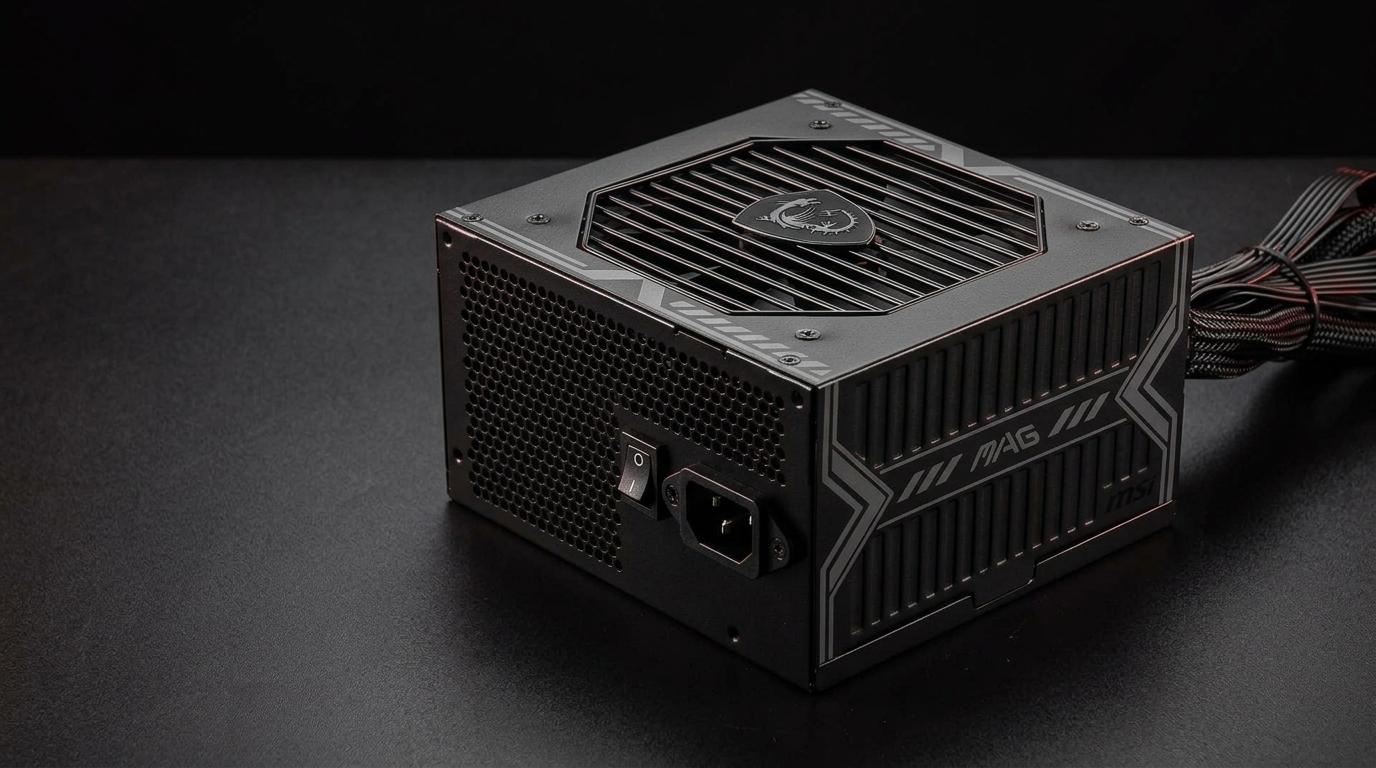
The A650BN is a plain, black standard ATX unit with a 140mm-deep chassis, which helps in smaller cases where a longer PSU would crowd the cables. There's no RGB lighting, no fan switch and no modular panel. All cables are fixed to the housing.
MSI doesn't publish the internal platform, capacitor brands or MTBF for this model, so we can't judge component quality from official data. What MSI does document is a sensible budget feature set for a 650W unit: Bronze efficiency, active PFC, DC-to-DC conversion and five protection circuits.
650W Power Capacity and the +12V Rail
MSI's output table rates the +12V rail at 54A, or 648W, out of a 650W total. Nearly everything that draws significant power in a modern PC, including the CPU, graphics card, fans and pumps, runs on +12V, so having almost the entire rating there matters more than the headline wattage. The +3.3V and +5V rails share 110W combined, which is plenty for SSDs, USB devices and other low-voltage loads.
A single +12V rail puts all 54A in one pool, so you don't need to balance loads across rails. MSI lists over-current protection (OCP), which helps limit fault current on a single-rail design.
80 PLUS Bronze Efficiency Explained
80 PLUS Bronze requires at least 82% efficiency at 20% and 100% load and 85% at 50% load (115V internal, non-redundant). MSI quotes "up to 85%," which matches the Bronze target at 50% load. In plain terms, at a 400W DC load a Bronze unit draws around 470W from the wall. A Gold unit would draw a little less, so it would run slightly cooler and cost less to operate.
For most gaming PCs that spend a lot of time at light and medium load, the running-cost gap between Bronze and Gold is modest. It matters more if your PC runs heavy loads for many hours a day.
Cooling Fan and Noise Considerations
Cooling comes from a 120mm fan that MSI describes as low-noise, using a sleeve bearing. Sleeve bearings are common in budget PSUs and are usually quiet when new. Fluid-dynamic or ball bearings generally last longer, especially in hot cases or when the PSU is mounted fan-down with poor airflow. MSI doesn't list a zero-RPM (fanless) mode, a fan curve or decibel figures, and we haven't measured noise, so we make no specific noise claims. Mount the PSU with its fan over a filtered intake or open space, and clean the filter regularly.
Non-Modular Cable Design and Installation
Because the A650BN is non-modular, every cable stays attached, including SATA, Molex and FDD leads you may never use. That keeps the price down and removes any risk of mixing up modular cables from another PSU, but it makes cable management harder. In a case with a PSU shroud or basement, spare cables can be bundled out of sight. In a compact or shroud-less case, plan your routing before installation. MSI doesn't publish cable lengths on its product page, so check clearances in larger cases or with top-mounted PSUs. Our gaming PC build guide walks through PSU installation and cable routing step by step.
Connectors and Compatibility
| Connector | Quantity |
|---|---|
| ATX 20+4-pin (motherboard) | 1 |
| EPS 4+4-pin (CPU) | 1 |
| PCIe 6+2-pin (GPU) | 2 |
| SATA (15-pin) | 5 |
| Molex (4-pin peripheral) | 2 |
| FDD (4-pin floppy) | 1 |
This covers a typical single-GPU build: one motherboard, one CPU connector, a graphics card that needs up to two 8-pin (6+2-pin) inputs, and up to five SATA drives or accessories. The limits are clear. There's only one EPS connector, so boards that want 8+4-pin or 8+8-pin CPU power for heavy overclocking won't have every socket filled. There are only two PCIe 6+2-pin plugs, and there's no native 12V-2x6 or 12VHPWR (16-pin) connector. The original A650BN isn't marketed as ATX 3.0, ATX 3.1 or PCIe 5.x compliant.
Protection Features and DC-to-DC Design
MSI lists five protection circuits:
- OCP (over-current protection) limits current if a load draws more than the rail is designed for.
- OVP (over-voltage protection) shuts down if output voltage rises too high.
- OPP (over-power protection) trips when total output exceeds the unit's capacity.
- OTP (over-temperature protection) shuts down if internal temperatures get too high.
- SCP (short-circuit protection) cuts power if an output is shorted.
MSI doesn't list under-voltage protection (UVP), so we don't claim it. The DC-to-DC design generates the +3.3V and +5V rails from +12V instead of a group-regulated design. MSI says this reduces output voltage instability, and it's generally the preferred approach in modern PSUs. Active PFC lets the unit accept 100–240V input without a voltage switch.
Gaming PC Compatibility and Recommended Use Cases
The A650BN fits best in a single-GPU gaming PC with a mainstream CPU and a graphics card that uses one or two 8-pin power connectors. Examples include builds around an ASUS Dual RTX 5060, an ASUS Dual RTX 5060 Ti 16GB or an ASUS Dual Radeon RX 9060 XT, paired with a CPU such as the AMD Ryzen 5 7600X. Before you buy, confirm that your card uses 8-pin rather than 16-pin power and that your card maker's recommended PSU wattage is 650W or lower. Those recommendations assume a complete system, so treat them as a minimum.
It also works well as a replacement PSU for older ATX systems and as a reliable-brand option for office, home and media PCs that may get a modest graphics card later.
Who Should Consider Buying the MSI MAG A650BN?
- First-time and budget gaming PC builders who want a name-brand 650W unit with Bronze efficiency.
- Owners of 8-pin graphics cards that need no more than two PCIe 6+2-pin connectors.
- Upgraders replacing an older, lower-wattage PSU in a standard ATX case.
- Builders who value a 5-year limited warranty at the budget end of the market.
Who Should Consider Another Power Supply?
- Owners of 16-pin GPUs. There's no native 12V-2x6 connector.
- Builders who want ATX 3.1 compliance or headroom for a future high-power GPU.
- Small-case and showcase builders who want modular or semi-modular cables.
- High-end CPU and overclocking builds that need a second CPU power connector.
- Anyone sensitive to noise over the long term, who may prefer a fluid-dynamic or ball-bearing fan with a zero-RPM mode.
MSI MAG A650BN vs Competitors
| Model | Efficiency | Standard | Cables | GPU power | Fan | Warranty |
|---|---|---|---|---|---|---|
| MSI MAG A650BN | 80 PLUS Bronze | ATX (3.x not claimed) | Non-modular | 2 × 6+2-pin | 120mm sleeve | 5 years |
| CORSAIR CX650M (2025) | Cybenetics Bronze | ATX 3.1, PCIe 5.1 | Semi-modular | 1 × 12V-2x6 (450W) + 4 × 6+2-pin | 120mm sleeve | 7 years |
| Seasonic S12III 650 | 80 PLUS Bronze | ATX12V / EPS12V | Fixed | 2 × 6+2-pin | 120mm sleeve, S2FC | 5 years |
| EVGA SuperNOVA 650 GA | 80 PLUS Gold | ATX (3.x not claimed) | Fully modular | See EVGA listing | 135mm double ball bearing, Eco mode | 10 years |
| Thermaltake Smart BM3 650W | 80 PLUS Bronze | ATX 3.1, PCIe 5 | Semi-modular | 1 × 12+4-pin (300W) + 4 × 6+2-pin | 120mm FDB, Smart Zero Fan | 5 years |
All five units are rated at 650W. Prices change often, so check current pricing before deciding.
MSI MAG A650BN vs CORSAIR CX650M (2025)
The CORSAIR CX650M (2025) is the more future-ready unit. It's ATX 3.1 and PCIe 5.1 compliant, semi-modular, has a native 12V-2x6 cable rated for 450W plus four PCIe 6+2-pin connectors, and comes with a 7-year warranty. Both use 120mm sleeve-bearing fans. The MSI is the simpler, non-modular option for 8-pin GPUs; the Corsair is the better pick for a 16-pin card.
MSI MAG A650BN vs Seasonic S12III 650
The Seasonic S12III 650 (SSR-650GB3) is the closest match on paper: 650W, 80 PLUS Bronze, fixed cables, 54A (648W) on +12V, a 120mm sleeve-bearing fan, the same 140 × 150 × 86mm size and a 5-year warranty. Seasonic adds its S2FC fan control and an LLC resonant converter and lists OPP, OVP, UVP and SCP. MSI's list adds OCP and OTP instead, and MSI lists more SATA connectors (five, versus three in Seasonic's cable table).
MSI MAG A650BN vs EVGA SuperNOVA 650 GA
The EVGA SuperNOVA 650 GA is a step up in class: 80 PLUS Gold, fully modular, 100% Japanese capacitors, LLC resonant plus DC-to-DC design, a double-ball-bearing fan with Eco mode and a 10-year warranty. It doesn't claim ATX 3.x support. If it costs only a little more than the MSI where you shop, the efficiency, cabling and warranty upgrades are significant.
MSI MAG A650BN vs Thermaltake Smart BM3 650W
The Thermaltake Smart BM3 650W keeps Bronze efficiency but adds ATX 3.1 compliance, a 12+4-pin PCIe 5 connector rated for 300W, four PCIe 6+2-pin plugs, semi-modular cables, a Japanese 105°C main capacitor and a fluid-dynamic-bearing fan that stays off below 20% load. Thermaltake lists OCP, OVP, UVP, OPP, OTP and SCP. The MSI's advantage is simplicity; the Thermaltake is more flexible for modern GPUs.
For more options, browse all power supply reviews, or compare the Thermaltake SMART 600W at the low end and the MSI MAG A750GL PCIE5 and CORSAIR RM850e (2025) for higher-power, ATX 3.x builds.
Important Buying Considerations
- Check your GPU's power connector. If it uses a 16-pin 12V-2x6 or 12VHPWR input, choose an ATX 3.1 unit with a native cable.
- Add up your system's power draw. Use CPU and GPU power figures and your card maker's PSU recommendation, and leave headroom for upgrades.
- Confirm the exact model. Make sure the listing says MAG A650BN, not A650BN PCIE5 II or III, if you're comparing specs or prices.
- Check warranty terms in your region. MSI lists a 5-year limited warranty, but coverage can vary by region and seller.
- Measure your case. At 140mm deep the A650BN fits most ATX cases, but fixed cables need space behind the motherboard tray or in a PSU shroud.
Final Verdict
The MSI MAG A650BN is a straightforward budget 650W power supply. You get 648W on a single +12V rail, 80 PLUS Bronze efficiency, active PFC, DC-to-DC conversion, five protection circuits, enough connectors for a single 8-pin graphics card build and a 5-year limited warranty. Its trade-offs are just as clear: fixed cables, one CPU connector, only two PCIe 6+2-pin plugs, a sleeve-bearing fan and no native 16-pin connector or ATX 3.1 claim.
For entry-level and mainstream gaming PCs with an 8-pin graphics card, the MSI MAG A650BN 650W power supply is a sensible, low-fuss choice. If you own a 16-pin GPU or want modular cables, the CORSAIR CX650M (2025) or Thermaltake Smart BM3 650W fits better. Check the MSI MAG A650BN's current price and availability on Amazon.
Pros
- 650W rated output, with 54A (648W) available on a single +12V rail
- 80 PLUS Bronze certified, with MSI quoting up to 85% efficiency
- DC-to-DC circuit design for the +3.3V and +5V rails
- Active PFC with a universal 100–240V input
- OCP, OVP, OPP, OTP and SCP protection listed by MSI
- Five SATA connectors plus two Molex and one FDD
- Compact 140mm-deep standard ATX chassis
- 5-year limited warranty from MSI
Cons
- Non-modular: every cable is fixed, including unused SATA, Molex and FDD leads
- Fixed cables make tidy routing harder in compact or shroud-less cases
- Only two PCIe 6+2-pin connectors and one EPS 4+4-pin CPU connector
- No native 16-pin 12V-2x6 or 12VHPWR connector on the original model
- No ATX 3.0 or ATX 3.1 compliance claimed for this version
- Sleeve-bearing fan with no listed zero-RPM mode
- MSI doesn't publish cable lengths, MTBF or noise figures for this model
Spec Sheet
Specifications
General
| Product Name | MSI MAG A650BN |
|---|---|
| Brand | MSI |
| Series | MAG |
| Model Number | 306-7ZP2B11-CE0 (per Amazon listing) |
| Form Factor | ATX |
| Color | Black |
Power
| Total Continuous Output | 650W |
|---|---|
| +12V Output | 54A (648W), single rail |
| +3.3V / +5V Output | 20A / 20A (110W combined) |
| -12V Output | 0.3A (3.6W) |
| +5VSB Output | 2.5A (12.5W) |
| AC Input | 100–240V, 10–5A, 50–60Hz |
| PFC | Active PFC |
| Circuit Design | DC-to-DC |
Efficiency
| 80 PLUS Rating | 80 PLUS Bronze |
|---|---|
| Rated Efficiency | Up to 85% (per MSI) |
Cooling
| Fan Size | 120mm |
|---|---|
| Fan Bearing | Sleeve bearing |
Connectors
| Modularity | Non-modular |
|---|---|
| ATX Main (20+4-pin) | 1 |
| EPS CPU (4+4-pin) | 1 |
| PCIe (6+2-pin) | 2 |
| SATA (15-pin) | 5 |
| Molex (4-pin peripheral) | 2 |
| FDD (4-pin) | 1 |
| 16-pin 12V-2x6 / 12VHPWR | None |
Protection
| Protection Features | OCP, OVP, OPP, OTP, SCP |
|---|
Physical
| Dimensions (D × W × H) | 140 × 150 × 86mm |
|---|
Warranty
| Warranty | 5-year limited (terms vary by region) |
|---|
Frequently Asked Questions
Is the MSI MAG A650BN a good power supply?+
Is the MSI MAG A650BN suitable for gaming PCs?+
Does the MSI MAG A650BN have 80 PLUS Bronze certification?+
Is the MSI MAG A650BN modular?+
How many PCIe connectors does the MSI MAG A650BN have?+
Does the original MSI MAG A650BN support ATX 3.1?+
What is the warranty on the MSI MAG A650BN?+
What are the best alternatives to the MSI MAG A650BN?+
As an Amazon Associate we earn from qualifying purchases. See our affiliate disclosure.