
ASUS
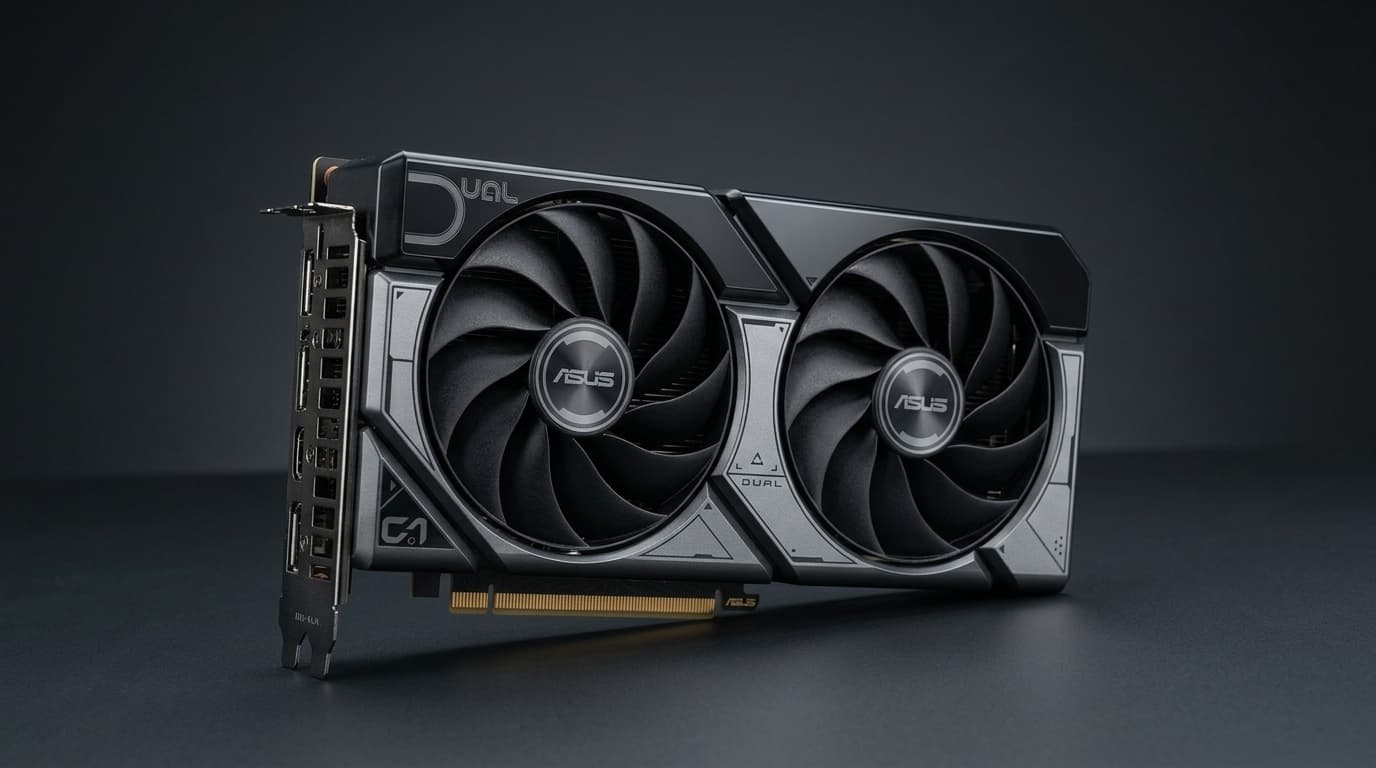
ASUS Dual GeForce RTX 5060 Ti 16GB GDDR7 OC Edition
A compact 229 mm, 2.5-slot GeForce RTX 5060 Ti with 16GB of GDDR7, a single 8-pin connector, and a 550W PSU recommendation. It's aimed at 1080p and 1440p gamers and creators who want NVIDIA's DLSS 4 features and enough VRAM to avoid 8GB limitations.
ASUS Dual GeForce RTX 5060 Ti 16GB OC Edition Review: Specs, Benchmarks, and Alternatives
The ASUS Dual GeForce RTX 5060 Ti 16GB GDDR7 OC Edition (model DUAL-RTX5060TI-O16G) is a compact, two-fan version of NVIDIA's GeForce RTX 5060 Ti. It's built for people buying a mid-range card for a new PC or upgrading an older GPU, who want 16GB of video memory without moving up to a larger, more power-hungry card.
This review covers the card's verified specifications, its design and power requirements, gaming performance from independent testing, the case for 16GB of VRAM, and how it stacks up against five alternatives from NVIDIA and AMD. We did not test this card ourselves. Performance figures come from independent reviewers, and each one is attributed. Most of those reviewers tested the RTX 5060 Ti 16GB chip on other partner boards rather than this exact ASUS model.
Quick Verdict
The ASUS Dual RTX 5060 Ti 16GB pairs NVIDIA's full RTX 5060 Ti GPU (4,608 CUDA cores) with 16GB of GDDR7 memory on a 229 mm, 2.5-slot card that needs only one 8-pin power connector and a 550W recommended power supply. Independent testing of the RTX 5060 Ti 16GB shows it handles 1080p well and runs 1440p at high settings in most games. It also supports NVIDIA's DLSS 4 with Multi Frame Generation.
- Strengths: 16GB of VRAM, compact dimensions, a modest power requirement, a standard 8-pin connector, DLSS 4 support, and a 9th-generation NVENC encoder for streaming.
- Limitations: a 128-bit memory bus and a PCIe 5.0 x8 link. It's also clearly slower than the RTX 5070 and Radeon RX 9070 in independent tests, and demanding 4K games generally need upscaling.
- Consider it if: you play at 1080p or 1440p, want to avoid the VRAM limits of 8GB cards, and value NVIDIA features or a smaller card.
- Compare alternatives if: you want the most rasterization performance for the money, plan to game mainly at 4K, or find the AMD Radeon RX 9060 XT 16GB selling for noticeably less.
Key Specifications
The values below come from ASUS's official specification page for the DUAL-RTX5060TI-O16G. Shared GPU details come from NVIDIA.
| Specification | ASUS Dual RTX 5060 Ti 16GB OC |
|---|---|
| Model number | DUAL-RTX5060TI-O16G |
| Graphics engine | NVIDIA GeForce RTX 5060 Ti (Blackwell architecture) |
| CUDA cores | 4,608 |
| Video memory | 16GB GDDR7 |
| Memory speed | 28 Gbps |
| Memory interface | 128-bit |
| Memory bandwidth | 448 GB/s (calculated from 28 Gbps × 128-bit) |
| Boost clock | 2,602 MHz (Default mode); 2,632 MHz (OC mode) |
| NVIDIA reference boost clock | 2.57 GHz |
| Bus standard | PCI Express 5.0 |
| Display outputs | 1 × HDMI 2.1b, 3 × DisplayPort 2.1b |
| Maximum displays | 4 |
| Maximum digital resolution | 7680 × 4320 |
| HDCP | 2.3 |
| Power connector | 1 × 8-pin |
| Recommended PSU (ASUS) | 550W |
| Total graphics power (NVIDIA reference) | 180W |
| Slot width | 2.5 slots |
| Dimensions | 229 × 120 × 50 mm |
| Software | ASUS GPU Tweak III, MuseTree, GeForce Game Ready and Studio drivers |
Design, Build, and Cooling
The Dual is ASUS's no-frills line, and this card follows that approach. It measures 229 × 120 × 50 mm and occupies 2.5 expansion slots. That makes it shorter than many triple-fan cards, but thicker than a strict dual-slot design. ASUS describes it as compatible with small-form-factor builds. Before buying, check that your case has enough GPU length clearance and room below the PCIe slot for a 2.5-slot cooler. In compact cases, also confirm the card won't block other expansion slots or front-panel headers.
According to ASUS, the cooling system uses:
- Two Axial-tech fans with longer blades, a smaller hub, and a barrier ring intended to increase downward air pressure.
- Dual ball-bearing fans, which ASUS claims last up to twice as long as sleeve-bearing designs.
- 0dB technology, which stops the fans when the GPU is below 50°C and drawing little power, so the card can stay silent at the desktop and during light tasks.
- A vented backplate and a shroud, heatsink, and heatpipe layout designed to work with side-panel airflow.
- A dual BIOS switch with a Performance mode, which runs the fans faster for lower temperatures, and a Quiet mode, which uses a gentler fan curve with the same power target.
For build quality, ASUS lists a protective backplate to reduce PCB flex, a 304 stainless-steel I/O bracket, its "GPU Guard" adhesive reinforcement at the PCB corners, and Auto-Extreme automated soldering. These are manufacturer claims. We did not find an independent review that measured temperatures or noise on this exact Dual model, so we can't report verified thermal or acoustic results. Reviews of other RTX 5060 Ti 16GB models use different coolers, and their results shouldn't be assumed to apply here.
Gaming Performance
The benchmark results below come from independent reviews of the GeForce RTX 5060 Ti 16GB. In most cases the reviewers didn't test this specific ASUS Dual card. Because the Dual uses the same GPU and memory configuration with a modest factory overclock (a 2,602–2,632 MHz boost against NVIDIA's 2.57 GHz reference), we would expect broadly similar results. That is an expectation, not a measurement, and your results will vary with your CPU, game version, settings, drivers, and cooling.
1080p gaming
At 1080p, the RTX 5060 Ti 16GB has plenty of headroom in most games. In GamersNexus's launch review, the card averaged 160 FPS in Final Fantasy XIV: Dawntrail at 1080p Maximum, against 133 FPS for the RTX 4060 Ti. With ray tracing enabled in Cyberpunk 2077 at 1080p, GamersNexus measured 63 FPS at RT Medium and 50 FPS at RT Ultra. GamersNexus summarized the generational gain over the RTX 4060 Ti at 1080p as roughly 11–24%, depending on the game.
1440p gaming
1440p is where this card makes the most sense. GamersNexus's 1440p results included:
- Final Fantasy XIV: Dawntrail (1440p Maximum): 104 FPS. The Radeon RX 9070 averaged 126 FPS and the RX 7700 XT averaged 98 FPS in the same test.
- Cyberpunk 2077: Phantom Liberty (1440p Ultra): 68 FPS, against about 88 FPS for the RTX 5070.
- Starfield (1440p Ultra): 65 FPS, against 58 FPS for the RTX 4060 Ti.
- Dragon's Dogma 2 (1440p Max): 70 FPS.
GamersNexus reported the RTX 5060 Ti as typically 20–25% faster than the RTX 4060 Ti at 1440p, with a 13–27% range across its tests. 3DTested separately found it about 25% faster than the 8GB RTX 4060 Ti at 1440p. Taken together, the evidence points to a capable high-settings 1440p card, though some of the most demanding titles will need tuned settings or DLSS to hold high frame rates.
4K gaming
The card can run games at 4K, but it isn't primarily a 4K card. GamersNexus measured 54 FPS in Final Fantasy XIV at 4K Maximum and 41 FPS in Starfield at 4K Ultra. The RTX 5070 averaged 78 FPS and 54 FPS in those same tests. For demanding modern games at 4K, expect to rely on DLSS upscaling, lower settings, or both.
Ray tracing
The RTX 5060 Ti uses NVIDIA's 4th-generation RT cores. In GamersNexus's ray-traced tests, it averaged 62 FPS in Dragon's Dogma 2 (1440p Max RT), 60 FPS in Dying Light 2 (1440p upscaled, RT High Quality), and 74 FPS in Black Myth: Wukong (1080p upscaled, Medium RT). The RTX 5070 was clearly ahead in the same tests, at 82.8 FPS in Dragon's Dogma 2 and 81 FPS in Dying Light 2. Ray tracing is usable on this card at 1080p and 1440p, especially with DLSS. Heavier path-traced settings are a better fit for higher-tier GPUs.
DLSS 4, upscaling, and frame generation
According to NVIDIA, the RTX 5060 Ti supports DLSS 4, which includes Super Resolution, DLAA, Ray Reconstruction, Frame Generation, and Multi Frame Generation. Multi Frame Generation is limited to GeForce RTX 50 Series GPUs and requires game support. Generated frames raise the displayed frame rate but don't reduce input latency the way natively rendered frames do, so they work best when the base frame rate is already reasonable. NVIDIA Reflex helps offset added latency in supported games.
Is 16GB of VRAM Useful?
VRAM capacity and GPU speed are separate things. The 8GB and 16GB versions of the RTX 5060 Ti use the same GPU with the same 4,608 CUDA cores, 128-bit bus, and clock targets. ASUS lists identical clocks for its Dual 8GB and 16GB OC models. When a game fits comfortably within 8GB, the two perform about the same. In synthetic tests that don't fill the memory, reviewers found little to no difference.
The difference shows up when a game needs more than 8GB. Hardware Unboxed's 8GB versus 16GB testing, as reported by Overclock3D and TweakTown, found the 16GB card ahead in every game and setting tested. The 16GB model was more than 30% faster on average at 1440p Very High and about 18% faster at 1440p High. In one 4K test it delivered more than double the average frame rate. Notebookcheck also reported that limited VRAM can hold back DLSS 4 Frame Generation on the 8GB card.
Practically, 16GB gives you more room for high-resolution texture packs, ray tracing, frame generation, and future games that use more memory. It also helps in creative and AI applications that load large assets. It won't make this card faster than a stronger GPU with less memory. The 12GB RTX 5070 is still faster in independent testing because it has more compute resources and a wider memory bus.
Features and Software
- NVIDIA Blackwell features: 5th-generation Tensor cores, 4th-generation RT cores, DLSS 4, and NVIDIA Reflex. These are shared across the RTX 5060 Ti family rather than unique to this ASUS model.
- Media engines: one 9th-generation NVENC encoder and one 6th-generation NVDEC decoder, according to NVIDIA.
- NVIDIA app and drivers: Game Ready and Studio drivers, G-SYNC support, NVIDIA Broadcast, and RTX Video.
- ASUS GPU Tweak III: clock, memory, voltage, and fan-curve adjustment with on-screen monitoring.
- Display support: HDMI 2.1b and DisplayPort 2.1b, which NVIDIA lists as UHBR20 with DSC support, for high-refresh and high-resolution monitors. The card supports up to four displays.
ASUS's spec page lists 759 AI TOPS, which matches NVIDIA's figure for the RTX 5060 Ti. The ASUS product overview page lists 767 AI TOPS, likely reflecting the factory overclock. We used the specification-page figure.
Power Requirements and Compatibility
Power supply
ASUS recommends a 550W power supply for this card, and NVIDIA lists a 180W total graphics power for the RTX 5060 Ti. NVIDIA's own reference guidance is a 600W minimum, based on a high-end Ryzen 9 9950X test system. The card uses one standard 8-pin PCIe connector, so you don't need a 12V-2x6 (16-pin) cable or adapter. Use a quality PSU from a reputable brand, and check your total system power if you run a high-power CPU.
Motherboard and PCIe slot
The card uses a PCI Express 5.0 interface and works in PCIe 4.0 and 3.0 slots. The RTX 5060 Ti connects over eight PCIe lanes rather than sixteen, so bandwidth on older platforms is lower. Secondary coverage of TechPowerUp's PCIe scaling tests on the 16GB model reported small losses: about 2% on PCIe 4.0 and roughly 4–5% on PCIe 3.0 at 1080p, with smaller differences at higher resolutions. Owners of PCIe 3.0 systems should expect a modest performance trade-off. The 16GB capacity reduces how often the card has to pull data across the bus.
Case clearance and airflow
Make sure you have at least 229 mm of GPU clearance, and remember the card is 2.5 slots thick. The cooler is designed to work with side-panel ventilation, so a case with reasonable intake and exhaust airflow will help it run cooler and quieter.
CPU pairing
At 1080p, high frame rates can be limited by the CPU, especially with older processors. At 1440p and above, the GPU usually becomes the limiting factor. A modern six-core or better CPU is a sensible match, but the real bottleneck depends on the games and settings you use.
Productivity and Content Creation
With 16GB of VRAM, CUDA support, a 9th-generation NVENC encoder, and NVIDIA Studio drivers, the card is a reasonable fit for:
- Streaming and recording with NVENC in OBS and similar tools, so encoding doesn't eat into CPU resources.
- Video editing in GPU-accelerated editors that support NVIDIA hardware encoding and decoding.
- 3D rendering in CUDA- or OptiX-capable renderers, where 16GB helps with larger scenes.
- Local AI workloads such as image generation. ASUS bundles its MuseTree AI image-generation app, and 16GB lets you load larger models than 8GB cards can.
The narrow 128-bit memory bus and mid-range compute mean professionals with heavy rendering or AI workloads may want a higher-tier GPU. Software support and performance vary by application, so check benchmarks for the specific tools you use.
ASUS Dual RTX 5060 Ti 16GB vs. Alternatives
Specifications are from the manufacturers. Performance notes come from the independent sources cited in this review. Prices change frequently and are not listed. Use the links to check current pricing.
| Product | VRAM | Performance / intended use | Main advantage | Main limitation | Price | Check Price on Amazon |
|---|---|---|---|---|---|---|
| ASUS Dual GeForce RTX 5060 Ti 16GB OC Edition | 16GB GDDR7, 128-bit | 1080p high refresh; 1440p high settings | 16GB, compact, single 8-pin, DLSS 4 | Narrow bus; PCIe x8 | Not verified | Check Price on Amazon |
| ASUS Dual GeForce RTX 5060 Ti 8GB OC Edition | 8GB GDDR7, 128-bit | 1080p, especially esports and lighter titles | Same GPU, clocks, size, and power as the 16GB model | Falls behind significantly when games exceed 8GB | Not verified | Check Price on Amazon |
| ASUS Prime GeForce RTX 5070 12GB OC Edition | 12GB GDDR7, 192-bit | High-refresh 1440p; entry 4K with DLSS | Clearly faster than the RTX 5060 Ti in GamersNexus testing (6,144 CUDA cores) | Less VRAM; 250W TGP and 650W recommended system power (NVIDIA) | Not verified | Check Price on Amazon |
| ASRock Radeon RX 9060 XT Challenger 16GB OC | 16GB GDDR6, 128-bit | 1080p and 1440p; closest AMD rival | 16GB at a lower launch MSRP; full PCIe 5.0 x16 link | Slightly behind on average in reported tests; lower memory bandwidth; no DLSS | Not verified | Check Price on Amazon |
| XFX Swift Radeon RX 9070 OC Triple Fan 16GB | 16GB GDDR6, 256-bit | High-refresh 1440p; capable at 4K | 16GB on a 256-bit bus; well ahead in GamersNexus's 1440p raster test | Larger triple-fan card; 220W board power and higher PSU needs | Not verified | Check Price on Amazon |
| ASUS TUF Gaming GeForce RTX 5080 16GB BTF OC Edition | 16GB GDDR7, 256-bit | High-end 4K and high-refresh 1440p (a much higher class) | Far more GPU (10,752 CUDA cores) with the same 16GB capacity | Different price class; 360W TGP, 850W recommended system power, 3.6-slot card | Not verified | Check Price on Amazon |
RTX 5060 Ti 16GB vs. RTX 5060 Ti 8GB
ASUS's Dual 8GB and 16GB OC models share the same GPU, clocks, 229 mm size, 8-pin connector, and 550W PSU recommendation. The only meaningful difference is memory. Independent testing shows the 8GB card falling well behind in games and settings that exceed 8GB, and the gap is especially large at 1440p and 4K. If you play mostly lighter or esports titles at 1080p and the price gap is significant, the 8GB card can make sense. For most buyers who plan to keep the card for several years, the 16GB version is the safer choice.
RTX 5060 Ti 16GB vs. RTX 5070
In GamersNexus's tests, the RTX 5070 ran about 30% or more ahead in several titles. Examples include 88 versus 68 FPS in Cyberpunk 2077 at 1440p Ultra and 78 versus 54 FPS in Final Fantasy XIV at 4K. The trade-offs are 12GB instead of 16GB of VRAM, a 250W total graphics power, and a 650W recommended system power. If you want more frame rate at 1440p and can afford the price difference, the RTX 5070 is the stronger gaming card.
RTX 5060 Ti 16GB vs. Radeon RX 9060 XT 16GB
This is the closest head-to-head matchup. Both cards have 16GB and a 128-bit bus. The RX 9060 XT uses GDDR6 with lower bandwidth but a full PCIe 5.0 x16 link. TechSpot's per-game 1440p results went both ways: the RX 9060 XT was ahead in Oblivion Remastered and Hogwarts Legacy, and behind in Delta Force and The Last of Us Part I. PCGamesN noted that the 16GB RX 9060 XT launched at an $80 lower MSRP than the RTX 5060 Ti 16GB. Choose NVIDIA if you value DLSS 4, Multi Frame Generation, NVENC, and stronger ray tracing. Choose AMD if the price gap is meaningful and raster performance is your priority.
RTX 5060 Ti 16GB vs. Radeon RX 9070
The RX 9070 is a step up in class. It has 16GB of GDDR6 on a 256-bit bus and was 22% faster than the RTX 5060 Ti in GamersNexus's Final Fantasy XIV 1440p test (126 versus 104 FPS). It's a larger card with a higher power draw, typically 220W board power. If your case and power supply can handle it and the price fits, it offers substantially more raster performance with the same memory capacity.
RTX 5060 Ti 16GB vs. RTX 5080
The RTX 5080 is included as a high-end reference point, not a direct rival. It shares the 16GB capacity but has more than twice the CUDA cores (10,752), a 256-bit bus, a 360W total graphics power, and an 850W recommended system power. The ASUS TUF BTF OC version listed here is a 3.6-slot card that uses ASUS's detachable GC-HPWR power adapter. ASUS says the adapter allows it to work with both standard and ASUS BTF motherboards. Consider it only if you are targeting high-end 4K gaming and have the budget, case space, and power supply for it.
Which GPU Should You Buy?
- If you want 16GB of VRAM at a mid-range level: the ASUS Dual RTX 5060 Ti 16GB or the RX 9060 XT 16GB. Compare current prices, and pick NVIDIA for its feature set or AMD if it costs meaningfully less.
- If you want more gaming performance: step up to the RTX 5070 or RX 9070. Both were clearly faster in independent testing, and the RX 9070 keeps 16GB.
- If ray tracing and NVIDIA features matter most: the RTX 5060 Ti 16GB gives you DLSS 4, Multi Frame Generation, and Reflex at a mid-range level. The RTX 5070 adds more headroom.
- If value for money comes first: current pricing decides it. At launch MSRPs, the RX 9060 XT 16GB undercut the RTX 5060 Ti 16GB. Check live prices before deciding.
- If you're choosing between NVIDIA and AMD: NVIDIA leads in upscaling and frame-generation adoption, ray tracing, and NVENC streaming. AMD's alternatives often offer competitive raster performance for the price.
- If you're upgrading an older card: owners of GTX 10/16-series or RTX 20-series cards will see a significant jump. RTX 4060 Ti owners will see a smaller uplift (about 20–25% at 1440p per GamersNexus), which may not justify the cost. If you're on a PCIe 3.0 platform, expect a small extra loss from the x8 link.
Final Verdict
The ASUS Dual GeForce RTX 5060 Ti 16GB OC Edition is a sensible, compact way to get NVIDIA's RTX 5060 Ti with the memory capacity it needs. It offers 16GB of GDDR7, a single 8-pin connector, a 550W PSU recommendation, a 229 mm length, and NVIDIA's DLSS 4 feature set. Independent testing of the chip supports it as a strong 1080p card and a capable 1440p card.
Its limits are just as clear. The 128-bit bus and PCIe x8 link keep it firmly mid-range, the RTX 5070 and Radeon RX 9070 are notably faster, and the RX 9060 XT 16GB is a close competitor that launched at a lower MSRP. We also couldn't find independent thermal or noise testing for this specific Dual model. Before you buy, compare current prices against those alternatives, confirm your case clearance and PSU, and decide how much NVIDIA's software features are worth to you.
Pros
- 16GB of GDDR7 VRAM avoids the 8GB limitations shown in independent testing
- Compact 229 mm length for a 16GB card
- Single 8-pin power connector and 550W recommended PSU
- Strong 1080p and capable high-settings 1440p performance in independent RTX 5060 Ti 16GB tests
- DLSS 4 with Multi Frame Generation in supported games
- 9th-generation NVENC encoder for streaming and recording
- 0dB fan-stop and dual BIOS with Performance and Quiet modes
- HDMI 2.1b and three DisplayPort 2.1b outputs
Cons
- 128-bit memory bus (448 GB/s) limits bandwidth versus higher-tier cards
- PCIe 5.0 x8 link loses some performance on PCIe 3.0 systems
- Clearly slower than RTX 5070 and Radeon RX 9070 in independent tests
- Demanding 4K games generally need DLSS or reduced settings
- 2.5-slot thickness may not suit strict dual-slot small cases
- No independent temperature or noise testing of this specific Dual model found
Spec Sheet
Specifications
Graphics
| GPU Model | NVIDIA GeForce RTX 5060 Ti |
|---|---|
| Architecture | NVIDIA Blackwell |
| CUDA Cores | 4608 |
| AI TOPS | 759 |
Memory
| Capacity | 16GB |
|---|---|
| Type | GDDR7 |
| Speed | 28 Gbps |
| Interface | 128-bit |
| Bandwidth | 448 GB/s |
Performance
| Boost Clock | 2602 MHz (Default mode) |
|---|---|
| OC Mode Clock | 2632 MHz |
Connectivity
| PCI Express | PCI Express 5.0 |
|---|
Display
| Outputs | 1x HDMI 2.1b, 3x DisplayPort 2.1b |
|---|---|
| Maximum Displays | 4 |
| Maximum Resolution | 7680 x 4320 |
| HDCP | 2.3 |
Power
| Power Connector | 1x 8-pin |
|---|---|
| Recommended PSU | 550W |
| Total Graphics Power (NVIDIA reference) | 180W |
Physical
| Dimensions | 229 x 120 x 50 mm |
|---|---|
| Slot Width | 2.5 slots |
Cooling
| Fans | 2x Axial-tech, dual ball bearing, 0dB technology |
|---|
Features
| Dual BIOS | Yes (Performance / Quiet) |
|---|
Software
| Utilities | ASUS GPU Tweak III, MuseTree |
|---|
Model
| Manufacturer Part | DUAL-RTX5060TI-O16G |
|---|
Frequently Asked Questions
Is the ASUS Dual RTX 5060 Ti 16GB good for 1440p gaming?+
Is 16GB of VRAM enough for modern games?+
Can this card handle 4K gaming?+
What power supply does it require?+
Will it fit in my PC case?+
Does it work in a PCIe 4.0 or 3.0 motherboard?+
How does it compare with the RTX 5060 Ti 8GB?+
Should I consider an AMD alternative?+
As an Amazon Associate we earn from qualifying purchases. See our affiliate disclosure.