
ASUS
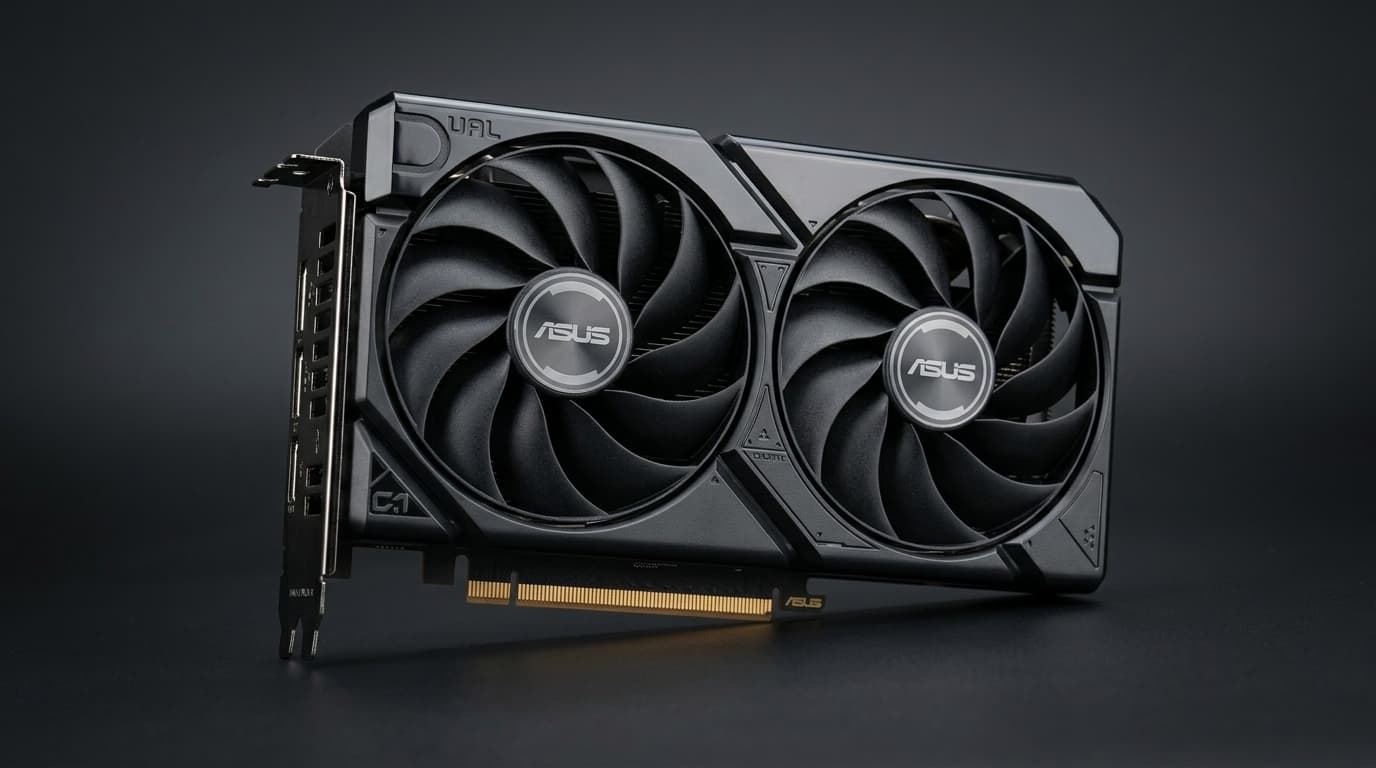
ASUS Dual Radeon RX 9060 XT 16GB GDDR6
A compact 202 mm, 2.5-slot ASUS Dual card built on AMD's Radeon RX 9060 XT with 16GB GDDR6, a single 8-pin connector and a 550 W PSU recommendation. Aimed at 1080p and 1440p gamers who want 16GB of VRAM without a large, power-hungry card.
ASUS Dual Radeon RX 9060 XT 16GB Review: A Compact 16GB Card for 1080p and 1440p Gaming
The ASUS Dual Radeon RX 9060 XT 16GB GDDR6 (model DUAL-RX9060XT-16G) is ASUS's most compact take on AMD's mainstream RDNA 4 graphics card. It pairs the full Radeon RX 9060 XT chip with 16GB of video memory, a two-fan cooler, and a 2.5-slot body that measures just 202 mm long. That combination makes it relevant to anyone building or upgrading a mid-range gaming PC, especially if your case is small or you want more VRAM than most cards at this tier offer.
In this review we cover the verified specifications, what independent benchmarks show at 1080p, 1440p, and 4K, how useful 16GB of VRAM really is, power supply and case requirements, and how this card stacks up against the GeForce RTX 5060 Ti 16GB, RTX 5060, Radeon RX 9060 XT 8GB, Radeon RX 9070, and GeForce RTX 5070.
How this review was produced: we did not run our own hands-on tests on this card. Specifications come from ASUS and AMD. Performance figures come from named independent publications, mostly tested on RX 9060 XT 16GB cards from other brands or at reference settings. The ASUS Dual runs slightly higher factory clocks than AMD's reference specification, so expect results in the same range rather than identical numbers.
Quick Verdict
The ASUS Dual Radeon RX 9060 XT 16GB is a sensible choice for gamers who want 16GB of VRAM in a short, two-fan card for 1080p and 1440p play. In rasterized (non-ray-traced) games it performs close to the GeForce RTX 5060 Ti 16GB, and it supports AMD's FSR upscaling and frame-generation features. Its weak spot is demanding ray tracing, where NVIDIA's RTX 5060 Ti pulls clearly ahead.
- Main strengths: 16GB GDDR6, compact 202 mm length, PCIe 5.0 x16 interface, single 8-pin power connector, dual BIOS and 0dB fan stop.
- Main limitations: heavy ray tracing performance trails NVIDIA; native 4K at high settings is beyond its comfort zone; 128-bit memory bus limits bandwidth to 320 GB/s.
- Good fit for: 1080p high-refresh and 1440p gamers, small-case builders, and buyers who want headroom for high-resolution textures.
- Consider an alternative if: you prioritize path tracing, rely on CUDA-only software, or want high-settings 1440p and entry 4K performance (look at the RX 9070 or RTX 5070).
- Check before buying: that the listing is the 16GB model (the 8GB card uses the same name), your PSU has an 8-pin PCIe connector, and the current price compared with the RTX 5060 Ti 16GB.
ASUS Dual Radeon RX 9060 XT 16GB Specifications
| Specification | Value |
|---|---|
| Model number | DUAL-RX9060XT-16G |
| Graphics engine | AMD Radeon RX 9060 XT (RDNA 4) |
| Compute units | 32 |
| Stream processors | 2,048 |
| Ray accelerators / AI accelerators | 32 / 64 |
| Boost clock | Up to 3230 MHz (default mode); up to 3250 MHz (OC mode via GPU Tweak III) |
| Game clock | Up to 2620 MHz (default mode); up to 2640 MHz (OC mode) |
| AMD reference clocks | Boost up to 3130 MHz; game 2530 MHz |
| Video memory | 16GB GDDR6, 20 Gbps |
| Memory interface / bandwidth | 128-bit / up to 320 GB/s |
| AMD Infinity Cache | 32 MB |
| Bus interface | PCI Express 5.0 x16 |
| Display outputs | 1 x HDMI 2.1b, 2 x DisplayPort 2.1a |
| Maximum displays / HDCP | 3 / HDCP 2.3 |
| Power connector | 1 x 8-pin |
| ASUS recommended PSU | 550 W |
| AMD typical board power (reference) | 160 W |
| Dimensions | 202 x 120 x 49 mm |
| Slot width | 2.5-slot |
| Cooling | Two Axial-tech fans with dual ball bearings, 0dB fan stop, dual BIOS switch (Quiet / Performance) |
| Video encode / decode | AV1, H.265/HEVC, and H.264 encode and decode |
| Software | ASUS GPU Tweak III; AMD Software: Adrenalin Edition |
Card-specific values (model, clocks, outputs, dimensions, slot width, connector, PSU) are from ASUS. Chip-level values (compute units, accelerators, cache, bandwidth, PCIe lane count, board power, media engine) are from AMD's RX 9060 XT 16GB specifications. ASUS does not publish a separate board-power figure for this card.
Design, Cooling, and Build Quality
The Dual is ASUS's no-frills line, and the RX 9060 XT version keeps things short. At 202 mm long, 120 mm tall, and 49 mm thick, it is considerably shorter than most triple-fan cards, so it should suit compact ATX, micro-ATX, and many small-form-factor cases. The 2.5-slot thickness means it blocks the adjacent expansion slot and part of the next one, so check where your second M.2 heatsink, capture card, or Wi-Fi card sits.
According to ASUS, the cooler uses two Axial-tech fans with a smaller hub, longer blades, and a barrier ring designed to increase downward air pressure. The fans run on dual ball bearings, which ASUS says last up to twice as long as sleeve-bearing designs. The 0dB feature stops the fans under light loads, and a physical dual BIOS switch lets you choose between a Quiet and a Performance profile.
These are manufacturer claims. We could not find an independent review that measured temperatures or noise on this specific ASUS Dual 16GB card. Thermal results published for other RX 9060 XT models, including the larger ASUS Prime, use different coolers and should not be treated as a substitute. With a modest 160 W reference board power, a compact two-fan design is a reasonable match for this GPU, but sound levels in your PC will depend on case airflow, ambient temperature, and which BIOS mode you use.
Gaming Performance
Two independent sources give a consistent picture of where the RX 9060 XT 16GB sits. Results below are for the RX 9060 XT 16GB GPU in general rather than this exact ASUS card.
1080p and 1440p
TechSpot tested the RX 9060 XT 16GB (an ASRock Steel Legend card) in 18 games on a Ryzen 7 9800X3D system. At native 1440p it averaged 70 fps, landing within about 1% of the RTX 5060 Ti 16GB. At 1080p it was about 6% slower than the 5060 Ti. Individual games varied widely: the Radeon was 32% faster in Call of Duty: Black Ops 6 and 11% faster in Oblivion Remastered, but 17% slower in Counter-Strike 2 and 13% slower in Space Marine 2.
Tom's Hardware keeps an updated GPU Benchmarks Hierarchy, also tested on a Ryzen 7 9800X3D, using the geometric mean of 11 games at a mix of high and ultra settings. In its rasterization table, the RX 9060 XT 16GB averages 98.3 fps at 1080p ultra and 67.3 fps at 1440p ultra, versus 105.2 fps and 73.4 fps for the RTX 5060 Ti 16GB.
The two outlets disagree slightly on the size of the gap (roughly 1% versus roughly 9% at 1440p), which reflects different game lists, settings, and driver versions. The practical takeaway is the same: in rasterized games the RX 9060 XT 16GB is in the same class as the RTX 5060 Ti 16GB, and which card wins depends on the game you play.
4K
Native 4K at ultra settings is a stretch. Tom's Hardware's rasterization geomean for the RX 9060 XT 16GB at 4K ultra is 35.2 fps. Lighter or older games can run well at 4K, but for demanding new releases you should plan on upscaling and lower presets.
Ray tracing
Ray tracing is where NVIDIA keeps a clear lead at this price tier. TechSpot found the RX 9060 XT 16GB about 20% slower than the RTX 5060 Ti 16GB across its ray tracing tests. The gap was small in well-optimized titles such as Marvel's Spider-Man Remastered and Metro Exodus Enhanced, but very large in heavy ones: in Black Myth: Wukong and Indiana Jones and the Great Circle the Radeon reached only 26 fps and 23 fps respectively at upscaled 1080p. Tom's Hardware's ray tracing table shows a similar pattern, with the RX 9060 XT 16GB at 31.0 fps at 1440p ultra versus 38.9 fps for the RTX 5060 Ti 16GB.
Neither card in this class delivers a consistently smooth experience in the heaviest ray-traced games, so many buyers will turn ray tracing down or off regardless of brand.
Upscaling and frame generation
The RX 9060 XT supports AMD FSR, including the machine-learning upscaling introduced with RDNA 4 in supported games, and AMD lists FSR "Redstone" features and AMD Fluid Motion Frames among its supported technologies. Frame generation increases displayed frame rate but does not equal native rendering: it adds generated frames between rendered ones and works best when the base frame rate is already reasonable. Benchmarks quoted in this review are native or upscaled results, not frame-generation results.
Why your results may differ
Both sources used a top-tier gaming CPU to minimize CPU bottlenecks. With an older or slower CPU, results at 1080p in particular may be limited by the processor rather than the GPU. Game selection, in-game settings, driver updates, and background software all move the numbers, so treat any single average as a guide rather than a guarantee.
Is 16GB VRAM Enough?
For a card in this class, 16GB is generous. It lets you use higher texture settings in modern games and reduces the risk of stuttering when a game's memory needs exceed what is on the card.
TechSpot's direct comparison of the RX 9060 XT 8GB and 16GB shows why this matters. In The Last of Us Part II at 1440p with FSR quality upscaling and the Ultra preset, the 16GB card was 22% faster on average with 37% higher 1% lows on a Ryzen 7 9800X3D system. On an older Core i7-8700K system limited to PCI Express 3.0, the 16GB card was 52% faster, because the 8GB card had to fetch data over the slower bus. In Indiana Jones and the Great Circle, the 8GB card needed a lower texture pool setting that visibly reduced texture quality.
Tom's Hardware's ray tracing table shows the same effect: at 1440p ultra, the RX 9060 XT 8GB averages 20.2 fps against 31.0 fps for the 16GB model.
That said, VRAM capacity does not make the GPU faster when memory is not the bottleneck. In lighter games or at lower settings, the 8GB and 16GB versions perform similarly, and the 16GB card has the same compute power and 128-bit bus. Extra memory protects performance and texture quality; it does not turn this card into a 4K card.
AMD Graphics Features and Software
AMD's specifications list the following supported technologies for the RX 9060 XT. Most are configured in AMD Software: Adrenalin Edition.
- AMD FSR: upscaling and frame generation in games that support it. FSR features available depend on each game's implementation.
- AMD Fluid Motion Frames: driver-level frame generation that works in many games without per-game integration.
- Radeon Anti-Lag 2: latency reduction in supported games.
- Radeon Super Resolution and Radeon Image Sharpening 2: driver-level upscaling and sharpening.
- AMD FreeSync: variable refresh rate with compatible monitors.
- Radeon Chill, Radeon Boost, and HYPR-RX profiles: power-saving and one-click performance presets.
- AMD Smart Access Memory: resizable BAR support on compatible platforms.
- AMD Noise Suppression and Privacy View: extra features for streaming and calls.
ASUS adds GPU Tweak III for overclocking, fan control, and switching to the card's OC mode. AMD lists driver support for Windows 10 and 11 (64-bit) and Linux.
Power Requirements and PC Compatibility
- Power supply: ASUS recommends a 550 W PSU for this card. AMD's minimum recommendation for the RX 9060 XT chip is 450 W, but follow the card maker's figure, especially with a high-power CPU.
- Power connector: one 8-pin PCIe connector. No 12V-2x6 (16-pin) cable is needed.
- Size: 202 mm long and 2.5 slots thick. Compare these numbers with your case's maximum GPU length and available slot clearance.
- PCIe: the card uses a full PCIe 5.0 x16 link and works in PCIe 4.0 and 3.0 x16 slots. Unlike the RTX 5060 series, which uses eight lanes, it keeps all 16 lanes on older boards. TechSpot's 8GB testing shows why bus bandwidth matters most when VRAM runs out, which the 16GB model largely avoids.
- Power draw: TechSpot measured roughly 21 W to 27 W more total system power than the RTX 5060 Ti 16GB in its test games.
- Airflow: the two fans exhaust heat inside the case, so at least one intake and one exhaust fan is advisable, particularly in small cases.
For CPU pairing, a modern six-core or eight-core processor is a sensible match. Very old CPUs can limit frame rates at 1080p, but the right pairing depends on the games you play and your target frame rate.
Productivity and Content Creation
AMD lists hardware encode and decode support for AV1, H.265/HEVC, and H.264, which is useful for streaming and for editors that support AMD's media engine. The 16GB frame buffer also helps with large textures, high-resolution timelines, and some local AI workloads that fit in VRAM.
However, some creative and AI applications are optimized primarily for NVIDIA's CUDA and OptiX. If you depend on a specific application, check its current GPU support and published benchmarks before choosing. For mostly-gaming buyers with occasional streaming or editing, the RX 9060 XT 16GB covers the basics well.
Pros and Cons
Pros
- 16GB GDDR6 provides headroom for high texture settings at 1080p and 1440p
- Rasterization performance close to the RTX 5060 Ti 16GB in independent testing
- Compact 202 mm length suits small and mid-size cases
- Single 8-pin power connector; ASUS recommends a 550 W PSU
- Full PCIe 5.0 x16 interface, helpful on older PCIe 3.0 and 4.0 boards
- 0dB fan stop, dual ball bearing fans, and a dual BIOS switch
- AV1 encode and decode for streaming and video work
Cons
- Heavy ray tracing performance trails the RTX 5060 Ti 16GB
- Native 4K at high settings is generally not practical
- 128-bit memory bus limits bandwidth to 320 GB/s
- Slightly higher power draw than the RTX 5060 Ti 16GB in TechSpot's testing
- No independent temperature or noise measurements found for this specific ASUS model
- Shares its name with an 8GB version, so buyers must check listings carefully
ASUS Dual RX 9060 XT 16GB vs Competitors
The table below uses Tom's Hardware's GPU Benchmarks Hierarchy (geometric mean of 11 games, 1440p ultra, rasterization) for a consistent performance reference. Those results reflect each GPU at its standard configuration, not the specific partner cards linked here. Prices change often, so check the current price before deciding.
| Graphics Card | VRAM | Gaming Performance / Intended Use | Main Advantage | Main Limitation | Price | Check Price on Amazon |
|---|---|---|---|---|---|---|
| ASUS Dual Radeon RX 9060 XT 16GB | 16GB GDDR6 | 67.3 fps at 1440p ultra (raster); 1080p and 1440p gaming | 16GB in a compact 202 mm card | Weaker heavy ray tracing | Not verified | Check Price on Amazon |
| ASUS Dual GeForce RTX 5060 Ti 16GB OC Edition | 16GB GDDR7 | 73.4 fps at 1440p ultra (raster); 1080p and 1440p with ray tracing | Stronger ray tracing; DLSS support | Launched at a higher MSRP; PCIe 5.0 x8 | Not verified | Check Price on Amazon |
| ASUS Dual GeForce RTX 5060 8GB OC Edition | 8GB GDDR7 | 59.8 fps at 1440p ultra (raster); budget 1080p gaming | Lower launch price; DLSS support | 8GB can limit texture settings | Not verified | Check Price on Amazon |
| ASUS Prime Radeon RX 9060 XT 8GB OC Edition | 8GB GDDR6 | 62.5 fps at 1440p ultra (raster); budget 1080p gaming | Same GPU at a lower launch price | Large drops when VRAM runs out | Not verified | Check Price on Amazon |
| XFX Swift Radeon RX 9070 OC Triple Fan | 16GB GDDR6 | 104.0 fps at 1440p ultra (raster); high-refresh 1440p, entry 4K | Much faster; 256-bit bus, 640 GB/s | Higher price tier; 650 W minimum PSU (AMD) | Not verified | Check Price on Amazon |
| ASUS Prime GeForce RTX 5070 12GB OC Edition | 12GB GDDR7 | 96.4 fps at 1440p ultra (raster); 1440p with ray tracing | Strong ray tracing and DLSS | Higher price tier; 12GB, less than the 16GB cards | Not verified | Check Price on Amazon |
Performance figures: Tom's Hardware GPU Benchmarks Hierarchy 2026, rasterization table, 1440p ultra geometric mean, Ryzen 7 9800X3D test system. Ray tracing results differ; see the sections above and below. "Not verified" means we did not confirm a current US price.
Which GPU Should You Buy?
If 16GB of VRAM is your priority
The RX 9060 XT 16GB and RTX 5060 Ti 16GB are the two current-generation 16GB options in this class. AMD's launch MSRP for the RX 9060 XT 16GB was $349, versus $429 for the RTX 5060 Ti 16GB according to Tom's Hardware. If that gap holds at the prices you see, the Radeon is the more affordable route to 16GB.
If you mostly game at 1440p
The ASUS Dual RX 9060 XT 16GB handles 1440p well in many games at high settings, with upscaling for the most demanding titles. If you want consistently high frame rates at 1440p ultra, the RX 9070 and RTX 5070 are a full tier faster in Tom's Hardware's testing.
If ray tracing or NVIDIA features matter most
Choose the RTX 5060 Ti 16GB at this level, or the RTX 5070 if your budget allows. Both benefit from NVIDIA's DLSS and stronger ray tracing hardware.
RX 9060 XT 16GB vs 8GB
Independent testing shows the 8GB version falling well behind when games exceed 8GB, especially on PCIe 3.0 systems. Unless your budget is fixed and you play mostly lighter or esports titles, the 16GB model is the safer long-term choice. AMD's launch MSRPs were $299 for 8GB and $349 for 16GB.
If you are considering the RTX 5060 Ti 16GB
Performance in rasterized games is similar, so compare current prices first. Pick the RTX 5060 Ti 16GB if ray tracing, DLSS, or CUDA-based software is important to you. Pick the RX 9060 XT 16GB if it is meaningfully cheaper and you mostly play without heavy ray tracing.
If you are considering a higher-tier GPU
The RX 9070 (16GB) and RTX 5070 (12GB) both launched at $549. They make sense if you play at 1440p on a high-refresh monitor or want to try 4K. Make sure your PSU meets their higher requirements; AMD recommends at least 650 W for the RX 9070.
If value is the deciding factor
Divide each card's price by its performance in the games you play. TechSpot found that at launch MSRPs, the RX 9060 XT 16GB offered about 17% better value per frame than the RTX 5060 Ti 16GB, but that advantage shrinks as the Radeon's street price rises. Check current prices before deciding.
Final Verdict
The ASUS Dual Radeon RX 9060 XT 16GB brings 16GB of VRAM, rasterization performance near the RTX 5060 Ti 16GB, and modest power requirements to a short 202 mm card. It is a strong candidate for 1080p and 1440p gamers and small-case builders who mostly play with ray tracing turned down. Buyers who prioritize heavy ray tracing, DLSS, or CUDA-dependent software should compare it closely with the RTX 5060 Ti 16GB, and those aiming for high-refresh 1440p or 4K should look at the RX 9070 or RTX 5070.
Before buying, confirm the listing is the 16GB model, check your PSU and case clearance, and compare current prices with the alternatives above.
Sources
Pros
- 16GB GDDR6 provides headroom for high texture settings at 1080p and 1440p
- Rasterization performance close to the RTX 5060 Ti 16GB in independent testing
- Compact 202 mm length suits small and mid-size cases
- Single 8-pin power connector; ASUS recommends a 550 W PSU
- Full PCIe 5.0 x16 interface, helpful on older PCIe 3.0 and 4.0 boards
- 0dB fan stop, dual ball bearing fans, and a dual BIOS switch
- AV1 encode and decode for streaming and video work
Cons
- Heavy ray tracing performance trails the RTX 5060 Ti 16GB
- Native 4K at high settings is generally not practical
- 128-bit memory bus limits bandwidth to 320 GB/s
- Slightly higher power draw than the RTX 5060 Ti 16GB in TechSpot's testing
- No independent temperature or noise measurements found for this specific ASUS model
- Shares its name with an 8GB version, so buyers must check listings carefully
Spec Sheet
Specifications
Graphics
| GPU Model | AMD Radeon RX 9060 XT |
|---|---|
| Architecture | RDNA 4 |
| Compute Units | 32 |
| Stream Processors | 2048 |
| Ray Accelerators | 32 |
Memory
| Capacity | 16GB |
|---|---|
| Type | GDDR6 |
| Speed | 20 Gbps |
| Interface | 128-bit |
| Bandwidth | Up to 320 GB/s |
| Infinity Cache | 32 MB |
Performance
| Game Clock | Up to 2620 MHz (default); up to 2640 MHz (OC mode) |
|---|---|
| Boost Clock | Up to 3230 MHz (default); up to 3250 MHz (OC mode) |
Connectivity
| PCI Express | PCIe 5.0 x16 |
|---|
Power
| Recommended PSU | 550 W |
|---|---|
| Power Connector | 1 x 8-pin |
| Typical Board Power (AMD reference) | 160 W |
Physical
| Dimensions | 202 x 120 x 49 mm |
|---|---|
| Slot Width | 2.5-slot |
Cooling
| Fans | 2 x Axial-tech, dual ball bearings, 0dB |
|---|---|
| BIOS | Dual BIOS (Quiet / Performance) |
Display
| Outputs | 1 x HDMI 2.1b, 2 x DisplayPort 2.1a |
|---|---|
| Max Displays | 3 |
| HDCP | 2.3 |
Frequently Asked Questions
Is the ASUS Dual Radeon RX 9060 XT 16GB good for 1440p gaming?+
Is 16GB VRAM enough for modern games?+
Can this GPU handle 4K gaming?+
How does the RX 9060 XT 16GB compare with the RTX 5060 Ti 16GB?+
Is the RX 9060 XT 8GB version worth considering?+
What power supply does this ASUS graphics card require?+
Is it suitable for ray tracing?+
Will it fit in my PC case?+
Is it a worthwhile upgrade from an older GPU?+
As an Amazon Associate we earn from qualifying purchases. See our affiliate disclosure.