
Cooler Master
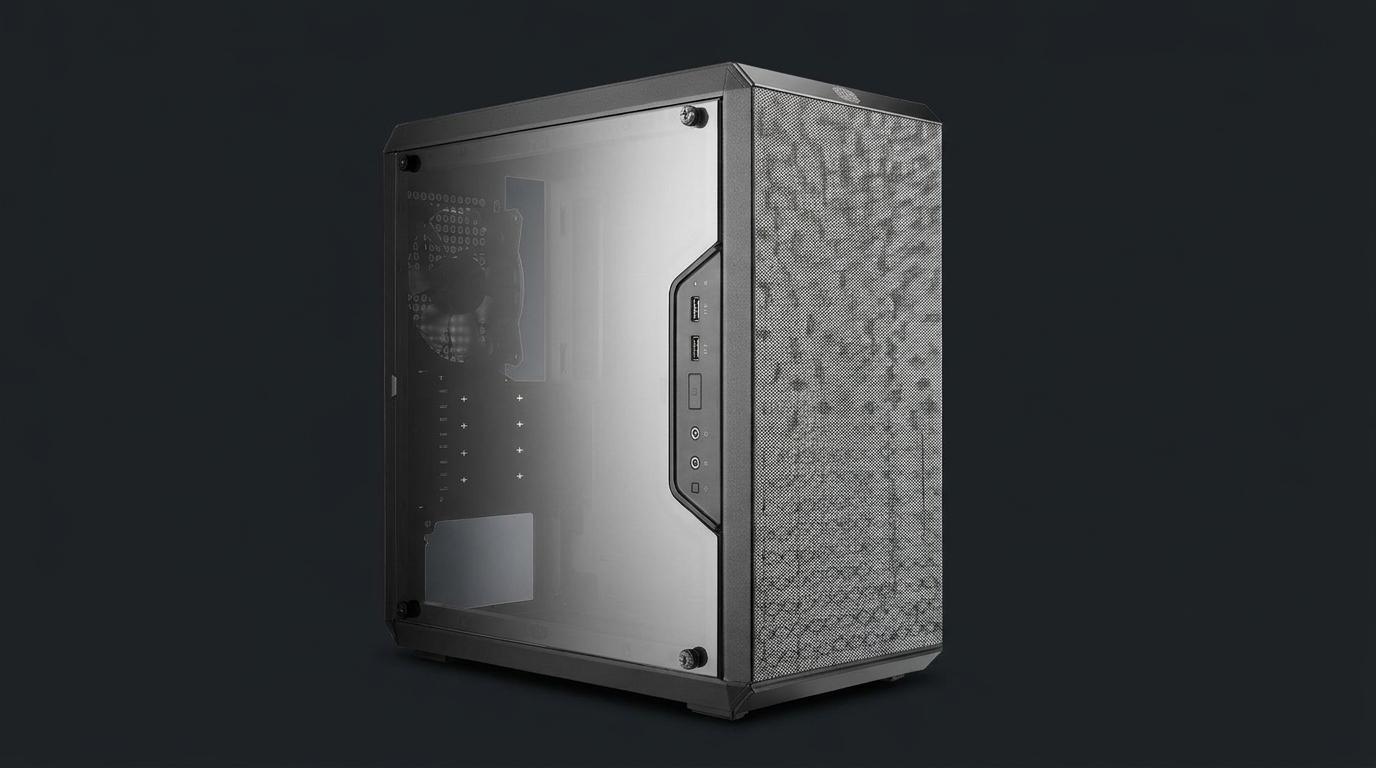
Cooler Master Q300L V1 Micro-ATX PC Case, High Airflow, Transparent Panel
The original Cooler Master MasterBox Q300L is a compact Micro-ATX and Mini-ITX case with perforated mesh panels, magnetic dust filters, an acrylic side window and an I/O panel you can move to six positions. It fits 360mm GPUs, 159mm coolers and ATX power supplies, with mounts for up to six fans and a 240mm front radiator.
Cooler Master Q300L V1 Review: Is This Compact Micro-ATX Case Worth Buying?
The Cooler Master MasterBox Q300L (V1, Black) is the original version of one of the best-known budget Micro-ATX cases. Cooler Master showed it at CES in January 2018 and put it on sale that March. It's a small cube-style mini tower for Micro-ATX and Mini-ITX boards, with perforated mesh panels, magnetic dust filters, an edge-to-edge acrylic side window and a front I/O panel you can move to six positions.
This Cooler Master Q300L review is for anyone planning a compact budget or entry-level gaming PC. We cover the case's official dimensions and hardware compatibility, how its airflow layout works, where fans and radiators fit, the limits of the compact interior, and how the V1 compares with the newer Q300L V2 and three other budget Micro-ATX cases. GearNexis has not tested this case hands-on. The specifications come from Cooler Master's product page, and any observations from independent reviewers are credited to them.
Cooler Master Q300L V1 at a Glance
- Model: MasterBox Q300L, black (MCB-Q300L-KANN-S00), mini tower
- Motherboards: Micro-ATX and Mini-ITX
- Dimensions (L × W × H): 387 × 230 × 381mm (Cooler Master's current listing; some launch coverage lists 378mm tall)
- Materials: steel and plastic, with a transparent acrylic side panel
- Included fans: one 120mm fan at the rear
- Radiator support: 120mm or 240mm at the front, 120mm at the rear
- Clearances: 360mm graphics card length, 159mm CPU cooler height, 160mm power supply length
- Storage: two 2.5-inch drives and one 3.5-inch drive
- Front I/O: two USB 3.0 ports, a headphone jack and a microphone jack, relocatable to six positions
- Expansion slots: four
- Warranty: two years (per Cooler Master)
Design and Build Quality
A Compact Cube-Style Mini Tower
The Q300L is short and fairly deep rather than tall. At 387mm deep, 230mm wide and about 381mm high, it takes up much less desk space than a typical ATX mid-tower but is still big enough for a full-length graphics card. That size is the main appeal: a compact Micro-ATX PC case that fits on a desk or shelf without moving the rest of your setup around.
Steel, Plastic and Mesh Panels
Cooler Master lists steel and plastic as the materials. The front and top panels have a perforated, patterned mesh design, and the larger openings are covered by magnetic dust filters that you lift off to clean. The perforations aren't just for looks. They are where the case breathes, which matters in a box this small.
Acrylic Transparent Side Panel
The window on the original Q300L is acrylic, not tempered glass. Cooler Master calls it an edge-to-edge acrylic transparent side panel. Acrylic is lighter and won't shatter, but it scratches much more easily than glass and looks less premium. Clean it with a soft microfiber cloth, never paper towels or harsh cleaners. If you want glass, the Q300L V2 (covered below) switched to a 4mm tempered-glass panel.
Vertical or Horizontal Placement
Cooler Master designed the Q300L to be used standing upright or lying on its side. Combined with the movable I/O panel, this lets you place it under a monitor, beside a desk or in an entertainment unit and still reach the ports. If you lay it horizontally, keep the intake and exhaust openings clear and leave room for air to escape.
Airflow and Cooling Performance
Out of the box, the Q300L V1 has one pre-installed 120mm fan, mounted at the rear as exhaust. Fresh air comes in passively through the perforated front and top panels and the bottom filter. That's enough for a light office or home-theater build, but most gaming builds should add at least one or two front intake fans.
The fan layout is flexible for a case this size. The front takes two 120mm or two 140mm fans, the top takes two 120mm fans, the rear holds the included 120mm fan, and there's a 120mm position at the bottom. A common budget layout is two front intakes and the rear exhaust, with top fans added as exhaust if your components run warm. Because the I/O panel can be moved, check that it doesn't block a fan position you plan to use.
We haven't measured temperatures or noise on this case and won't guess at them. Cooling depends heavily on your fans, CPU cooler and graphics card. What the specifications show is that the panels are perforated and there are enough mounting points for a positive or balanced airflow setup, if you add fans.
Fan and Radiator Compatibility
The table separates the one fan Cooler Master includes from the optional mounting positions you can fill yourself.
| Position | Included | Optional fan support | Radiator support |
|---|---|---|---|
| Front | None | 2 × 120mm or 2 × 140mm | 120mm or 240mm |
| Top | None | 2 × 120mm | Not listed |
| Rear | 1 × 120mm | 1 × 120mm (the included fan's position) | 120mm |
| Bottom | None | 1 × 120mm | Not listed |
Cooler Master Q300L radiator support is limited to the front (120mm or 240mm) and rear (120mm). There is no listed top radiator position and no 280mm or 360mm support. A front 240mm AIO such as the NZXT Kraken Plus 240 RGB or the Thermalright Aqua Elite 240 V3 is the largest liquid cooler to plan for. A front radiator and its fans take up space in front of the graphics card, so check your GPU length against the combined thickness before buying.
Interior Space and Hardware Compatibility
Motherboard Support
The Q300L takes Micro-ATX and Mini-ITX motherboards, with four expansion slots. That's enough for a dual-slot graphics card plus one more card. ATX and E-ATX boards won't fit, so start your parts list with a Micro-ATX or Mini-ITX board.
Cooler Master Q300L GPU Clearance
Cooler Master specifies a maximum graphics card length of 360mm. That's generous for a case this small, and it covers most dual-fan cards and many triple-fan models. A compact card like the ASUS Dual RTX 5060 OC Edition (228mm) fits easily. Front fans or a radiator reduce the usable length, and very thick cards can crowd the bottom fan position, so check your card's full dimensions.
CPU Cooler Clearance
The maximum CPU cooler height is 159mm. Some third-party spec sheets list 157mm, so leave a few millimeters of margin. Most single-tower air coolers fit, including the Thermalright Assassin X120 Refined SE at 148mm. Large dual-tower coolers around 165mm tall won't. Browse our CPU cooler reviews and check each cooler's height before you buy.
Power Supply Compatibility
The Q300L uses a standard ATX (PS2) power supply mounted at the bottom, up to 160mm long. Being able to use a full-size ATX PSU instead of a more expensive SFX unit is a real advantage for a budget build. Many 160mm-or-shorter ATX units exist, but longer high-wattage models may not fit, and a modular PSU makes the tight space easier to work in.
Cable Management and Building Experience
Cooler Master lists 28mm of space behind the motherboard tray. That's enough room for the 24-pin and CPU power cables plus a few SATA and fan cables, but not as much as larger cases offer, so plan your routing before closing the back panel. With no power supply shroud and a clear acrylic window, any extra cable length at the bottom stays visible.
The compact layout brings some practical limits. The PSU, a 3.5-inch drive and any bottom fan share the lower area. Installing a front radiator takes planning. And in a small case, it helps to connect the CPU power cable and front-panel headers before you fit the graphics card. Vortez, one of the independent outlets that reviewed the V1, also noted that the expansion slot covers are break-off rather than reusable, so only remove the ones you need.
Front I/O and Connectivity
The original Q300L's I/O panel has two USB 3.0 Type-A ports, a 3.5mm headphone jack and a 3.5mm microphone jack. There's no USB Type-C port, which is the most noticeable sign of its age. If you need a front Type-C port, the Q300L V2 adds one.
The panel is modular. You can mount it at the front, top or bottom on either side of the case, six positions in all. That makes it easy to keep the ports within reach whether the PC sits left or right of you, on the floor, or lying horizontally.
Storage and Expansion Options
The Q300L V1 holds two 2.5-inch drives and one 3.5-inch drive, and it has no 5.25-inch bay. For most new builds that's fine, since the main drive is usually an M.2 NVMe SSD on the motherboard, such as the WD_BLACK SN7100. If you want several hard drives for a home server or media library, the storage is limiting, and cases like the Thermaltake Versa H18 or DeepCool MATREXX 30 have more 3.5-inch bays.
Cooler Master Q300L V1 vs Competitors
The table compares the Q300L V1 with four other budget Micro-ATX cases. All figures come from each manufacturer's published specifications. Where a manufacturer's own page contradicts itself, we note it.
| Case | Motherboards | Included fans | Max GPU | Max CPU cooler | Radiator support | Side panel | Main advantage | Main limitation |
|---|---|---|---|---|---|---|---|---|
| Cooler Master Q300L V1 | Micro-ATX, Mini-ITX | 1 × 120mm (rear) | 360mm | 159mm | Front 120/240mm; rear 120mm | Acrylic | Six-position I/O, magnetic filters | No USB-C, acrylic window, one fan |
| Cooler Master MasterBox Q300L V2 | Micro-ATX, Mini-ITX | 1 × 120mm (rear) | 360mm | 159mm | Front 120/240mm; rear 120mm | 4mm tempered glass | Adds USB 3.2 Gen 2x2 Type-C and glass | Same single-fan bundle and clearances |
| Thermaltake Versa H18 | Micro-ATX, Mini-ITX | 1 × 120mm (rear) | 350mm (without front fan) | 155mm | Front 240/280mm; rear 120mm | Acrylic window or 4mm tempered glass, depending on version | 280mm front radiator, 220mm PSU, 2 × 3.5" bays | One USB 3.0 port, lower cooler clearance |
| DeepCool MATREXX 30 | Micro-ATX, Mini-ITX | 1 × 120mm (rear) | 250mm | 151mm | 120mm only | 3mm tempered glass | Three 3.5" bays plus a 5.25" bay | 250mm GPU limit, little fan support |
| MONTECH AIR 100 LITE | Micro-ATX, Mini-ITX | 2 × 120mm (1 front, 1 rear) | 330mm | 161mm | Front up to 280mm; top up to 240mm; rear 120mm | Tempered glass (swivel) | Two fans and top radiator support | Larger case, 160mm PSU limit, no USB-C |
Q300L V1 vs Q300L V2
- Brand: Cooler Master
- Side panel: 4mm tempered glass
- Front I/O: 1 × USB 3.2 Gen 2x2 Type-C, 2 × USB 3.2 Gen 1 Type-A, combo audio jack
- Fans: 1 × 120mm rear included; front 2 × 120/140mm optional
- Clearances: 360mm GPU, 159mm CPU cooler, 160mm PSU
- Radiators: front 120/240mm, rear 120mm
The Cooler Master MasterBox Q300L V2 keeps the same core layout and clearances: 360mm GPU, 159mm CPU cooler, 160mm PSU, front 240mm radiator and one included rear fan. The main upgrades are a 4mm tempered-glass side panel instead of acrylic and a front USB 3.2 Gen 2x2 Type-C port next to two USB Type-A ports and a combo audio jack. If you want glass or front USB-C, choose the V2. If you don't need either, the V1 gives you the same hardware fit.
Q300L V1 vs Thermaltake Versa H18
- Brand: Thermaltake
- Side panel: acrylic window (CA-1J4-00S1WN-00) or 4mm tempered glass (CA-1J4-00S1WN-01)
- Dimensions (D × W × H): 439 × 205 × 398mm
- Fans: 1 × 120mm rear included; front 3 × 120mm or 2 × 140mm, top 1 × 120/140mm optional
- Clearances: 350mm GPU (without front fan), 155mm CPU cooler, 220mm PSU
- Radiators: front 240/280mm, rear 120mm
- Storage: 2 × 2.5-inch, 2 × 3.5-inch
- Front I/O: 1 × USB 3.0, 2 × USB 2.0, HD audio
The Thermaltake Versa H18 is deeper (439mm) and narrower (205mm). It supports a 280mm front radiator, a 220mm PSU and two 3.5-inch plus two 2.5-inch drives. The Q300L allows a taller CPU cooler (159mm vs 155mm) and a slightly longer GPU, has two USB 3.0 ports instead of one, and adds the movable I/O and magnetic filters. Thermaltake sells the H18 with either an acrylic window or a tempered-glass panel, so check which version the listing shows.
Q300L V1 vs DeepCool MATREXX 30
- Brand: DeepCool
- Side panel: 3mm tempered glass
- Dimensions (L × W × H): 405.8 × 193 × 378.2mm
- Fans: 1 × 120mm rear included; 1 × 120mm front optional
- Clearances: 250mm GPU, 151mm CPU cooler, 170mm PSU
- Radiators: 120mm only
- Storage: 3 × 3.5-inch, 2 × 2.5-inch, 1 × 5.25-inch
- Front I/O: 1 × USB 3.0, 1 × USB 2.0, headphone and mic jacks
The DeepCool MATREXX 30 is a very basic case. It has the most drive bays here (three 3.5-inch, two 2.5-inch and a 5.25-inch bay that can't be used with full-size Micro-ATX boards) and a 3mm tempered-glass panel. But it's limited to 250mm graphics cards and 151mm coolers, and it has only one optional front fan position. For a gaming build with a modern graphics card, the Q300L is the more flexible choice.
Q300L V1 vs MONTECH AIR 100 LITE
- Brand: MONTECH
- Side panel: tempered glass, swivel-opening
- Fans: 2 × 120mm non-LED included (1 front, 1 rear); top 2 × 120/140mm, front 3 × 120mm or 2 × 140mm, PSU shroud 2 × 120mm optional
- Clearances: 330mm GPU, 161mm CPU cooler, 160mm PSU
- Radiators: front up to 280mm, top up to 240mm, rear 120mm
- Front I/O: 2 × USB 3.0, 1 × USB 2.0, headphone and mic jacks
The MONTECH AIR 100 LITE is the stronger airflow-focused option on paper. It ships with two 120mm fans, supports up to a 280mm front and 240mm top radiator, adds fan mounts on the PSU shroud, and allows a 161mm cooler. In return, the case is taller and deeper (405 × 210 × 425mm, L × W × H) and limits GPUs to 330mm. MONTECH also sells the same chassis as the MONTECH AIR 100 ARGB, with four ARGB fans (three front, one rear) and a lighting controller. The Q300L remains the smaller case, with more GPU length and the relocatable I/O.
Who Should Buy the Cooler Master Q300L V1?
- Budget-conscious builders who want a full-size graphics card and a standard ATX power supply in an inexpensive case.
- Compact Micro-ATX builders who want a small footprint without the strict clearances of an SFF case.
- Mini-ITX builders who want more room and easier building than a tight ITX case allows.
- Anyone with an awkward desk layout, thanks to the six-position I/O panel and vertical or horizontal placement.
- Builders who want a window and are fine with acrylic.
Choose something else if you need front USB Type-C, tempered glass, a 280mm or 360mm radiator, several hard drives, an ATX motherboard or fans already installed. A larger ATX case like the Lian Li V100RX fits bigger radiators and includes four ARGB fans, and you can browse more options in our PC case reviews.
Final Verdict
The Cooler Master Q300L V1 is still a sensible case for a compact budget build, judged on its specifications. It fits Micro-ATX and Mini-ITX boards, 360mm graphics cards, 159mm air coolers and a standard ATX power supply in a small cube, and it has magnetic dust filters and an I/O panel that goes wherever your desk needs it. Its weaknesses are just as clear: an acrylic window, a single included fan, no front USB-C, 28mm of cable space and room for only three drives.
If those limits don't affect your build and you're prepared to add a front fan or two, the Cooler Master MasterBox Q300L V1 is worth considering for a small gaming or home PC. If you'd rather have glass and front Type-C in the same layout, look at the Q300L V2. If you want more airflow out of the box, look at the MONTECH AIR 100 LITE. Check the listing for current pricing and availability.
Pros
- Compact 387 × 230 × 381mm footprint for Micro-ATX and Mini-ITX builds
- Fits graphics cards up to 360mm and CPU coolers up to 159mm
- Takes a standard ATX power supply (up to 160mm), not a pricier SFX unit
- I/O panel relocates to six positions, and the case works vertically or horizontally
- Perforated front and top panels with magnetic, easy-to-clean dust filters
- Room for up to six fans and a 240mm front radiator
Cons
- Side window is scratch-prone acrylic, not tempered glass
- Only one 120mm fan included, so most gaming builds need extra fans
- No front USB Type-C (the Q300L V2 adds it)
- Limited storage: two 2.5-inch drives and one 3.5-inch drive
- Radiator support stops at 240mm, front only (120mm rear)
- Tight 28mm cable space and no PSU shroud; independent reviewers also noted break-off slot covers
Spec Sheet
Specifications
General
| Product Name | Cooler Master MasterBox Q300L (V1) |
|---|---|
| Brand | Cooler Master |
| Model Number | MCB-Q300L-KANN-S00 |
| Series | MasterBox |
| Case Type | Mini tower |
| Color | Black |
| Release | March 2018 |
Dimensions
| Dimensions (L × W × H) | 387 × 230 × 381mm (some launch sources list 378mm height) |
|---|---|
| Weight | Not listed by Cooler Master (about 3.7kg per OCinside) |
Materials
| Chassis Material | Steel, plastic |
|---|---|
| Side Panel | Edge-to-edge transparent acrylic |
| Front and Top Panels | Perforated mesh pattern with magnetic dust filters |
Motherboard Compatibility
| Supported Form Factors | Micro-ATX, Mini-ITX |
|---|---|
| Expansion Slots | 4 |
Cooling
| Pre-installed Fans | 1 × 120mm (rear) |
|---|---|
| Front Fan Support | 2 × 120mm or 2 × 140mm |
| Top Fan Support | 2 × 120mm |
| Rear Fan Support | 1 × 120mm |
| Bottom Fan Support | 1 × 120mm |
| Front Radiator Support | 120mm or 240mm |
| Rear Radiator Support | 120mm |
| Dust Filters | Magnetic patterned filters plus bottom filter |
Clearance
| Max GPU Length | 360mm |
|---|---|
| Max CPU Cooler Height | 159mm |
| Max PSU Length | 160mm |
| Cable Space Behind Motherboard Tray | 28mm |
Power Supply
| PSU Support | Standard ATX (PS2), bottom mount |
|---|
Storage
| 2.5-inch Drives | 2 |
|---|---|
| 3.5-inch Drives | 1 |
| 5.25-inch Bays | 0 |
Front I/O
| USB | 2 × USB 3.0 Type-A |
|---|---|
| Audio | 1 × 3.5mm headphone, 1 × 3.5mm microphone |
| USB Type-C | No |
| I/O Placement | Relocatable to 6 positions (front, top or bottom on either side) |
Design
| Orientation | Vertical or horizontal |
|---|
Warranty
| Warranty | 2 years (per Cooler Master) |
|---|
Frequently Asked Questions
Is the Cooler Master Q300L V1 a good PC case?+
What motherboard sizes does the Cooler Master Q300L support?+
Does the Q300L V1 come with pre-installed fans?+
What is the maximum GPU length supported?+
Does the Cooler Master Q300L support a 240mm radiator?+
Is the Q300L side panel tempered glass or acrylic?+
Can the Q300L use a standard ATX power supply?+
How many storage drives can the Q300L support?+
Is the Cooler Master Q300L suitable for a gaming PC?+
What is the difference between the Q300L V1 and Q300L V2?+
As an Amazon Associate we earn from qualifying purchases. See our affiliate disclosure.