
Thermalright
Thermalright Aqua Elite 240 V3 Water Cooling CPU Cooler, Double PWM ARGB Fans with S-FDB Bearings, Efficient PWM Controlled Pump, for AMD AM4/AM5 and Intel
Thermalright Aqua Elite 240 V3 review: a 240mm AIO liquid CPU cooler with two S-FDB PWM ARGB fans, a PWM-controlled ARGB pump, a 3-year warranty, and official AMD AM4/AM5 and Intel LGA115X/1200/1700/1851 support. We cover its specs, noise ratings, compatibility, installation, and how it compares with five alternatives.
Thermalright Aqua Elite 240 V3 Review: Overview
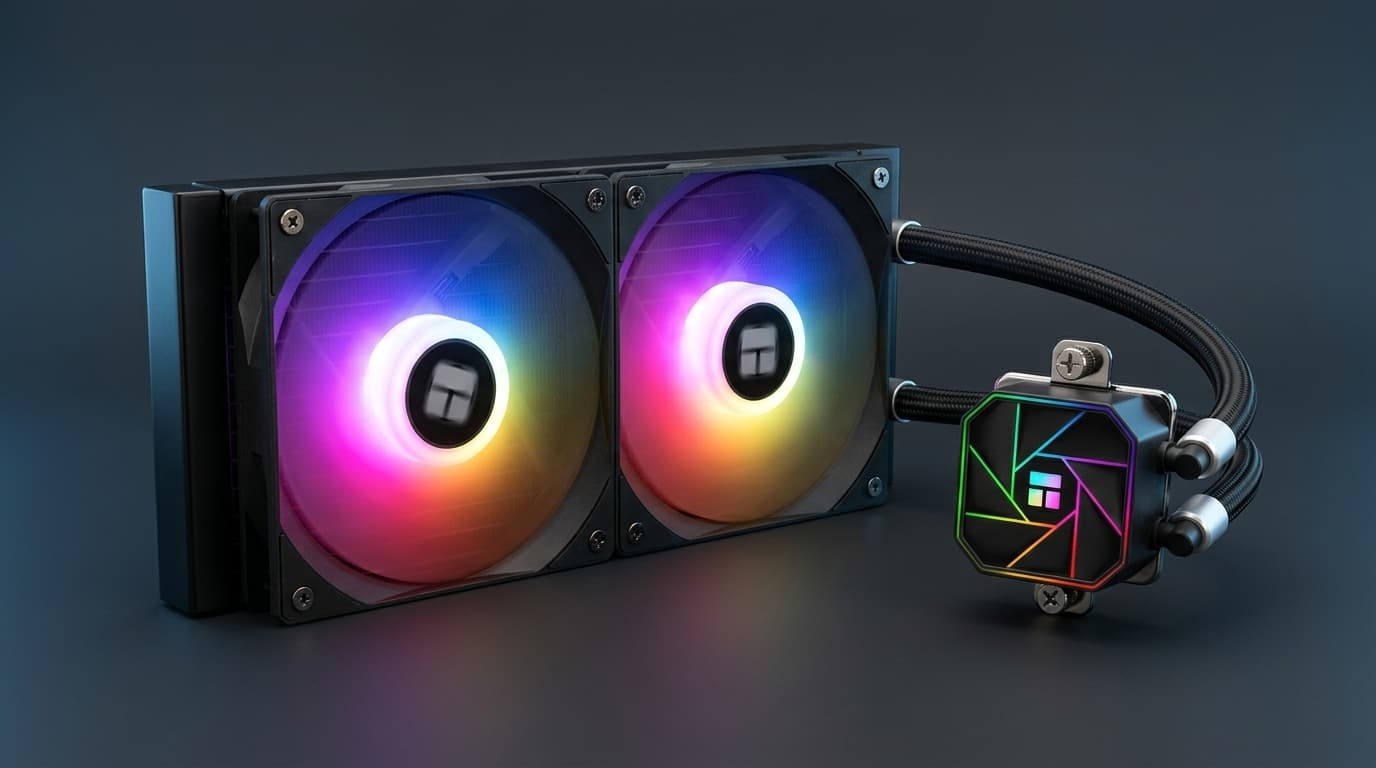
The Thermalright Aqua Elite 240 V3 (AE240 V3) is a 240mm all-in-one (AIO) liquid CPU cooler. It pairs an aluminum radiator with two 120mm PWM ARGB fans on S-FDB bearings and a PWM-controlled pump with ARGB lighting. Thermalright lists support for current AMD AM4/AM5 and Intel LGA115X, LGA1200, LGA1700, and LGA1851 platforms.
This review is for gamers, first-time AIO buyers, and builders who want a closed-loop cooler with a 240mm footprint and motherboard-controlled ARGB lighting, without a display screen or proprietary software. We have not tested this cooler ourselves. Everything below comes from Thermalright's published specifications, the Amazon US listing, and a comparison of documented features. Manufacturer claims are labeled as such.
Product Overview: How the AE240 V3 Is Built
An AIO cooler is a sealed liquid loop with three main parts: a pump block that mounts on the CPU, a radiator that releases heat into the air, and two tubes that connect them. The coolant is pre-filled at the factory, so you don't need to fill or bleed the loop.
- Pump block: Thermalright lists the pump at 62 x 62 x 53 mm with a 4-pin PWM connector, a rated maximum of 2,800 RPM (±10%), 4.8W maximum draw at 12V, and a 40,000-hour MTTF rating. The pump head also has ARGB lighting on a 3-pin 5V connector.
- Radiator: Aluminum, 240mm class, with space for two 120mm fans. Retailers list it at roughly 276 x 120 x 27 mm (about 10.9 x 4.7 x 1.1 in), but Thermalright's spec page doesn't state these dimensions, so check them against the official drawing.
- Fans: Two TL-C12B-S V2 120mm fans with 4-pin PWM control, 3-pin 5V ARGB lighting, and S-FDB bearings.
- Tubing: Retailers list 400mm (about 15.7 in) tubes. Thermalright's product page doesn't confirm this, so treat it as unverified.
Key Features Explained
240mm Radiator Configuration
A 240mm radiator holds two 120mm fans and fits a wide range of mid-tower cases. That makes it a common middle ground between compact 120mm AIOs and larger 280mm or 360mm units. A 240mm radiator has less surface area than a 360mm one, so very high-wattage CPUs under sustained all-core loads may need more fan speed, or a larger cooler, to stay at a given temperature.
Dual PWM ARGB Fans
Thermalright rates each TL-C12B-S V2 fan at up to 1,500 RPM (±10%), 66.17 CFM of airflow, 1.53 mm H2O of static pressure, and 25.6 dBA maximum noise. Static pressure matters because radiator fins resist airflow. PWM control lets your motherboard slow the fans at idle and speed them up under load.
S-FDB Fan Bearings
Thermalright specifies S-FDB (fluid dynamic) bearings for the fans. FDB-type bearings are generally chosen for smooth, quiet operation. Thermalright doesn't publish a separate lifespan rating for these fans, so we can't make a durability claim beyond the 3-year warranty.
PWM-Controlled Pump
Because the pump has a 4-pin PWM connector, its speed can be managed through BIOS fan settings instead of always running at full speed. This matters for noise, since pump whine is a common complaint with AIOs. Many motherboards have a dedicated AIO_PUMP or PUMP_FAN header, and some builders run the pump at a fixed speed for steady coolant flow.
ARGB Lighting and Synchronization
The pump and both fans use standard 3-pin 5V ARGB connectors, which means lighting is controlled by a compatible motherboard header or a separate ARGB controller. Thermalright doesn't list dedicated lighting software for this model. Effects depend on your motherboard's RGB utility (for example, the vendor tools from ASUS, MSI, Gigabyte, or ASRock).
Installation and Maintenance
Like other sealed AIOs, the AE240 V3 doesn't need refilling. Routine care is mostly dusting the radiator and fans, plus replacing thermal paste if you remount the pump block. Thermalright publishes an installation manual on its website. Download and review it before you start, especially for socket-specific bracket steps.
Cooling Performance
We couldn't find a credible independent lab review of the Aqua Elite 240 V3 with controlled methodology: a stated CPU, power limits, ambient temperature, and fixed fan/pump settings. For that reason, this review doesn't list temperature figures or benchmark comparisons. We'll update it if reliable test data becomes available.
Based on its design and specifications, here is what's reasonable to expect:
- Gaming: Most games put moderate, variable loads on the CPU. For mainstream gaming processors, this is the type of workload a 240mm AIO is generally designed for.
- Everyday computing: Web browsing, office work, and media playback produce little heat. In those cases, PWM control lets the fans and pump run slower.
- Heavy productivity: Long rendering, compiling, or encoding jobs on high-core-count, high-wattage CPUs are the most demanding case for any 240mm cooler. Temperatures may rise and the CPU may boost less aggressively, depending on power limits.
Actual results depend on the processor, its power settings, the workload, mounting pressure and paste application, radiator placement, case airflow, room temperature, and your fan and pump curves. A listed socket confirms that the cooler can be mounted, not how well it will cool every CPU on that socket.
Noise and Acoustics
Thermalright's ratings are 25.6 dBA maximum per fan and 23 dBA maximum for the pump. These are manufacturer figures, not independent measurements, and dBA ratings from different brands are often taken under different conditions, so compare them with caution. Some owners in user forums report that the pump can be audible, but these are anecdotal reports.
How loud the cooler sounds in practice depends on:
- Fan curves: A gentle curve keeps fans slow during light use and gaming.
- Pump speed: Running the pump below maximum, where your board allows, can reduce hum or whine.
- Radiator orientation: Air trapped in the pump can cause gurgling. Avoid placing the pump at the highest point of the loop, and check the manual for recommended orientations.
- Case airflow and workload: Hot cases and sustained heavy loads push fans to higher speeds.
We don't describe the AE240 V3 as "silent," because no independent acoustic testing supports that.
Compatibility and Installation
Supported CPU Sockets
Thermalright's official product page lists Intel LGA115X/1200/1700/1851 and AMD AM4/AM5. That matches the Amazon US listing's claims of LGA1150, LGA1151, LGA1200, LGA1700, LGA1851, AM4, and AM5. Some third-party retailers list older HEDT sockets such as LGA2011/2066, but Thermalright's page doesn't, so don't count on that support.
Case and Radiator Clearance
- Confirm that your case officially supports a 240mm radiator in the position you plan to use: typically top or front, depending on the case.
- Allow for the full radiator-plus-fan thickness, about 52 mm (2.0 in) as listed by retailers, especially in top mounts above tall RAM or motherboard heatsinks.
- Make sure the tubing can reach from the CPU to the radiator without sharp bends.
Motherboard Header Requirements
- Pump: One 4-pin PWM header (CPU_FAN, AIO_PUMP, or PUMP_FAN). Check your manual for the recommended header.
- Fans: 4-pin PWM fan header(s). Check whether the package includes a splitter or daisy-chain cables before planning your wiring.
- Lighting: A 3-pin 5V ARGB header (often labeled ADD_GEN2, JRAINBOW, or D_LED) or a separate ARGB controller. Never connect a 3-pin 5V ARGB plug to a 4-pin 12V RGB header, because that can damage the LEDs.
Mounting Hardware
Mounting kits for the supported Intel and AMD sockets are designed to come in the box. Verify the exact accessory list against the installation manual when you unbox it, and check whether thermal paste comes pre-applied or separately before you install.
Thermalright Aqua Elite 240 V3 vs. Competitors
The comparison below uses manufacturer and retailer specifications, not side-by-side testing. Prices change often, so check current pricing on each listing.
| Product | Key Features | Potential Advantages | Important Considerations | Ideal Buyer |
|---|---|---|---|---|
| Thermalright Aqua Elite 240 V3 | 240mm aluminum radiator; 2x TL-C12B-S V2 PWM ARGB fans (up to 1,500 RPM); PWM pump with ARGB; 3-year warranty | Simple motherboard-based control; low rated fan noise (25.6 dBA max); current Intel and AMD socket support | No display or dedicated software; no credible independent benchmarks found; lower maximum fan speed than some rivals | Builders who want a straightforward ARGB 240mm AIO |
| ARCTIC Liquid Freezer III Pro 240 A-RGB | 2x P12 Pro A-RGB fans (600–3,000 RPM listed); 60mm VRM fan in pump block; MX-6 paste included | High-speed fans for heavy loads; active VRM airflow; retailers list a 6-year warranty (confirm with ARCTIC) | Thicker radiator design needs more clearance; fans can be loud at full speed; listed sockets are AM4/AM5/LGA1700/LGA1851 only | Performance-focused builders with a roomy case |
| Cooler Master MasterLiquid 240L Core ARGB | Gen S dual-chamber pump; 2x ARGB fans (650–1,750 RPM); 277 x 119.6 x 27.2 mm radiator | Established brand; low rated pump noise (12 dBA listed); thermal paste included | Socket lists vary by retailer, so confirm AM5/LGA1851 for your version; 27.2 dBA rated fan maximum | Buyers who want a mainstream-brand budget AIO |
| DeepCool LE520 | 2x 120mm fans (500–2,250 RPM, 85.85 CFM); 282 x 120 x 27 mm radiator; 410mm tubes; ARGB pump | Higher rated airflow and fan speed; 3-year warranty per DeepCool | Higher rated fan noise (32.9 dBA); DeepCool's spec table doesn't list LGA1851, and US availability can vary | Gamers who prioritize airflow headroom |
| NZXT Kraken 240 | 1.54-inch 240 x 240 LCD on the pump; 2x F120P static-pressure fans; NZXT CAM software | Customizable display for temperatures or images; software-based monitoring | Relies on NZXT CAM for display features; LGA1851 support and warranty terms vary by listing, so verify both | Builders who want a pump-head screen and software control |
| CORSAIR Nautilus 240 RS ARGB | 2x RS120 ARGB fans (up to about 2,100 RPM); copper cold plate; daisy-chain fan wiring | Simplified cabling; motherboard ARGB control without a controller; retailers list a 5-year warranty | Higher maximum fan speed may mean more noise at full load; listed sockets are AM4/AM5/LGA1700/LGA1851 | Builders who want tidy wiring and a longer warranty |
Who Should Buy the Thermalright Aqua Elite 240 V3?
- Gamers and everyday users building on AM4, AM5, LGA1700, or LGA1851 who have a case with a 240mm radiator mount.
- First-time AIO buyers who prefer BIOS-based fan and pump control over extra software.
- Builders who want ARGB lighting on the pump and fans synced through their motherboard's 5V ARGB header.
- Anyone moving from a stock or entry-level air cooler who wants a cleaner look around the CPU socket.
Who Should Consider an Alternative?
- Cases without 240mm support: Consider a 120mm AIO or a tower air cooler that fits your case's CPU height limit.
- Air-cooling fans: Air coolers have no pump, which removes pump noise and any risk of leaks or permeation over time.
- Very high-wattage CPUs under sustained load: A 280mm or 360mm AIO gives more radiator area.
- Screen or software fans: The NZXT Kraken 240 offers an LCD and software monitoring that the AE240 V3 doesn't.
- Longer warranty coverage: The CORSAIR Nautilus 240 RS ARGB and ARCTIC Liquid Freezer III Pro 240 A-RGB are listed with longer warranties than the AE240 V3's 3 years.
- Older HEDT platforms: LGA2011/2066 and Threadripper aren't on Thermalright's official list for this model.
Installation Checklist
- Your CPU socket is on the official list (LGA115X/1200/1700/1851, AM4/AM5).
- Your case supports a 240mm radiator in your chosen position, with clearance for radiator and fan thickness.
- The tubes reach comfortably from the CPU to the radiator.
- You have a free 4-pin PWM header for the pump, ideally AIO_PUMP or CPU_FAN.
- You have 4-pin PWM fan header(s), or a splitter, for both fans.
- You have a 3-pin 5V ARGB header, or an ARGB controller, for lighting.
- The bundled mounting hardware for your socket and the thermal paste are in the box.
- You've read Thermalright's installation manual and planned pump orientation to avoid trapped air.
Final Verdict
The Thermalright Aqua Elite 240 V3 is a no-frills 240mm AIO. You get two S-FDB PWM ARGB fans with modest rated noise, a PWM-controlled ARGB pump, official support for current Intel and AMD sockets, and a 3-year warranty. Control runs entirely through your motherboard, which keeps setup simple for first-time AIO builders.
It has limits. We found no credible independent thermal or acoustic testing, its fans have a lower rated top speed than several rivals, and it has no display or dedicated software. If you need a pump screen, a longer warranty, or more headroom for a high-wattage CPU, one of the alternatives above or a larger radiator may suit you better.
If your case fits a 240mm radiator and you want a straightforward ARGB liquid cooler for gaming or general use, the AE240 V3 is worth considering. Check the current price and availability of the Thermalright Aqua Elite 240 V3 on Amazon.
Pros
- Two 120mm PWM ARGB fans with S-FDB bearings
- PWM-controlled pump allows BIOS-based speed and noise tuning
- Low manufacturer-rated noise: 25.6 dBA max per fan, 23 dBA max pump
- Official support for AMD AM4/AM5 and Intel LGA115X/1200/1700/1851
- Standard 3-pin 5V ARGB lets the pump and fans sync with motherboard lighting
- No proprietary software needed
- 3-year manufacturer warranty
- 240mm format fits many mid-tower cases
Cons
- No credible independent thermal or noise benchmarks found
- Fans have a lower rated top speed (1,500 RPM) than several 240mm rivals
- No pump display or dedicated monitoring software
- Needs a 5V ARGB header or separate controller for lighting control
- Shorter warranty than some competitors listed at 5–6 years
- Radiator and tubing dimensions not confirmed on Thermalright’s product page
- 240mm radiator may be limiting for very high-wattage CPUs under sustained load
Spec Sheet
Specifications
General
| Model | Aqua Elite 240 V3 (AE240 V3) |
|---|---|
| Manufacturer | Thermalright |
| Cooler Type | All-in-one (AIO) liquid CPU cooler |
Radiator
| Size | 240mm |
|---|---|
| Material | Aluminum |
| Dimensions | 276 x 120 x 27 mm (retailer-listed; needs verification) |
Fan
| Model | TL-C12B-S V2 |
|---|---|
| Quantity | 2 |
| Dimensions | 120 x 120 x 25 mm |
| Rated Speed | 1500 RPM ±10% (max) |
| Airflow | 66.17 CFM (max) |
| Static Pressure | 1.53 mm H2O (max) |
| Noise Level | 25.6 dBA (max) |
| Bearing | S-FDB |
| Current | 0.2 A |
| Weight | 135 g |
| Connector | 4-pin PWM |
Pump
| Dimensions | 62 x 62 x 53 mm |
|---|---|
| Rated Speed | 2800 RPM ±10% (max) per Thermalright; some retailers list 3300 RPM (needs verification) |
| Noise Level | 23 dBA (max) |
| Power Consumption | 4.8 W (max) |
| Rated Voltage | 12V DC |
| Current | 0.4 A ±10% |
| Connector | 4-pin PWM |
| MTTF | 40,000 hours |
Lighting
| Type | ARGB (pump and fans) |
|---|---|
| Connector | 3-pin 5V ARGB |
Compatibility
| Intel Sockets | LGA1150, LGA1151, LGA1155, LGA1156 (LGA115X), LGA1200, LGA1700, LGA1851 |
|---|---|
| AMD Sockets | AM4, AM5 |
Physical Dimensions
| Tube Length | 400 mm (retailer-listed; needs verification) |
|---|---|
| Radiator + Fan Thickness | 52 mm (retailer-listed; needs verification) |
Warranty
| Manufacturer Warranty | 3 years |
|---|
Frequently Asked Questions
Is the Thermalright Aqua Elite 240 V3 good for gaming?+
Which AMD and Intel sockets does the Thermalright Aqua Elite 240 V3 support?+
Does the Thermalright Aqua Elite 240 V3 come with ARGB fans?+
Does it require an ARGB motherboard header or controller?+
Will a 240mm radiator fit in a mid-tower case?+
How loud are the Aqua Elite 240 V3’s fans and pump?+
How does it compare with other 240mm AIO coolers?+
Should I choose a 240mm AIO or an air cooler?+
As an Amazon Associate we earn from qualifying purchases. See our affiliate disclosure.