
NZXT
NZXT Kraken Plus 240 RGB — 240mm AIO CPU Cooler, LCD — Black
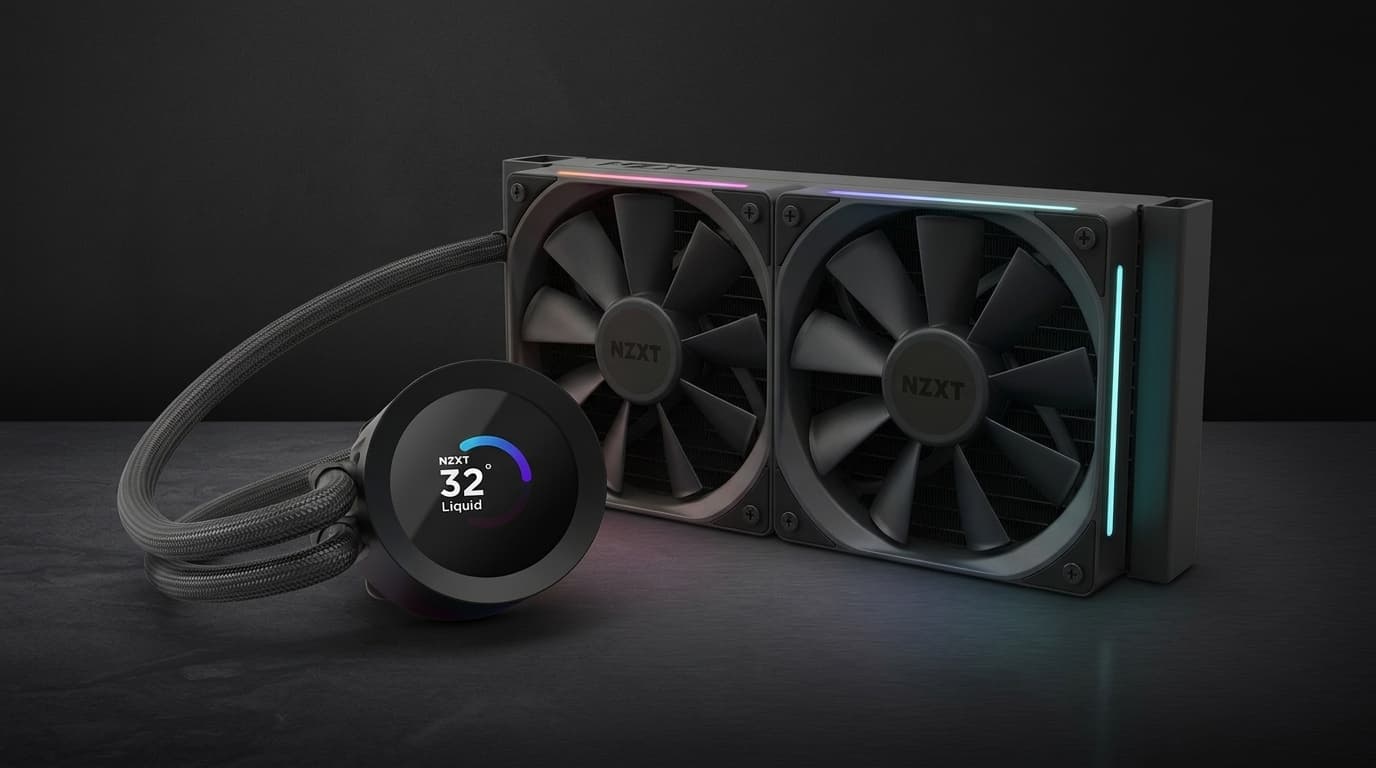
The NZXT Kraken Plus 240 RGB Black is a 240mm AIO liquid CPU cooler with a 1.54" 240x240 LCD on the pump cap, a single-frame F240 RGB Core fan unit, NZXT’s Turbine pump, and a 6-year warranty. NZXT CAM controls the LCD, RGB lighting, and fan and pump curves.
NZXT Kraken Plus 240 RGB Review: A Compact LCD AIO for Clean Gaming Builds
The NZXT Kraken Plus 240 RGB is a 240mm all-in-one liquid CPU cooler with a 1.54-inch square LCD on the pump cap, a single-frame RGB fan unit, and a black finish. It is part of NZXT's 2025 Kraken lineup and sits between the entry Kraken and the larger-screen Kraken Elite.
This NZXT Kraken Plus 240 RGB review is based on NZXT's official specifications, retailer listings, and the documented differences between Kraken models. It is not a hands-on test, so we report no temperatures or noise readings of our own. The goal is to help you decide whether this black LCD AIO cooler suits your gaming PC, your case, and your CPU.
At a Glance: Key Features and Specifications
- Type: 240mm AIO liquid CPU cooler (black, SKU RL-KR240-B2)
- Display: 1.54" TFT LCD, 240 x 240 px, 30 Hz, 300 cd/m²
- Pump: NZXT Turbine pump, 1,200–2,800 RPM (±300)
- Cold plate: 56 x 56 mm copper, split-flow design, pre-applied thermal paste
- Radiator: Aluminum, 281 x 120 x 27 mm
- Fans: One F240 RGB Core unit (two 120mm fans in one frame), 500–2,400 RPM, 75.05 CFM, 3.07 mmH₂O, 31.9 dBA max (per fan)
- Tubing: 400 mm CIIR rubber with nylon-braided sleeve
- Sockets: Intel LGA 1851/1700/1200/115X; AMD AM5/AM4
- Software: NZXT CAM
- Warranty: 6 years
Design and Build Quality
The NZXT Kraken Plus 240 RGB Black keeps the round-cap pump look NZXT is known for, with the LCD set in the center of the cap. The radiator is aluminum and 27 mm thick, which is standard for 240mm AIOs and helps with case clearance. The rubber tubing has a nylon-braided sleeve, and at 400 mm it is long enough for most front- or top-mounted radiator layouts in mid-tower cases.
The biggest design change from older Kraken RGB models is the fan. Instead of two loose fans, NZXT ships one F240 RGB Core unit: two 120mm fans in a single 240 x 120 x 26 mm frame. That means fewer screws, fewer cables, and a cleaner look.
LCD Display Features and Customization
The 1.54-inch square LCD runs at 240 x 240 pixels and a 30 Hz refresh rate. Through NZXT CAM, NZXT says it can show:
- Real-time system data, such as CPU temperature and clock speeds
- Custom images and animated GIFs
- Web integrations, with Spotify and YouTube named as examples
You can change the screen's orientation in software, so it reads correctly however the pump is mounted. Keep your expectations in line with the hardware: this is a small, lower-resolution panel next to the 640 x 640 screens on Kraken Elite models, and 30 Hz animation will look less smooth than a 60 Hz display. It is great for a temperature readout or a logo, and less impressive for detailed images.
The LCD depends on NZXT CAM and an internal USB connection to the motherboard. Without CAM running, you lose live customization.
Pump and Liquid-Cooling Design
The NZXT Turbine pump is rated at 1,200–2,800 RPM (±300) at 12 V and 0.3 A. NZXT says it was designed for high flow and head pressure with low noise. Below it, a 56 x 56 mm copper cold plate uses a split-flow design that sends coolant over the hottest part of the CPU first. Thermal paste comes pre-applied, so you don't need to buy or spread your own for a first install.
Included RGB Fans and Lighting
The F240 RGB Core unit has eight addressable LEDs per fan and fluid dynamic bearings rated for 60,000 hours. Each fan is rated at 500–2,400 RPM, 75.05 CFM, 3.07 mmH₂O static pressure, and 31.9 dBA at full speed.
The fan unit uses one 8-pin connector that carries both PWM and RGB signals. NZXT says fan control is built into the pump cap, so the fan lighting and speed are handled through the cooler and CAM, not a separate RGB controller. That makes this 240mm RGB liquid CPU cooler simpler to wire than older Kraken RGB kits. It also means you control the lighting in CAM. Don't assume it will sync with your motherboard's RGB software.
NZXT Kraken Plus 240 RGB Performance: What the Evidence Shows
We found no independent reviews with measured results for this exact 2025 model, so we won't quote any temperatures. Older Kraken 240 reviews cover a different pump and different fans, so their numbers don't carry over.
From the specifications, you can expect typical 240mm AIO behavior. A 240mm radiator is a good match for mainstream gaming CPUs, such as Ryzen 5/Ryzen 7 or Core i5/Core Ultra 5-class chips. It has less headroom than a 280mm or 360mm cooler for high-wattage processors that run at full load for long stretches, like top-end Core i9 or Ryzen 9 parts in rendering work. If you own one of those, consider a larger radiator or one of the thicker 240mm alternatives below.
NZXT Kraken Plus 240 RGB Noise and Fan Behavior
NZXT rates each fan at 31.9 dBA at its 2,400 RPM maximum. That's a manufacturer figure measured under its own conditions, not a real-world reading. In practice, how loud it sounds depends on your fan curve. With a 500 RPM minimum and PWM control through CAM, you can set a quiet curve for light use and let the fans ramp up only under heavy load. The pump speed can also be adjusted in CAM.
Gaming and Productivity Use Cases
For gaming, where CPU load goes up and down, a 240mm AIO usually handles mid-range and many upper-mid-range processors well when the case has good airflow. For streamers and creators, the LCD is useful for keeping an eye on CPU temperature. For long all-core workloads on hot, high-core-count CPUs, a 360mm cooler is the safer choice.
NZXT Kraken Plus 240 RGB Installation and Cable Management
NZXT includes tool-free brackets for AM5, AM4, and LGA 1851/1700/1200/115X, pre-applied paste, and a single breakout cable set from the pump cap. The single-frame fan unit cuts installation down to one fan assembly and one fan cable. Before you start:
- Check that your case supports a 240mm radiator in the spot you plan to use
- Find a free internal USB 2.0 header for CAM and LCD control
- Read NZXT's manual to see where each breakout-cable lead goes (motherboard header, power)
- If you mount the radiator in front, keep the pump below the top of the radiator to avoid air in the pump
NZXT Kraken Plus 240 RGB Compatibility: CPU Sockets
Official socket support covers Intel LGA 1851, 1700, 1200, and 115X, plus AMD AM5 and AM4. That includes current Intel Core Ultra (LGA 1851) and AMD Ryzen 7000/9000 (AM5) desktop processors. HEDT platforms like Threadripper are not listed.
Radiator, Case, and RAM-Clearance Considerations
Not every case fits a 240mm radiator. The radiator measures 281 x 120 x 27 mm, and the fans add about 26 mm, for roughly 53 mm total thickness. Check your case manual for:
- A 240mm mounting spot on the front, top, or side
- Top clearance above the motherboard (radiator plus fans) so it doesn't hit tall RAM or VRM heatsinks
- Front clearance if your GPU is long
Because the pump sits on the CPU, RAM height is rarely a problem at the socket. The usual conflict is a top-mounted radiator over tall memory.
Software, USB Headers, and RGB Control Requirements
NZXT CAM handles monitoring, LCD content, fan and pump curves, and lighting. NZXT's support guidance says the Kraken Plus connects to CAM over an internal USB connection, so you need a free USB 2.0 header. On boards with only one header that's already taken, you may need a USB header hub. CAM runs on Windows. Plan on keeping it installed if you want the LCD and RGB effects you picked.
NZXT Kraken Plus 240 RGB vs Competitors
The table below uses manufacturer and retailer specifications. Noise ratings are measured differently by each brand, so they are not directly comparable. Prices change often and are not listed.
| Cooler | Radiator | Display | Fans | Pump / Design | Rated Fan Noise | Lighting & Software | Sockets | Main Advantage | Main Drawback | Best For |
|---|---|---|---|---|---|---|---|---|---|---|
| NZXT Kraken Plus 240 RGB | 240mm, 27 mm thick | 1.54" 240x240, 30 Hz | F240 RGB Core (2 x 120mm, single frame) | NZXT Turbine, 1,200–2,800 RPM | 31.9 dBA max/fan | RGB via pump cap; NZXT CAM | LGA 1851/1700/1200/115X, AM5/AM4 | LCD plus simple single-frame fan wiring | Small, 30 Hz screen | Mid-range builds that want a status screen |
| NZXT Kraken Elite 240 RGB | 240mm | 640x640 LCD (2.36" on the 2023 model) | 2 x F120 RGB Core | Check selected listing | Check listing | RGB; NZXT CAM | Check listing | Much larger, sharper LCD | Costs more; generation varies by listing | Showcase builds focused on the screen |
| CORSAIR iCUE LINK TITAN 240 RX RGB | 240mm aluminum | None included | 2 x RX120 RGB, 300–2,100 RPM | FlowDrive, three-phase motor | 10–36 dBA (rated range) | iCUE LINK; iCUE software | LGA 1851/1700, AM5/AM4 | Single-cable iCUE LINK ecosystem | Needs iCUE LINK hub; no screen | Builders already using Corsair iCUE LINK |
| Lian Li Galahad II Trinity SL-INF 240 | 240mm, 27 mm thick | None (lit pump cap) | 2 x SL-INF 120mm, up to 2,100 RPM | Up to 3,200 RPM | 29 dBA (retailer spec) | ARGB infinity-mirror fans; L-Connect 3 | LGA 1700/1200/115X, AM5/AM4 (1851 not confirmed) | Infinity-mirror lighting | No LCD; availability may vary | Lighting-focused builds |
| ARCTIC Liquid Freezer III Pro 240 A-RGB | 240mm, 38 mm thick | None | 2 x P12 Pro A-RGB, about 600–3,000 RPM | PWM pump plus VRM fan | Not confirmed | 3-pin ARGB; motherboard software | LGA 1851/1700, AM5/AM4 | Thick radiator, high-pressure fans | No LCD; thicker radiator needs more room | Performance-per-dollar buyers |
| ASUS TUF Gaming LC II 360 ARGB | 360mm, 27 mm thick | None | 3 x 120mm ARGB, 800–2,000 RPM | Pump in tubing, not on the cold plate | 29 dB(A) max/fan | Aura Sync ARGB | LGA 1851/1700/1200/115X, AM5/AM4 | More radiator area for hot CPUs | Needs a 360mm mount; no LCD | High-wattage CPUs in larger cases |
NZXT Kraken Plus vs Kraken Elite
The NZXT Kraken Elite 240 RGB is the step up if the screen is the main reason you're buying. Its 640 x 640 LCD is far sharper and larger than the Plus's 240 x 240 panel, so photos and GIFs look much better. The Kraken Plus costs less, and in its 2025 form it uses a single-frame fan that connects through the pump cap. Kraken Elite listings on Amazon span more than one generation, so check the screen size and fan model on the listing before you buy.
Cooling, Noise, and RGB Differences
The ARCTIC Liquid Freezer III Pro 240 A-RGB has a 38 mm radiator, higher-pressure fans, and a VRM fan. It suits buyers who care more about thermal headroom than a display, as long as the case can fit the extra thickness. The CORSAIR iCUE LINK TITAN 240 RX RGB makes sense if your fans and hub already run on iCUE LINK. The Lian Li Galahad II Trinity SL-INF 240 is the lighting showpiece. The ASUS TUF Gaming LC II 360 ARGB is a 360mm option for hotter CPUs. It isn't a direct 240mm rival, but it's the better choice if your case supports a 360mm radiator.
Practical Advantages and Limitations
The Kraken Plus's main strengths are the built-in LCD, easy single-frame fan installation, wiring that runs through the pump cap, a split-flow copper cold plate, and NZXT's 6-year warranty. The trade-offs are a small, low-refresh screen, reliance on CAM and a free USB header, the cooling limits of a 240mm radiator, and lighting that stays inside NZXT's ecosystem.
Who Should Buy the NZXT Kraken Plus 240 RGB
- Gamers with mainstream Intel or AMD CPUs who want a clean, black LCD AIO cooler
- Builders using NZXT cases, fans, or CAM
- Anyone who wants a CPU temperature display without paying Elite prices
- Mid-tower owners with a 240mm mounting spot
Who Should Consider Alternatives
- Owners of high-wattage CPUs that run long all-core workloads (consider a 360mm cooler)
- Buyers who want a large, high-resolution screen (look at the Kraken Elite)
- Builders tied to Corsair iCUE, ASUS Aura, or Lian Li L-Connect lighting
- Small cases without 240mm radiator support
- Anyone who doesn't want background RGB/LCD software
Value for Money
We couldn't confirm a current Amazon price for this black model, so check the live price before you decide. As a guide, the Kraken Plus is worth it when it costs clearly less than the Kraken Elite and you value the LCD. If it costs about the same as thicker, display-free coolers and you only care about temperatures, those coolers may be better value.
Final Verdict
The NZXT Kraken Plus 240 RGB is a well-designed, easy-to-install 240mm AIO that adds a useful LCD and tidy RGB to a black build. It's best for mainstream gaming CPUs in cases that support a 240mm radiator, and for users happy to run NZXT CAM. Buyers who need maximum cooling, a big screen, or another brand's RGB ecosystem have stronger options in the table above.
Check the current price and availability of the NZXT Kraken Plus 240 RGB Black on Amazon
Affiliate disclosure: GearNexis Official is a participant in the Amazon Services LLC Associates Program. As an Amazon Associate, we earn from qualifying purchases made through links on this page, at no extra cost to you. Specifications come from manufacturer and retailer sources and may change. Please confirm details on the product listing before you buy.
Pros
- Built-in 1.54-inch LCD can show system temperatures, custom images, GIFs, and web integrations through NZXT CAM
- Single-frame F240 RGB Core fan unit makes installation and cable management simpler than two separate fans
- Fan PWM and RGB use one 8-pin connector, with control built into the pump cap
- Split-flow copper cold plate with pre-applied thermal paste
- 27 mm radiator is a standard thickness for wide case compatibility
- 400 mm nylon-sleeved tubing suits most front- or top-mount layouts
- Tool-free brackets for Intel LGA 1851/1700/1200/115X and AMD AM5/AM4
- LCD orientation can be changed in software
- 6-year manufacturer warranty
Cons
- 1.54-inch, 240x240, 30 Hz LCD is much smaller and less sharp than Kraken Elite screens
- LCD customization and lighting control depend on NZXT CAM running in Windows
- Needs a free internal USB 2.0 header for CAM and LCD functions
- 240mm radiator has less thermal headroom than 280mm or 360mm coolers for high-wattage CPUs
- RGB lighting is managed in CAM, not in motherboard RGB software
- No independently measured performance data was available for this exact 2025 model at the time of writing
- Requires a case with a 240mm radiator mount and about 53 mm of radiator-plus-fan clearance
Spec Sheet
Specifications
General
| Model | NZXT Kraken Plus 240 RGB |
|---|---|
| Manufacturer SKU | RL-KR240-B2 |
| Color | Black |
| Cooler Type | All-in-One (AIO) Liquid CPU Cooler |
| Release Year | 2025 |
Radiator
| Size | 240 mm |
|---|---|
| Dimensions | 281 x 120 x 27 mm |
| Material | Aluminum |
Pump
| Model | NZXT Turbine Pump |
|---|---|
| Speed | 1,200–2,800 ±300 RPM |
| Voltage / Current | 12 V DC / 0.3 A |
Cooling
| Cold Plate | Copper, 56 x 56 mm, split-flow design |
|---|---|
| Thermal Compound | Pre-applied |
| Tubing | 400 mm CIIR rubber with nylon-braided sleeve |
LCD
| Size | 1.54 in (39.1 mm) |
|---|---|
| Panel Type | TFT |
| Resolution | 240 x 240 px |
| Refresh Rate | 30 Hz |
| Brightness | 300 cd/m² |
| Supported Content | System stats, custom images, animated GIFs, web integrations (via NZXT CAM) |
Fans
| Model | NZXT F240 RGB Core (single-frame unit) |
|---|---|
| Count | 1 unit (2 x 120 mm fans) |
| Unit Dimensions | 240 x 120 x 26 mm |
| Speed | 500–2,400 RPM |
| Airflow | 75.05 CFM (per fan, max) |
| Static Pressure | 3.07 mmH₂O (per fan, max) |
| Noise | 31.9 dBA (per fan, max) |
| Bearing | Fluid dynamic bearing, 60,000 hours |
| Connector | Single 8-pin (PWM + RGB) |
Lighting
| RGB | 8 LEDs per fan; controlled via pump cap and NZXT CAM |
|---|
Compatibility
| Intel Sockets | LGA 1851, 1700, 1200, 115X |
|---|---|
| AMD Sockets | AM5, AM4 |
| Software | NZXT CAM |
| Motherboard Connection | Internal USB connection for CAM (USB 2.0 header); breakout cable set from pump cap |
Package Contents
| Included | Kraken Plus 240 RGB cooler, 1 x F240 RGB Core fan, installation accessories, breakout cable set |
|---|
Warranty
| Manufacturer Warranty | 6 years |
|---|
Frequently Asked Questions
Is the NZXT Kraken Plus 240 RGB worth buying?+
What does the Kraken Plus 240 RGB LCD display support?+
How well does it cool a gaming CPU?+
Is the NZXT Kraken Plus 240 RGB quiet?+
Does it include RGB fans?+
Which Intel and AMD sockets does it support?+
Does it require NZXT software?+
Does it need an internal USB header?+
Will the Kraken Plus 240 RGB fit in my PC case?+
How does the Kraken Plus compare with the Kraken Elite?+
Is it better than a premium air cooler?+
What is included in the box?+
What warranty does NZXT provide?+
As an Amazon Associate we earn from qualifying purchases. See our affiliate disclosure.