
G.SKILL
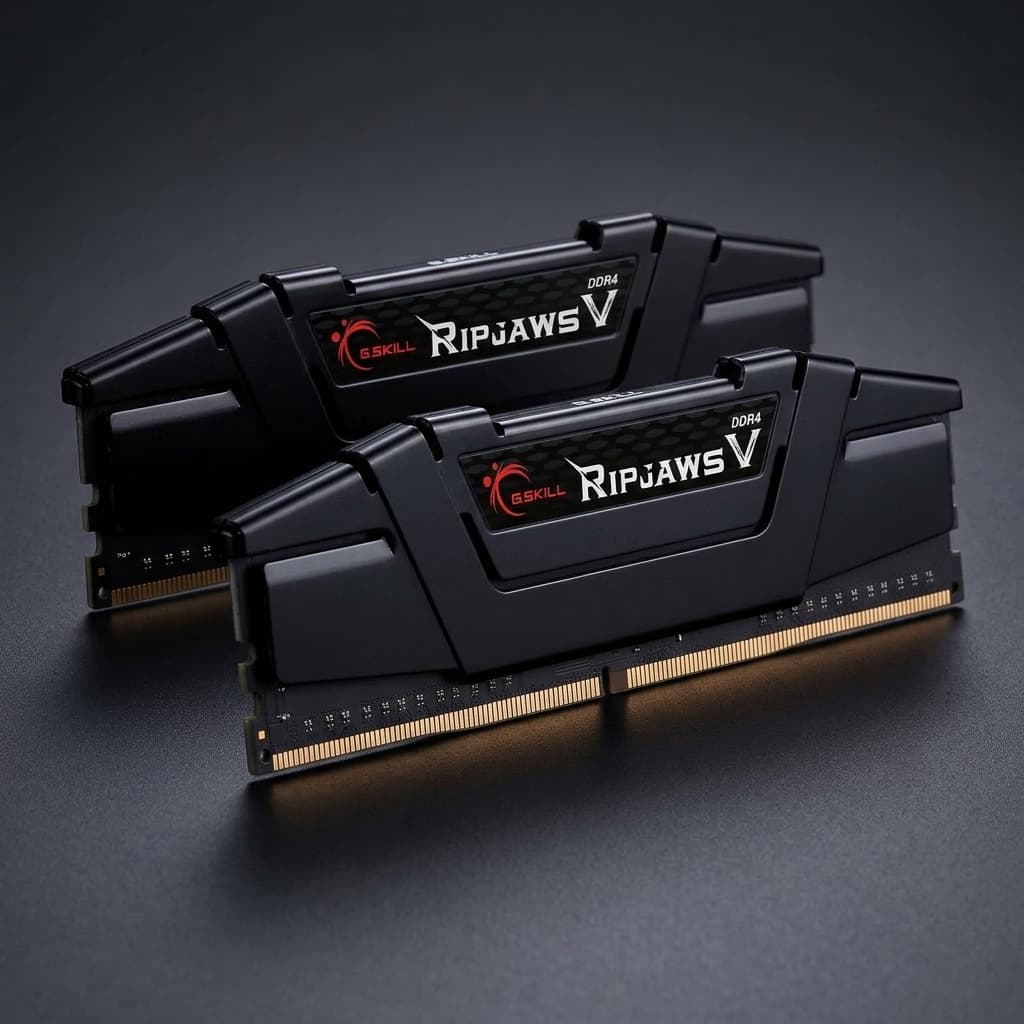
G.SKILL Ripjaws V Series DDR4 32GB RAM Kit (2×16GB) 3200MT/s CL16 — Black
The G.SKILL Ripjaws V F4-3200C16D-32GVK is a 32GB (2×16GB) dual-channel DDR4 desktop memory kit. Its Intel XMP 2.0 profile is rated for up to 3200MT/s at CL16-18-18-38 and 1.35V. By default it runs at 2133MT/s until XMP or an equivalent profile is enabled in BIOS. It suits gaming, multitasking and everyday work on compatible Intel and AMD DDR4 desktops.
G.SKILL Ripjaws V 32GB DDR4 3200MHz Review (F4-3200C16D-32GVK)
This G.SKILL Ripjaws V 32GB DDR4 3200MHz review covers model F4-3200C16D-32GVK: two 16GB modules, 32GB in total, with an Intel XMP 2.0 profile rated for up to DDR4-3200 at CL16-18-18-38 and 1.35V. The kit doesn't try to be flashy. It gives a DDR4 desktop enough memory for modern games, heavy browser use and everyday productivity in one plain black package.
If you're upgrading an existing DDR4 Intel or AMD Ryzen system from 16GB, or building a budget DDR4 gaming PC, the G.SKILL Ripjaws V 32GB DDR4 RAM Kit is worth a look. This review uses G.SKILL's published specifications and explains what they mean in practice. GearNexis has not run its own hands-on benchmarks of this kit, and we don't present any performance numbers as our own test results.
G.SKILL Ripjaws V Overview
Ripjaws V is G.SKILL's long-running mainstream DDR4 line. The F4-3200C16D-32GVK is the black 32GB dual-channel version rated for DDR4-3200 CL16. Here's what you get:
- 32GB dual-channel kit: two matched 16GB modules, one per memory channel on a typical two-channel desktop board.
- DDR4-3200 XMP rating: up to 3200MT/s once the XMP profile is enabled.
- CL16 timings: rated at 16-18-18-38.
- Intel XMP 2.0: a stored overclock profile that motherboards can load. AMD boards usually read it through DOCP, A-XMP or a similarly named setting.
- Black heat spreader: with a module height of 42mm, according to G.SKILL.
- Desktop DDR4 platforms: Intel and AMD DDR4 desktop boards. Support depends on your CPU, motherboard and BIOS.
DDR4-3200 CL16 is a common speed and latency for DDR4 desktops. Many Intel and AMD DDR4 CPUs officially support DDR4-3200, so a kit at this rating often runs at a speed the platform was designed for, without pushing the memory controller beyond its rating.
Key Specifications
| Specification | F4-3200C16D-32GVK |
|---|---|
| Series | Ripjaws V |
| Model number | F4-3200C16D-32GVK |
| Color | Black |
| Total capacity | 32GB |
| Kit configuration | 2×16GB (dual-channel kit) |
| Memory type | DDR4 |
| Tested speed (XMP) | Up to 3200MT/s (PC4-25600) |
| Tested timings (XMP) | 16-18-18-38 |
| Tested voltage (XMP) | 1.35V |
| Default SPD speed | 2133MT/s |
| Default SPD voltage | 1.20V |
| Memory profile | Intel XMP 2.0 |
| Form factor | 288-pin desktop DIMM (UDIMM) |
| Buffering / ECC | Unbuffered, Non-ECC |
| Module height | 42mm (per G.SKILL) |
| RGB lighting | None |
| Warranty | Limited Lifetime (manufacturer and regional terms apply) |
Specifications are from G.SKILL's published data for F4-3200C16D-32GVK. This is a different product from F4-3200C16D-32GVKA and from other Ripjaws V timing, speed or capacity variants.
Design and Build Quality
Ripjaws V uses G.SKILL's angular, claw-style heat spreader. On this SKU it's finished in black, with no lighting and no RGB connectors or software. That makes it an easy fit in an all-black build, a windowless case or a workstation-style system where you don't want anything glowing.
Height and CPU cooler clearance
G.SKILL lists a module height of 42mm. That's taller than low-profile kits, which are usually around 34mm, but shorter than many RGB kits. Most tower air coolers and AIO liquid coolers will clear it. Some large dual-tower air coolers overhang the first DIMM slot, though, so compare the cooler's RAM clearance spec with 42mm before you buy. If space is tight, a lower-profile kit may be the safer pick.
Memory Speed, Timings, and Performance Explained
What DDR4-3200 and PC4-25600 mean
"DDR4-3200" means 3200 megatransfers per second (MT/s). You'll often see it written as "3200MHz", but MT/s is the accurate unit. PC4-25600 is the module's bandwidth label: 3200MT/s × 8 bytes per transfer is about 25,600MB/s per module. Two modules in dual-channel mode give the memory controller two of those paths in parallel.
What CL16 and 16-18-18-38 mean
The four numbers are primary timings, measured in clock cycles:
- 16 (CL, CAS latency): cycles between a read command and the first data coming back.
- 18 (tRCD): cycles to activate a row before it can be read or written.
- 18 (tRP): cycles to close one row before opening another.
- 38 (tRAS): the minimum time a row stays open.
Lower is better at the same speed. A common rough guide to first-word latency is (CL ÷ transfer rate) × 2000. For DDR4-3200 CL16 that comes to about 10ns, a typical result for mainstream DDR4.
XMP vs. default SPD speed
This is the point that most often confuses buyers. The 3200MT/s rating lives in an XMP profile, which is a stored memory overclock. With default BIOS settings, the kit boots at its standard SPD speed of 2133MT/s at 1.20V. To run at the rated DDR4-3200 CL16 at 1.35V, you enable XMP on Intel boards, or DOCP/A-XMP (or similar) on many AMD boards.
Whether the system stays stable at 3200MT/s depends on the CPU's memory controller, the motherboard, the BIOS version and how many modules are installed. G.SKILL says itself that the rated speed depends on the other components in the system. Most current DDR4 platforms handle DDR4-3200 well, but nobody can promise it for every system.
Why dual-channel matters
Fitting one module per channel, usually slots A2 and B2 (check your manual), roughly doubles the memory bandwidth available compared with a single stick. Integrated graphics and some games and creative apps are sensitive to bandwidth, so a 2×16GB kit is usually a better choice for a desktop than one 32GB module.
Gaming and Everyday Performance
Memory speed and timings matter less in games than the GPU and CPU do. Faster memory mostly helps in CPU-limited situations, while running out of capacity can cause stutter. That's where 32GB earns its keep:
- Modern gaming: 16GB still runs many games, but several recent titles use more than that once you add a browser, Discord, game launchers and overlays. 32GB leaves room for all of it.
- Everyday computing and web browsing: lots of browser tabs and background apps fit comfortably in 32GB.
- Multitasking: gaming while streaming, or keeping office apps, chat and media open together, is less likely to push the system into using the page file.
- Productivity and content creation: photo editing, 1080p–1440p video editing, coding with containers, and light virtualization all benefit from the extra memory. Very large 4K/8K timelines, big datasets or several VMs may need 64GB or more.
- General upgrades: on an older DDR4 desktop, going from 8GB or 16GB to 32GB is often one of the most noticeable upgrades for responsiveness under load.
We don't quote FPS numbers here. Frame rates depend on the GPU, CPU, resolution and game settings, and this kit can't promise any particular result.
Intel and AMD Compatibility
What your system needs
- A DDR4 desktop motherboard with 288-pin DIMM slots. DDR4 and DDR5 are physically keyed differently, so this kit can't be installed in a DDR5-only board. Laptops need SO-DIMMs and won't take it either.
- Support for unbuffered non-ECC memory. Servers and workstations that require registered (RDIMM) ECC memory won't accept it.
Intel DDR4 platforms
Many Intel desktop platforms use DDR4, from earlier Core generations through 12th–14th Gen boards with DDR4 slots (some B660, B760, Z690 and Z790 models). Some 12th–14th Gen boards are DDR5-only, so check which memory type your exact board supports. On Intel boards, enable the XMP profile in BIOS to run at 3200MT/s.
AMD Ryzen DDR4 platforms
All AM4 Ryzen desktops (300, 400 and 500-series chipsets such as B450, X570 and B550) use DDR4. AM5 is DDR5-only. On AMD boards the XMP profile usually appears as DOCP, A-XMP or a similar option. Many Ryzen 3000 and 5000-series CPUs officially support DDR4-3200, which makes this rating a sensible match for them.
QVL, BIOS and memory controller limits
For the best chance of trouble-free operation, check your motherboard's memory QVL (Qualified Vendors List) and G.SKILL's own compatibility tools, and update the BIOS before enabling XMP. Kits that aren't on a QVL often work fine, but a QVL listing tells you the combination was validated. Older CPUs, or boards with four DIMMs installed, may need a lower speed or manual tuning.
Pros and Cons
Pros
- 32GB capacity gives modern games and multitasking plenty of headroom
- Matched 2×16GB kit for dual-channel operation
- XMP 2.0 profile for DDR4-3200 at CL16-18-18-38, 1.35V
- 3200MT/s matches the officially supported memory speed of many DDR4 CPUs
- Plain black, non-RGB design fits most builds
- Limited lifetime warranty from G.SKILL
Cons
- DDR4 only, so it won't work in DDR5 platforms such as AM5 or DDR5-only Intel boards
- Boots at 2133MT/s; XMP/DOCP has to be enabled to reach 3200MT/s
- 42mm height can conflict with some large air coolers
- No RGB lighting, if you want a lit build
- 32GB may be too little for very large professional workloads
G.SKILL Ripjaws V vs. Competitors
These are popular 32GB (2×16GB) DDR4-3200 alternatives. All of them are DDR4 desktop kits. Specifications come from manufacturer or retailer listings for the model numbers shown. Where full sub-timings weren't consistently published, only the CAS latency is listed.
| Product | Capacity | Memory Speed | CAS Latency | Voltage | XMP or Memory Profile | Design | RGB | Main Difference |
|---|---|---|---|---|---|---|---|---|
| G.SKILL Ripjaws V 32GB (F4-3200C16D-32GVK) | 32GB (2×16GB) | 3200MT/s (XMP) | CL16-18-18-38 | 1.35V | Intel XMP 2.0 | Black heat spreader, 42mm | No | Tighter tRCD/tRP than the Corsair LPX listing |
| Corsair Vengeance LPX DDR4 32GB (CMK32GX4M2E3200C16) | 32GB (2×16GB) | 3200MT/s (XMP) | CL16-20-20-38 | 1.35V | Intel XMP 2.0 | Low-profile black heat spreader | No | Lower height for cooler clearance |
| Kingston FURY Beast DDR4 32GB (KF432C16BBK2/32) | 32GB (2×16GB) | 3200MT/s (XMP) | CL16 | 1.35V | Intel XMP | Black low-profile heat spreader | No | Low-profile Kingston alternative |
| Crucial Pro DDR4 32GB (CP2K16G4DFRA32A) | 32GB (2×16GB) | 3200MT/s (standard) | CL22 | 1.2V | Standard JEDEC-speed kit | Black heat spreader | No | Runs 3200 at 1.2V without overclocking, but with looser timings |
| TEAMGROUP T-Force Vulcan Z DDR4 32GB (TLZGD432G3200HC16FDC01) | 32GB (2×16GB) | 3200MT/s (XMP) | CL16 | 1.35V | Intel XMP | Gray low-profile heat spreader | No | Gray finish, low-profile design |
Which kit suits which buyer?
- G.SKILL Ripjaws V 32GB: a good fit if you want CL16-18-18-38 at DDR4-3200 and your cooler clears 42mm. On paper, its tRCD and tRP of 18 are tighter than the 20-20 listed for the Corsair LPX E-revision kit.
- Corsair Vengeance LPX DDR4 32GB: the safer pick when cooler clearance is tight, thanks to its low-profile heat spreader. Its listed sub-timings are looser.
- Kingston FURY Beast DDR4 32GB: a low-profile CL16 option from a major memory brand, for buyers who prefer Kingston's support and ecosystem.
- Crucial Pro DDR4 32GB: best for buyers who want 3200MT/s at standard voltage with as little BIOS tweaking as possible, or who use prebuilt systems where XMP options are limited. CL22 means higher latency than the CL16 kits.
- TEAMGROUP T-Force Vulcan Z DDR4 32GB: a low-profile CL16 kit with a gray finish that suits gray or silver themed builds.
No single kit wins on every point. Among the CL16 kits, the real-world differences are usually small, so cooler clearance, looks, warranty experience and current price often decide it. Compare prices on the day you buy.
Who Should Buy G.SKILL Ripjaws V 32GB?
- DDR4 desktop upgraders going from 8GB or 16GB on a compatible board
- Gamers who want 32GB of headroom for recent games plus background apps
- Multitaskers who keep many browser tabs, chat and media open at once
- Productivity users doing office work, coding, photo editing and moderate video editing
- Intel DDR4 builders on supported DDR4 boards
- AMD Ryzen AM4 builders, where DDR4-3200 CL16 is a common and well-supported setup
Who Should Avoid It?
- DDR5 system owners or builders (AM5 and DDR5-only Intel boards). Look at DDR5 kits instead.
- Laptop and mini-PC users whose systems need SO-DIMMs
- Server and workstation users who need registered ECC memory
- Heavy professional users working on large datasets, many VMs or high-resolution video, who may need 64GB or more
- Builders with very tall air coolers whose RAM clearance is under 42mm
None of these are flaws in the kit. They're cases where a different memory type or capacity fits better.
Final Verdict
The G.SKILL Ripjaws V 32GB DDR4-3200 CL16 kit (F4-3200C16D-32GVK) is a straightforward, sensible memory upgrade for compatible DDR4 desktops. You get 32GB across two 16GB modules, an Intel XMP 2.0 profile for DDR4-3200 at CL16-18-18-38 and 1.35V, an understated black design, and G.SKILL's limited lifetime warranty.
The main limitations are practical rather than serious. It's DDR4 only, it starts at 2133MT/s until you enable XMP or DOCP, and its 42mm height needs checking against large air coolers. Reaching 3200MT/s also depends on your CPU, motherboard and BIOS.
If you're on an AM4 Ryzen or a DDR4 Intel platform and want more capacity for gaming and multitasking, this is a solid kit to shortlist. Check your board's QVL, confirm cooler clearance, and compare current prices with the alternatives above before you check the G.SKILL Ripjaws V 32GB on Amazon.
Related GearNexis Guides
Pros
- 32GB capacity gives modern games and multitasking plenty of headroom
- Matched 2×16GB kit for dual-channel operation
- XMP 2.0 profile for DDR4-3200 at CL16-18-18-38, 1.35V
- 3200MT/s matches the officially supported memory speed of many DDR4 CPUs
- Plain black, non-RGB design fits most builds
- Limited lifetime warranty from G.SKILL
Cons
- DDR4 only, so it won't work in DDR5 platforms such as AM5 or DDR5-only Intel boards
- Boots at 2133MT/s; XMP/DOCP has to be enabled to reach 3200MT/s
- 42mm height can conflict with some large air coolers
- No RGB lighting, if you want a lit build
- 32GB may be too little for very large professional workloads
Spec Sheet
Specifications
General
| Product Name | G.SKILL Ripjaws V Series DDR4 |
|---|---|
| Model Number | F4-3200C16D-32GVK |
| Brand | G.SKILL |
| Series | Ripjaws V |
| Color | Black |
Capacity
| Total Capacity | 32GB |
|---|---|
| Kit Configuration | 2×16GB (Dual Channel Kit) |
Memory
| Memory Type | DDR4 |
|---|---|
| Rated Speed | Up to 3200MT/s (XMP) |
| Standard | PC4-25600 |
| CAS Latency | CL16 |
| Tested Timings | 16-18-18-38 |
| Tested Voltage | 1.35V |
| Default SPD Speed | 2133MT/s |
| Default SPD Voltage | 1.20V |
| Form Factor | 288-pin desktop DIMM (UDIMM) |
| Error Correction | Non-ECC |
| Buffering | Unbuffered |
Profile
| Memory Profile | Intel XMP 2.0 |
|---|
Cooling
| Heat Spreader | Black Ripjaws V heat spreader (no fan) |
|---|---|
| Module Height | 42mm |
Lighting
| RGB | None |
|---|
Warranty
| Warranty | Limited Lifetime (manufacturer and regional terms apply) |
|---|
Frequently Asked Questions
Is G.SKILL Ripjaws V 32GB DDR4 RAM good for gaming?+
Does the F4-3200C16D-32GVK run at 3200MT/s out of the box?+
What are the timings of G.SKILL Ripjaws V 32GB DDR4-3200?+
Does this RAM support Intel XMP 2.0?+
Is G.SKILL Ripjaws V compatible with AMD Ryzen?+
Is 32GB of RAM enough for gaming in 2026?+
Can I use this DDR4 RAM in a DDR5 motherboard?+
Why does my G.SKILL RAM run at 2133MT/s instead of 3200MT/s?+
Is 2×16GB better than 1×32GB for gaming?+
Can I mix two different G.SKILL RAM kits?+
Does G.SKILL Ripjaws V have RGB lighting?+
Should I upgrade from 16GB to 32GB of RAM?+
As an Amazon Associate we earn from qualifying purchases. See our affiliate disclosure.