
Crucial
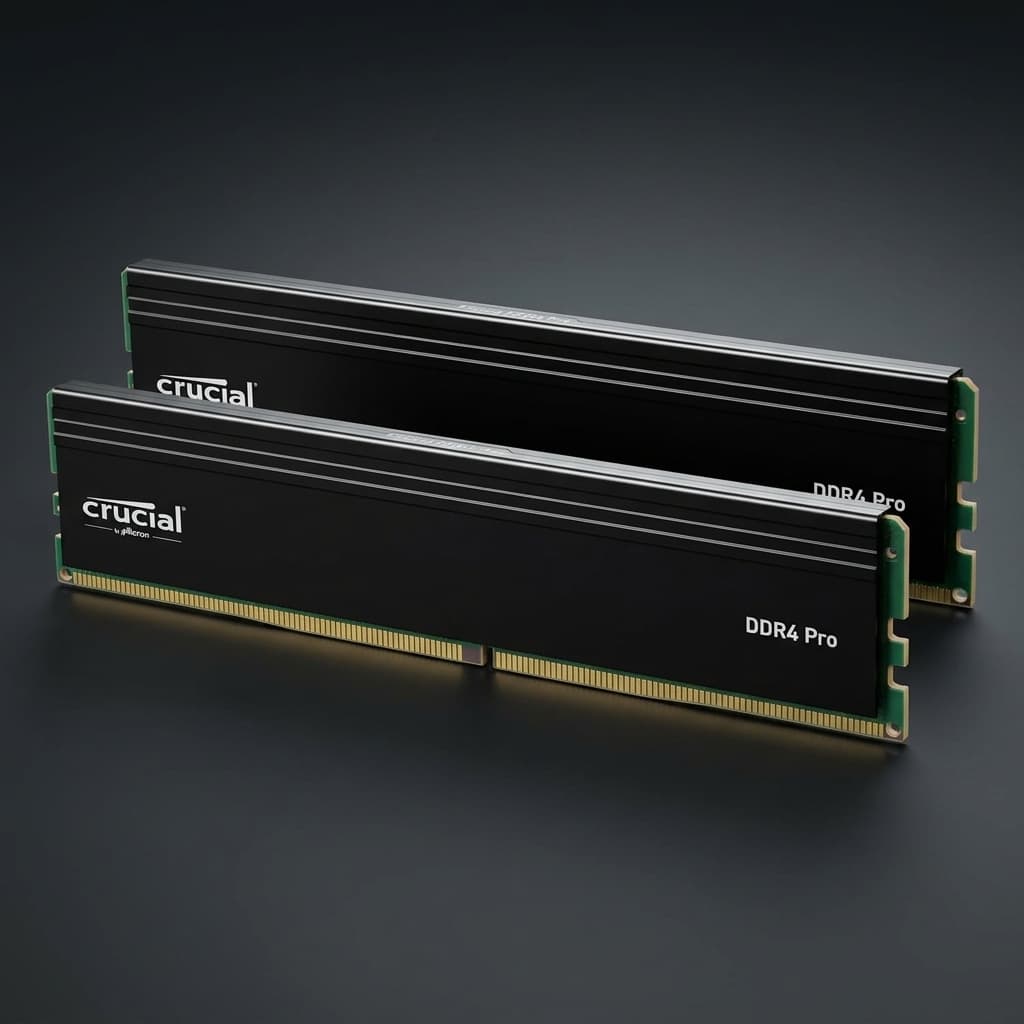
Crucial Pro 32GB DDR4 RAM Kit (2×16GB) 3200MHz Desktop Memory — CP2K16G4DFRA32A
Crucial Pro 32GB DDR4 RAM Kit (2×16GB) is a dual-channel desktop memory kit rated at DDR4-3200 with CL22 timings at 1.2V and Intel XMP 2.0 support. Designed for compatible Intel and AMD Ryzen DDR4 systems, it offers a practical 32GB configuration for gaming, multitasking and everyday desktop workloads.
If your desktop runs on DDR4 and 16GB is starting to feel tight, the Crucial Pro 32GB DDR4 RAM Kit (model CP2K16G4DFRA32A) is one of the simplest upgrades available. This Crucial Pro 32GB DDR4 3200MHz RAM review covers what the kit is, how its CL22 timings compare with CL16 gaming kits, which Intel and AMD Ryzen systems it suits, and where it falls short.
The kit pairs two 16GB modules for a dual-channel 32GB setup rated at DDR4-3200. It is aimed at gaming PC builders, everyday desktop users and anyone upgrading a compatible DDR4 system who wants more capacity without RGB or tall heat spreaders.
Transparency note: GearNexis has not physically tested this kit. This review is based on manufacturer specifications, retailer documentation and established DDR4 platform behavior. We do not quote benchmarks or FPS figures we have not measured.
Crucial Pro 32GB DDR4 Overview
Crucial launched its Pro memory line in May 2023 in DDR4 and DDR5 versions. The DDR4 Pro range sits above the brand's basic modules with an aluminum heat spreader, but it is not an extreme-overclocking product. Its rated timings follow the standard JEDEC DDR4-3200 specification.
- 32GB total capacity split across two 16GB modules
- DDR4-3200 (3200MT/s) rated speed, with CL22 timings at 1.2V
- Dual-channel operation when the modules are installed in the slots your motherboard specifies
- Intel XMP 2.0 profile support, plus compatibility with AMD Ryzen DDR4 platforms
- Low-profile aluminum heat spreader with no RGB lighting
Its niche is simple: a capacity-first, standards-based 32GB DDR4 kit. Gamers chasing the tightest timings usually shop for CL16 kits. Buyers who mainly need 32GB, low voltage and broad compatibility are the ones this kit is designed for.
Availability note: In December 2025, Micron announced it would exit the Crucial consumer business, with shipments planned through February 2026. Micron said warranty service and support for existing Crucial products would continue. Retail availability of this kit may therefore vary, so check the listing before you plan a build around it.
Crucial Pro CP2K16G4DFRA32A Technical Specifications
| Specification | Crucial Pro CP2K16G4DFRA32A |
|---|---|
| Brand | Crucial (Micron) |
| Model number | CP2K16G4DFRA32A |
| Total capacity | 32GB |
| Kit configuration | 2×16GB (module: CP16G4DFRA32A) |
| Memory type | DDR4 SDRAM |
| Rated speed | DDR4-3200 (3200MT/s) |
| Module standard | PC4-25600 |
| CAS latency | CL22 |
| Timings | 22-22-22 |
| Voltage | 1.2V |
| Form factor | 288-pin desktop UDIMM |
| ECC / buffering | Non-ECC, unbuffered |
| Memory profile | Intel XMP 2.0 |
| Heat spreader | Low-profile aluminum |
| RGB lighting | No |
| Warranty | Limited lifetime (regional terms apply) |
Crucial does not publish an official module height in the sources we could verify, so we have not listed one. The heat spreader is designed as low-profile, but check your CPU cooler's RAM clearance specification if space is tight.
Design and Build Quality
The Crucial Pro DDR4 modules use a black aluminum heat spreader with a clean, understated design and Crucial Pro branding. There is no RGB lighting, no lighting software and no extra cables.
The low-profile design suits large air coolers that overhang the DIMM slots, compact cases and builds where the RAM should blend in. The plain finish works well in black or neutral builds. If you want the memory to be a visual centerpiece, an RGB kit is the better fit.
At 1.2V, these modules run at standard DDR4 voltage rather than the 1.35V most CL16 gaming kits need. That means lower power and heat, though the difference is small in a typical desktop. The heat spreader is mainly a finishing and protection feature at this voltage.
Memory Speed, Timings and Performance Explained
What DDR4-3200 and PC4-25600 mean
DDR4-3200 describes an effective data rate of 3200 megatransfers per second (MT/s). DDR memory transfers data twice per clock cycle, so the underlying I/O clock is 1600MHz. Retailers often write "3200MHz", but MT/s is the technically correct unit.
PC4-25600 is the module's theoretical peak bandwidth: 3200MT/s multiplied by the 8-byte (64-bit) module bus equals 25,600MB/s per module. In dual-channel mode, the theoretical peak doubles to about 51.2GB/s. Real-world bandwidth is always lower than these figures.
CAS latency and the 22-22-22 timings
CAS latency (CL) is the number of clock cycles between a read command and the first data becoming available. The kit's primary timings, 22-22-22, are CL, tRCD and tRP.
Converted to time, CL22 at DDR4-3200 is about 13.75 nanoseconds (22 ÷ 1600MHz). A CL16 DDR4-3200 kit works out to 10 nanoseconds. That is the clearest technical difference between this kit and enthusiast DDR4-3200 kits. Those kits get tighter timings by running at 1.35V through an XMP profile.
How much this matters depends on the workload. Latency-sensitive tasks, including some CPU-bound games, can respond to tighter timings. Capacity-heavy workloads usually benefit more from having 32GB at all. We have not measured this kit, so we make no performance-percentage claims.
XMP, BIOS settings and real operating speed
The kit supports Intel XMP 2.0. Because CL22 at 3200MT/s matches a standard JEDEC DDR4-3200 configuration, some platforms that officially support DDR4-3200 may run it at rated speed with little or no configuration. On others, you may need to enable XMP in the BIOS or set the speed manually.
Actual operating speed depends on the CPU's memory controller, the motherboard and its BIOS. If a platform only supports DDR4-2666 or DDR4-3000, the kit is designed to run at those lower speeds instead. That is why the Amazon listing mentions 3000MHz and 2666MHz. These are fallback speeds a system may select, not separate rated profiles. Don't assume every system will run the kit at 3200MT/s automatically.
Why dual-channel matters
Two modules let the memory controller use both channels at once, which doubles the theoretical bandwidth compared with a single module. Install the sticks in the slots your motherboard manual recommends, usually the second and fourth slots on four-slot boards. If you don't, the system may run in single-channel mode.
Gaming and Everyday Performance
For modern gaming, 32GB gives comfortable headroom over 16GB, especially when Discord, a browser, game launchers and overlays run alongside the game. Some recent titles use more system memory than older games did. The extra capacity can help reduce paging to storage when memory runs out. It doesn't guarantee higher FPS, which depends mostly on your GPU and CPU.
For everyday use, web browsing and multitasking, the kit's main benefit is capacity. Dozens of browser tabs, office apps, communication tools and background services can all stay in memory.
For productivity and light content creation, such as photo editing, 1080p video editing, code compilation or running a small virtual machine, 32GB is a practical baseline. Heavier professional workloads, like large 4K or 8K timelines, big datasets or several VMs, may need 64GB or more.
Intel and AMD Ryzen Compatibility
This kit only works in motherboards with DDR4 desktop DIMM slots. DDR4 and DDR5 modules are keyed differently and cannot be swapped, so it will not physically fit a DDR5 board.
AMD Ryzen DDR4 platforms
AMD's AM4 platform uses DDR4. Ryzen 5000 desktop processors officially support DDR4-3200, which makes them a natural fit. Older Ryzen generations may officially support lower speeds, and the kit would run at those speeds. AMD's AM5 platform (Ryzen 7000 and 9000) is DDR5-only and is not compatible. Our AMD Ryzen CPU and motherboard compatibility guide explains the socket and chipset differences.
Intel DDR4 platforms
Intel 12th, 13th and 14th Gen Core desktop processors support both DDR4 and DDR5, but each LGA1700 motherboard supports only one type. Check that your board is a DDR4 model. Earlier Intel platforms such as 10th and 11th Gen are DDR4 only, though their officially supported speed varies by processor. Intel's Core Ultra 200S desktop platform (LGA1851) uses DDR5 and is not compatible.
Check the QVL and BIOS
Before buying, check your motherboard's Qualified Vendor List (QVL) and Crucial's compatibility tools for your exact board. Updating to the latest BIOS can improve memory compatibility, especially on older AM4 boards. No memory kit is guaranteed to work in every Intel or AMD motherboard.
Pros and Cons
Pros
- 32GB capacity in a dual-channel 2×16GB configuration
- Rated DDR4-3200 at a standard 1.2V
- Standards-based CL22 timings with XMP 2.0 support
- Low-profile heat spreader helps with cooler clearance
- Clean, non-RGB design with no software to install
- Practical upgrade path from 16GB on compatible DDR4 systems
- Limited lifetime warranty
Cons
- CL22 timings are looser than common CL16 DDR4-3200 gaming kits
- DDR4-only; not compatible with DDR5 motherboards
- No RGB lighting for builders who want it
- Actual speed depends on CPU, motherboard and BIOS configuration
- Limited tuning headroom compared with enthusiast-binned kits
- Retail availability may vary following Micron's exit from the Crucial consumer business
Crucial Pro vs Corsair, Kingston, G.SKILL and TEAMGROUP
All five kits below are 32GB (2×16GB) DDR4-3200 desktop kits. The key differences are timings, voltage and heat spreader design.
| Product | Capacity | Memory Speed | CAS Latency | Voltage | Design | RGB | Main Difference |
|---|---|---|---|---|---|---|---|
| Crucial Pro 32GB DDR4 (CP2K16G4DFRA32A) | 32GB (2×16GB) | DDR4-3200 | CL22 (22-22-22) | 1.2V | Low-profile aluminum | No | Standard JEDEC-style timings at 1.2V |
| Corsair Vengeance LPX DDR4 32GB (CMK32GX4M2E3200C16) | 32GB (2×16GB) | DDR4-3200 | CL16 (16-20-20-38) | 1.35V | Low-profile aluminum | No | Tighter CAS latency via XMP |
| Kingston FURY Beast DDR4 32GB (KF432C16BBK2/32) | 32GB (2×16GB) | DDR4-3200 | CL16 (16-20-20) | 1.35V | Low-profile heat spreader | No | CL16 XMP kit with a second 3000MT/s profile |
| G.SKILL Ripjaws V DDR4 32GB (F4-3200C16D-32GVK) | 32GB (2×16GB) | DDR4-3200 | CL16 (16-18-18-38) | 1.35V | 42mm aluminum heat spreader | No | Tightest listed timings here; taller modules |
| TEAMGROUP T-Force Vulcan Z DDR4 32GB | 32GB (2×16GB) | DDR4-3200 | CL16 (secondary timings vary by SKU) | 1.35V | Low-profile aluminum | No | CL16 kit with a slim heat spreader |
Specifications are taken from manufacturer and retailer documentation for the model numbers listed. Timings for each competitor are the XMP-rated values. Confirm the exact SKU before purchase, because brands sell several variants under the same product name.
Which kit fits which buyer?
Choose Corsair Vengeance LPX DDR4 32GB if you want a widely used CL16 kit with a low-profile heat spreader and you're comfortable enabling XMP.
Choose Kingston FURY Beast DDR4 32GB if you want CL16 timings plus a second XMP profile at 3000MT/s, which can be useful on platforms that won't hold 3200MT/s.
Choose G.SKILL Ripjaws V DDR4 32GB if you want the tightest listed primary timings in this group and have confirmed that your cooler clears 42mm modules.
Choose TEAMGROUP T-Force Vulcan Z DDR4 32GB if you want a CL16 kit with a slim heat spreader. Check the exact SKU's secondary timings first.
Choose the Crucial Pro kit if you value standard 1.2V operation, a conservative JEDEC-based configuration and a clean low-profile design. It is the most standards-oriented kit here, while the competitors offer tighter timings at higher voltage. The better choice depends on whether you prioritize simplicity or the lowest latency, and on current pricing.
Who Should Buy Crucial Pro 32GB DDR4?
- DDR4 upgraders moving from 8GB or 16GB on a compatible AM4 or Intel DDR4 desktop
- Gamers who want 32GB of headroom for modern games plus background apps
- Multitaskers who keep many browser tabs, office apps and chat tools open
- Productivity users doing photo editing, light video work or development
- Builders who prefer stock settings and want a standard-voltage kit with a simple, non-RGB look
Who Should Consider Other Options?
- DDR5 builders: AM5 and Intel Core Ultra 200S systems need DDR5 memory
- Owners of non-DDR4 or laptop systems: this is a desktop UDIMM kit, not SO-DIMM laptop memory
- Workstation and server users who need ECC or registered (RDIMM) memory
- Heavy professional workloads such as large VMs, 8K video or big datasets, which may need 64GB or more
- Latency-focused enthusiasts who specifically want CL16 or tighter timings
Final Verdict: Is Crucial Pro 32GB DDR4 3200MHz Worth It?
The Crucial Pro 32GB DDR4 3200MHz RAM Kit is a sensible, low-fuss option for compatible DDR4 desktops. It delivers 32GB in a dual-channel 2×16GB configuration, rated DDR4-3200 at 1.2V, XMP 2.0 support and a low-profile, non-RGB heat spreader.
Its main trade-off is CL22 timings, which are looser than the CL16 kits from Corsair, Kingston, G.SKILL and TEAMGROUP. Its other limits are DDR4-only compatibility and the fact that real-world speed depends on your CPU, motherboard and BIOS.
If your priority is getting to 32GB on an AM4 or Intel DDR4 build with standard settings and a clean look, it deserves a place on your shortlist. If you want the lowest latency, compare it with the CL16 alternatives above at current prices. For your next steps, see our gaming PC build guide or browse more memory in our RAM category.
Pros
- 32GB capacity in a dual-channel 2x16GB configuration
- Rated DDR4-3200 at a standard 1.2V
- Standards-based CL22 timings with Intel XMP 2.0 support
- Low-profile aluminum heat spreader helps with CPU cooler clearance
- Clean non-RGB design with no software required
- Practical upgrade from 16GB on compatible DDR4 systems
- Limited lifetime warranty
Cons
- CL22 timings are looser than common CL16 DDR4-3200 gaming kits
- DDR4-only, so not compatible with DDR5 motherboards
- No RGB lighting
- Actual operating speed depends on CPU, motherboard and BIOS settings
- Less tuning headroom than enthusiast-binned kits
- Retail availability may vary after Micron's exit from the Crucial consumer business
Spec Sheet
Specifications
General
| Product Name | Crucial Pro DDR4 Desktop Memory |
|---|---|
| Model Number | CP2K16G4DFRA32A |
| Module Part Number | CP16G4DFRA32A (x2) |
| Brand | Crucial |
Capacity
| Total Capacity | 32GB |
|---|---|
| Kit Configuration | 2x16GB |
Memory
| Memory Type | DDR4 SDRAM |
|---|---|
| Rated Speed | DDR4-3200 (3200MT/s) |
| Standard | PC4-25600 |
| CAS Latency | CL22 |
| Timings | 22-22-22 |
| Rated Voltage | 1.2V |
| Form Factor | 288-pin desktop UDIMM |
| ECC | Non-ECC |
| Buffering | Unbuffered |
| Fallback Speeds | 3000MT/s or 2666MT/s on platforms limited to those speeds |
Compatibility
| Platforms | DDR4 desktop motherboards on supported Intel and AMD Ryzen platforms |
|---|---|
| Not Compatible With | DDR5 motherboards, laptop SO-DIMM slots, RDIMM/ECC-only servers |
Cooling
| Heat Spreader | Low-profile aluminum (black) |
|---|
Lighting
| RGB | No |
|---|
Profile
| Memory Profile | Intel XMP 2.0 |
|---|
Warranty
| Warranty | Limited lifetime (regional terms apply) |
|---|
Frequently Asked Questions
Is Crucial Pro 32GB DDR4 RAM good for gaming?+
Does the Crucial Pro CP2K16G4DFRA32A run at 3200MHz?+
What is the CAS latency of this Crucial Pro RAM kit?+
Is Crucial Pro 32GB DDR4 compatible with AMD Ryzen?+
Does this RAM work with Intel processors?+
Is 32GB RAM enough for gaming in 2026?+
Can I use this RAM with a DDR5 motherboard?+
Does Crucial Pro DDR4 support XMP?+
Is 2x16GB better than 1x32GB for dual-channel memory?+
Can I mix this Crucial Pro kit with another DDR4 RAM kit?+
Why might this 3200MHz RAM run at 2666MHz or 3000MHz?+
Should I upgrade from 16GB to 32GB RAM?+
As an Amazon Associate we earn from qualifying purchases. See our affiliate disclosure.