
CORSAIR
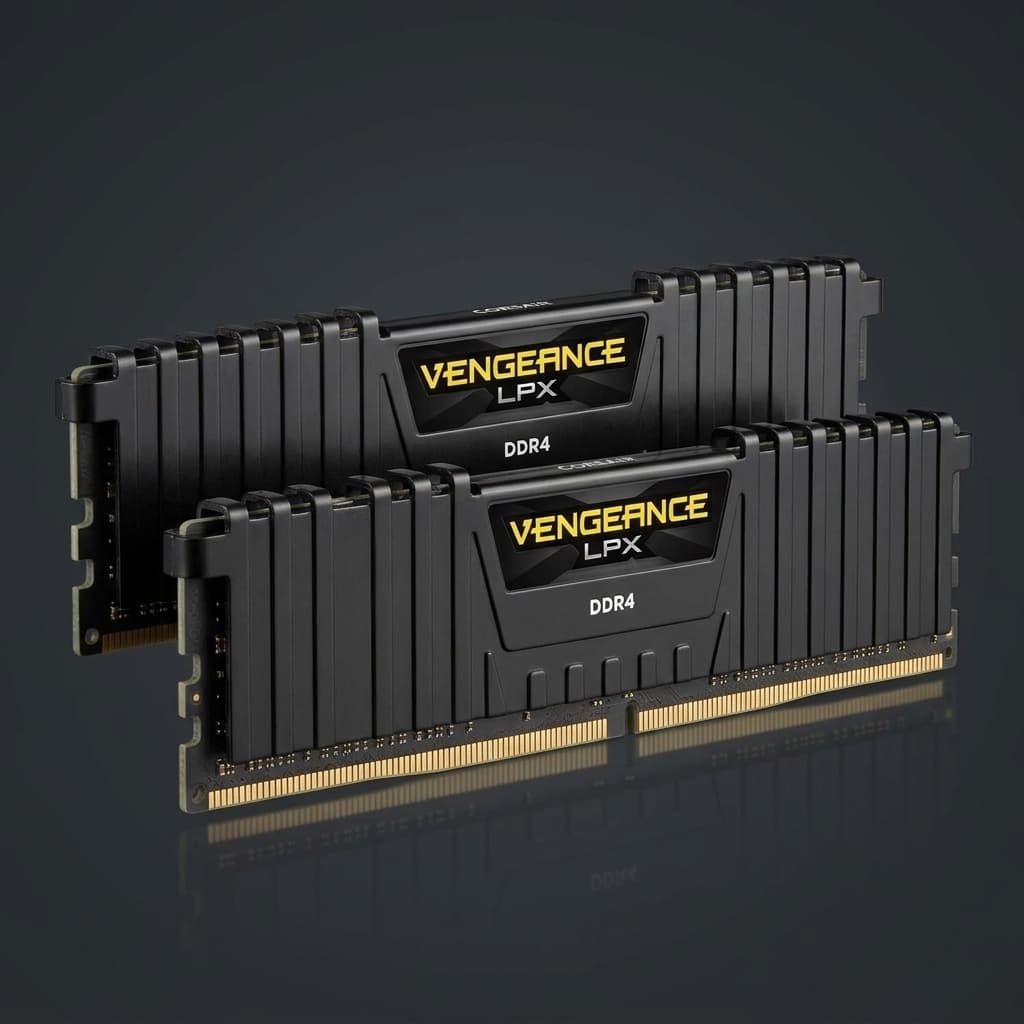
CORSAIR Vengeance LPX DDR4 RAM 32GB (2×16GB) 3200MHz CL16 Black
The CORSAIR Vengeance LPX 32GB (2×16GB) DDR4-3200 kit (CMK32GX4M2E3200C16) is a dual-channel desktop memory kit rated for 3200 MT/s at CL16-20-20-38 and a tested voltage of 1.35V via its Intel XMP 2.0 profile. Low-profile black anodized aluminum heat spreaders and a no-RGB design make it a simple, cooler-friendly upgrade for compatible Intel and AMD DDR4 PCs.
CORSAIR Vengeance LPX 32GB DDR4-3200 Review: Introduction
If you own a DDR4 desktop and want more headroom for gaming, multitasking, or creative work, the CORSAIR Vengeance LPX 32GB DDR4 RAM is a sensible option. The short answer: it is a well-matched, no-frills 32GB kit for DDR4 systems, but it is not for DDR5 motherboards, and you will usually need to enable XMP in the BIOS to get its rated 3200 MT/s speed.
The kit (model CMK32GX4M2E3200C16) includes two 16GB modules for 32GB total. It is rated for DDR4-3200 at CL16-20-20-38 and 1.35V through an Intel XMP 2.0 profile. The modules have low-profile anodized aluminum heat spreaders in plain black with no RGB lighting. It suits gamers, home-office users, and builders upgrading an existing Intel or AMD AM4 DDR4 system.
Quick Verdict
The CORSAIR Vengeance LPX 32GB DDR4-3200 kit offers 32GB of dual-channel memory with mainstream DDR4-3200 CL16 timings, a short heat spreader, and broad DDR4 platform support. Its strengths are capacity, a clean look, and good clearance under large air coolers. Its limits: no RGB, no native AMD EXPO profile, secondary timings of 20-20-38 that are looser than some CL16 rivals, and an SPD default of 2133 MT/s until XMP is enabled. For an existing DDR4 gaming PC that has 16GB or less, it is a logical upgrade. If you are building a new DDR5 platform, look elsewhere.
CORSAIR Vengeance LPX 32GB Specifications
| Specification | Detail |
|---|---|
| Model number | CMK32GX4M2E3200C16 |
| Capacity | 32GB |
| Module configuration | 2 × 16GB (dual-channel kit) |
| Memory generation | DDR4 |
| Rated (tested) speed | 3200 MT/s (PC4-25600) |
| Tested latency | CL16 |
| Timings | 16-20-20-38 |
| Tested voltage | 1.35V |
| SPD speed / latency | 2133 MT/s / CL15 |
| SPD voltage | 1.2V |
| Performance profile | Intel XMP 2.0 |
| Form factor | Desktop UDIMM |
| Pin count | 288-pin |
| Heat spreader | Anodized aluminum, low profile |
| Color | Black |
| RGB lighting | No |
| Fan included | No |
| Warranty (US) | Limited lifetime (per CORSAIR US product page) |
Design and Build Quality
Vengeance LPX is CORSAIR's understated memory line. These modules use a plain black anodized aluminum heat spreader with no lighting, so they fit almost any build theme, from all-black and monochrome to workstation builds where nobody sees the RAM. You do not need RGB software, extra cables, or lighting controllers.
CORSAIR says the modules use an eight-layer PCB that "helps manage heat and provides superior overclocking headroom," and that each IC is individually screened. These are manufacturer claims; GearNexis has not measured temperatures or overclocking results.
When installing, make sure each module's notch lines up with the DDR4 slot key, press firmly until the latches click, and use the dual-channel slots your motherboard manual recommends, usually the second and fourth slots from the CPU (A2/B2).
32GB Capacity: Is 2×16GB Enough?
For most home desktops, 32GB is a comfortable amount of memory. 16GB still runs many games, but 32GB gives more room for:
- Modern gaming: some recent titles use a lot of memory, especially with high-resolution textures or mods.
- Gaming while multitasking: Discord, a browser, launchers, and overlays running in the background.
- Streaming: encoding software running alongside the game.
- Web browsing: dozens of tabs and web apps open at once.
- Photo and video editing: larger projects, previews, and caches.
- Productivity and everyday use: office suites, virtual meetings, and light virtualization.
More capacity only helps when your workload actually needs more memory. 32GB will not raise frame rates on a system that never runs out of RAM.
A matched 2×16GB kit runs in dual-channel mode when installed in the correct slots. That gives the CPU two 64-bit memory channels instead of one, which typically means more memory bandwidth than a single 32GB module. One 32GB module leaves a slot free for later, but it runs single-channel until you add a second stick.
DDR4-3200 Speed and CL16 Latency Explained
DDR4-3200 means 3200 mega-transfers per second (MT/s). It is often marketed as "3200MHz," although the actual clock is half that, because DDR transfers data twice per clock. PC4-25600 is the module's peak theoretical bandwidth: about 25,600 MB/s per module (3200 MT/s × 8 bytes).
CL16 is the CAS latency: the number of clock cycles between a read command and the first data being returned. The full timing set 16-20-20-38 stands for CL-tRCD-tRP-tRAS, which are CAS latency, RAS-to-CAS delay, row precharge time, and row active time. Lower numbers at the same speed are tighter. This kit's tRCD and tRP of 20 are looser than kits rated 16-18-18.
Speed and latency work together. At DDR4-3200, CL16 works out to about 10 ns of true CAS latency, which is typical for mainstream DDR4. How much memory performance matters also depends on the CPU's memory controller, the platform, and the workload.
Intel XMP 2.0 and BIOS Setup
Out of the box, many systems boot this kit at its SPD default of 2133 MT/s and 1.2V. To use the rated 3200 MT/s CL16 profile at 1.35V, enable XMP:
- Install both modules in the dual-channel slots your motherboard recommends.
- Restart and enter the BIOS/UEFI, usually with Delete or F2.
- Find the memory or overclocking section (names include Ai Tweaker, OC, Extreme Tweaker, or Tweaker).
- Enable XMP, or A-XMP / DOCP / EXPO on boards that read XMP data, and pick the 3200 profile.
- Save and restart.
- Check the speed in the BIOS or in system tools such as Task Manager or CPU-Z.
BIOS menus differ between manufacturers. Every system is different: the CPU, the motherboard, the BIOS version, and how many modules are installed all affect whether the rated profile runs stably. If it does not, update the BIOS first.
AMD Ryzen Compatibility
This kit is a standard DDR4 UDIMM and works with compatible AMD AM4 DDR4 motherboards. CORSAIR's product page lists AMD 300, 400, and 500 series chipsets (including X570, B550, and A520). Many AMD boards can read Intel XMP data through features such as A-XMP (MSI), DOCP (ASUS), or EXPO/XMP settings (other vendors), so you can usually apply the 3200 profile with one setting.
This exact SKU is officially specified with Intel XMP 2.0 and has no native AMD EXPO profile. AMD's EXPO standard applies to DDR5, and AM5 motherboards are DDR5-only, so this DDR4 kit will not fit or work in any AM5 board. Whether you can run the rated speed also depends on the motherboard's memory support, the Ryzen CPU's memory controller, the BIOS version, the motherboard's QVL (qualified vendor list), and how many modules you install.
Intel Platform Compatibility
CORSAIR lists Intel 300, 400, 500, and 600 series chipsets plus X299. Many 12th–14th Gen Intel (LGA 1700) boards, including some 600- and 700-series models such as B760, come in separate DDR4 and DDR5 versions. These look alike but take different memory, so check the exact board model, often marked "D4" or "DDR4." 700-series chipsets do not appear in CORSAIR's listed compatibility for this page, so B760 DDR4 owners should check their board's QVL or CORSAIR's compatibility tool. Intel Core Ultra (LGA 1851) platforms are DDR5-only.
Gaming Performance and Productivity
A 32GB DDR4-3200 kit is a balanced choice for gaming, gaming with background apps, streaming, content creation, light workstation tasks, and everyday productivity. In practice, the main benefit is avoiding memory shortages: fewer stutters from paging, smoother app switching, and room for large projects. GearNexis does not publish FPS figures for this kit, because real performance depends on the CPU, GPU, motherboard, game, software, memory timings, and the rest of the system configuration.
Cooling and Low-Profile Design
The aluminum heat spreaders are there to spread heat away from the memory ICs. The LPX design is shorter than tall RGB or gaming-style heat spreaders, which helps in builds with large tower air coolers whose fans overhang the DIMM slots, in compact micro-ATX and small cases, and in standard ATX builds. Clearance is not guaranteed in every build, so check your CPU cooler's RAM-clearance specification and your motherboard's slot layout before buying.
CORSAIR Vengeance LPX vs Competitors
Below are four popular 32GB (2×16GB) DDR4-3200 alternatives. Specifications come from manufacturer and retailer listings; where listings disagree, check the label on the exact SKU you buy.
| RAM Kit | Capacity | Speed | CAS Latency | Voltage | RGB | Key Difference | Best For |
|---|---|---|---|---|---|---|---|
| CORSAIR Vengeance LPX 32GB DDR4-3200 | 32GB (2×16GB) | 3200 MT/s | CL16 (16-20-20-38) | 1.35V | No | Low-profile black aluminum spreader, XMP 2.0 | Simple, cooler-friendly DDR4 upgrades |
| Kingston FURY Beast 32GB DDR4-3200 | 32GB (2×16GB) | 3200 MT/s | CL16 (secondary timings vary by SKU) | 1.35V | No (RGB version sold separately) | Kingston Plug N Play auto-overclocking on supported systems plus XMP | Buyers wanting easy setup |
| G.SKILL Ripjaws V 32GB DDR4-3200 | 32GB (2×16GB) | 3200 MT/s | CL16 (16-18-18-38) | 1.35V | No | Tighter secondary timings; taller fin-style heat spreader | Value-focused tuners |
| TEAMGROUP T-Force Vulcan Z 32GB DDR4-3200 | 32GB (2×16GB) | 3200 MT/s | CL16 (secondary timings vary by listing) | 1.35V | No | Very low-profile spreader; several colors | Budget and compact builds |
| Crucial Pro 32GB DDR4-3200 | 32GB (2×16GB) | 3200 MT/s | CL22 (22-22-22) | 1.2V | No | Runs 3200 at standard 1.2V; looser timings | Plug-and-play stability, office PCs |
CORSAIR Vengeance LPX vs Kingston FURY Beast
The Kingston FURY Beast 32GB DDR4-3200 (kit KF432C16BB1K2/32) is also CL16 at 1.35V and non-RGB. Kingston promotes Plug N Play automatic overclocking on supported systems in addition to XMP, which appeals to buyers who never want to open the BIOS. Secondary timings vary between Kingston kit revisions, so check the label. Choose CORSAIR for its proven low-profile design, or Kingston if hands-off setup matters most.
CORSAIR Vengeance LPX vs G.SKILL Ripjaws V
The G.SKILL Ripjaws V 32GB DDR4-3200 (F4-3200C16D-32GVK) is rated 16-18-18-38 at 1.35V with XMP 2.0, so its tRCD and tRP are tighter than the CORSAIR kit's 20-20 on paper. Its heat spreader is taller with a fin-style design, so check cooler clearance. Ripjaws V suits buyers chasing slightly tighter timings, while Vengeance LPX suits buyers who care more about clearance.
CORSAIR Vengeance LPX vs TEAMGROUP T-Force Vulcan Z
The TEAMGROUP T-Force Vulcan Z 32GB DDR4-3200 (for example TLZGD432G3200HC16FDC01 in gray) is a CL16, 1.35V, XMP 2.0 kit with a very short heat spreader and several color options. Retail listings disagree on its secondary timings, so check the SKU. It is often positioned as a budget pick; CORSAIR offers a more recognizable brand ecosystem and a black finish.
CORSAIR Vengeance LPX vs Crucial Pro
The Crucial Pro 32GB DDR4-3200 (CP2K16G4DFRA32A) runs DDR4-3200 at CL22 and 1.2V. Its latency is looser, but it is a conservative, standard-voltage design that may reach 3200 without enabling a profile on platforms that support JEDEC DDR4-3200. It suits office or stability-first builds. The CORSAIR kit's CL16 timings are better suited to gamers willing to enable XMP.
Who Should Buy This RAM?
- Users upgrading an existing DDR4 desktop from 8GB or 16GB.
- Gamers who want 32GB of headroom for modern titles and background apps.
- Builders using compatible Intel DDR4 motherboards.
- Builders using compatible AMD AM4 motherboards such as B450, B550, or X570.
- People who prefer a simple black, no-RGB memory kit.
- Builders with large air coolers who need a low-profile heat spreader.
Who Should Avoid It?
- Anyone with a DDR5-only motherboard, including all AM5 and LGA 1851 boards and DDR5 versions of LGA 1700 boards.
- Buyers who want RGB lighting.
- Users who need more than 32GB, a different speed, or tighter timings for tuning.
- Anyone who needs memory validated on a specific motherboard QVL that does not list this kit.
Final Verdict
The CORSAIR Vengeance LPX 32GB DDR4-3200 CL16 is a dependable, sensible DDR4 upgrade. You get 32GB in a dual-channel 2×16GB kit, a rated 3200 MT/s at 16-20-20-38 and 1.35V through Intel XMP 2.0, and a low-profile black heat spreader that suits most builds and coolers. Its limitations are a lack of RGB, no native AMD EXPO profile, secondary timings that are looser than some CL16 rivals, and the need to enable XMP manually. For gamers and multitaskers with a compatible Intel or AMD AM4 DDR4 system, it is easy to recommend. If it fits your platform, you can check the current price of the CORSAIR Vengeance LPX 32GB DDR4 RAM on Amazon.
Pros
- 32GB total capacity, enough for gaming, streaming, and heavy multitasking
- Matched 2×16GB kit for dual-channel operation
- Rated DDR4-3200 at CL16 through Intel XMP 2.0
- Low-profile anodized aluminum heat spreaders help with large air coolers
- Clean black, no-RGB design; no lighting software required
- CORSAIR lists broad DDR4 support across Intel 300–600 series, X299, and AMD 300–500 series/X570
- Limited lifetime warranty (CORSAIR US)
Cons
- No RGB lighting
- DDR4 only; not compatible with DDR5 motherboards such as AM5 or LGA 1851
- Secondary timings (20-20-38) are looser than some CL16 rivals rated 16-18-18
- Boots at 2133 MT/s by default; XMP must be enabled for 3200 MT/s
- Officially specified with Intel XMP 2.0 only; no native AMD EXPO profile
- 3200 MT/s may not be the best choice for every DDR4 platform; some systems benefit from faster kits
Spec Sheet
Specifications
General
| Brand | CORSAIR |
|---|---|
| Product Family | Vengeance LPX |
| Model | CMK32GX4M2E3200C16 |
| Color | Black |
Memory
| Memory Type | DDR4 |
|---|---|
| Total Capacity | 32GB |
| Kit Configuration | 2 × 16GB |
| Channel Configuration | Dual-channel kit |
Performance
| Tested Speed | 3200 MT/s |
|---|---|
| Speed Rating | PC4-25600 |
| Tested Latency | CL16 |
| Timings | 16-20-20-38 |
| SPD Speed | 2133 MT/s |
| SPD Latency | CL15 |
| Performance Profile | Intel XMP 2.0 |
Voltage
| Tested Voltage | 1.35V |
|---|---|
| SPD Voltage | 1.2V |
Physical Design
| Form Factor | Desktop UDIMM |
|---|---|
| Pin Count | 288-pin |
| Heat Spreader | Anodized aluminum, low profile |
| PCB | Eight-layer (per CORSAIR) |
| RGB Lighting | No |
| Fan Included | No |
Compatibility
| Intel (per CORSAIR) | Intel 300, 400, 500, 600 Series; X299 (DDR4 boards only) |
|---|---|
| AMD (per CORSAIR) | AMD 300, 400, 500 Series; X570 (AM4 DDR4) |
| DDR5 Motherboards | Not compatible |
Warranty
| Warranty (US) | Limited lifetime |
|---|
Frequently Asked Questions
Is CORSAIR Vengeance LPX 32GB DDR4-3200 good for gaming?+
Is 32GB RAM enough for modern gaming?+
Does CMK32GX4M2E3200C16 support Intel XMP?+
Does this RAM support AMD EXPO?+
Is this RAM compatible with AMD Ryzen processors?+
Does it work with B550 motherboards?+
Does it work with Intel B760 DDR4 motherboards?+
What does CL16-20-20-38 mean?+
Does this RAM run at 3200MHz automatically?+
Does CORSAIR Vengeance LPX have RGB?+
Is 2×16GB better than 1×32GB?+
Can DDR4 RAM work in a DDR5 motherboard?+
As an Amazon Associate we earn from qualifying purchases. See our affiliate disclosure.