
ASUS
ASUS ProArt GeForce RTX 5070 Ti 16GB GDDR7 OC Edition Graphics Card
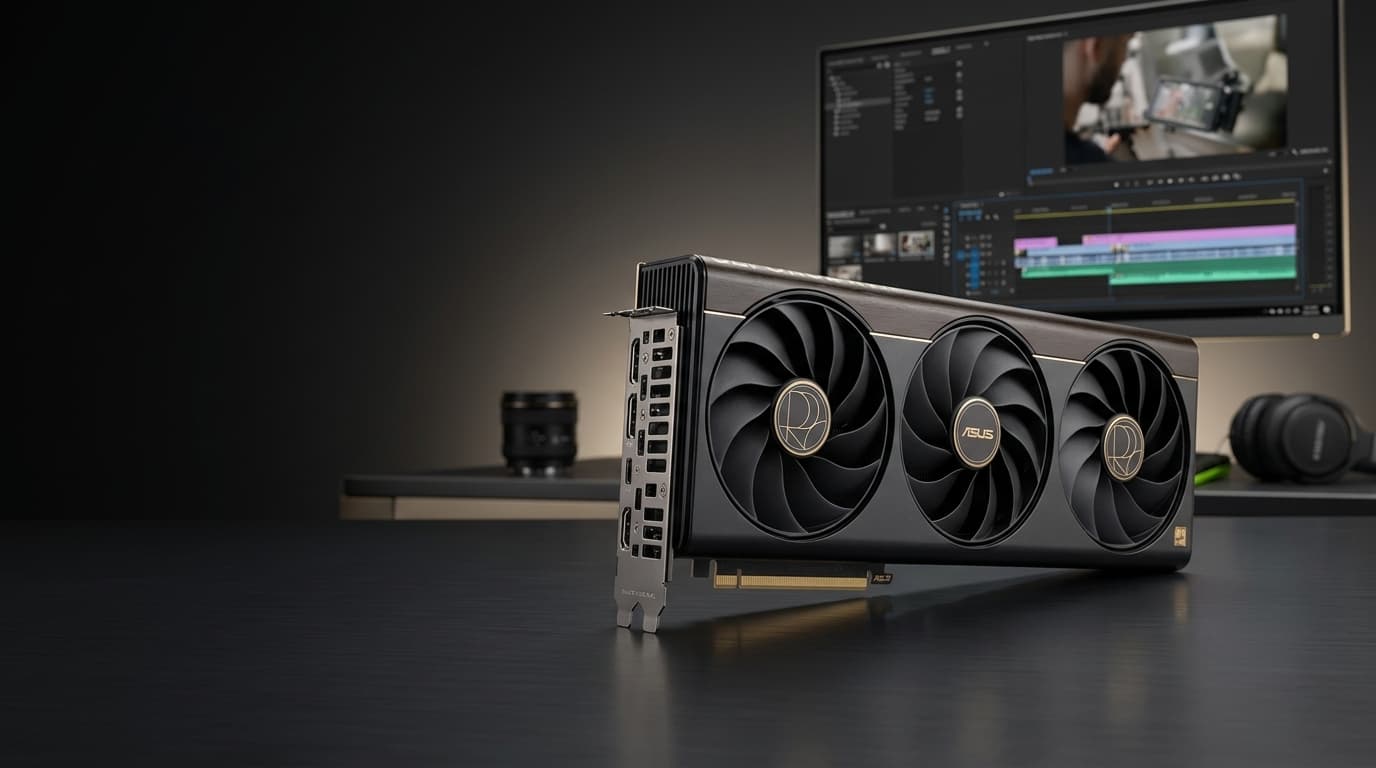
ASUS's ProArt GeForce RTX 5070 Ti OC Edition pairs NVIDIA's Blackwell RTX 5070 Ti and 16GB of GDDR7 with a 2.5-slot vapor-chamber cooler, a USB-C video output, and wood-trim styling. It is a strong 1440p, capable 4K, and NVIDIA-optimized creator card, but it costs more than basic RTX 5070 Ti models that use the same GPU.
ASUS ProArt RTX 5070 Ti Review: Gaming, Creative Performance & Value
The ASUS ProArt GeForce RTX 5070 Ti 16GB GDDR7 OC Edition (PROART-RTX5070TI-O16G) is ASUS's creator-focused RTX 5070 Ti. It uses the same GPU as every RTX 5070 Ti, on a 2.5-slot board with a vapor-chamber cooler, a USB-C video output, and wood-patterned trim. The real question is whether those extras justify its price over cheaper RTX 5070 Ti cards. We did not test it ourselves. This review uses ASUS and NVIDIA specifications, two independent reviews of this exact card (Hardware & Co, May 2026; Gpureport.cz, August 2026), and RTX 5070 Ti testing from TechSpot, TechPowerUp, Puget Systems, and Blender Open Data.
Quick Verdict
- Best for: Creators who also game, owners of USB-C monitors or pen displays, and compact builds that need a 2.5-slot card.
- Strengths: 16GB of GDDR7, excellent 1440p and capable 4K gaming, strong ray tracing and DLSS, CUDA/OptiX and two NVENC encoders, a vapor chamber, USB-C video, and premium build quality.
- Weaknesses: It costs more than basic RTX 5070 Ti cards with the same GPU, the factory overclock adds only a few percent, ASUS recommends an 850W PSU, and the USB-C port replaces a third DisplayPort.
- Consider instead: The RX 9070 XT for raster gaming on a budget, the RTX 5080 for about 15% more performance, or the ASUS Prime RTX 5070 Ti if you don't need USB-C.
Key Specifications
| Specification | ASUS ProArt RTX 5070 Ti OC |
|---|---|
| GPU / CUDA cores | GeForce RTX 5070 Ti (Blackwell), 8,960 |
| Memory | 16GB GDDR7, 256-bit, 28 Gbps (896 GB/s) |
| Boost clock | 2588 MHz; 2610 MHz OC mode (NVIDIA reference: 2452 MHz) |
| Outputs | 1x HDMI 2.1b, 2x DisplayPort 2.1b, 1x USB-C (video); up to 4 displays; 7680 x 4320 max |
| Cooling | 3 fans, vapor chamber, phase-change pad, 0dB fan stop, dual BIOS |
| Size | 304 x 126 x 50 mm, 2.5 slots, SFF-Ready |
| Power | 1x 16-pin (1-to-3 adapter included); 850W PSU recommended by ASUS (NVIDIA lists 750W) |
| Measured (independent) | About 66°C and 269–313 W in 4K gaming (Hardware & Co) |
Design and Compatibility
The ProArt has a dark shroud with a wood-pattern strip, gold accents, and subtle ARGB lighting. Both reviewers praised its build quality. Compared with ASUS's same-size Prime RTX 5070 Ti, it adds a vapor chamber, and both cards share the phase-change pad, MaxContact, and dual BIOS. It's SFF-Ready, but that doesn't guarantee it fits every case. You need 304 mm of length, 2.5 slots, and room above the card: Gpureport.cz notes the included 16-pin adapter adds about 30–50 mm. The card is heavy, so use the included holder.
Gaming Performance
Gaming performance comes from the GPU, so expect results within a few percent of any RTX 5070 Ti. TechPowerUp says factory overclocks this size gain only "a few percent."
- 1080p: The card is usually CPU-limited at 1080p, so a cheaper card is better value. See how much your CPU matters for gaming FPS.
- 1440p: Excellent. TechPowerUp called it "awesome" for 1440p.
- 4K: Capable, but use DLSS in the heaviest games. In Hardware & Co's native 4K Ultra tests of this card, results ranged from 43 fps (S.T.A.L.K.E.R. 2) to 69 fps (A Plague Tale: Requiem), with no difference between BIOS modes.
- Versus RX 9070 XT: In TechSpot's May 2026 test of 52 games (Ryzen 7 9800X3D, native rendering), the RTX 5070 Ti was about 1.4% faster at 1440p and about 4% faster at 4K (84 vs 81 fps).
- Ray tracing: NVIDIA's big advantage. In Doom: The Dark Ages with path tracing at 1440p, it was 63% faster than the RX 9070 XT (31 fps).
- Frame generation: DLSS Multi Frame Generation makes motion smoother, but the game still responds at the rendered frame rate, so generated frames aren't the same as native ones.
Content Creation
- Video editing: In Puget Systems' launch testing, the RTX 5070 Ti was 8.5% faster than the RTX 4070 Ti Super in Premiere Pro and 12% faster in DaVinci Resolve, where its LongGOP decoding matched the RTX 5080.
- 3D rendering: Its Blender Open Data median is 7,589 (Blender 4.5.0, OptiX), more than twice the RX 9070 XT's 3,279 (HIP).
- AI: CUDA support is broad. 16GB fits roughly 7–14B-parameter language models at 4-bit, but not 30B+ models.
- 16GB VRAM: Enough for most 4K editing and moderate scenes, but very large scenes and models can exceed it. The RTX 5080 also has 16GB.
USB-C and Connectivity
ASUS documents the USB-C port as a video output for monitors that accept video over USB-C. Guru3D describes it as DisplayPort Alt Mode. No USB data or charging is documented, so use a video-rated cable. The card supports four displays in total. If you need three full-size DisplayPorts, the Prime RTX 5070 Ti has them.
Cooling, Noise, and Power
Hardware & Co (open bench, 15 cm) measured 65.9°C and 36 dB(A) in Performance mode and 66.8°C and 35 dB(A) in Quiet mode, and found the two modes too similar. Gpureport.cz measured 66°C at 1,560 rpm in Performance mode and 70°C at 1,280 rpm in Quiet mode, and praised the low noise. Card power was about 310 W under load. ASUS's 850W PSU recommendation assumes a fully overclocked system. Gpureport.cz thought a quality 750W unit would likely be enough. Use a native 16-pin cable or three separate 8-pin cables, and seat the connector fully.
Pros and Cons
Pros: 16GB GDDR7; strong 1440p and 4K gaming; ray tracing and DLSS; strong creative performance; vapor chamber in 2.5 slots; USB-C video; premium build.
Cons: Premium over same-GPU cards; small factory overclock gain; 850W PSU recommendation; noise results varied between reviews; one fewer DisplayPort.
Comparison With Competitors
Gaming figures use TechPowerUp's database (RTX 5070 Ti = 100%, checked October 22, 2026). Prices are TechSpot's lowest US price for each GPU class (July 31, 2026), not verified prices for these exact models.
| Graphics Card | GPU / VRAM | Key Difference | Gaming | Blender | Price (class) | Best For | Amazon |
|---|---|---|---|---|---|---|---|
| ASUS ProArt RTX 5070 Ti OC | RTX 5070 Ti / 16GB | Vapor chamber, USB-C, 2.5-slot | 100% | 7,589 | Not verified | Creators who game | Check price |
| MSI RTX 5080 16G Shadow 3X OC | RTX 5080 / 16GB | Faster, 360 W, same size | ~115% | 9,138 | From $1,250 | Demanding 4K | View |
| ASUS TUF RTX 5070 OC | RTX 5070 / 12GB | Slower, 12GB, 3.125-slot | ~78% | 6,174 | From $600 | Budget 1440p | View |
| ASUS Prime RX 9070 XT OC | RX 9070 XT / 16GB | Raster parity, weaker RT, 3x 8-pin | ~96% | 3,279 | From $690 | Value gaming | View |
| ASUS Prime RX 9070 OC | RX 9070 / 16GB | Lower power, 650W PSU | ~86% | 2,840 | From $620 | Cheapest 16GB | View |
| ASUS Prime RTX 5070 Ti | RTX 5070 Ti / 16GB | Same GPU and size, no vapor chamber or USB-C | ~100% | Same GPU | From $960 | Same GPU for less | View |
vs MSI RTX 5080 16G Shadow 3X OC
About 15% faster (TechPowerUp), with a second NVDEC decoder and a 14% lead in Resolve GPU effects (Puget). It has the same 16GB of VRAM and an almost identical 303 x 121 x 49 mm size, but a 360 W draw. Choose it for demanding 4K or heavy effects work if its price is close to the ProArt's. Choose the ProArt for USB-C or a lower price.
vs ASUS TUF RTX 5070 OC
The RTX 5070 Ti is about 28% faster and has 16GB instead of 12GB, plus two NVENC encoders instead of one. The TUF is also larger: 329 mm and 3.125 slots. Choose it only for budget 1440p gaming. See our ASUS Prime RTX 5070 review for the 12GB trade-offs.
vs ASUS Prime RX 9070 XT OC
It ties the RTX 5070 Ti in TechSpot's 52-game average, but trails badly in heavy ray tracing and Blender. It also uses about 20% more power and three 8-pin cables. TechSpot found a nearly 40% price gap in 2026 and favored the Radeon for gaming alone. Choose the ProArt for creative work, path tracing, or DLSS. See our ASUS Prime RX 9070 XT review.
vs ASUS Prime RX 9070 OC
The cheapest 16GB option here. The RTX 5070 Ti is about 16% faster and much stronger in rendering. The RX 9070 needs only a 650W PSU and two 8-pin cables. It's a sensible choice for budget 1440p gaming.
vs ASUS Prime RTX 5070 Ti
Same GPU, same 304 x 126 x 50 mm footprint, and a 750W PSU recommendation. It runs at NVIDIA's reference 2452 MHz boost clock and has three DisplayPorts, but no vapor chamber, USB-C, or lighting. Performance is within a few percent. The listing's title matches the non-OC PRIME-RTX5070TI-16G, so confirm the model.
Is the ProArt Worth Paying Extra For?
You pay for the USB-C output, the vapor chamber, the build quality, and the design, not for speed. ASUS announced the card at $1,039 in September 2025. We couldn't verify a current US price, while the cheapest RTX 5070 Ti was $960 in July 2026. A modest premium is reasonable if you'll use USB-C or value the build. A large premium, or a price close to an RTX 5080's, is not.
Who Should Buy It, and Who Should Avoid It
Buy it if you use NVIDIA-optimized creative apps, want RTX 5070 Ti performance with 16GB, have a USB-C monitor or pen display, or need a compact 2.5-slot card. Avoid it if a cheaper RTX 5070 Ti meets your needs, you need RTX 5080-level performance or more than 16GB of VRAM, or your case or PSU can't support it.
Buying Checklist
- Exact model PROART-RTX5070TI-O16G from a reputable seller
- Price compared with the Prime RTX 5070 Ti, RTX 5080, and RX 9070 XT
- 304 mm length, 2.5 slots, and room above the card for the power cable
- 850W PSU (ASUS recommendation) with a 16-pin cable or three 8-pin cables
- A monitor that accepts video over USB-C, if you plan to use that port
- Your apps benefit from CUDA, OptiX, NVENC, or DLSS, and 16GB is enough
- Seller return policy and ASUS warranty terms (not verified by us)
Final Verdict
The ASUS ProArt RTX 5070 Ti is best for a creator workstation running NVIDIA-optimized apps. It's also excellent at 1440p and capable at 4K with DLSS. Its vapor chamber, USB-C output, and build quality are real but modest advantages, and they don't make it faster. Buy it at a small premium over the Prime RTX 5070 Ti. If the gap is large, choose the Prime, or the RX 9070 XT for gaming alone.
Check the current price of the ASUS ProArt RTX 5070 Ti on Amazon
Sources: ASUS, NVIDIA, Hardware & Co, Gpureport.cz, TechSpot, TechPowerUp, Puget Systems, Blender Open Data. Checked October 22, 2026.
Pros
- 16GB of GDDR7 on a 256-bit bus (896 GB/s) suits 4K gaming and moderate creative projects
- Excellent 1440p and capable 4K performance; TechSpot's 52-game test put the RTX 5070 Ti level with the RX 9070 XT at 1440p and about 4% ahead at 4K
- Much stronger heavy ray tracing and path tracing than Radeon rivals in many games, plus DLSS Multi Frame Generation
- Strong creative performance: its Blender Open Data median is more than double the RX 9070 XT's, and it has two 9th-gen NVENC encoders
- Vapor-chamber cooler in a 2.5-slot, 304 mm SFF-Ready body (ASUS lists no vapor chamber on the same-size Prime)
- USB Type-C video output for compatible monitors and pen displays
- Independent tests measured about 66°C GPU temperatures under gaming and stress loads
- Premium build quality praised by Hardware & Co and Gpureport.cz, with a graphics card holder included
Cons
- Costs more than basic RTX 5070 Ti cards that use the same GPU
- Factory overclock adds only a few percent of performance at most
- Hardware & Co found the Quiet BIOS barely quieter than Performance mode under load
- ASUS recommends an 850W PSU, above NVIDIA's 750W guidance for the GPU class
- The USB-C port replaces a third DisplayPort and is documented for video only
- At 304 mm long and fairly heavy, it still won't fit every compact case
- Native 4K Ultra can drop into the 40s fps in demanding games without upscaling
- No current US price could be verified, and value depends heavily on that price
Spec Sheet
Specifications
General
| Model | PROART-RTX5070TI-O16G |
|---|---|
| Brand | ASUS |
| Series | ProArt |
GPU
| Graphics Processor | NVIDIA GeForce RTX 5070 Ti |
|---|---|
| Architecture | NVIDIA Blackwell |
| CUDA Cores | 8960 |
| AI Performance (NVIDIA, GPU class) | 1406 AI TOPS |
Performance
| Boost Clock (Default Mode) | 2588 MHz |
|---|---|
| Boost Clock (OC Mode, GPU Tweak III) | 2610 MHz |
| NVIDIA Reference Boost Clock | 2452 MHz |
Memory
| Capacity | 16GB GDDR7 |
|---|---|
| Interface | 256-bit |
| Speed | 28 Gbps |
| Bandwidth | 896 GB/s |
Interface
| Bus Standard | PCI Express 5.0 |
|---|
Display
| HDMI | 1x HDMI 2.1b (native) |
|---|---|
| DisplayPort | 2x DisplayPort 2.1b (native) |
| USB Type-C | 1x USB Type-C (video output for compatible monitors) |
| HDCP | 2.3 |
| Maximum Displays | 4 (simultaneous) |
| Max Digital Resolution | 7680 x 4320 |
Media Engine
| Video Encoders (NVENC) | 2x 9th generation (NVIDIA RTX 5070 Ti spec) |
|---|---|
| Video Decoders (NVDEC) | 1x 6th generation (NVIDIA RTX 5070 Ti spec) |
Power
| Total Graphics Power (NVIDIA reference) | 300 W |
|---|---|
| Recommended PSU | 850W (ASUS, based on a fully overclocked system) |
| Connector | 1x 16-pin |
| Included Adapter | 1-to-3 adapter cable |
Cooling
| Fans | 3x Axial-tech |
|---|---|
| Heat Transfer | Vapor chamber, heatpipes, heatsink |
| GPU Thermal Interface | Phase-change thermal pad (MaxContact) |
| 0dB Technology | Yes (fans stop below 50°C, restart above 55°C) |
| Dual BIOS | Yes (Performance / Quiet) |
Physical
| Dimensions | 304 x 126 x 50 mm |
|---|---|
| Dimensions (inches) | 12 x 5 x 2 in |
| Slot Thickness | 2.5 slots |
| SFF-Ready | Yes (listed by ASUS as compatible) |
Design
| Lighting | ARGB (Aura Sync) |
|---|---|
| Trim | Wood-pattern laminate with gold ProArt accents |
Compatibility
| OpenGL | 4.6 |
|---|---|
| NVLink / Multi-GPU | No |
Software
| Bundled | ASUS GPU Tweak III, MuseTree |
|---|---|
| Drivers | GeForce Game Ready and Studio drivers |
Accessories
| In the Box | Speedsetup manual, ProArt graphics card holder, hook-and-loop strap, thank-you card, 1-to-3 adapter cable |
|---|
Frequently Asked Questions
Is the ASUS ProArt RTX 5070 Ti worth buying?+
Is the ASUS ProArt RTX 5070 Ti good for 1440p and 4K gaming?+
Is 16GB of VRAM enough for content creation?+
How does the ProArt RTX 5070 Ti compare with the RTX 5080?+
Is the ProArt model faster than other RTX 5070 Ti cards?+
What power supply does the ASUS ProArt RTX 5070 Ti need?+
What are the dimensions of the ASUS ProArt RTX 5070 Ti?+
What does the USB Type-C port on the ProArt RTX 5070 Ti do?+
Is the ProArt RTX 5070 Ti good for video editing and 3D rendering?+
Can the ASUS ProArt RTX 5070 Ti fit in a small-form-factor PC?+
Is the ProArt RTX 5070 Ti cooling system quiet?+
Should I buy the ProArt or a cheaper RTX 5070 Ti?+
As an Amazon Associate we earn from qualifying purchases. See our affiliate disclosure.