
ASUS
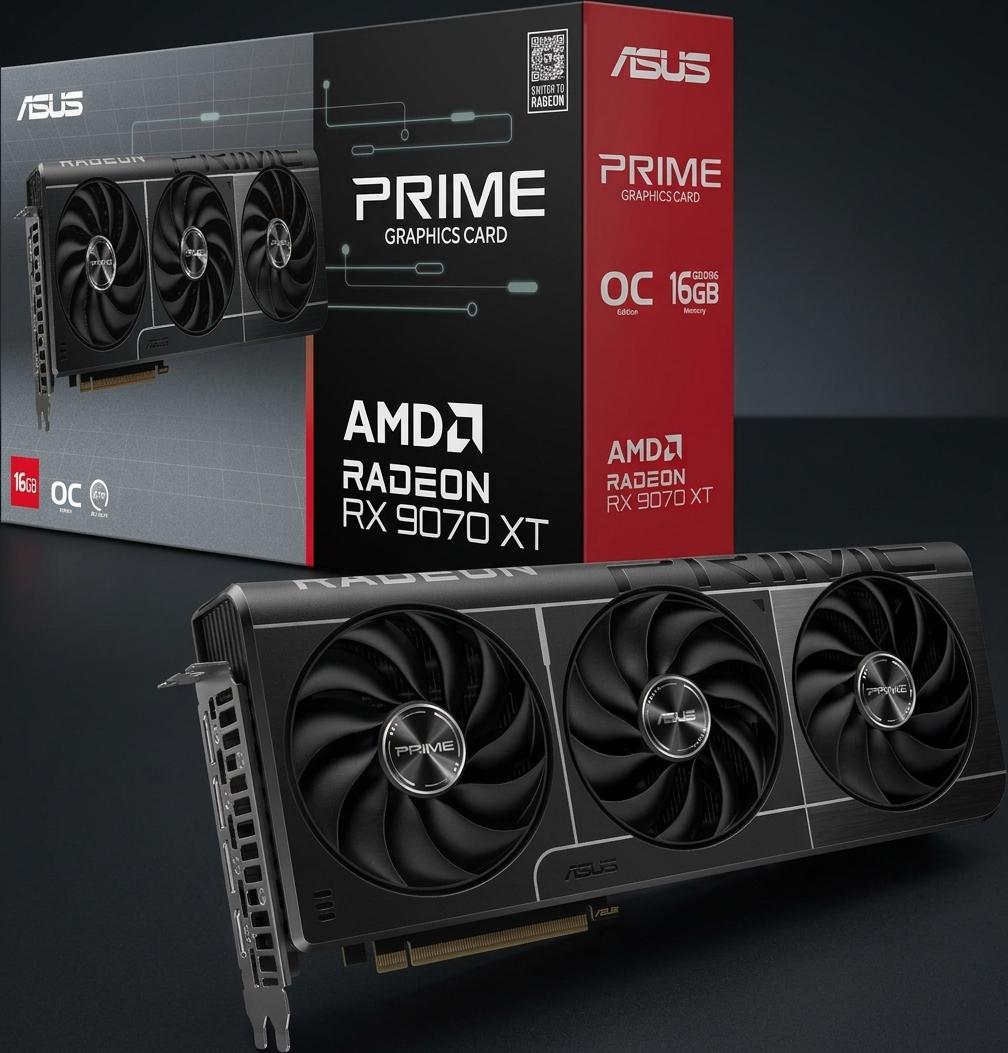
ASUS PRIME Radeon RX 9070 XT 16GB GDDR6 OC Edition Gaming Graphics Card
ASUS’s PRIME Radeon RX 9070 XT OC Edition pairs AMD’s RDNA 4 GPU and 16GB of GDDR6 with a 2.5-slot triple-fan cooler, dual BIOS and 0dB idle. It is a strong 1440p and 4K gaming card, but it trails NVIDIA in heavy ray tracing and needs a 750W PSU with three 8-pin connections.
ASUS PRIME Radeon RX 9070 XT Review: 1440p and 4K Performance, Fit, and Value
The ASUS PRIME Radeon RX 9070 XT 16GB GDDR6 OC Edition (model PRIME-RX9070XT-O16G) is ASUS's no-frills take on AMD's RDNA 4 flagship: three fans, no RGB lighting, a dual BIOS switch, and a modest factory overclock. It is aimed at gamers who want strong high-refresh 1440p and capable 4K performance without paying for an enthusiast-tier card.
The main question is not whether the RX 9070 XT is fast. Independent testing shows it is. The question is whether this particular ASUS version, at the price you see at checkout, is a better buy than a cheaper RX 9070 XT or an NVIDIA GeForce RTX 5070 Ti. This review is based on manufacturer documentation and published independent testing; we did not test this card ourselves. It covers specifications, what the PRIME cooler adds, published performance at 1440p and 4K, ray tracing, power and case fit, and the alternatives worth comparing.
Quick Verdict
- Best suited for: High-refresh 1440p gaming and 4K gaming at sensible settings, especially in games that rely mostly on traditional rasterized rendering.
- Main strengths: Raster performance close to the GeForce RTX 5070 Ti across large published test suites, 16GB of VRAM, FSR 4 support, a dual BIOS with Performance and Quiet modes, and fans that stop at idle.
- Main trade-offs: Heavy ray tracing and path tracing still favor NVIDIA, gaming power draw is higher than the RTX 5070 Ti, and the card needs three 8-pin PCIe power connections.
- Model-specific details: 312 mm long, 2.5 slots thick, a phase-change GPU thermal pad, dual-ball fan bearings, and a factory boost clock of up to 3010 MHz (3030 MHz in OC mode).
- Case and PSU: ASUS recommends a 750W power supply. Check case length, side-panel clearance, and that your PSU has three separate 8-pin PCIe connections.
- Compare alternatives first if: you play mostly path-traced or heavily ray-traced games, your case is compact, or this ASUS model costs much more than other RX 9070 XT cards.
- Value: This depends on price. The ASUS factory overclock is small, so the PRIME's premium over a cheaper RX 9070 XT buys you its cooler, dual BIOS, and build features rather than meaningfully higher frame rates.
Key Specifications
ASUS figures come from the official PRIME-RX9070XT-O16G specification page. AMD reference figures are shown separately so you can see what ASUS changed.
| Specification | ASUS PRIME RX 9070 XT OC Edition | AMD RX 9070 XT reference |
|---|---|---|
| Model number | PRIME-RX9070XT-O16G | Not applicable |
| GPU and architecture | AMD Radeon RX 9070 XT (Navi 48), RDNA 4 | |
| Compute units | 64 | |
| Stream processors | 4,096 | |
| Ray / AI accelerators | 64 ray accelerators / 128 AI accelerators | |
| Game clock | Up to 2460 MHz (default); up to 2480 MHz (OC mode via GPU Tweak III) | 2400 MHz |
| Boost clock | Up to 3010 MHz (default); up to 3030 MHz (OC mode) | Up to 2970 MHz |
| Memory | 16GB GDDR6, 20 Gbps, 256-bit | |
| Memory bandwidth | 640 GB/s (calculated from 20 Gbps on a 256-bit bus) | |
| Infinity Cache | 64 MB | |
| Interface | PCI Express 5.0 | |
| Display outputs | 1x HDMI 2.1b, 3x DisplayPort 2.1a; up to 4 displays; max digital resolution 7680 x 4320 | Varies by board partner |
| Board power | Not listed by ASUS | 304 W total board power (TBP) |
| Recommended PSU | 750W | Varies by board partner |
| Power connectors | 3x 8-pin PCIe | Varies by board partner |
| Dimensions | 312 x 130 x 50 mm (12.3 x 5.1 x 2.0 in) | Not applicable |
| Slot width | 2.5 slots | Not applicable |
| Cooling | Three Axial-tech fans, dual-ball bearings, 0dB fan stop, phase-change GPU thermal pad, vented backplate | Not applicable |
| BIOS | Dual BIOS (Performance and Quiet) | Not applicable |
| Key technologies | Hardware ray tracing, FSR 4 (in supported games), FSR 3.1 frame generation, AMD Fluid Motion Frames 2.1, Radeon Anti-Lag, HYPR-RX | |
| Availability | AMD board-partner cards on sale from March 6, 2025 |
What the ASUS PRIME OC Edition Adds
Every RX 9070 XT uses the same 64-compute-unit Navi 48 GPU and 16GB of GDDR6, so the differences between brands are in the cooler, power configuration, clocks, size, and features. Here is what ASUS has documented for the PRIME version.
Factory overclock: real, but small
ASUS rates the default boost clock at up to 3010 MHz, about 1.3% above AMD's 2970 MHz reference figure. OC mode in GPU Tweak III adds another 20 MHz. A difference this small is unlikely to be noticeable in games. Treat it as a minor bonus, not a reason to pay more.
Cooling design
The cooler uses three Axial-tech fans with dual-ball bearings, which ASUS says last up to twice as long as sleeve bearings. A phase-change thermal pad sits between the GPU and the heatsink, and there is a vented backplate. With 0dB technology, the fans stop below 55°C and start again above 60°C, so the card can be silent at the desktop and in light games.
The dual BIOS switch selects Performance or Quiet mode. ASUS says both modes use the same power target and differ only in how aggressively the fans run. In Pokde's review of this card (open-air test bench, Core i9-13900K), the fans settled at about 2,000 RPM in Performance mode and about 1,670 RPM in Quiet mode, with temperatures roughly 6–8°C higher in Quiet mode. Results inside a closed case will depend on your airflow and room temperature.
Build features
ASUS also lists GPU Guard (adhesive at the corners of the GPU package plus a mounting bracket), a protective backplate, and a 304 stainless-steel I/O bracket. These may help with handling and long-term durability, but there is no independent evidence that they make this card last longer than its rivals. There is no RGB lighting, which some buyers will appreciate.
Gaming Performance at 1080p, 1440p, and 4K
We have not run our own benchmarks. The figures below come from independent publications, and each one used its own games, drivers, and test system, so compare results within a source, not across sources.
Against the RTX 5070 Ti: near parity in rasterized games
In TechSpot's 52-game comparison published in May 2026 (Ryzen 7 9800X3D, AMD Adrenalin 26.5.2, NVIDIA 596.49, native rendering with a mix of raster and ray-traced presets), the two cards were within about 1.4% of each other on average at 1440p. At native 4K, the RTX 5070 Ti averaged 84 fps against the RX 9070 XT's 81 fps, a lead of about 4%. TechSpot found that the Radeon card usually won when ray tracing was off at 1440p and that NVIDIA tended to scale better at 4K.
Against the RTX 5070: a clear lead
In TechSpot's September 2026 52-game update, the RX 9070 XT averaged 24% more frames per second than the GeForce RTX 5070 at 1440p and 25% more at 4K. It also had stronger 1% lows. TechSpot noted that the RTX 5070's 12GB of memory became a limit in some demanding 4K ray-traced tests.
Where it sits in the wider field
TechPowerUp's GPU database (checked October 18, 2026), with the RX 9070 XT set to 100%, rates the RTX 5080 at 120%, the RX 7900 XTX at 106%, the RTX 5070 Ti at 105%, and both the RX 7900 XT and RX 9070 at about 90–91%. This rating uses TechPowerUp's own test suite, which is why its RTX 5070 Ti gap is larger than TechSpot's 2026 results.
What that means for your monitor
- 1440p: This is the card's strongest resolution. In large published test suites, it typically delivers high-refresh frame rates at high settings when ray tracing is off.
- 4K: It handles many games well at native 4K, but the newest and most demanding titles, especially with ray tracing on, usually need FSR upscaling to stay smooth.
- 1080p and esports: The card is more than fast enough. At these frame rates your CPU, the game's engine, or a frame cap often becomes the limit. TechSpot hit CPU and engine limits in titles such as Fortnite and Apex Legends, and in several competitive shooters the RTX 5070 Ti was faster on average.
Results can shift between games, game patches, driver releases, and graphics presets. If you play a handful of titles most of the time, look up benchmarks for those games specifically.
Ray Tracing, FSR 4, and Frame Generation
RDNA 4 brought third-generation ray accelerators and a big improvement over earlier Radeon cards, but NVIDIA is still ahead when ray tracing is heavy. In TechSpot's May 2026 testing, the RTX 5070 Ti was about 15% faster with ray tracing in Cyberpunk 2077 at 1440p and 56% faster in Indiana Jones and the Great Circle with high ray tracing. With path tracing in Doom: The Dark Ages, it was 63% faster, although neither card reached comfortable frame rates. In other ray-traced games, such as Resident Evil Requiem and Monster Hunter Wilds, the two cards were close.
FSR 4 is AMD's machine-learning-based upscaler. AMD says it is exclusive to RX 9000 series cards and requires game support. Upscaling renders the game at a lower internal resolution and reconstructs a sharper image, which raises frame rates. Frame generation, available through FSR 3.1 in supported games or driver-level AMD Fluid Motion Frames 2.1, inserts generated frames between the ones the GPU actually renders. That makes motion look smoother, but it does not improve responsiveness in the same way as higher native frame rates, and it works best when the starting frame rate is already reasonable. Radeon Anti-Lag can help reduce input latency in supported games. NVIDIA's DLSS is still available in more games than FSR 4, so check support for the games you play.
Is 16GB of VRAM Enough?
For current games at 1440p, 16GB gives comfortable headroom for high-resolution texture packs. At 4K, it covers most games at high settings. VRAM is mainly a ceiling rather than a source of speed: running out causes stutter and texture problems, but having more does not make the GPU faster. The RX 7900 XTX's 24GB, for example, does not make it a better card in every situation.
Memory use goes up with resolution, texture quality, ray tracing, and frame generation. TechSpot's RTX 5070 testing showed a 12GB card struggling in demanding 4K ray-traced tests, which is an advantage for the RX 9070 XT. No one can guarantee that 16GB will be enough for every future game at maximum settings, but it is a sensible amount for this class of GPU.
Power, Cooling, Noise, and PSU Requirements
AMD rates the RX 9070 XT at 304 W total board power. ASUS does not publish a board-power figure for the PRIME, but Pokde reports 317 W for this card, which suggests ASUS has set a slightly higher power target. That number covers the graphics card only. Your total system draw also includes the CPU, motherboard, storage, and fans.
ASUS recommends a 750W PSU and says this recommendation assumes a fully overclocked GPU and CPU. A good-quality 750W unit is a sensible starting point for a typical gaming build. If you have a high-power CPU or plan to overclock, use ASUS's PSU calculator or allow more headroom. The card needs three 8-pin PCIe power connections, so confirm your PSU has them. Using separate cables rather than one daisy-chained cable is generally the safer choice.
On efficiency, TechSpot reports that the RX 9070 XT usually uses about 20% more power than the RTX 5070 Ti in games. Temperatures and noise depend on case airflow, room temperature, the BIOS mode, and the game, so published numbers from open test benches will not exactly match what you see in a closed case.
Case, Motherboard, and System Compatibility
- Length: 312 mm. Measure the space in your case with any front fans or radiator installed.
- Height and cable clearance: The card is 130 mm tall. Leave room above it for three power cables to bend without pressing against the side panel.
- Thickness: At 2.5 slots (50 mm), it will cover at least the expansion slot below it.
- Small cases: ASUS markets the 2.5-slot design as suitable for small-form-factor builds, but a 312 mm card will not fit many compact cases. Check your case's maximum GPU length and width.
- PCIe: The card is PCIe 5.0 and works in PCIe 4.0 and 3.0 x16 slots. Enabling Resizable BAR (Smart Access Memory on AMD platforms) in the BIOS is recommended. Older platforms may need a BIOS update.
- CPU pairing: For high-refresh 1440p, a modern six- or eight-core CPU makes the most of this GPU. Older CPUs will hold it back most at 1080p and in esports titles.
- Displays: Three DisplayPort 2.1a outputs and one HDMI 2.1b output support up to four displays.
Productivity and Creator Workloads
The RX 9070 XT has hardware video encoding and decoding, and ASUS's page refers to support for HEVC, H.264, VP9, and AV1 in compatible software. That makes it a reasonable choice for game streaming and video editing in apps that use AMD's media engine. AMD lists the RX 9070 XT (gfx1201) in its ROCm GPU documentation, which matters if you want to run local AI tools. However, software that only supports NVIDIA's CUDA will not run natively on this card. Gaming benchmarks also do not tell you how a card will perform in rendering, AI, or editing. If your work depends on a specific application, check that application's GPU support and benchmarks before buying.
Pros and Cons
Pros
- Rasterized gaming performance close to the RTX 5070 Ti in large 2026 test suites
- About 24–25% faster on average than the RTX 5070 in TechSpot's 52-game test
- 16GB of VRAM for 1440p and 4K texture settings
- Supports FSR 4 machine-learning upscaling in compatible games
- Dual BIOS with Performance and Quiet modes at the same power target
- Fans stop at low temperatures, and the cooler uses dual-ball bearings and a phase-change thermal pad
- 2.5-slot thickness and no RGB lighting
Cons
- Heavy ray tracing and path tracing performance trails NVIDIA
- Uses more power in games than the RTX 5070 Ti
- Needs three 8-pin PCIe power connections
- At 312 mm long, it is too large for many compact cases
- The factory overclock is too small to make a practical difference
- Worth less if it costs significantly more than other RX 9070 XT cards
ASUS PRIME RX 9070 XT vs RTX 5070 Ti, RTX 5080, RTX 5070, and Other Radeons
Relative performance comes from TechPowerUp's GPU database (checked October 18, 2026, with the RX 9070 XT at 100%). Board power is the manufacturer's rating for the GPU model, and specific partner cards may differ. Linked product names go to the specific retail model we chose for each GPU.
| Graphics card | Architecture and VRAM | Relative performance (TechPowerUp) | Ray tracing and upscaling | Rated board power | Best for | Advantage over the ASUS card | Disadvantage vs the ASUS card |
|---|---|---|---|---|---|---|---|
| ASUS PRIME Radeon RX 9070 XT OC Edition | RDNA 4, 16GB GDDR6 | 100% (baseline) | Good, but behind NVIDIA in heavy ray tracing; FSR 4 | 304 W (AMD TBP); 3x 8-pin on this model | High-refresh 1440p and 4K at sensible settings | Not applicable | Not applicable |
| GeForce RTX 5070 Ti (listing: PNY GeForce RTX 5070 Ti Epic-X RGB OC) | Blackwell, 16GB GDDR7 | About 105% | Stronger in heavy ray and path tracing; DLSS 4 with Multi Frame Generation | 300 W | Ray-tracing-focused players and DLSS users | Better ray tracing, efficiency, and 4K scaling | TechSpot reported it costing far more than the RX 9070 XT in 2026 |
| GeForce RTX 5080 (listing: ASUS TUF Gaming GeForce RTX 5080 OC Edition) | Blackwell, 16GB GDDR7 | About 120% | Strongest of this group; DLSS 4 with Multi Frame Generation | 360 W | 4K with heavy ray tracing | Clearly faster overall | Much higher price; same 16GB of VRAM |
| GeForce RTX 5070 (listing: ASUS Prime GeForce RTX 5070 OC Edition) | Blackwell, 12GB GDDR7 | About 81% | DLSS 4 with Multi Frame Generation | 250 W | Lower-power 1440p builds | Lower power draw; DLSS | About 24–25% slower in TechSpot's test; only 12GB of VRAM |
| AMD Radeon RX 9070 | RDNA 4, 16GB GDDR6 | About 90% | Same RDNA 4 feature set, including FSR 4 | 220 W | 1440p buyers with less power headroom | Lower power draw; usually costs less | Slower, especially at 4K |
| AMD Radeon RX 7900 XT (listing: Sapphire Pulse Radeon RX 7900 XT 20GB) | RDNA 3, 20GB GDDR6 | About 91% | Weaker ray tracing; FSR 4 not officially supported | 315 W | Buyers who need 20GB of VRAM at the right price | More VRAM | Slower, older architecture, higher rated power |
| AMD Radeon RX 7900 XTX (listing: ASRock Radeon RX 7900 XTX Taichi 24GB OC) | RDNA 3, 24GB GDDR6 | About 106% | Weaker ray tracing than RDNA 4; FSR 4 not officially supported | 355 W | Raster-focused 4K and VRAM-heavy workloads | Slightly faster in raster; 24GB of VRAM | Higher rated power and an older feature set |
How to choose: The RTX 5070 Ti makes sense if ray tracing, DLSS, or efficiency matters more to you than price. TechSpot reported it costing roughly 40–50% more than the RX 9070 XT in mid-2026, which is a lot to pay for similar raster performance. The RTX 5080 is a step up for demanding 4K with ray tracing if your budget allows. The RTX 5070 only makes sense at a clearly lower price, given its 12GB of VRAM and slower performance. The RX 9070 gives you the same features for less money and less power, at the cost of some speed. The RX 7900 XT and RX 7900 XTX are mainly worth considering if you find one at a good price and value extra VRAM more than FSR 4 support and better ray tracing.
Who Should Buy the ASUS PRIME RX 9070 XT?
- Gamers with a 1440p high-refresh monitor who want strong performance in mostly rasterized games.
- 4K gamers who are happy to use FSR or adjust settings in the most demanding titles.
- Upgraders from older cards such as the RX 6000 series or RTX 30 series who want 16GB of VRAM.
- Builders whose case fits a 312 mm, 2.5-slot card and whose PSU has three 8-pin PCIe connections.
- Buyers who want a dual BIOS, fans that stop at idle, and no RGB lighting, as long as the price premium over other RX 9070 XT cards is small.
Who Should Consider Another GPU?
- Ray tracing and path tracing fans: The RTX 5070 Ti or RTX 5080 will perform better in those games.
- Small-case builders: Look for a shorter RX 9070 XT, or step down to an RX 9070 or RTX 5070.
- PSU-limited systems: If you lack three 8-pin connections or a good 750W unit, the RX 9070 (220 W) is easier to power.
- Buyers on a strict budget: The RX 9070 gives you the same feature set for less money.
- Price-conscious RX 9070 XT buyers: If another RX 9070 XT costs significantly less, it will deliver almost the same frame rates.
- CUDA-dependent professionals: Choose an NVIDIA card if your software requires CUDA.
Is the ASUS PRIME RX 9070 XT Worth Buying?
The RX 9070 XT is one of the strongest choices for 1440p and 4K gaming in this price class. Large 2026 test suites show it close to the RTX 5070 Ti in rasterized games and well ahead of the RTX 5070, with 16GB of VRAM and FSR 4. Its weak spot is heavy ray tracing, where NVIDIA still leads.
Whether the ASUS PRIME version is the right RX 9070 XT comes down to price. TechSpot reported typical RX 9070 XT pricing of about $730–750 in September 2026. If the PRIME costs about the same as other RX 9070 XT cards, its dual BIOS, cooler, and quiet idle behavior make it an easy choice. If it costs much more, a cheaper RX 9070 XT will deliver nearly the same frame rates, because the factory overclock is minor. Compare the current price with other RX 9070 XT models and the RTX 5070 Ti before you buy.
Final Verdict
The ASUS PRIME Radeon RX 9070 XT OC Edition is a sensible way to buy one of the best-value high-end GPUs of this generation. It offers RTX 5070 Ti-class rasterized performance in recent large test suites, 16GB of VRAM, and practical features such as a dual BIOS and fans that stop at idle. Make sure your case fits a 312 mm card, your PSU can supply three 8-pin connections, and you are comfortable with NVIDIA's lead in ray tracing. Then compare its current price with other RX 9070 XT models.
Check the current price of the ASUS PRIME Radeon RX 9070 XT on Amazon
Pros
- Rasterized performance close to the RTX 5070 Ti in large 2026 test suites
- About 24–25% faster on average than the RTX 5070 in TechSpot's 52-game test
- 16GB GDDR6 for high texture settings at 1440p and 4K
- FSR 4 machine-learning upscaling support in compatible games
- Dual BIOS with Performance and Quiet modes at the same power target
- 0dB fan stop, dual-ball fan bearings, and phase-change GPU thermal pad
- 2.5-slot thickness and no RGB lighting
Cons
- Heavy ray tracing and path tracing performance trails NVIDIA
- Higher gaming power draw than the RTX 5070 Ti
- Requires three 8-pin PCIe power connections
- 312 mm length rules out many compact cases
- Factory overclock is too small to make a practical difference
- Value drops if priced well above other RX 9070 XT cards
Spec Sheet
Specifications
General
| Model | PRIME-RX9070XT-O16G |
|---|---|
| Brand | ASUS |
| Series | Prime |
GPU
| Graphics Engine | AMD Radeon RX 9070 XT |
|---|---|
| Architecture | AMD RDNA 4 |
| Compute Units | 64 |
| Stream Processors | 4096 |
| Ray Accelerators | 64 |
| AI Accelerators | 128 |
Performance
| Boost Clock (Default Mode) | Up to 3010 MHz |
|---|---|
| Game Clock (Default Mode) | Up to 2460 MHz |
| Boost Clock (OC Mode, GPU Tweak III) | Up to 3030 MHz |
| Game Clock (OC Mode, GPU Tweak III) | Up to 2480 MHz |
Memory
| Video Memory | 16GB GDDR6 |
|---|---|
| Memory Speed | 20 Gbps |
| Memory Interface | 256-bit |
| Infinity Cache | 64 MB |
Connectivity
| Bus Standard | PCI Express 5.0 |
|---|---|
| HDMI | 1x HDMI 2.1b |
| DisplayPort | 3x DisplayPort 2.1a |
| HDCP | 2.3 |
| Maximum Displays | 4 |
| Max Digital Resolution | 7680 x 4320 |
Power
| Total Board Power (AMD reference) | 304 W |
|---|---|
| Recommended PSU | 750W |
| Power Connectors | 3x 8-pin |
Cooling
| Fans | 3x Axial-tech |
|---|---|
| Fan Bearings | Dual-ball |
| 0dB Technology | Yes (fans stop below 55°C) |
| GPU Thermal Interface | Phase-change thermal pad |
| Dual BIOS | Yes (Performance / Quiet) |
Dimensions
| Card Size | 312 x 130 x 50 mm |
|---|---|
| Card Size (inches) | 12.3 x 5.1 x 2.0 in |
| Slot Width | 2.5 slots |
Compatibility
| API | OpenGL 4.6 |
|---|---|
| Multi-GPU (CrossFire/NVLink) | No |
| Software | ASUS GPU Tweak III |
Frequently Asked Questions
Is the ASUS PRIME RX 9070 XT good for gaming?+
Can the RX 9070 XT handle 4K gaming?+
How much VRAM does this graphics card have?+
How does the RX 9070 XT compare with the RTX 5070 Ti?+
What power supply does the ASUS PRIME RX 9070 XT need?+
Will the card fit in my case?+
Is the RX 9070 XT good for ray tracing?+
How is the ASUS PRIME different from other RX 9070 XT cards?+
Does it support FSR 4?+
As an Amazon Associate we earn from qualifying purchases. See our affiliate disclosure.