
ASUS
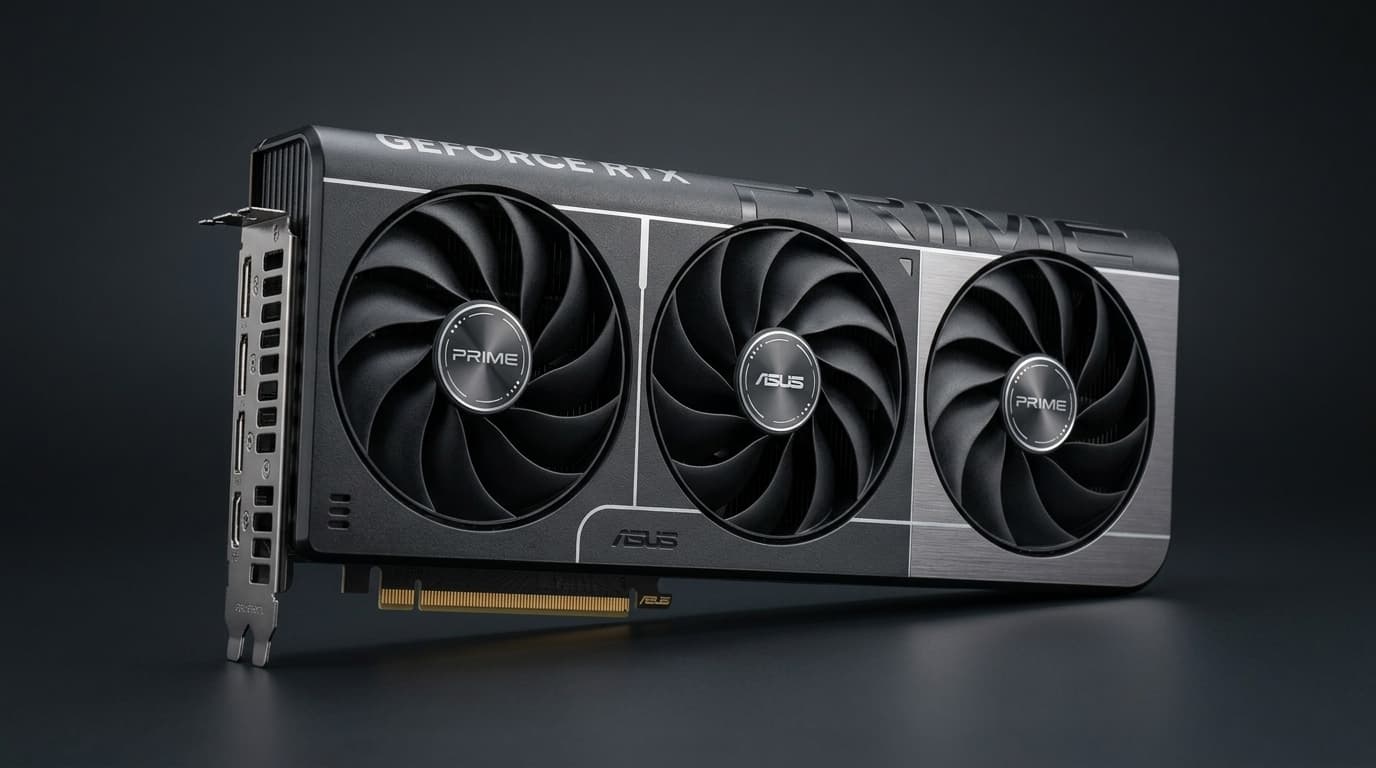
ASUS Prime GeForce RTX 5070 12GB GDDR7 OC Edition Gaming Graphics Card
ASUS's Prime GeForce RTX 5070 OC Edition pairs NVIDIA's Blackwell RTX 5070 and 12GB of GDDR7 with a 2.5-slot, SFF-Ready triple-fan cooler, dual BIOS, and 0dB idle. It is a capable 1440p card with DLSS 4 Multi Frame Generation, but 12GB of VRAM limits some 4K and heavy ray-tracing settings, and Radeon RX 9070-series cards are faster in many games.
ASUS Prime GeForce RTX 5070 OC Review: Performance, Pros, Cons & Alternatives
The ASUS Prime GeForce RTX 5070 12GB GDDR7 OC Edition (model PRIME-RTX5070-O12G) is ASUS's entry-level RTX 5070. It has three Axial-tech fans, a 2.5-slot SFF-Ready cooler, a dual BIOS, and a small factory overclock. It suits 1440p gamers who want NVIDIA's DLSS 4 features without paying for an RTX 5070 Ti.
The RTX 5070 is a known quantity, so the useful questions are practical ones. Is 12GB of VRAM enough? Will a 304 mm card fit your case? Is this model better value than a Radeon RX 9070 XT or a premium RTX 5070 at the price you see today? This review uses ASUS and NVIDIA documentation plus published independent testing; we did not test this card ourselves. We clearly separate what the NVIDIA GPU provides from what the ASUS Prime board adds.
Quick Verdict
- Best suited for: High-refresh 1440p gaming, especially in games that support DLSS upscaling and frame generation.
- Main strengths: Solid 1440p performance, DLSS 4 Multi Frame Generation and DLSS 5 support (in compatible games), a compact 2.5-slot triple-fan design, a Quiet BIOS mode, and fans that stop at idle.
- Main limitations: 12GB of VRAM can run short at 4K and with heavy ray tracing, and the RX 9070 XT was about 24% faster at 1440p in TechSpot's 52-game test from September 2026.
- What to verify before buying: The current price compared with RX 9070-series cards, your case's GPU clearance (304 mm long, 50 mm thick), and that your PSU meets ASUS's 750W recommendation with a 16-pin cable or two 8-pin cables for the included adapter.
- Worth considering if: You want an NVIDIA card for 1440p, value DLSS and NVIDIA's software support, and can buy it at a sensible price.
- Compare alternatives if: You play at 4K, keep GPUs for many years, play heavily modded games, or find an RX 9070 XT for a similar or lower price.
Key Specifications
ASUS figures come from the official PRIME-RTX5070-O12G specification page. NVIDIA reference figures are shown separately so you can see what ASUS changed.
| Specification | ASUS Prime RTX 5070 OC Edition | NVIDIA RTX 5070 reference |
|---|---|---|
| GPU / architecture | NVIDIA GeForce RTX 5070, Blackwell | Same |
| CUDA cores | 6,144 | 6,144 |
| Boost clock | 2557 MHz (default); 2587 MHz (OC mode via GPU Tweak III) | 2512 MHz |
| Video memory | 12GB GDDR7 | 12GB GDDR7 |
| Memory interface / speed | 192-bit, 28 Gbps | 192-bit, 28 Gbps |
| Memory bandwidth | 672 GB/s (calculated) | 672 GB/s |
| AI performance | 988 AI TOPS (spec page; ASUS's overview page lists 1005) | 988 AI TOPS |
| Interface | PCI Express 5.0 | PCI Express 5.0 |
| Display outputs | 1x HDMI 2.1b, 3x DisplayPort 2.1b; up to 4 displays | 1x HDMI, 3x DisplayPort |
| Max digital resolution | 7680 x 4320 | 4K at 480Hz or 8K at 165Hz with DSC |
| Power connector | 1x 16-pin (1-to-2 adapter included) | 16-pin or 2x 8-pin via adapter |
| Total graphics power | Not listed by ASUS | 250 W |
| Recommended PSU | 750W | 650W minimum |
| Dimensions | 304 x 126 x 50 mm (12 x 5 x 2 in) | Not applicable |
| Slot width | 2.5 slots, SFF-Ready | Not applicable |
| Cooling | 3x Axial-tech fans, dual-ball bearings, phase-change GPU thermal pad, 0dB fan stop, dual BIOS | Not applicable |
Design, Dimensions, and Build Compatibility
What the ASUS Prime board adds
ASUS uses three Axial-tech fans with dual-ball bearings. ASUS says these bearings last up to twice as long as sleeve bearings. The GPU sits on a phase-change thermal pad. ASUS's MaxContact process enlarges the heat spreader's contact surface, which ASUS claims improves temperatures by up to 2°C. The card also has a vented protective backplate, a stainless-steel bracket, and ASUS GPU Guard adhesive on all four corners of the GPU to reduce stress cracking. ASUS also includes a GPU support bracket. The design has no RGB lighting.
A dual BIOS switch selects Performance or Quiet mode. ASUS says both modes keep the same power target and differ only in fan behavior. The fans stop when the GPU is below 50°C and restart above 55°C.
Case clearance
At 304 mm long, 126 mm tall, and 50 mm thick (2.5 slots), the Prime is more compact than many triple-fan RTX 5070 cards. ASUS's own TUF RTX 5070 OC, for example, measures 329 x 140 x 62.5 mm and takes 3.125 slots. ASUS labels the Prime "SFF-Ready." Still, check your case's maximum GPU length and the room between the card and the side panel. Leave space for the power cable to bend at the 16-pin connector. Also check whether a large card would block M.2 slots or motherboard headers below it.
Power and connector considerations
The card uses one 16-pin power connector. If your PSU has a native 16-pin (12V-2x6 or 12VHPWR) cable, use it. Otherwise, use the included adapter with two separate 8-pin PCIe cables rather than one daisy-chained cable. Make sure the connector is fully seated. ASUS recommends a 750W power supply and says this figure assumes a fully overclocked CPU and GPU. NVIDIA lists 650W as the minimum for its reference RTX 5070.
Gaming Performance at 1080p, 1440p, and 4K
We did not benchmark this card ourselves. The results below come from independent publications and are labeled with their source, test system, and the RTX 5070 board they used. ASUS's factory overclock is small: 2557 MHz versus NVIDIA's 2512 MHz, or about 1.8%. TechPowerUp found that the larger overclock on the ASUS TUF RTX 5070 added only about 2% performance. Expect the Prime to perform within a few percent of other RTX 5070 cards.
Where the RTX 5070 sits overall
TechPowerUp's GPU database (checked October 20, 2026) sets the RTX 5070 at 100%. On that scale, the RTX 4070 Super rates 94%, the RX 9070 110%, the RX 9070 XT 123%, and the RTX 5070 Ti 129%. In its March 2025 launch-era review of the ASUS RTX 5070 TUF OC, TechPowerUp measured the RTX 5070 about 7% faster than the RTX 4070 Super. It recommended the card for 1440p, noting it is "a little bit weak for 4K gaming without upscaling."
RTX 5070 vs RX 9070 XT: TechSpot's 52-game test
In TechSpot's September 7, 2026 comparison (Ryzen 7 9800X3D, GeForce driver 610.88, Adrenalin 26.8.1, native rendering), the RX 9070 XT averaged 24% more frames per second than the RTX 5070 at 1440p and 25% more at 4K. TechSpot tested an MSI RTX 5070 Gaming Trio White, not this ASUS model. Selected results:
| Game | Resolution / settings | RTX 5070 (MSI Gaming Trio) | RX 9070 XT (Sapphire Pure) |
|---|---|---|---|
| God of War Ragnarök | 1440p High | 112 fps | 143 fps |
| Crimson Desert | 1440p Cinematic | 75 fps | 86 fps |
| Final Fantasy XVI | 1440p Ultra | 66 fps | 103 fps |
| Assassin's Creed Shadows | 1440p Ultra High (ray tracing) | 40 fps | 55 fps |
| Doom: The Dark Ages | 1440p, path tracing | 25 fps | 19 fps |
| Battlefield 6 | 4K Overkill | 45 fps | 63 fps |
| Overwatch | 4K Epic | 137 fps | 137 fps |
Source: TechSpot, September 2026. All results are native rendering with no upscaling or frame generation. Results from different publications use different test systems and should not be compared directly.
1080p
TechSpot's 2026 comparison tested only 1440p and 4K. At 1080p the RTX 5070 has plenty of headroom in most games, so your CPU often becomes the limit, especially in competitive shooters at very high frame rates. If you game at 1080p, read how much your CPU matters for gaming FPS before choosing a GPU tier.
1440p
This is the RTX 5070's strongest resolution. In TechSpot's data, many demanding 2025–2026 games ran between about 65 and 145 fps at 1440p with high presets. Competitive games ran much higher.
4K
The RTX 5070 can run many games at 4K, especially with DLSS upscaling. Native 4K with heavy ray tracing is where it struggles. TechSpot recorded a 9 fps average in Cyberpunk 2077: Phantom Liberty at 4K Ray Tracing Ultra. It also noted severe memory limits in Mafia: The Old Country at Epic settings and in Star Wars Outlaws at 4K with RTX Direct Lighting.
Ray tracing and path tracing
Ray tracing is mixed. In TechPowerUp's launch testing, the RTX 5070 was slightly faster than the RX 9070 with ray tracing on but about 15% behind the RX 9070 XT. In TechSpot's 2026 data, the RTX 5070 won the heaviest path-traced tests, including Doom: The Dark Ages at 1440p and Indiana Jones and the Great Circle with full ray tracing (by about 10% at 1440p and 19% at 4K). The RX 9070 XT led in most other ray-traced games.
DLSS and frame generation: what the numbers mean
DLSS Super Resolution renders at a lower resolution and upscales, which raises real frame rates. DLSS Frame Generation and Multi Frame Generation insert AI-generated frames between rendered ones. That makes motion look smoother, but the game still responds to your inputs at the underlying rendered frame rate. A frame-generated "120 fps" is not the same as 120 natively rendered frames. TechPowerUp found Multi Frame Generation works well when the base frame rate is around 40 fps or higher, but it cannot make a 15 fps game feel responsive.
VRAM: Is 12GB Enough?
The RTX 5070 has 12GB of GDDR7. That is the same capacity as the RTX 4070 Super, but with much more bandwidth (672 GB/s). The RX 9070, RX 9070 XT, and RTX 5070 Ti all have 16GB.
- 1080p and 1440p: TechPowerUp found 12GB sufficient at 1440p in its testing, even with ray tracing. It added that the card is not "future-proof" for 1440p unless you are willing to lower settings in some future games.
- 4K, ray tracing, and frame generation: This is where 12GB runs out first. Frame generation also uses extra memory. TechPowerUp listed 12GB as not enough for 4K with ray tracing and frame generation in some titles.
- Texture settings: Dropping textures one step is often the quickest fix when a game exceeds VRAM, and the visual cost is usually small.
- Mods: High-resolution texture packs and heavily modded games can exceed 12GB even at 1440p.
- Creative and AI work: Large 3D scenes, high-resolution video timelines, and local AI models benefit from more memory. 12GB limits the size of AI models you can run on the GPU.
If you plan to keep your GPU for four or more years, play at 4K, or use lots of mods, a 16GB card is the safer choice. If you play at 1440p and don't mind adjusting a setting occasionally, 12GB is workable. For more background, see our graphics card reviews.
Features and Software
Provided by the NVIDIA RTX 5070 (any RTX 5070 card)
- DLSS 4: Super Resolution, DLAA, Ray Reconstruction, Frame Generation, and Multi Frame Generation. Multi Frame Generation is exclusive to RTX 50 cards.
- DLSS 5: NVIDIA launched DLSS 5 neural rendering for RTX 50 GPUs in September 2026, starting with NBA 2K27. Only a small number of games support it so far.
- NVIDIA Reflex: Lowers system latency in supported games.
- Media engine: One ninth-generation NVENC encoder and one sixth-generation NVDEC decoder, for streaming and video editing.
- CUDA and Studio drivers: Widely supported in creative and AI applications.
Specific to the ASUS Prime board
- Factory boost clock of 2557 MHz, or 2587 MHz in OC mode through ASUS GPU Tweak III.
- A dual BIOS switch with Performance and Quiet modes.
- Triple Axial-tech fans with dual-ball bearings, a phase-change pad, 0dB fan stop, a 2.5-slot SFF-Ready design, and GPU Guard.
All DLSS and Reflex features need a supported game and current drivers. They do not guarantee a specific frame rate.
Noise, Temperatures, and Power
HWCooling's review of this exact model (May 2025, updated November 2025) tested it in a closed Fractal Design Meshify 2 case with a Ryzen 7 9800X3D. Highlights:
- In Performance mode, Cyberpunk 2077 at 4K ran with GPU temperatures averaging below 70°C and memory at about 72°C. The fans reached about 1,800 RPM, and HWCooling recorded noise of roughly 42–45 dBA, which it called fairly average.
- In Quiet mode, the fans ran at about 1,290 RPM and noise dropped to about 36 dBA. GPU temperatures rose by nearly 10°C and memory reached about 80°C. HWCooling called this mode "impressively quiet for its price."
- The card held its 250 W power limit in both modes. HWCooling reports the limit is adjustable from 175 W to 300 W.
- On HWCooling's sample, one fan was noticeably louder than the other two, and faint coil whine was audible behind the fans in Quiet mode. Individual units can vary.
Noise measurements depend on each publication's distance and setup, so dBA figures from different sites aren't directly comparable. For context, TechPowerUp measured the premium ASUS TUF RTX 5070 OC at 61°C and 26.2 dBA in its own gaming test, compared with 77°C and 37.7 dBA for NVIDIA's Founders Edition.
ASUS Prime RTX 5070 OC vs RTX 5070 Ti, RX 9070 XT, RX 9070, RTX 4070 Super, and ASUS TUF RTX 5070
Performance figures use TechPowerUp's relative-performance database (RTX 5070 = 100%, checked October 20, 2026) unless another source is named. Prices change quickly and we could not verify comparable current US prices, so check each listing.
| Graphics Card | GPU / VRAM | Key Difference | Performance Evidence | Verified Price | Best For | Amazon Link |
|---|---|---|---|---|---|---|
| ASUS Prime GeForce RTX 5070 OC Edition (reference) | RTX 5070 / 12GB GDDR7 | Compact 2.5-slot triple-fan, dual BIOS | 100% (baseline) | Not verified | 1440p gamers who want NVIDIA features in a compact card | Check price on Amazon |
| PNY GeForce RTX 5070 Ti OC Triple Fan | RTX 5070 Ti / 16GB GDDR7 | More GPU power and 16GB of VRAM; 300 W, 750W PSU | About 129% | Not verified | 4K and long-term buyers who want NVIDIA | View on Amazon |
| ASUS PRIME Radeon RX 9070 XT OC Edition | RX 9070 XT / 16GB GDDR6 | Much faster raster, 16GB; 3x 8-pin, 312 mm | About 123%; +24% at 1440p in TechSpot's 52 games | Not verified | Raster-focused 1440p and 4K gamers | View on Amazon |
| ASUS Prime Radeon RX 9070 EVO OC Edition | RX 9070 / 16GB GDDR6 | 16GB VRAM, same 304 mm size, 650W PSU, 2x 8-pin | About 110% | Not verified | Buyers who want 16GB at a similar tier | View on Amazon |
| GIGABYTE GeForce RTX 4070 Super WINDFORCE OC 12G | RTX 4070 Super / 12GB GDDR6X | Previous generation; no Multi Frame Generation; 261 mm | About 94% | Not verified | Buyers who find it clearly cheaper | View on Amazon |
| ASUS TUF Gaming GeForce RTX 5070 OC Edition | RTX 5070 / 12GB GDDR7 | Larger premium cooler, second HDMI port; 3.125 slots | About 2% faster than a stock RTX 5070 (TechPowerUp) | Not verified | Buyers who prioritize the lowest noise and have a large case | View on Amazon |
vs PNY GeForce RTX 5070 Ti OC Triple Fan (16GB)
The RTX 5070 Ti uses a larger GPU (8,960 CUDA cores vs 6,144) and has 16GB of GDDR7 on a 256-bit bus. TechPowerUp rates it about 29% faster than the RTX 5070. It is rated at 300 W versus 250 W, and NVIDIA lists a 750W minimum PSU. The Amazon listing describes this PNY model as a 2.98-slot card with a 2572 MHz boost clock. We could not find PNY's own product page for this exact SKU, so check its dimensions on the listing before buying. In TechSpot's September 2026 article, RTX 5070 Ti cards were selling for more than $1,100, roughly 50% more than the RX 9070 XT.
Choose the RTX 5070 Ti if you game at 4K, want 16GB for long-term use, and can afford the premium. Choose the ASUS Prime RTX 5070 if you game at 1440p, have a smaller case, or can't justify a large price jump.
vs ASUS PRIME Radeon RX 9070 XT OC Edition (16GB)
This is the strongest challenger. In TechSpot's 52-game test, the RX 9070 XT was 24% faster at 1440p and 25% faster at 4K, with stronger 1% lows. When those results were published, it was also cheaper: about $730–$750 versus about $800–$820 for RTX 5070 cards. It has 16GB of GDDR6. The trade-offs are higher power (304 W reference board power), three 8-pin connectors, a longer 312 mm card, and weaker results in the heaviest path-traced games. For more detail, read our full ASUS PRIME Radeon RX 9070 XT review.
Choose the RX 9070 XT if raw performance and VRAM per dollar matter most. Choose the ASUS Prime RTX 5070 if you rely on DLSS 4 Multi Frame Generation, NVIDIA-only software, or path-traced games, or if your PSU has a 16-pin cable but not three 8-pin cables.
vs ASUS Prime Radeon RX 9070 EVO OC Edition (16GB)
The Prime RX 9070 EVO (PRIME-RX9070-O16G-EVO) uses the same 304 x 126 x 50 mm, 2.5-slot size as the Prime RTX 5070, so case fit is identical. It has 3,584 stream processors, 16GB of GDDR6 on a 256-bit bus, a boost clock of up to 2590 MHz (2610 MHz in OC mode), two 8-pin connectors, and a 650W PSU recommendation. AMD rates the RX 9070 at 220 W. TechPowerUp's database rates it about 10% faster than the RTX 5070 overall. In TechPowerUp's launch testing, the RTX 5070 was slightly faster with ray tracing on.
Choose the RX 9070 if you want 16GB of VRAM and lower power at a similar performance tier. Choose the RTX 5070 for NVIDIA's DLSS features and stronger ray tracing support.
vs GIGABYTE GeForce RTX 4070 Super WINDFORCE OC 12G
The RTX 4070 Super is previous-generation Ada Lovelace hardware. This GIGABYTE model (GV-N407SWF3OC-12GD) has 7,168 CUDA cores, 12GB of GDDR6X at 21 Gbps on a 192-bit bus, PCIe 4.0, DisplayPort 1.4a outputs, and a 2505 MHz core clock. It measures 261 x 126 x 50 mm and GIGABYTE recommends a 700W PSU. It supports DLSS upscaling and single frame generation, but not RTX 50-exclusive Multi Frame Generation or DLSS 5. The RTX 5070 was about 7% faster in TechPowerUp's testing. Both cards have 12GB, so the 4070 Super doesn't solve the VRAM concern. Its $599 launch price (January 2024) is not its current price, and we could not verify a current price.
Choose the RTX 4070 Super only if it is clearly cheaper than an RTX 5070, or if its shorter 261 mm length is needed. Otherwise the RTX 5070 is the better buy.
vs ASUS TUF Gaming GeForce RTX 5070 OC Edition
Same GPU, different board. The TUF (TUF-RTX5070-O12G-GAMING) boosts to 2610 MHz (2640 MHz in OC mode), adds a second HDMI 2.1b port, and uses a much larger cooler: 329 x 140 x 62.5 mm, 3.125 slots. In TechPowerUp's testing it ran at 61°C and 26.2 dBA (22.8 dBA with the quiet BIOS) and was about 2% faster than a stock RTX 5070. It launched at a $740 MSRP in March 2025, so it has historically cost more than the Prime. HWCooling estimated the premium at around 130 EUR in Europe and called it hard to justify for most buyers.
Choose the TUF if you want the lowest possible noise and temperatures, or need two HDMI ports, and your case fits a 3.125-slot card. Choose the Prime if you want the same GPU in a smaller, typically cheaper package.
Who Should Buy the ASUS Prime RTX 5070 OC?
- Gamers with a 1440p high-refresh monitor who want strong performance with DLSS.
- Buyers who want NVIDIA's ecosystem: DLSS 4 Multi Frame Generation, DLSS 5 in supported games, Reflex, CUDA, and NVENC.
- Builders with mid-size or compact cases that can't fit 3-slot, 330 mm cards.
- People who play path-traced games where NVIDIA leads.
- Buyers who can get it at or below the price of competing 16GB Radeon cards.
Who Should Consider Another GPU?
- 4K gamers using maximum settings: Consider the RTX 5070 Ti or RX 9070 XT.
- Buyers who keep GPUs for many years or use texture mods: A 16GB card such as the RX 9070 or RX 9070 XT gives more headroom.
- Value-focused raster gamers: If the RX 9070 XT costs the same or less, it offers more performance per dollar.
- Systems with a weak or old PSU: Make sure you have enough capacity and either a 16-pin cable or two separate 8-pin cables for the adapter.
Price and Value Analysis
We could not verify a current, comparable US price for this card, so we don't list one. The RTX 5070 launched at a $549 MSRP in March 2025, but that is not today's price. GPU pricing rose sharply in 2026. TechSpot's September 2026 survey found RTX 5070 cards starting around $800 (most around $820), RX 9070 XT cards around $730–$750, and RTX 5070 Ti cards above $1,100.
Use this framework at checkout:
- If the Prime RTX 5070 costs about the same as an RX 9070 XT, the Radeon offers more performance and VRAM unless you specifically need NVIDIA features.
- If it costs noticeably less than an RX 9070 XT and close to an RX 9070, the choice comes down to DLSS versus 16GB of VRAM.
- Compare it with other RTX 5070 models. The Prime's compact cooler is a good reason to pick it, but its factory overclock isn't worth paying extra for.
- Only buy an RTX 4070 Super instead if it is meaningfully cheaper.
Buying Checklist
- Confirm the exact model: ASUS Prime GeForce RTX 5070 OC Edition, PRIME-RTX5070-O12G.
- Check the current selling price and seller, and compare it with RX 9070-series and RTX 5070 Ti cards.
- Measure case clearance: at least 304 mm of length, 126 mm of height plus room for the power cable, and 2.5 slots.
- Check PSU capacity against ASUS's 750W recommendation.
- Check power cables: a native 16-pin cable, or two separate 8-pin PCIe cables for the included adapter.
- Match the card to your monitor: it is ideal for 1440p high refresh and workable at 4K with DLSS.
- Decide whether 12GB is enough for your games, settings, and mods.
- Review the seller's return policy and ASUS's warranty terms for your region before you buy.
Final Verdict
The ASUS Prime GeForce RTX 5070 OC Edition is a sensible, compact way to get an RTX 5070. Its strongest use case is high-refresh 1440p gaming with DLSS, in a 2.5-slot card that fits more cases than most triple-fan models. Independent testing shows a Quiet mode that is impressively quiet for the price.
Its biggest limitation is the RTX 5070 itself: 12GB of VRAM restricts some 4K and heavy ray-tracing settings. The Radeon RX 9070 XT was about 24% faster at 1440p in TechSpot's 2026 test, and it was cheaper when that test was published. Before buying, compare current prices against the RX 9070 XT and RX 9070, and confirm your case clearance and PSU cables. At a price at or below competing Radeon cards, the ASUS Prime is a good buy for NVIDIA-focused 1440p gamers. At a clear premium over the RX 9070 XT, most buyers who don't need NVIDIA features should choose the Radeon.
Check the current price of the ASUS Prime GeForce RTX 5070 OC Edition on Amazon
Pros
- Strong 1440p performance; TechPowerUp measured it about 7% faster than the RTX 4070 Super
- DLSS 4 Multi Frame Generation and new DLSS 5 neural rendering are exclusive to RTX 50 cards (in supported games)
- Better heavy path tracing than Radeon in some titles, such as Doom: The Dark Ages and Indiana Jones full RT
- 2.5-slot, 304 mm, SFF-Ready design fits more cases than many triple-fan cards
- Dual BIOS; HWCooling found Quiet mode about 36 dBA under load in its testing
- 0dB fan stop, dual-ball fan bearings, and a phase-change GPU thermal pad
- Single 16-pin power input with a 1-to-2 adapter included in the box
Cons
- 12GB VRAM runs short in some 4K, ray-traced, and highest-texture settings
- Radeon RX 9070 XT averaged about 24% faster at 1440p in TechSpot's 52-game test (Sept 2026)
- Factory overclock is small (+45 MHz boost over NVIDIA's reference) and adds little performance
- HWCooling's sample had one louder fan and faint coil whine audible in Quiet mode
- ASUS recommends a 750W PSU, higher than NVIDIA's 650W minimum for the reference card
- No RGB lighting for buyers who want it
- Value depends heavily on current pricing, which rose sharply in 2026
Spec Sheet
Specifications
General
| Model | PRIME-RTX5070-O12G |
|---|---|
| Brand | ASUS |
| Series | Prime |
GPU
| Graphics Engine | NVIDIA GeForce RTX 5070 |
|---|---|
| Architecture | NVIDIA Blackwell |
| CUDA Cores | 6144 |
| AI Performance | 988 AI TOPS (ASUS spec page) |
Performance
| Boost Clock (Default Mode) | 2557 MHz |
|---|---|
| Boost Clock (OC Mode, GPU Tweak III) | 2587 MHz |
| NVIDIA Reference Boost Clock | 2512 MHz |
Memory
| Video Memory | 12GB GDDR7 |
|---|---|
| Memory Speed | 28 Gbps |
| Memory Interface | 192-bit |
| Memory Bandwidth | 672 GB/s (calculated) |
Connectivity
| Bus Standard | PCI Express 5.0 |
|---|---|
| HDMI | 1x HDMI 2.1b |
| DisplayPort | 3x DisplayPort 2.1b |
| HDCP | 2.3 |
| Maximum Displays | 4 |
| Max Digital Resolution | 7680 x 4320 |
Power
| Total Graphics Power (NVIDIA reference) | 250 W |
|---|---|
| Recommended PSU | 750W |
| Power Connector | 1x 16-pin |
| Included Adapter | 1x adapter cable (1 to 2) |
Cooling
| Fans | 3x Axial-tech |
|---|---|
| Fan Bearings | Dual-ball |
| 0dB Technology | Yes (fans stop below 50°C, restart above 55°C) |
| GPU Thermal Interface | Phase-change thermal pad |
| Dual BIOS | Yes (Performance / Quiet) |
Dimensions
| Card Size | 304 x 126 x 50 mm |
|---|---|
| Card Size (inches) | 12 x 5 x 2 in |
| Slot Width | 2.5 slots |
| SFF-Ready | Yes |
Compatibility
| API | OpenGL 4.6 |
|---|---|
| Multi-GPU (NVLink/CrossFire) | No |
| Software | ASUS GPU Tweak III, MuseTree |
Frequently Asked Questions
Is the ASUS Prime RTX 5070 OC worth buying?+
Is the RTX 5070 good for 1440p gaming?+
Can the ASUS Prime RTX 5070 OC run games at 4K?+
Is 12GB of VRAM enough?+
What power supply does the ASUS Prime RTX 5070 OC need?+
How many monitors can it drive?+
How big is the ASUS Prime RTX 5070 OC?+
How does the RTX 5070 compare with the RTX 5070 Ti?+
Should I buy a Radeon RX 9070 or RX 9070 XT instead?+
Is the OC Edition much faster than a standard RTX 5070?+
Is the RTX 5070 good for content creation?+
What should I check before buying?+
As an Amazon Associate we earn from qualifying purchases. See our affiliate disclosure.