
TEAMGROUP
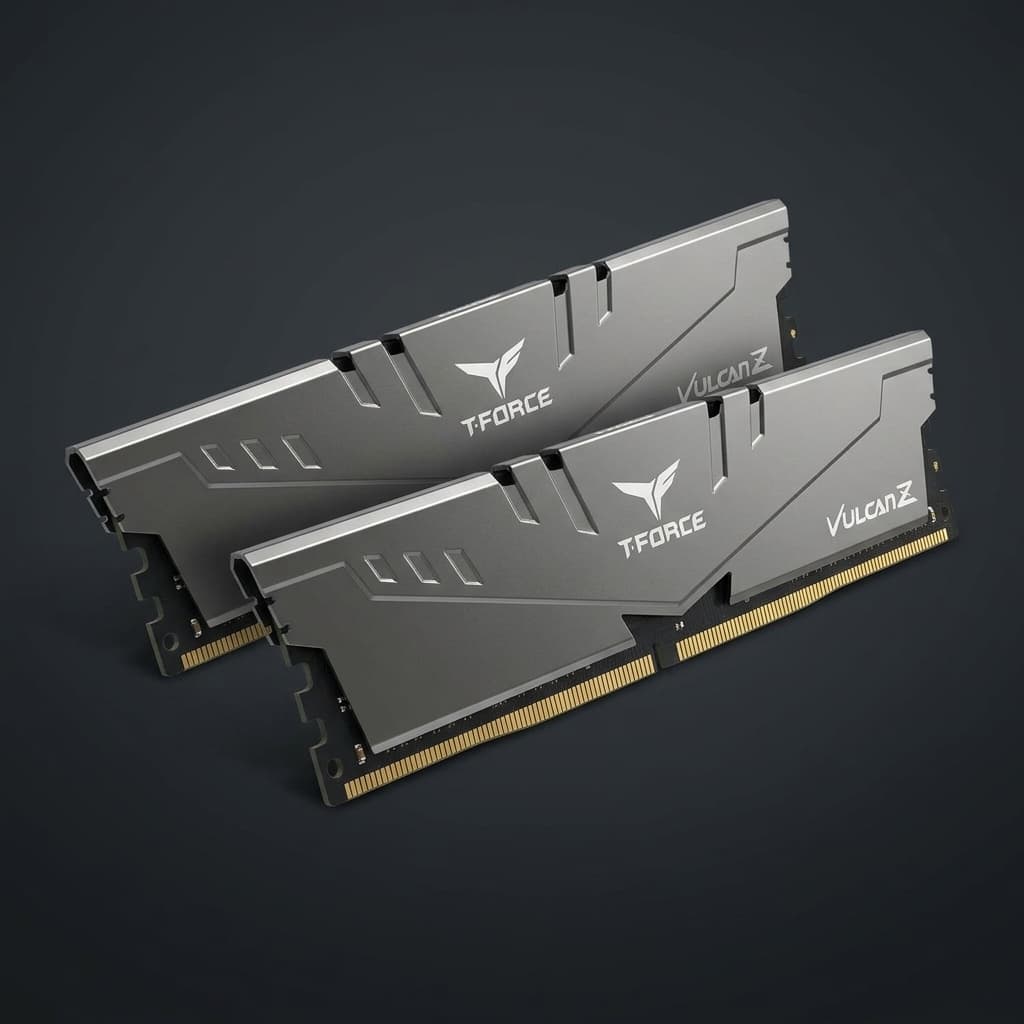
TEAMGROUP T-Force Vulcan Z DDR4 16GB Kit (2×8GB) 3200MHz CL16 Desktop Memory — Gray
TEAMGROUP T-Force Vulcan Z is a 16GB (2×8GB) DDR4-3200 desktop memory kit with CL16-20-20-40 timings at 1.35V, Intel XMP 2.0 support, and a 32mm gray aluminum heat spreader. It’s designed for compatible Intel and AMD DDR4 desktop systems.
TEAMGROUP T-Force Vulcan Z 16GB DDR4 3200MHz Review: Introduction
If you're building a budget gaming PC or adding memory to an older DDR4 desktop, the TEAMGROUP T-Force Vulcan Z DDR4 16GB Kit is one of the plainest options you'll find. You get two 8GB modules for dual-channel operation, a DDR4-3200 rating with CL16 timings, and a gray aluminum heat spreader. There's no RGB lighting and no software to install.
This review covers the exact model TLZGD416G3200HC16FDC01. Its full timings are 16-20-20-40, which is different from the 16-18-18-38 timings of other Vulcan Z SKUs. We explain what those numbers mean, how the kit compares with similar 3200MHz CL16 kits, and who should buy something else.
Note: GearNexis has not run its own tests on this kit. Everything here comes from TEAMGROUP's published specifications, retailer spec listings, and general DDR4 memory behavior. We don't include benchmark figures or FPS numbers.
Quick Verdict
For a compatible Intel or AMD DDR4 desktop that needs 16GB, the Vulcan Z is a simple, sensible choice. It's 32mm tall, so it fits under most air coolers, and TEAMGROUP backs it with a lifetime limited warranty. The tradeoff is its looser 20-20-40 secondary timings. If two kits cost about the same, a 3200MHz CL16 kit with 18-18 secondary timings has a small advantage on paper. If you game heavily, edit video, or multitask a lot, 32GB is worth considering.
TEAMGROUP T-Force Vulcan Z Overview
T-Force is TEAMGROUP's gaming brand, and the Vulcan Z is its no-frills DDR4 line. The T-Force Vulcan Z 16GB DDR4-3200 kit is meant to be a dependable, good-looking upgrade, not a showpiece. It fits these uses best:
- Budget gaming PC builds on DDR4 platforms, where 16GB in dual channel is a reasonable starting point.
- Everyday desktop computing: browsing, office apps, streaming, and light creative work.
- DDR4 system upgrades, such as replacing a single 8GB stick or slow DDR4-2133/2400 memory.
- Compatible Intel desktop platforms. TEAMGROUP lists Intel Z390, Z490, and Z590 among its supported chipsets.
- Compatible AMD desktop platforms. TEAMGROUP lists AMD B550 and X570.
Those chipset lists are examples, not a complete list. Many other DDR4 desktop boards can run this kit too. What really matters is whether your specific board and CPU support it.
T-Force Vulcan Z 16GB Key Specifications
| Specification | TLZGD416G3200HC16FDC01 |
|---|---|
| Total capacity | 16GB (2×8GB kit) |
| Memory type | DDR4 SDRAM |
| Rated speed | DDR4-3200 (3200 MT/s) |
| Module standard | PC4-25600 (25,600 MB/s per module) |
| Timings | CL16-20-20-40 |
| Rated voltage | 1.35V |
| Memory profile | Intel XMP 2.0 |
| Form factor | 288-pin desktop DIMM (UDIMM) |
| ECC / buffering | Non-ECC, unbuffered |
| Heat spreader | Aluminum, one-piece 0.8mm alloy, anodized finish |
| Dimensions | 32mm (H) × 140mm (L) × 7mm (W) |
| Lighting | None |
| Color | Gray |
| Operating temperature | 0°C to 85°C |
| Warranty | Lifetime limited (per TEAMGROUP; regional terms may vary) |
Design and Build Quality
Gray Aluminum Heat Spreader
TEAMGROUP describes the heat spreader as a single piece of 0.8mm aluminum alloy with an anodized finish. The gray color is neutral, so it suits black, white, or mixed-color builds without clashing. DDR4-3200 at 1.35V doesn't produce much heat in normal desktop use. The heat spreader mostly protects the chips and gives the modules a finished look.
Low-Profile Height for Cooler Clearance
At 32mm tall, the Vulcan Z is shorter than many enthusiast kits. Retailers list the G.SKILL Ripjaws V at around 42mm. The lower height matters with large tower air coolers whose fans or fins hang over the first RAM slot, and in small cases. Always compare the 32mm figure with your cooler's stated RAM clearance.
No RGB, No Software
The kit has no lighting, so there's no RGB controller software to install and no lighting cables or headers to deal with. That's a plus for windowless cases, office PCs, and builders who want a clean look. If you're planning a fully lit RGB build, it's a drawback.
Memory Speed and Performance Explained
What DDR4-3200 and PC4-25600 Mean
DDR4-3200 means the memory moves data at 3,200 mega-transfers per second. PC4-25600 is the matching bandwidth rating: 3,200 MT/s across a 64-bit (8-byte) module comes to about 25,600 MB/s of peak bandwidth per module. In dual channel, the theoretical peak doubles because the CPU reads from both modules at once.
What CL16 Means
CAS latency (CL) is the number of memory clock cycles between a read command and the first data coming back. At DDR4-3200, CL16 works out to about 10 nanoseconds of first-word latency. That's the usual mainstream class for 3200MHz kits. JEDEC-standard DDR4-3200 modules like Crucial's basic CL22 kit take about 13.75ns.
Why 16-20-20-40 Matters
The four numbers are CL, tRCD, tRP, and tRAS. On this SKU, tRCD and tRP are 20 cycles, or about 12.5ns. Several competing 3200 CL16 kits run them at 18 cycles, or about 11.25ns. Those secondary timings affect how quickly the memory opens and closes rows of data. With identical speed and CL, the 18-18 kits have a slight theoretical edge in latency-sensitive tasks. In everyday use the difference is usually small, and the CPU, GPU, and game engine have a much bigger effect on results. We haven't measured it on this kit.
Be careful when comparing listings. Another Vulcan Z 16GB SKU (TLZGD416G3200HC16CDC01) is rated at 16-18-18-38. Check the full model number before you buy.
Dual-Channel Memory
Two 8GB modules installed in the slots your motherboard manual recommends (often A2 and B2) run in dual channel. That gives the CPU twice the memory bandwidth of a single 16GB stick. Integrated graphics, such as AMD Ryzen APUs, benefit the most because they use system RAM as video memory. CPU-bound games can also gain.
Why You Need to Enable XMP
Out of the box, most motherboards run DDR4 at a JEDEC default speed, usually DDR4-2133 or 2400. To get the rated 3200MHz CL16-20-20-40 at 1.35V, turn on the XMP 2.0 profile in the BIOS/UEFI. On many AMD boards it's labeled DOCP, A-XMP, or EXPO-style. Whether the profile runs stably depends on your CPU's memory controller, the motherboard, and the BIOS version. A board that doesn't support DDR4-3200 will run the kit at a lower speed.
Gaming and Everyday Use
General Desktop Use and Productivity
For browsing with plenty of tabs open, office suites, video calls, streaming, and photo touch-ups, 16GB of dual-channel DDR4-3200 is comfortable. It's also a big step up from an 8GB single-channel setup.
Mainstream Gaming
16GB is still the baseline that many current games list in their recommended requirements. It works well for esports titles and plenty of single-player games, especially with background apps kept to a minimum. Your frame rate will depend mainly on the graphics card and CPU. RAM won't guarantee any particular FPS.
When 32GB Makes More Sense
Some demanding modern games, gaming while streaming or running Discord and a browser, video editing, large photo libraries, virtual machines, and other professional work can use more than 16GB. If that describes you, a 2×16GB kit is the better long-term buy. One option is the Corsair Vengeance LPX 32GB DDR4-3200 CL16 we've covered. It avoids having to fill all four slots later, which can be harder to run at full speed.
Older and Budget DDR4 Systems
For aging Intel Core or AMD Ryzen DDR4 desktops, this kit is a low-risk refresh as long as the board supports the speed. If your platform tops out at DDR4-2666 or 2933, the kit should run at that lower speed, but you won't get its full rating.
Compatibility: Intel, AMD, and DDR4 Requirements
- DDR4 motherboard required. This kit won't fit or work in DDR5 motherboards. The notch sits in a different position, so DDR4 and DDR5 modules physically can't swap.
- 288-pin desktop DIMM. These are full-size desktop modules. They won't fit laptops or mini PCs that use SO-DIMM slots.
- Intel and AMD support. The kit works on DDR4 desktop platforms from both vendors, as long as the motherboard and CPU support it.
- BIOS profile. Turn on XMP (or your board's equivalent) to run at the rated 3200MHz.
- CPU and board limits. Each CPU has an officially supported memory speed, and boards with locked chipsets may limit memory speed. Check both.
- QVL and manual. Look up your motherboard's Qualified Vendor List (QVL) for TLZGD416G3200HC16FDC01 and read the manual for the correct slot order. A kit missing from the QVL can still work, but it hasn't been validated.
Planning an AM4 build? See our guide to the best B550 motherboards, or browse more motherboards and CPUs.
Pros and Cons
Pros
- 16GB as a matched 2×8GB kit for dual-channel operation
- DDR4-3200 rating with CL16 (about 10ns first-word latency)
- Intel XMP 2.0 profile for simple one-setting configuration
- 32mm height clears most air coolers and fits small cases
- One-piece anodized aluminum heat spreader
- No RGB software or cables to manage
- Lifetime limited warranty from TEAMGROUP
Cons
- tRCD/tRP of 20 are looser than the 18-18 timings on some rival 3200 CL16 kits
- 16GB can be tight for heavy multitasking, video editing, and some demanding games
- DDR4 only; it can't move with you to a DDR5 platform
- No RGB lighting for builders who want it
- Rated speed requires XMP and compatible hardware
T-Force Vulcan Z vs Competitors: 16GB DDR4-3200 Kits Compared
All kits below are 16GB (2×8GB) DDR4-3200 desktop kits. The Crucial kit is the one listed with a different latency class. It's included as a JEDEC-standard reference point.
| Product | Capacity | Speed | Timings | Design | RGB | Key Differences |
|---|---|---|---|---|---|---|
| TEAMGROUP T-Force Vulcan Z (TLZGD416G3200HC16FDC01) | 2×8GB | 3200 | CL16-20-20-40, 1.35V | Gray aluminum, 32mm | No | Low profile; looser tRCD/tRP |
| Kingston FURY Beast DDR4 16GB (KF432C16BBK2/16) | 2×8GB | 3200 | CL16-18-18, 1.35V | Black, 34.1mm | No | Tighter tRCD/tRP; Intel XMP 2.0 |
| Corsair Vengeance LPX DDR4 16GB (CMK16GX4M2B3200C16) | 2×8GB | 3200 | CL16-18-18-36, 1.35V | Black aluminum, 34mm | No | Long-running low-profile line; XMP 2.0 |
| G.SKILL Ripjaws V DDR4 16GB (F4-3200C16D-16GVKB) | 2×8GB | 3200 | CL16-18-18-38, 1.35V | Black aluminum, about 42mm | No | Taller heat spreader; check cooler clearance |
| Crucial DDR4 16GB Kit (CT2K8G4DFRA32A) | 2×8GB | 3200 | CL22, 1.2V | Bare PCB, standard height | No | JEDEC speed with no XMP needed; higher latency |
Which Kit Fits Which Buyer?
- T-Force Vulcan Z: For buyers who want a short, neutral gray kit, and anyone who values TEAMGROUP's lifetime limited warranty, when the price is right.
- Kingston FURY Beast: For buyers who want tighter 18-18 secondary timings at the same speed and CL, in a black design.
- Corsair Vengeance LPX: For buyers who want a widely validated low-profile kit with 16-18-18-36 timings. Many motherboard QVLs list it.
- G.SKILL Ripjaws V: For buyers who want 16-18-18-38 timings and have enough cooler clearance for a taller heat spreader.
- Crucial DDR4: For office PCs and systems that can't enable XMP. It runs DDR4-3200 at standard JEDEC settings. Micron announced in December 2025 that it was leaving the Crucial consumer business, so stock may be limited to what retailers still have.
Overall, none of these kits clearly beats the others. The Vulcan Z wins on height and looks. The Kingston, Corsair, and G.SKILL kits win on paper secondary timings. Price on the day you buy and your board's QVL should decide it.
Who Should Buy This RAM?
- Builders putting together a budget or mainstream DDR4 gaming PC on a compatible Intel or AMD board
- Anyone upgrading from 8GB or single-channel memory on a DDR4 desktop
- Owners of large air coolers or compact cases who need lower-profile modules
- Users who want a clean non-RGB look with no extra software
- Ryzen APU users who need dual-channel bandwidth for integrated graphics
If that sounds like your build, you can check the TEAMGROUP T-Force Vulcan Z 16GB kit on Amazon.
Who Should Avoid It?
- Anyone building on a DDR5-only platform, since this kit physically won't fit
- Users who need 32GB or more for editing, streaming, VMs, or heavy multitasking
- Owners of boards or CPUs that don't support DDR4-3200, or that use SO-DIMM slots
- Enthusiasts after the tightest timings, who should look at 16-18-18 kits or faster DDR4
- RGB-focused builders
Still planning your build? Our step-by-step gaming PC build guide covers installing RAM and turning on XMP, and you can compare more kits on our RAM page.
Final Verdict
The TEAMGROUP T-Force Vulcan Z DDR4 16GB 3200MHz CL16 kit is a solid, unflashy choice for a compatible DDR4 budget or mainstream build. It has the specs most 16GB gaming and everyday systems need: dual-channel 2×8GB, DDR4-3200, CL16, and XMP 2.0. It also comes in a 32mm package that's easy to fit, with a lifetime limited warranty. Its main weakness is the 20-20-40 secondary timings, which are a bit looser than some rivals at the same headline speed. That's a small gap, but it's a fair tiebreaker when prices are close.
Buy it if the price is competitive and it's on your motherboard's QVL or supported speed list. If you already know your workload needs more memory, go straight to 32GB.
Pros
- 16GB matched 2×8GB kit for dual-channel operation
- DDR4-3200 speed with CL16 latency (~10ns first-word latency)
- Intel XMP 2.0 profile for one-setting BIOS configuration
- 32mm height suits most air coolers and compact cases
- One-piece anodized aluminum heat spreader
- No RGB software or cabling to manage
- Lifetime limited warranty from TEAMGROUP
Cons
- tRCD/tRP of 20 are looser than the 18-18 timings on some rival 3200 CL16 kits
- 16GB can be limiting for heavy multitasking, video editing, and some demanding games
- DDR4 only; not compatible with DDR5 platforms
- No RGB lighting
- Rated 3200MHz requires XMP and compatible CPU/motherboard support
Spec Sheet
Specifications
General
| Product Name | TEAMGROUP T-Force Vulcan Z DDR4 |
|---|---|
| Model Number | TLZGD416G3200HC16FDC01 |
| Color | Gray |
Capacity
| Total Capacity | 16GB |
|---|---|
| Kit Configuration | 2×8GB |
Memory
| Memory Type | DDR4 |
|---|---|
| Rated Speed | 3200MHz (3200 MT/s) |
| Standard | PC4-25600 |
| CAS Latency | CL16 |
| Timings | 16-20-20-40 |
| Rated Voltage | 1.35V |
| Module Type | 288-pin desktop DIMM (UDIMM) |
| Error Correction | Non-ECC |
| Buffering | Unbuffered |
Cooling
| Heat Spreader | Aluminum (one-piece 0.8mm alloy, anodized) |
|---|
Physical
| Dimensions | 32mm (H) × 140mm (L) × 7mm (W) |
|---|---|
| Operating Temperature | 0°C to 85°C |
Lighting
| RGB | No RGB lighting |
|---|
Compatibility
| Platform | Compatible DDR4 Intel and AMD desktop platforms, subject to motherboard and CPU support |
|---|---|
| Listed Chipsets | Intel Z390/Z490/Z590; AMD B550/X570 (per TEAMGROUP; not exhaustive) |
Profile
| Memory Overclocking | Intel XMP 2.0 (enable in BIOS) |
|---|
Warranty
| Warranty | Lifetime limited warranty (per TEAMGROUP; verify regional terms) |
|---|
Frequently Asked Questions
Is the TEAMGROUP T-Force Vulcan Z 16GB DDR4 RAM good for gaming?+
What are the timings of model TLZGD416G3200HC16FDC01?+
Will this RAM run at 3200MHz automatically?+
Does T-Force Vulcan Z support Intel XMP?+
Is this RAM compatible with AMD Ryzen processors?+
Can I use this RAM in a DDR5 motherboard?+
Is 16GB of RAM enough for gaming in 2026?+
Is 2×8GB better than 1×16GB?+
Does this RAM have RGB lighting?+
Will the Vulcan Z fit under my CPU cooler?+
Should I upgrade from 16GB to 32GB?+
How can I check whether my motherboard supports this RAM?+
As an Amazon Associate we earn from qualifying purchases. See our affiliate disclosure.