
GIGABYTE
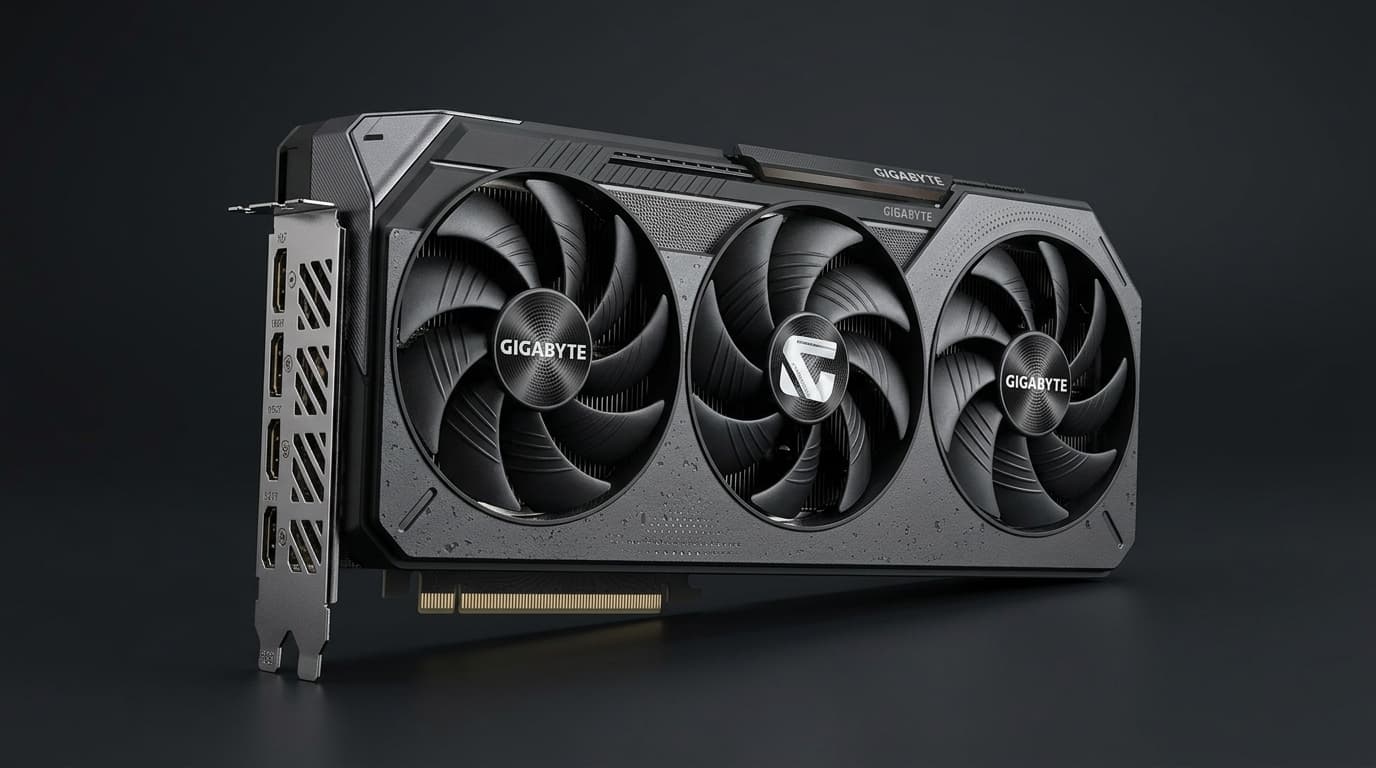
GIGABYTE Radeon RX 9070 XT Gaming OC 16G Graphics Card
GIGABYTE's RX 9070 XT Gaming OC 16G pairs AMD's RDNA 4 GPU and 16GB of GDDR6 with a 288 mm triple-fan WINDFORCE cooler, dual BIOS, and two HDMI 2.1b ports. It suits high-refresh 1440p and 4K gaming, but it runs warmer than larger RX 9070 XT coolers and needs an 850W PSU with three 8-pin connections.
GIGABYTE Radeon RX 9070 XT Gaming OC 16G Review
The GIGABYTE Radeon RX 9070 XT Gaming OC 16G (model GV-R9070XTGAMING OC-16GD) is GIGABYTE's mainstream version of AMD's RDNA 4 flagship graphics card. It pairs a factory-overclocked Radeon RX 9070 XT and 16GB of GDDR6 memory with a 288 mm triple-fan WINDFORCE cooler, a dual BIOS, RGB lighting, and an output layout with two HDMI 2.1b ports. It is built for high-refresh 1440p gaming and capable 4K gaming, and its 16GB of VRAM and AV1 encoding also suit streaming and general content work.
This card is worth a look if you want RTX 5070 Ti-class gaming performance, need a triple-fan card that fits a mid-size case, or use HDMI displays such as TVs. This review explains what the GIGABYTE board adds to the shared RX 9070 XT GPU, how it performs at 1440p and 4K, how hot and loud it runs, what power supply and case it needs, and how it compares with the SAPPHIRE NITRO+, PowerColor Hellhound, and ASUS TUF RX 9070 XT models and NVIDIA's RTX 5070 Ti and RTX 5070. It is based on GIGABYTE and AMD documentation and published independent testing. We did not test this card ourselves.
As an Amazon Associate I earn from qualifying purchases. See our affiliate disclosure for details.
Quick Verdict
- Strongest verified features: RTX 5070 Ti-class average gaming performance in large 2026 test suites, 16GB of VRAM, FSR 4 support, a dual BIOS, and two HDMI 2.1b plus two DisplayPort 2.1a outputs.
- What the GIGABYTE board adds: a 288 mm length that is shorter than many triple-fan RX 9070 XT cards, a 3060 MHz boost clock rating, a 330W power limit, recessed power connectors with fault-indicator LEDs, and a reinforced metal backplate.
- Key trade-offs: in HWCooling's testing, the compact cooler ran its hotspot and memory warmer than larger designs, noise was only average on the Performance BIOS, and the reviewer noted occasional coil whine. Heavy ray tracing still favors NVIDIA.
- Ideal buyer: a 1440p or 4K gamer with a mid-size case and an 850W power supply with three 8-pin PCIe cables.
- Compare first if: quiet operation is your top priority, you play mostly path-traced games, or this listing costs much more than other RX 9070 XT models.
Key Specifications
Board-specific figures come from GIGABYTE's official specification page. GPU-level figures shared by every RX 9070 XT come from AMD.
| Specification | GIGABYTE RX 9070 XT Gaming OC 16G | AMD RX 9070 XT reference spec |
|---|---|---|
| Product name and model | Radeon RX 9070 XT GAMING OC 16G (GV-R9070XTGAMING OC-16GD) | Not applicable |
| GPU | AMD Radeon RX 9070 XT, RDNA 4 | Same |
| Compute units / stream processors | 64 / 4096 | Same |
| Memory capacity | 16GB | 16GB |
| Memory type | GDDR6, 20 Gbps | GDDR6, up to 20 Gbps |
| Memory interface | 256-bit | 256-bit (up to 640 GB/s) |
| Interface | PCI Express 5.0 | PCIe 5.0 x16 |
| Boost clock | Up to 3060 MHz | Up to 2970 MHz |
| Game clock | Up to 2520 MHz | 2400 MHz |
| Display outputs | 2x DisplayPort 2.1a, 2x HDMI 2.1b | DisplayPort 2.1a, HDMI 2.1b |
| Power connectors | 3x 8-pin | 2x 8-pin |
| Recommended power supply | 850W | 750W minimum |
| Card dimensions | 288 x 132 x 56 mm | Varies by board |
| Cooling | WINDFORCE, 3 fans, vapor chamber | Varies by board |
| Dual BIOS | Yes (Performance / Silent) | Varies by board |
| Manufacturer warranty | Varies by region; confirm with GIGABYTE US or the seller | Not applicable |
Design and Build Quality
Cooler and fans
GIGABYTE's WINDFORCE cooler uses three Hawk fans, a large vapor chamber, composite copper heat pipes, and what GIGABYTE calls server-grade thermal conductive gel. HWCooling's inspection found impellers just under 9 cm across, a middle fan that spins opposite the outer two to reduce turbulence, and a backplate cutout that lets air pass straight through the heatsink.
Size and case compatibility
At 288 mm long, the Gaming OC is shorter than the SAPPHIRE NITRO+ (330.8 mm), ASUS TUF (330 mm), and PowerColor Hellhound (327 mm), based on each manufacturer's specifications, which makes it easier to fit in mid-size cases. It is 56 mm thick, so HWCooling recommends leaving at least three expansion slots free, ideally four, for airflow under the card. The three 8-pin connectors are recessed into the shroud, which helps in narrower cases, and each has an LED that flashes if it detects a power problem.
Backplate, lighting, and software
A reinforced metal backplate is fastened to the I/O bracket for rigidity, and GIGABYTE uses its Ultra Durable component set. RGB lighting sits behind a sliding side plate and is controlled through GIGABYTE Control Center, which also adjusts clocks, fan curves, and power targets. HWCooling measured the card at 1.26 kg and did not mention a support bracket in the box.
The thermal gel question
In 2025, some owners of GIGABYTE RTX 50 and RX 9000 cards reported thermal gel seeping out, mainly in vertically mounted setups. GIGABYTE attributed this to excess gel in early production batches. It said the issue was cosmetic and did not affect performance, reliability, or lifespan, and that later production runs were adjusted. According to TechPowerUp, no recall was issued. GIGABYTE's product page for this card still lists the gel.
Gaming Performance
We did not find a large, recent game-suite benchmark of this exact GIGABYTE board. The results below come from TechSpot's 52-game comparisons of the RX 9070 XT GPU using other partner cards. Because every RX 9070 XT shares the same GPU and memory, the GIGABYTE card should land close to these results. HWCooling measured it running slightly faster than reference-clocked cards thanks to its factory overclock and 330W power limit.
| Comparison (TechSpot, 52 games) | 1440p | 4K |
|---|---|---|
| RX 9070 XT vs RTX 5070 Ti (May 22, 2026) | RTX 5070 Ti about 1.4% faster on average | 81 fps vs 84 fps average (RTX 5070 Ti about 4% faster) |
| RX 9070 XT vs RTX 5070 (Sept. 7, 2026) | RX 9070 XT 24% faster on average | RX 9070 XT 25% faster on average |
Both tests used a Ryzen 7 9800X3D system, and each game was run at two quality presets, some with ray tracing enabled. The RTX 5070 comparison used a Sapphire RX 9070 XT Pure and an MSI RTX 5070 Gaming Trio White. Sources: TechSpot RX 9070 XT vs RTX 5070 Ti and TechSpot RX 9070 XT vs RTX 5070.
Rasterized gaming at 1440p and 4K
With ray tracing off, TechSpot found the RX 9070 XT consistently ahead of the RTX 5070 Ti at 1440p. For 1440p high-refresh monitors, it is a strong fit in most current games. At 4K, it handles many games natively at high settings, but the heaviest titles need upscaling or lower settings to stay smooth.
Ray tracing
RDNA 4 greatly improved AMD's ray tracing, but NVIDIA still leads in heavy ray tracing and path tracing. In TechSpot's 2026 testing, path tracing in Doom: The Dark Ages made the RTX 5070 Ti 63% faster than the RX 9070 XT at 1440p, although neither card was comfortably playable there. In other ray-traced games, including Resident Evil Requiem and Monster Hunter Wilds, the RX 9070 XT tied or beat the RTX 5070 Ti.
Upscaling and frame generation
FSR 4 is AMD's machine-learning upscaler for RX 9000 cards. TechPowerUp found its image quality greatly improved over earlier FSR versions and close to NVIDIA's DLSS, which it still rated slightly better. NVIDIA's RTX 50 cards also offer DLSS 4 Multi Frame Generation. FSR 4 works only in supported games, through developer integration or AMD's driver-level upgrade for supported FSR 3.1 titles.
Results vary by game
Averages hide big swings. In TechSpot's RTX 5070 Ti comparison, the RX 9070 XT led in games such as Call of Duty: Black Ops 7, Final Fantasy XVI, and Ghost of Tsushima. The RTX 5070 Ti led in Rust, Red Dead Redemption 2, Crimson Desert, and several competitive shooters. If you mainly play a few specific games, check per-game results before buying.
View the Current Amazon Listing
Cooling, Noise, and Power Consumption
Manufacturer specifications
GIGABYTE recommends an 850W power supply and uses three 8-pin connectors. For comparison, AMD's reference specification lists 304W typical board power and a 750W minimum PSU. The card ships in Performance BIOS mode, and a switch next to the power connectors selects the Silent BIOS, which changes only fan behavior.
Independent measurements
HWCooling tested this exact card in Cyberpunk 2077 at 4K with ray tracing on Medium and reported:
- A 330W power limit, adjustable from -30% to +10% (up to 363W) in AMD's software.
- An average GPU clock of 2767 MHz on the Performance BIOS and 2750 MHz on the Quiet BIOS.
- About 42 dBA on the Performance BIOS, which HWCooling rated as average for this class.
- Hotspot and memory temperatures close to 100 °C on the Quiet BIOS, with memory reaching 98 °C.
- Occasional coil whine.
HWCooling concluded that larger-cooler cards, such as Sapphire's Pure and Pulse RX 9070 XT, ran cooler and quieter. Temperatures in this range are within what modern GPUs are designed to handle, but good case airflow matters more with this card than with bigger coolers.
Power supply considerations
According to TechSpot, the RX 9070 XT typically uses about 20% more power in games than the RTX 5070 Ti. If you are upgrading an older system, check that your power supply meets GIGABYTE's 850W recommendation and has three separate 8-pin PCIe cables.
VRAM and Future Gaming Considerations
16GB of VRAM is comfortable for high texture settings at 1440p and for most games at 4K. TechSpot's 2026 testing showed why it matters: the 12GB RTX 5070 ran into memory limits in Mafia: The Old Country at Epic settings and in Star Wars Outlaws at 4K with ray tracing, where the RX 9070 XT kept running smoothly. The RTX 5070 Ti also has 16GB, so VRAM does not separate those two cards. Future game requirements are hard to predict, but 16GB gives more headroom than 12GB.
Features, Software, and Compatibility
- AMD Software: Adrenalin Edition: drivers plus HYPR-RX, Radeon Anti-Lag, Radeon Boost, and AMD Fluid Motion Frames, which work in supported titles.
- Media engine: AMD lists AV1, H.265/HEVC, and H.264 encode and decode support.
- Displays: up to four displays and a digital maximum resolution of 7680 x 4320. The two HDMI 2.1b ports are useful for TVs or VR headsets.
- Operating systems: AMD lists Windows 10 and Windows 11 (64-bit) and Linux x86-64.
- Platform: PCIe 5.0, backward compatible with PCIe 4.0 and 3.0 slots. Smart Access Memory works on supported platforms with Resizable BAR enabled.
- Creator and AI software: if your work depends on NVIDIA CUDA, a GeForce card is the better choice.
Top 5 Competitor Comparison
| Graphics Card | GPU / VRAM | Key Difference | Performance Evidence | Verified Price | Best For | Amazon Link |
|---|---|---|---|---|---|---|
| GIGABYTE RX 9070 XT Gaming OC 16G | RX 9070 XT / 16GB GDDR6 | 288 mm, dual BIOS, 2x HDMI | HWCooling: avg. 2767 MHz, 42 dBA | Changes often; see listing | Mid-size cases, HDMI users | Check price |
| SAPPHIRE NITRO+ RX 9070 XT | RX 9070 XT / 16GB GDDR6 | Bigger 3.2-slot cooler, 12V-2x6 power | TechPowerUp: 26 dBA, 83 °C hotspot | Changes often; see listing | Quiet premium builds | Check price (Crimson Desert edition) |
| PowerColor Hellhound RX 9070 XT | RX 9070 XT / 16GB GDDR6 | 2.5 slots, 2x 8-pin, 800W PSU | OC3D: cool, comparatively frugal | Changes often; see listing | Simpler power setup | Check price |
| ASUS TUF Gaming RX 9070 XT OC | RX 9070 XT / 16GB GDDR6 | Largest cooler, 3.125 slots | TechPowerUp: 30 dBA (26.6 quiet BIOS) | Changes often; see listing | Lowest temperatures | Check availability |
| PNY GeForce RTX 5070 Ti OC | RTX 5070 Ti / 16GB GDDR7 | Better RT, DLSS 4, lower power | TechSpot: about 4% faster at 4K | Changes often; see listing | Path tracing, efficiency | Check price |
| PNY GeForce RTX 5070 EPIC-X RGB OC | RTX 5070 / 12GB GDDR7 | Lower tier, 12GB VRAM | TechSpot: RX 9070 XT 24–25% faster | Changes often; see listing | Only if much cheaper | Check price |
Noise figures from different outlets use different methods and distances, so compare them only within the same source. The four Radeon cards share the same GPU, so gaming performance differences between them are small. Choose among them on size, cooling, noise, power connectors, and price.
- For quiet operation: the SAPPHIRE NITRO+ or ASUS TUF, if your case fits a cooler over 330 mm long.
- For a simpler power setup: the PowerColor Hellhound, which needs only two 8-pin cables and an 800W PSU.
- For heavy ray tracing, path tracing, or efficiency: the RTX 5070 Ti, if the price premium is acceptable to you.
- For a mid-size case or two HDMI ports: the GIGABYTE Gaming OC.
Individual Competitor Comparisons
GIGABYTE RX 9070 XT Gaming OC vs. SAPPHIRE NITRO+ RX 9070 XT
Both cards are rated for the same 3060 MHz boost and 2520 MHz game clocks and have two HDMI and two DisplayPort outputs, so expect near-identical frame rates. The difference is the cooler. Sapphire's card is 330.8 mm long and 3.2 slots thick, uses a single 12V-2x6 power connector (a 3x 8-pin adapter is included), and adds a magnetic backplate. TechPowerUp measured it at a very quiet 26 dBA with an 83 °C hotspot. The GIGABYTE card is about 43 mm shorter and uses standard 8-pin cables, but HWCooling found it louder and warmer than larger coolers. The linked NITRO+ listing is the Crimson Desert edition, which at the time of our check was sold by Amazon Germany as an import, so review the seller, warranty terms, and price before buying.
GIGABYTE RX 9070 XT Gaming OC vs. PowerColor Hellhound RX 9070 XT
PowerColor's Hellhound (RX9070XT 16G-L/OC) is rated for a 3010 MHz boost on its OC BIOS, slightly below GIGABYTE's 3060 MHz. Factory clock differences of this size change frame rates very little. The Hellhound is longer at 327 mm but slimmer at 2.5 slots, and it needs only two 8-pin connectors with an 800W PSU recommendation. It uses PTM7950 phase-change thermal material, a dual BIOS, and fans that stop below 50 °C, and OC3D found it cool and comparatively frugal on power. The GIGABYTE card offers the shorter body, two HDMI ports instead of one, and RGB lighting instead of a fixed blue glow.
GIGABYTE RX 9070 XT Gaming OC vs. ASUS TUF Gaming RX 9070 XT OC
The ASUS TUF matches GIGABYTE's default 3060 MHz boost and can reach 3080 MHz in OC mode through GPU Tweak III, a difference you are unlikely to notice in games. The bigger differences are physical. The TUF measures 330 x 140 x 62.5 mm and occupies 3.125 slots. TechPowerUp measured 30 dBA by default and 26.6 dBA on its quiet BIOS, with the lowest temperatures it recorded for an RX 9070 XT. Both cards need three 8-pin connectors and an 850W PSU. Choose the TUF for cooling headroom if it fits your case and is in stock. At the time of our check, it was listed as unavailable on Amazon.
GIGABYTE RX 9070 XT vs. NVIDIA RTX 5070 Ti
This is the closest performance matchup. In TechSpot's May 2026 test of 52 games, the RTX 5070 Ti was about 1.4% faster at 1440p and about 4% faster at 4K (84 fps vs 81 fps). The RX 9070 XT generally wins with ray tracing off, while the RTX 5070 Ti wins clearly in heavy ray tracing and path tracing and leads in several competitive shooters. NVIDIA rates the RTX 5070 Ti at 300W, and TechSpot found the RX 9070 XT typically uses about 20% more power. NVIDIA also adds DLSS 4 Multi Frame Generation and CUDA support for creator and AI software. Both cards have 16GB. In 2026, TechSpot reported the RTX 5070 Ti costing roughly 40–50% more than the RX 9070 XT. Unless you value its ray tracing, efficiency, or software advantages, the Radeon is usually the better value.
GIGABYTE RX 9070 XT vs. NVIDIA RTX 5070
These cards sit in different performance tiers. TechSpot's September 2026 test of 52 games found the RX 9070 XT 24% faster at 1440p and 25% faster at 4K, with stronger 1% lows. The RTX 5070 has 12GB of GDDR7 on a 192-bit bus versus 16GB on the Radeon, and that gap showed up as memory-limited performance in some demanding games. The RTX 5070 does use less power (250W rated), supports DLSS 4 Multi Frame Generation, and won in Indiana Jones with full ray tracing. At the prices TechSpot observed, the RTX 5070 cost more than the RX 9070 XT, so it makes sense only if you find it for significantly less, need a smaller card, or depend on NVIDIA-specific software.
Price and Value Analysis
GPU prices moved a lot in 2026. In September 2026, TechSpot reported RX 9070 XT cards at around $730 to $750, RTX 5070 models starting near $800, and RTX 5070 Ti cards above $1,100. Prices for this specific GIGABYTE model on Amazon vary by seller and condition. When we checked, the featured offer was a used unit, and new units were available from third-party sellers. Before buying, check whether the offer is new or used, who sells it, and the return terms.
Value comes down to the price gap. Paying a large premium for the GIGABYTE model over other RX 9070 XT cards buys a shorter body and two HDMI ports rather than more speed. Against the RTX 5070 Ti, a large discount makes the Radeon the stronger value for most gamers.
Looking at other options? Browse our GPU reviews or read our ASUS PRIME Radeon RX 9070 XT review.
GIGABYTE recommends an 850W power supply. The card uses three 8-pin PCIe connectors, so use three separate 8-pin cables where possible.
Will it fit in my case?
GIGABYTE lists the card at 288 x 132 x 56 mm. Check your case's GPU length limit, side-panel clearance, and room for power cables. HWCooling suggests leaving at least three expansion slots free for airflow.
How does it compare with the RTX 5070 Ti?
Overall gaming performance is very close in TechSpot's 52-game test. The RTX 5070 Ti is clearly faster in heavy ray tracing and path tracing, uses about 20% less power, and offers DLSS 4 Multi Frame Generation. The RX 9070 XT has usually been much cheaper.
How does it compare with other RX 9070 XT cards?
All RX 9070 XT cards use the same GPU, so gaming performance differences are usually small. GIGABYTE's version stands out for its 288 mm length, dual BIOS, and two HDMI ports. Larger coolers such as the SAPPHIRE NITRO+ and ASUS TUF measured quieter and cooler in TechPowerUp's tests.
Who should consider a different GPU?
Buyers who prioritize silence, play mostly path-traced games, rely on NVIDIA CUDA software, or lack three 8-pin power cables should compare the NITRO+, TUF, Hellhound, or RTX 5070 Ti first.
Final Verdict
The GIGABYTE Radeon RX 9070 XT Gaming OC 16G delivers what makes the RX 9070 XT appealing: performance close to the RTX 5070 Ti on average, a clear lead over the RTX 5070, and 16GB of VRAM. GIGABYTE's version stands out for its 288 mm length, dual BIOS, and two HDMI ports, which make it one of the easier RX 9070 XT cards to fit in a mid-size case.
Its limitations come from that compact cooler. HWCooling measured hotspot and memory temperatures near 100 °C on the Quiet BIOS, average noise on the Performance BIOS, and occasional coil whine. Like every RX 9070 XT, it trails NVIDIA in path tracing and efficiency. If silence matters most, the SAPPHIRE NITRO+ or ASUS TUF are better choices. The Hellhound is simpler to power. The RTX 5070 Ti makes sense only if its ray tracing, efficiency, or software justifies the price.
Before buying, confirm your case's GPU length clearance (288 mm plus cables), at least three free expansion slots, an 850W power supply with three 8-pin cables, and whether the offer is new or used.
Pros
- Raster performance close to the RTX 5070 Ti in TechSpot's 52-game 2026 test
- About 24–25% faster on average than the RTX 5070 in TechSpot's 52-game 2026 test
- 16GB GDDR6 for high texture settings at 1440p and 4K
- 288 mm length is shorter than many triple-fan RX 9070 XT cards
- Factory boost clock of up to 3060 MHz with a 330W power limit
- Dual BIOS with Performance and Silent modes
- Two HDMI 2.1b and two DisplayPort 2.1a outputs
- FSR 4 machine-learning upscaling in supported games
Cons
- Heavy ray tracing and path tracing trail NVIDIA
- Hotspot and memory temperatures near 100 °C in HWCooling's Quiet BIOS test
- Average noise on the Performance BIOS (42 dBA in HWCooling's test)
- Occasional coil whine reported by HWCooling
- Requires three 8-pin PCIe connections and an 850W recommended PSU
- Draws more power in games than the RTX 5070 Ti
- GIGABYTE confirmed thermal-gel overflow on some early-batch cards
- New units are currently sold mainly by third-party sellers on Amazon
Spec Sheet
Specifications
General
| Model | GV-R9070XTGAMING OC-16GD |
|---|---|
| Brand | GIGABYTE |
| Series | GAMING OC |
GPU
| Graphics Processing | AMD Radeon RX 9070 XT |
|---|---|
| Architecture | AMD RDNA 4 |
| Compute Units | 64 |
| Stream Processors | 4096 |
| Ray Accelerators | 64 |
| AI Accelerators | 128 |
Performance
| Boost Clock | Up to 3060 MHz (reference 2970 MHz) |
|---|---|
| Game Clock | Up to 2520 MHz (reference 2400 MHz) |
Memory
| Video Memory | 16GB GDDR6 |
|---|---|
| Memory Clock | 20 Gbps |
| Memory Bus | 256-bit |
| Memory Bandwidth (AMD) | Up to 640 GB/s |
| Infinity Cache | 64 MB |
Connectivity
| Card Bus | PCI Express 5.0 |
|---|---|
| DisplayPort | 2x DisplayPort 2.1a |
| HDMI | 2x HDMI 2.1b |
| Multi-View | 4 |
| Digital Max Resolution | 7680 x 4320 |
Power
| Recommended PSU | 850W |
|---|---|
| Power Connectors | 3x 8-pin |
| AMD Reference Typical Board Power | 304 W |
Cooling
| Cooling System | WINDFORCE, 3x Hawk fans |
|---|---|
| Heat Transfer | Vapor chamber and composite copper heat pipes |
| GPU Thermal Interface | Server-grade thermal conductive gel |
| Dual BIOS | Yes (Performance / Silent) |
Design
| Lighting | RGB (GIGABYTE Control Center) |
|---|---|
| Backplate | Reinforced metal |
Dimensions
| Card Size | 288 x 132 x 56 mm |
|---|---|
| PCB Form | ATX |
Compatibility
| DirectX | DirectX 12 API |
|---|---|
| OpenGL | 4.6 |
| Software | GIGABYTE Control Center |
Frequently Asked Questions
Is the GIGABYTE RX 9070 XT Gaming OC suitable for 1440p gaming?+
Is it suitable for 4K gaming?+
How much VRAM does it have?+
What power supply does it require?+
Will it fit in my case?+
How does it compare with the RTX 5070 Ti?+
How does it compare with other RX 9070 XT cards?+
Who should consider a different GPU?+
As an Amazon Associate we earn from qualifying purchases. See our affiliate disclosure.