
Thermalright
Thermalright Phantom Spirit 120 SE CPU Air Cooler, 7 Heat Pipes CPU Cooler
A dual-tower CPU air cooler with seven 6 mm heat pipes and two 1500 RPM PWM fans. It supports AM4, AM5, LGA1700, and LGA1851 and stands 154 mm tall. It suits gaming and mainstream productivity builds in mid-tower cases where you want strong air cooling without RGB or premium-brand pricing.
Thermalright Phantom Spirit 120 SE Review: Quick Verdict
The Thermalright Phantom Spirit 120 SE is a dual-tower CPU air cooler with seven 6 mm heat pipes and two 120 mm PWM fans. It is aimed at builders who want large dual-tower cooling capacity without paying premium-brand prices, and who have a case with at least 154 mm of CPU cooler clearance.
Short answer for most buyers: if your case fits it and you don't need RGB lighting, this is a sensible choice for gaming builds and most mainstream productivity CPUs on AM4, AM5, LGA1700, and LGA1851. It is not the right pick for small cases, for builds that need very tall RAM with no compromises, or for anyone who wants a cooler that disappears acoustically at full load.
Who Should Buy the Phantom Spirit 120 SE?
Good fit
- Gaming PC builders pairing it with CPUs such as a Ryzen 7 or Core i5/i7 class chip, where gaming loads rarely push the CPU to its full power limit for long.
- Budget-conscious upgraders replacing a stock or single-tower cooler and wanting more thermal headroom and lower fan speeds.
- Mid-tower case owners with confirmed clearance above 154 mm and decent front-to-back airflow.
- Builders on current platforms: Thermalright lists AM4, AM5, LGA115X, LGA1200, LGA1700, and LGA1851 support.
Consider something else if
- Your case is a compact mATX or ITX chassis with under roughly 155 mm of cooler clearance.
- You run sustained all-core workloads on a high-power CPU and want the lowest possible temperatures regardless of cost; a 360 mm AIO or a larger premium air cooler may suit you better.
- You want ARGB lighting. Thermalright sells a separate Phantom Spirit 120 SE ARGB model; this listing is the standard, non-RGB version.
- You need HEDT socket support (LGA2011/2066). Thermalright lists those sockets for the non-SE Phantom Spirit 120, not for the SE.
Key Specifications and Compatibility
The figures below come from Thermalright's official product page. They are manufacturer specifications, not independent measurements.
| Specification | Phantom Spirit 120 SE |
|---|---|
| Design | Dual tower, two 120 mm fans |
| Heatsink dimensions | 110 x 125 x 154 mm (L x W x H) |
| Heatsink weight | 765 g |
| Heat pipes | 7 x 6 mm |
| Base | C1100 copper, nickel-plated |
| Fans | 2 x TL-C12B V2, 120 x 120 x 25 mm |
| Fan speed | Up to 1500 RPM (±10%) |
| Airflow / static pressure | 66.17 CFM / 1.53 mm H2O (per fan, max) |
| Rated fan noise | 25.6 dBA |
| Connector / bearing | 4-pin PWM / S-FDB |
| Intel sockets | LGA115X, 1200, 1700, 1851 |
| AMD sockets | AM4, AM5 |
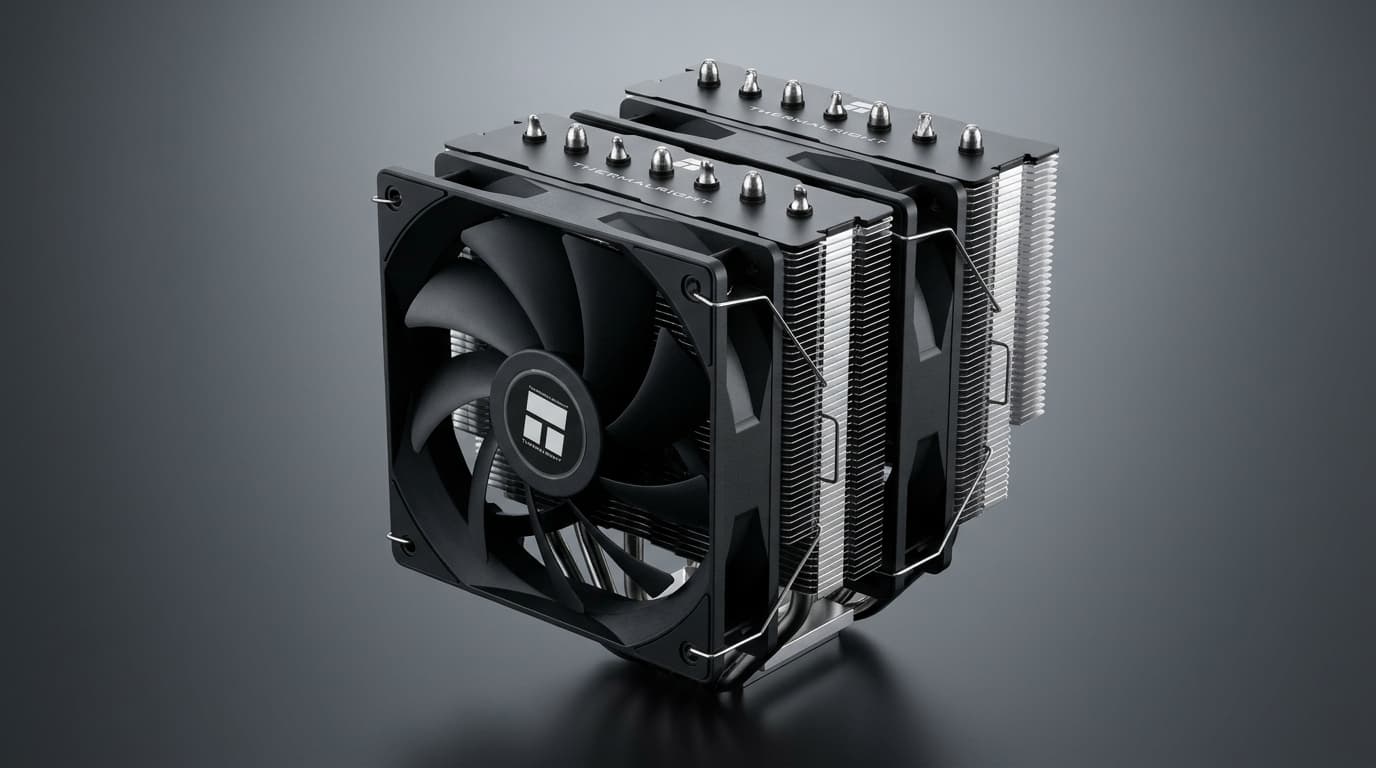
Variant check: The standard Phantom Spirit 120 SE has silver aluminum fins, black top covers, and black non-lit fans. Don't confuse it with the Phantom Spirit 120 SE ARGB, the all-black Phantom Spirit 120 SE Black, the original Phantom Spirit 120 (157 mm tall, 810 g heatsink, adds LGA2011/2066), or the newer Phantom Spirit 120 EVO.
Dual-Tower Design and Seven-Heat-Pipe Architecture
Seven 6 mm copper heat pipes carry heat from the nickel-plated copper base into two separate aluminum fin stacks. One fan sits between the towers and the other on the front, so air is pushed through both stacks in sequence. Compared with a single-tower cooler, this design gives you more fin area and lets the fans run slower for the same heat load.
The seventh heat pipe is the most visible difference from Thermalright's six-pipe Peerless Assassin family. More heat pipes help spread heat across the fin stacks, but the gain over a well-built six-pipe design is usually small. Fin density, fan behavior, base contact, and case airflow often matter just as much. Treat the seven-pipe count as one useful feature, not a guarantee of better temperatures.
At launch, Thermalright said the base is offset so the cooler doesn't block the first PCIe slot, and that the lower fins are cut away to make room for memory modules. Thermalright also includes its own thermal paste in the box.
Cooling Performance: What to Realistically Expect
Independent testing by Igor's Lab (published September 2026) covers the closely related Phantom Spirit 120 SE Black and SE ARGB. Those versions use the same seven-pipe heatsink layout and fan model; the main difference is the finish. On an open bench with a Ryzen 9 7900X under Prime95, the SE Black ran about 69 K above ambient at 200 W with the fans set for 40 dB(A). Running the fans at full speed improved that by only about 0.6–1.0 K. In practice, the cooler reaches most of its performance at moderate fan speeds, and running it flat out mostly adds noise.
That result doesn't directly predict temperatures in your PC. Your temperatures will depend on:
- The CPU and its power limits. A 105 W gaming chip is a very different load from a CPU allowed to draw 250 W or more.
- The workload. Gaming usually produces bursty, moderate load. Rendering, compiling, and video encoding produce sustained all-core load.
- Case airflow. An air cooler can only work with the air your case fans supply.
- Room (ambient) temperature, your BIOS fan curve, and how evenly the thermal paste is applied.
Gaming
For most gaming CPUs, this cooler has enough capacity that you can run a gentle fan curve. It is a reasonable pairing for popular gaming chips on AM5 and LGA1700/1851. Very high-power CPUs can still run warm under stress tests, which is normal behavior for any air cooler in this size class.
Productivity and workstation use
For sustained rendering or compiling on high-core-count CPUs, a dual-tower air cooler like this is a practical baseline. But it will not match a high-end liquid cooler at the highest power levels. If you regularly run long all-core jobs on a flagship chip, consider setting sensible power limits or choose a larger cooling solution.
Everyday use
For browsing, office work, and light creative tasks, the cooler is far more capable than the load requires. The fans can stay at low speeds most of the time.
Noise, Fan Control, and Acoustics
Both TL-C12B V2 fans are 4-pin PWM models with a 1500 RPM ceiling, so your motherboard can control their speed precisely. Thermalright rates each fan at 25.6 dBA. As with any manufacturer noise rating, that figure isn't measured the same way independent reviewers measure noise.
In Igor's Lab testing, the SE Black measured 43.4 dB(A) at 40 cm with the fans at 100% PWM. Hitting a 40 dB(A) target needed about 88% PWM (around 1,375 RPM). Since full speed barely helped temperatures, a custom fan curve that limits top speed is the easiest way to make this cooler quieter. Some owners on PCPartPicker describe it as quiet, while others find it somewhat loud at higher speeds, which is consistent with those measurements.
Tips for quieter operation:
- Connect both fans to CPU_FAN through a PWM splitter (or use CPU_FAN plus CPU_OPT) so they ramp together.
- Use a gradual fan curve with some hysteresis so the fans don't rev up on short load spikes.
- Make sure the case has enough intake airflow; a starved cooler spins faster for the same result.
RAM Clearance, Case Clearance, and Installation
Case clearance
The heatsink stands 154 mm tall. Check your case's listed CPU cooler clearance and leave a few millimeters of margin, especially with a thick side panel or a top-mounted radiator. Many mid-tower ATX cases clear this height, but some compact and slim cases do not.
RAM clearance
Thermalright's spec page does not list a RAM clearance figure. Low-profile memory is the safest pairing. With taller heat-spreader or RGB kits, you can usually raise the front fan on its clips, but that adds height. Check that the raised fan still fits under your side panel and top fans before you buy.
Installation
- The cooler uses a backplate-based mount for Intel. On AM4/AM5, it typically uses the motherboard's stock backplate after you remove the stock retention brackets.
- Mount the heatsink with the front fan removed, then reattach the fans with the wire clips. Expect a little effort getting at the mounting screws on a dual-tower cooler.
- Check fan direction (airflow toward the rear exhaust) and confirm the fan cables reach the CPU fan header.
- Always follow the current manual for your exact socket, since mounting hardware can change between production revisions.
Phantom Spirit 120 SE vs. Competitors
All specifications below are manufacturer figures; they are not measured head-to-head results. Noise ratings from different brands use different methods, so they aren't directly comparable. Note that the Peerless Assassin listing linked here is the newer SE V2, and the be quiet! model compared is the dual-tower Dark Rock Pro 5.
| Cooler | Design | Heat pipes | Fans | Height | Sockets (per maker) |
|---|---|---|---|---|---|
| Thermalright Phantom Spirit 120 SE | Dual tower | 7 x 6 mm | 2 x 120 mm, 1500 RPM | 154 mm | AM4, AM5, LGA115X/1200/1700/1851 |
| Thermalright Peerless Assassin 120 SE V2 | Dual tower | 6 x 6 mm | 2 x 120 mm (28 mm thick), 1850 RPM | 155 mm | AM4, AM5, LGA115X/1200/1700/1851 |
| Thermalright Phantom Spirit 120 | Dual tower | 7 x 6 mm | 2 x 120 mm, 1500 RPM | 157 mm | AM4, AM5, LGA115X/1200/1700/1851/2011/2066 |
| DeepCool AK620 | Dual tower | 6 x 6 mm | 2 x 120 mm, 500–1850 RPM | 160 mm | AM4, AM5, LGA1700 and older (check SKU) |
| be quiet! Dark Rock Pro 5 | Dual tower | 7 x 6 mm | 135 mm + 120 mm, up to 2000 RPM (switch) | 168 mm | AM4, AM5, LGA1700/1200/115X (LGA1851: not verified) |
| Noctua NH-D15 chromax.black | Dual tower | 6 | 2 x 140 mm, up to 1500 RPM | 165 mm | AM4, AM5; LGA1700 may need Noctua's mounting kit on older boxes |
Which one fits your build?
| Cooler | Main advantage | Main trade-off | Best for |
|---|---|---|---|
| Phantom Spirit 120 SE | Seven heat pipes at a budget-friendly position; independently tested SE variants show little gain from max fan speed | No RGB; RAM clearance not published | Value-focused gaming and mainstream builds |
| Peerless Assassin 120 SE V2 | Faster, thicker fans with higher rated airflow | Six heat pipes; higher rated fan noise (29.5 dBA) | Buyers who prioritize fan headroom and price |
| Phantom Spirit 120 | Same pipe count plus HEDT socket support | Slightly taller (157 mm) and heavier | LGA2011/2066 users or those who prefer its styling |
| DeepCool AK620 | Established design with a published 43 mm RAM clearance | Taller (160 mm); one fewer heat pipe | Builders who want a known RAM clearance figure |
| be quiet! Dark Rock Pro 5 | Low-noise focus with a fan speed switch | 168 mm tall; usually a higher price class | Quiet-first builds in roomy cases |
| Noctua NH-D15 chromax.black | Large 140 mm fans and Noctua's long-term mounting support | 165 mm tall, bulky, premium price | Large cases and buyers who value support over cost |
Best Alternatives for Different Needs
- Lowest cost dual tower: the Peerless Assassin 120 SE V2 gives up one heat pipe but has faster fans. Fan speed and noise matter more than the pipe count for many buyers.
- RGB lighting: the Phantom Spirit 120 SE ARGB uses the same heatsink. Igor's Lab found no meaningful thermal difference between the lit and non-lit SE versions.
- Quietest premium option: the be quiet! Dark Rock Pro 5 or Noctua NH-D15 chromax.black, if your case fits a 165–168 mm cooler and your budget allows.
- Small cases: look at a low-profile or single-tower cooler that matches your case's height limit instead of any dual-tower cooler on this list.
- Sustained flagship workloads: a 360 mm AIO liquid cooler, if your case supports one.
Final Verdict: Is the Thermalright Phantom Spirit 120 SE Worth Buying?
The Phantom Spirit 120 SE offers a seven-heat-pipe dual-tower heatsink, two PWM fans, and current Intel and AMD socket support at a non-premium price. Independent data on its closely related SE variants shows that it delivers most of its cooling at moderate fan speeds. It is a good choice for gaming and mainstream productivity builds with a quiet fan curve.
Before you buy, confirm three things: at least 154 mm of cooler clearance (plus margin), your memory height, and that you don't need RGB lighting or HEDT sockets. If those check out, it is easy to recommend for US builders on AM4, AM5, LGA1700, or LGA1851.
Check the current price of the Thermalright Phantom Spirit 120 SE on Amazon
As an Amazon Associate I earn from qualifying purchases. Prices and availability change frequently; check Amazon for current details.
Pros
- Seven 6 mm heat pipes and a dual-tower heatsink in a non-premium price class
- Thermalright lists support for AM4, AM5, LGA1700, and LGA1851
- Independent testing of SE variants shows only about 0.6–1.0 K gained at full fan speed, so you can run a quiet fan curve with little cooling loss
- Both fans are 4-pin PWM with fluid-dynamic (S-FDB) bearings for precise motherboard control
- At 154 mm tall, it is shorter than the DeepCool AK620, Noctua NH-D15, and Dark Rock Pro 5
- The offset base is designed to keep the first PCIe slot clear
- Thermal paste is included
Cons
- The 154 mm height rules out many compact and slim cases
- Thermalright doesn’t publish a RAM clearance figure, so tall memory may require raising the front fan
- Igor’s Lab measured 43.4 dB(A) at 40 cm with the fans at 100% speed
- No RGB lighting (a separate ARGB model exists)
- Unlike the standard Phantom Spirit 120, it has no LGA2011/2066 support
- Like any dual-tower air cooler, it can’t match high-end 360 mm AIOs on sustained flagship-CPU loads
Spec Sheet
Specifications
General
| Model | Phantom Spirit 120 SE |
|---|---|
| Brand | Thermalright |
| Cooler Type | Air cooler, dual tower |
| Lighting | None (non-ARGB version) |
Cooling
| Heat Pipes | 7 x 6 mm |
|---|---|
| Base Material | C1100 pure copper, nickel-plated |
| Thermal Paste | Included |
Fans
| Fan Model | TL-C12B V2 |
|---|---|
| Fan Count | 2 |
| Fan Size | 120 x 120 x 25 mm |
| Fan Speed | 1500 RPM ±10% (max) |
| Airflow | 66.17 CFM (max, per fan) |
| Static Pressure | 1.53 mm H2O (max) |
| Rated Noise | 25.6 dBA (manufacturer rating) |
| Bearing | S-FDB |
| Rated Current | 0.20 A |
| Fan Weight | 135 g (each) |
Dimensions
| Heatsink Dimensions | 110 x 125 x 154 mm (L x W x H) |
|---|---|
| Height | 154 mm |
| Heatsink Weight | 765 g |
Compatibility
| Intel Sockets | LGA115X, LGA1200, LGA1700, LGA1851 |
|---|---|
| AMD Sockets | AM4, AM5 |
Connectivity
| Fan Connector | 4-pin PWM |
|---|
Frequently Asked Questions
Does the Thermalright Phantom Spirit 120 SE support AM5 and LGA1851?+
How tall is the Phantom Spirit 120 SE, and will it fit my case?+
Will it clear tall RAM?+
Is the Phantom Spirit 120 SE loud?+
Is it good enough for gaming and workstation CPUs?+
What is the difference between the Phantom Spirit 120 SE and the Peerless Assassin 120 SE V2?+
Is the Phantom Spirit 120 SE the same as the ARGB or Black version?+
Does it come with thermal paste?+
As an Amazon Associate we earn from qualifying purchases. See our affiliate disclosure.