
Samsung
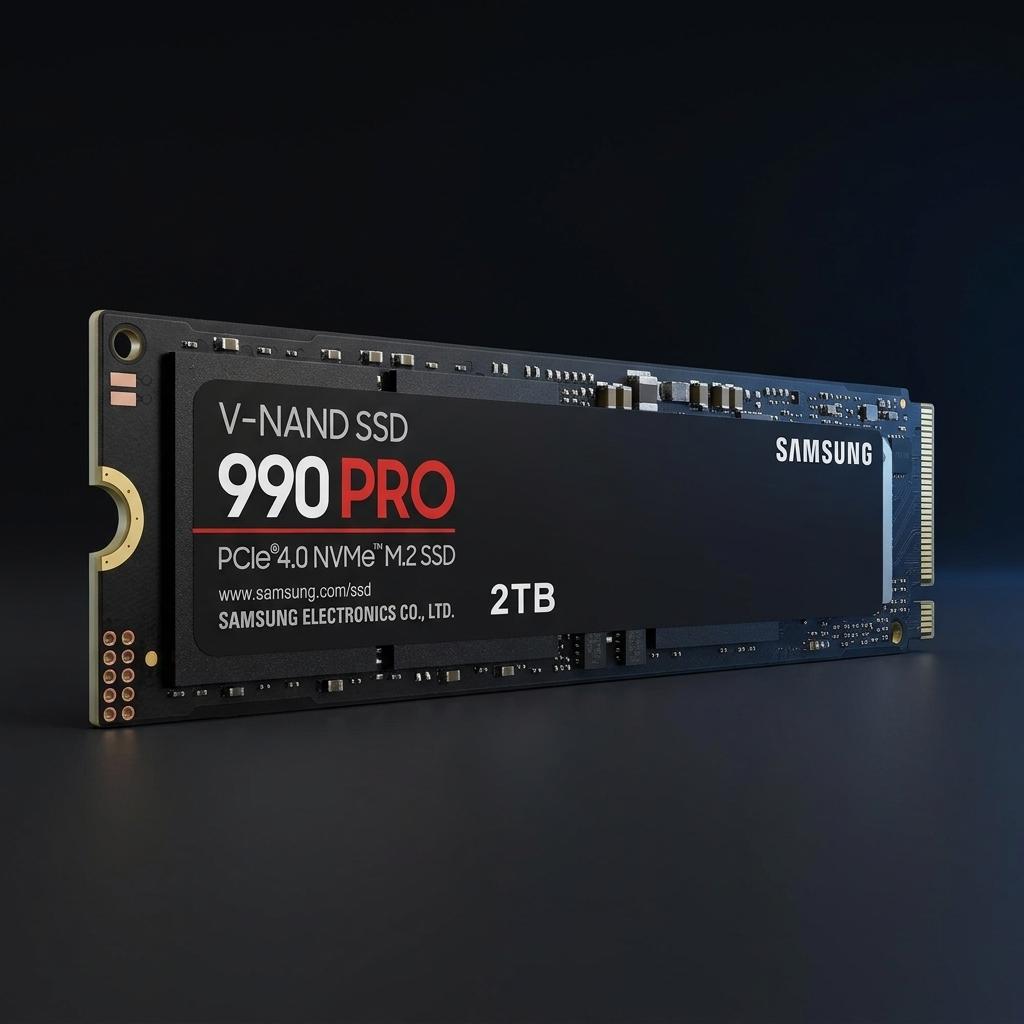
Samsung 990 PRO 2TB PCIe 4.0 NVMe M.2 SSD
The Samsung 990 PRO 2TB is a high-performance PCIe 4.0 NVMe M.2 SSD designed for gaming PCs, demanding workloads, and high-speed storage upgrades. With sequential read speeds of up to 7,450 MB/s, write speeds of up to 6,900 MB/s, Samsung V-NAND TLC technology, and a dedicated DRAM cache, this SSD delivers flagship-class Gen 4 storage performance. Discover its specifications, performance capabilities, compatibility, and how it compares with competing 2TB NVMe SSDs.
Samsung 990 PRO 2TB Review: Is This PCIe 4.0 SSD Worth Buying?
As an Amazon Associate I earn from qualifying purchases.
The Samsung 990 PRO is Samsung's flagship PCIe 4.0 SSD, launched in 2022 as the successor to the 980 PRO. The 2TB capacity is the sweet spot for many builders: room for Windows, a large game library and active projects on one M.2 drive.
The Samsung 990 PRO 2TB PCIe 4.0 NVMe SSD is rated for up to 7,450 MB/s reads and 6,900 MB/s writes. It also has a 2GB LPDDR4 DRAM cache, Samsung V-NAND TLC, 1,200 TBW endurance and a five-year limited warranty. This review explains what those specs mean in practice, covers thermals, PS5 compatibility and firmware, and compares the drive with four 2TB Gen 4 rivals.
Method note: GearNexis has not physically tested this drive. Figures are labeled as Samsung's rated specifications or as results from named independent reviewers.
Samsung 990 PRO 2TB — Quick Verdict
The Samsung 990 PRO 2TB is one of the most complete high-end PCIe 4.0 SSDs available. It pairs top-tier rated speeds with a full DRAM cache, mature software and strong security features. It isn't the clear value pick, though. Rivals like the WD_BLACK SN850X and Crucial T500 feel very similar in real use and often cost less.
- Strengths: 7,450/6,900 MB/s, 1.4M/1.55M rated IOPS, 2GB DRAM, 1,200 TBW, 5-year warranty, TCG Opal 2.0 encryption, Samsung Magician.
- Limitations: PCIe 4.0 only, no heatsink on the standard model, often premium pricing, early firmware health issue (since fixed).
- Best for: High-end gaming PCs, creator workstations, and upgrades from SATA or PCIe 3.0.
Samsung 990 PRO 2TB Specifications
These are Samsung's official datasheet figures for the standard (no heatsink) model MZ-V9P2T0B/AM (ASIN B0BHJJ9Y77). The heatsink version, MZ-V9P2T0CW, is a separate product.
| Interface | PCIe 4.0 x4, NVMe 2.0 (PCIe 3.0 compatible) |
|---|---|
| Form factor | M.2 2280, max 80 × 22 × 2.3 mm |
| Controller / NAND | Samsung in-house / Samsung V-NAND TLC |
| DRAM cache | 2GB LPDDR4 |
| Sequential read / write | Up to 7,450 / 6,900 MB/s |
| Random read / write (QD32) | Up to 1,400K / 1,550K IOPS |
| Random read / write (QD1) | Up to 22K / 80K IOPS |
| Power (avg. read / write) | Up to 5.8W / 5.1W; idle 55mW |
| Operating temperature | 0°C to 70°C |
| Endurance / warranty | 1,200 TBW / 5-year limited (whichever comes first) |
| Security | AES 256-bit, TCG Opal 2.0, IEEE 1667 |
| Heatsink | None (heatsink version sold separately) |
Design and Build Quality
The standard 990 PRO is a single-sided M.2 2280 drive, just 2.3 mm thick, so it fits under motherboard M.2 heatsinks and in most laptops with a 2280 slot. Its label acts as a heat spreader, but it is not a heatsink. Samsung makes the controller, DRAM and NAND itself and supports them all through Magician.
Standard vs. heatsink version: The heatsink model (MZ-V9P2T0CW) adds an aluminum heatsink with RGB lighting and is aimed at the PS5 and desktops without M.2 cooling. It's too thick for most laptops. This review covers the standard model.
Samsung 990 PRO 2TB Performance and Speed
Sequential speed covers large file moves. PCIe 4.0 x4 tops out near 8 GB/s in theory, so 7,450 MB/s is close to the practical Gen 4 ceiling. The 6,900 MB/s write rating applies while data lands in Samsung's Intelligent TurboWrite SLC cache. Very large continuous writes slow down once that cache fills, which is normal for TLC drives.
Random speed drives everyday responsiveness: booting, launching apps and loading assets. The QD32 ratings (1,400K/1,550K IOPS) show peak capability. The QD1 figures (22K/80K IOPS) better reflect typical desktop use.
PCIe 4.0 x4 roughly doubles PCIe 3.0's per-lane bandwidth. NVMe 2.0 is a flash-native protocol with deep parallel queues and far less overhead than SATA's AHCI.
Independent results: TechPowerUp found throttling well managed, with writes holding around 1.3 GB/s when throttled. PC Gamer saw little sign of throttling, and Windows Central placed it at or near the top of its PCMark 10 storage results.
Real-world speed depends on PCIe generation and lanes, the M.2 slot (CPU or chipset), platform, temperature, free space, workload and firmware.
DRAM Cache and Samsung V-NAND TLC Technology
A DRAM cache stores the drive's address-mapping table in fast memory. The usual ratio is 1GB per 1TB, hence 2GB on the 2TB model. It helps most with random access and heavy, mixed workloads. DRAM-less drives use system memory (HMB) instead and are fine for gaming, but they're less consistent under sustained load.
TLC NAND stores three bits per cell, balancing speed, cost and endurance better than QLC. Reviewers identify the flash as Samsung's 176-layer V-NAND; Samsung's datasheet says only "V-NAND TLC." Short benchmarks mostly measure the SLC cache. For multi-hundred-gigabyte transfers, check sustained-write results in independent reviews.
Gaming Performance — Is the Samsung 990 PRO Good for Gaming?
Yes. Moving from a hard drive or SATA SSD to NVMe is a clear improvement. Between top Gen 4 drives, though, load-time differences are usually small, because decompression and shader work load the CPU. The 2TB capacity holds a big library. Strong random reads suit open-world asset streaming, and DirectStorage benefits depend on each game. An SSD doesn't raise FPS, and we don't quote loading times we haven't measured.
Planning a build? See our gaming PC build guide.
Productivity and Professional Workloads
High throughput, a DRAM cache and 1,200 TBW make it a strong drive for video editing (scratch or project drive), large NVMe-to-NVMe transfers, photo libraries, 3D assets, software builds and heavy multitasking. Renders and encodes are usually CPU-, GPU- or RAM-limited, so upgrading those may matter more. See the best CPUs for video editing.
Thermal Performance and Cooling
Samsung rates the drive for operation from 0°C to 70°C, recommends proper airflow and claims up to 50% better power efficiency than the 980 PRO. In 3DTested's cooling test, the drive held full speed without reaching 70°C, and TechPowerUp found throttling well behaved. Results vary with case, airflow and slot location.
- Gaming and general use: A heatsink isn't usually required, but use your motherboard's M.2 heatsink if you have one.
- Sustained writes or hot cases: A heatsink is recommended.
- PS5: A heatsink is required. Add one that fits Sony's limits, or buy the heatsink version.
- Laptops: Use the bare drive.
Samsung Magician Software and Features
Magician provides drive health and S.M.A.R.T. data, firmware updates, benchmarks, diagnostics, performance optimization and encryption-related management. Samsung Data Migration handles cloning.
Firmware note: In early 2023, some drives showed rapid health-percentage drops. Samsung's firmware 1B2QJXD7 (February 2023) stopped further abnormal wear but didn't restore health already lost. Update to the latest firmware before filling the drive.
Compatibility and Installation
- Requires an M.2 2280 NVMe (M-key) slot. Some slots are SATA-only.
- Full speed in PCIe 4.0 x4 slots (AM4 X570/B550, AM5, Intel 11th-gen and newer). It runs at Gen 4 speed in PCIe 5.0 slots.
- Works in PCIe 3.0 slots, limited to about 3,500 MB/s.
- Some M.2 slots disable SATA ports or share lanes. Check your manual.
- Fits most laptops. PS5-compatible with a compliant heatsink.
- Update your BIOS and the SSD firmware.
Our B550 motherboards guide and Ryzen compatibility guide explain M.2 lane allocation.
Install: Power off and unplug the PC. Remove the M.2 cover and peel the film off the thermal pad. Insert the drive at an angle and secure it, then refit the heatsink. In Windows, initialize the drive as GPT in Disk Management and format it, or clone or install your OS for a boot drive. Finally, install Magician and update the firmware.
Samsung 990 PRO 2TB vs Competitors
Manufacturer-rated specs for bare 2TB models. DRAM details marked "reported" come from reviews or listings, not official spec sheets.
| Feature | Samsung 990 PRO | WD_BLACK SN850X | Crucial T500 | Kingston KC3000 | SK hynix P41 |
|---|---|---|---|---|---|
| Product | Samsung 990 PRO 2TB PCIe 4.0 NVMe SSD | WD_BLACK SN850X 2TB PCIe Gen4 NVMe M.2 SSD | Crucial T500 2TB PCIe Gen4 NVMe M.2 SSD | Kingston KC3000 2TB PCIe 4.0 NVMe M.2 SSD | SK hynix Platinum P41 2TB PCIe Gen4 NVMe M.2 SSD |
| Model | MZ-V9P2T0B/AM | WDS200T2X0E | CT2000T500SSD8 | SKC3000D/2048G | SHPP41-2000GM-2 |
| Interface / form | PCIe 4.0 x4, M.2 2280 | PCIe 4.0 x4, M.2 2280 | PCIe 4.0 x4, M.2 2280 | PCIe 4.0 x4, M.2 2280 | PCIe 4.0 x4, M.2 2280 |
| Seq. read / write | 7,450 / 6,900 MB/s | 7,300 / 6,600 MB/s | 7,400 / 7,000 MB/s | 7,000 / 7,000 MB/s | 7,000 / 6,500 MB/s |
| Random R / W | 1,400K / 1,550K | 1,200K / 1,100K | 1,180K / 1,440K | 1,000K / 1,000K | 1,400K / 1,300K |
| NAND | Samsung V-NAND TLC | BiCS5 112L TLC | Micron 232L TLC | 3D TLC | SK hynix 176L TLC |
| DRAM | 2GB LPDDR4 | 2GB (reported) | 2GB LPDDR4 (reported) | Yes (reported) | 2GB LPDDR4 (reported) |
| TBW / warranty | 1,200 / 5 yr | 1,200 / 5 yr | 1,200 / 5 yr | 1,600 / 5 yr | 1,200 / 5 yr |
| Heatsink option | Separate SKU | Separate RGB SKU | Separate SKU | Low-profile heat spreader | None |
| Main advantage | Top rated speeds, Magician, encryption | Consistent gaming performance | Newest NAND, near-max Gen 4 ratings | Best endurance | Strong efficiency in reviews |
Gaming: All five are excellent, and load times are typically close. The Samsung 990 PRO 2TB and WD_BLACK SN850X 2TB are the established flagships, and both offer PS5 heatsink versions. Buy whichever is cheaper.
Value: Pricing changes, so we name no permanent winner. The Crucial T500 2TB nearly matches Samsung's ratings with a DRAM cache and 1,200 TBW, and it's a strong pick when it costs less.
Productivity: The 990 PRO's high random write IOPS suit mixed workloads. The SK hynix Platinum P41 2TB is also highly rated by reviewers for real-world performance and efficiency.
Endurance: The Kingston KC3000 2TB leads at 1,600 TBW. Even 1,200 TBW is about 650GB per day for five years, far beyond typical home use.
Is Samsung's premium justified? Partly. You get the highest ratings here, in-house components, mature software and encryption, but not meaningfully faster real-world gaming. At similar prices it's an easy pick; at a notable premium, the rivals are just as sensible. For more on Gen 3 vs Gen 4 vs Gen 5, read our NVMe SSD buying guide.
Who Should Buy the Samsung 990 PRO 2TB?
- High-end gaming PC builders who want a fast, roomy primary drive.
- Content creators and video editors who need a responsive project drive.
- Workstation users who value TCG Opal encryption and monitoring tools.
- Anyone upgrading from SATA, a hard drive or PCIe 3.0 NVMe who needs fast 2TB storage.
Who Should Avoid It?
- Budget builders: mid-range Gen 4 drives load games almost as fast for less.
- PCIe 3.0-only systems: speed is capped near 3,500 MB/s.
- Gen 5 platform owners who need peak sequential throughput.
- Buyers who need 1TB or 4TB instead.
- PS5 owners who don't want to add a heatsink: buy the heatsink edition instead.
Final Verdict — Is Samsung 990 PRO 2TB Worth Buying?
The Samsung 990 PRO 2TB delivers top-tier Gen 4 speeds, a 2GB DRAM cache, Samsung V-NAND TLC, 1,200 TBW and a five-year warranty. Reviewers found its thermals manageable, and its slim design fits desktops and laptops. It isn't an automatic winner, because the SN850X, T500, KC3000 and P41 compete closely. It's best for gamers and creators on PCIe 4.0 or newer who want a polished, well-supported 2TB drive. If that's you, the Samsung 990 PRO 2TB PCIe 4.0 NVMe SSD is an easy recommendation. Compare current prices first.
Sources
Pros
- Rated up to 7,450 MB/s sequential read and 6,900 MB/s sequential write
- Rated up to 1,400K random read and 1,550K random write IOPS
- Dedicated 2GB LPDDR4 DRAM cache for consistent performance
- Samsung in-house controller with Samsung V-NAND TLC flash
- 1,200 TBW endurance rating with a five-year limited warranty
- AES 256-bit encryption with TCG Opal 2.0 and IEEE 1667 support
- Samsung Magician software for health monitoring, firmware updates and benchmarks
- Slim 2.3mm single-sided design fits under motherboard heatsinks and in laptops
- Backward compatible with PCIe 3.0 systems
Cons
- PCIe 4.0 only, so it cannot match PCIe 5.0 SSD throughput
- Standard model has no factory heatsink, so sustained heavy writes in poorly cooled slots may throttle
- Often priced at a premium over rivals with similar real-world performance
- Peak write speed relies on the TurboWrite cache, so very large sustained writes run slower
- Early units needed a firmware update to fix an abnormal health-wear issue
- Real-world speed depends on platform, M.2 slot, cooling and workload
Spec Sheet
Specifications
General
| Brand | Samsung |
|---|---|
| Product Series | 990 PRO |
| Model | MZ-V9P2T0B/AM |
| Release Year | 2022 |
Storage
| Capacity | 2TB |
|---|---|
| Storage Type | NVMe SSD |
| Controller | Samsung in-house controller |
| NAND Type | Samsung V-NAND TLC |
| DRAM Cache | 2GB LPDDR4 |
Interface
| PCIe | PCIe Gen 4.0 x4 (backward compatible with PCIe 3.0) |
|---|---|
| Protocol | NVMe 2.0 |
Form Factor
| Size | M.2 2280 |
|---|---|
| Dimensions | Max 80.0 x 22 x 2.3 mm |
Performance
| Sequential Read | Up to 7,450 MB/s |
|---|---|
| Sequential Write | Up to 6,900 MB/s |
| Random Read (QD32) | Up to 1,400,000 IOPS |
| Random Write (QD32) | Up to 1,550,000 IOPS |
| Random Read / Write (QD1) | Up to 22,000 / 80,000 IOPS |
Power
| Active Average (Read / Write) | Up to 5.8W / 5.1W |
|---|---|
| Idle (APST) / L1.2 | 55mW / 5mW |
Reliability
| Operating Temperature | 0°C to 70°C |
|---|---|
| MTBF | 1.5 million hours |
Endurance
| TBW | 1,200 TBW |
|---|
Warranty
| Limited Warranty | 5 years or 1,200 TBW, whichever comes first |
|---|
Security
| Encryption | AES 256-bit, TCG Opal 2.0, IEEE 1667 |
|---|
Software
| Management | Samsung Magician |
|---|
Cooling
| Heatsink | None (standard model; heatsink version is MZ-V9P2T0CW) |
|---|
Frequently Asked Questions
Is the Samsung 990 PRO 2TB worth buying?+
How fast is the Samsung 990 PRO 2TB?+
Is Samsung 990 PRO good for gaming?+
Is Samsung 990 PRO compatible with PCIe 4.0 motherboards?+
Does Samsung 990 PRO work in a PCIe 3.0 M.2 slot?+
Does Samsung 990 PRO 2TB need a heatsink?+
Is Samsung 990 PRO compatible with PS5?+
What is the TBW rating of Samsung 990 PRO 2TB?+
What is the difference between Samsung 990 PRO and Samsung 990 PRO with Heatsink?+
Is Samsung 990 PRO better than WD_BLACK SN850X?+
Is Samsung 990 PRO better than Crucial T500?+
How do I update Samsung 990 PRO firmware?+
As an Amazon Associate we earn from qualifying purchases. See our affiliate disclosure.