
Samsung
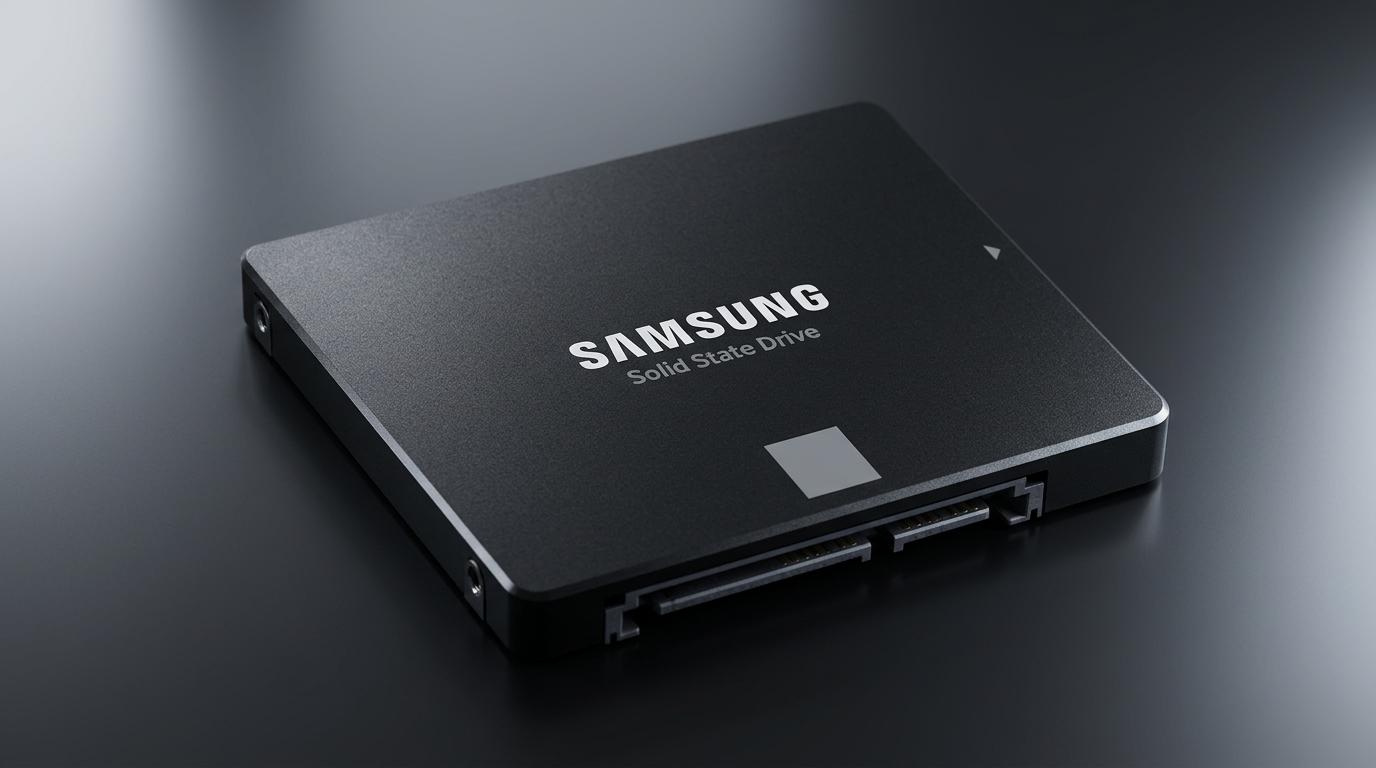
Samsung 870 EVO 1TB SATA III 2.5" SSD
The Samsung 870 EVO 1TB is a 2.5-inch SATA III SSD for desktops, laptops and older systems that don't have an M.2 NVMe slot. It uses Samsung V-NAND 3-bit MLC (TLC) flash with a DRAM cache and is rated for sequential reads of up to 560 MB/s, sequential writes of up to 530 MB/s and 600TBW of endurance. That makes it one of the most straightforward ways to replace a hard drive or upgrade an ageing SATA SSD.
The Samsung 870 EVO 1TB SATA SSD is a 2.5-inch SATA III drive for PC users who want reliable, upgrade-friendly storage that works in almost any system with a SATA port. Its model number is MZ-77E1T0B/AM. Samsung rates it for sequential reads of up to 560 MB/s and sequential writes of up to 530 MB/s, close to the practical limit of the SATA 6 Gb/s interface.
This Samsung 870 EVO 1TB review covers the drive's specifications, its DRAM cache and V-NAND, real-world use, laptop and desktop compatibility, endurance, warranty, how SATA compares with NVMe, and the main alternatives. GearNexis has not run its own benchmarks on this drive. All performance figures below are manufacturer ratings unless stated otherwise.
Samsung 870 EVO 1TB at a Glance
With 1TB of storage, the 870 EVO has room for an operating system, applications, a moderate game library and everyday files. It uses Samsung's MKX controller, a dedicated LPDDR4 DRAM cache and Samsung V-NAND 3-bit MLC flash. Its standard 2.5-inch, 7 mm form factor fits most desktop drive bays and laptops with a 2.5-inch bay.
- Capacity: 1TB
- Interface: SATA III (6 Gb/s), backward-compatible with SATA 3 Gb/s and 1.5 Gb/s
- Form factor: 2.5-inch, 7 mm
- Rated sequential read: Up to 560 MB/s
- Rated sequential write: Up to 530 MB/s
- NAND: Samsung V-NAND 3-bit MLC (TLC)
- Cache: 1GB LPDDR4 DRAM
- Rated endurance: 600TBW (1TB model)
- Software: Samsung Magician
How Fast Is the Samsung 870 EVO 1TB?
Samsung rates the 1TB model for sequential reads of up to 560 MB/s and sequential writes of up to 530 MB/s, with random performance of up to 98K IOPS read and 88K IOPS write. Those figures sit at the top end of what the SATA 6 Gb/s interface allows, so no SATA SSD can be dramatically faster.
Compared with a traditional hard drive, the difference is large. A typical 7,200 RPM HDD manages roughly 100–200 MB/s sequentially and far lower random performance. Moving to an SSD like the 870 EVO usually makes boot times, application launches and file searches feel much quicker.
Rated speeds versus real-world performance
Rated maximums are not guaranteed in every situation. Real results depend on the host system, the SATA controller, the workload, how full the drive is and its temperature. The 870 EVO uses Samsung's Intelligent TurboWrite technology, a fast write buffer that keeps short bursts of writes at full speed. During very long sustained writes that exceed the buffer, write speed can drop. If sustained write performance matters to you, check independent reviews that test long transfers before you buy.
Is the Samsung 870 EVO Good for Gaming?
The 870 EVO is a solid choice for gaming storage, especially in systems without M.2 slots or as a secondary drive for a game library. The 1TB capacity holds several modern games along with launchers and DLC.
Moving games from a hard drive to the 870 EVO can noticeably shorten loading screens and make installing, updating and moving games quicker. Fast PCIe NVMe drives can load some games faster again, but in many titles the difference between a good SATA SSD and an NVMe SSD is small compared with the jump from a hard drive.
An SSD does not directly raise frame rates, though. FPS depends mainly on the processor, graphics card, memory, game engine and settings. The 870 EVO improves storage speed and responsiveness, not GPU performance.
V-NAND and DRAM Cache Explained
Samsung V-NAND 3-bit MLC (TLC)
The 870 EVO uses Samsung V-NAND 3-bit MLC flash memory. Samsung uses the term "3-bit MLC" for what most brands call TLC, which stores three bits per cell. TLC is the most common NAND type in mainstream consumer SSDs and balances capacity, speed and endurance well.
Why the DRAM cache matters
The 1TB 870 EVO carries a dedicated 1GB LPDDR4 DRAM chip, which stores the drive's mapping tables. A DRAM cache helps an SSD stay responsive with random reads and writes and when the drive is getting full. Many budget SATA SSDs are DRAM-less, so this is one of the 870 EVO's main advantages within the SATA category.
Samsung 870 EVO Laptop and Desktop Compatibility
The 870 EVO is a 2.5-inch SATA drive, so it works in a different set of devices from M.2 NVMe SSDs.
2.5-inch SATA vs M.2 NVMe: which slot do you have?
A 2.5-inch SATA SSD connects with a SATA data cable and a SATA power cable in desktops, or slides straight into the SATA bay of a laptop. M.2 NVMe drives are small sticks that plug directly into the motherboard. The 870 EVO will not fit in an M.2 slot, and an M.2-only laptop or handheld cannot take it.
Before buying the 870 EVO, check your device for:
- A free 2.5-inch drive bay (desktops) or a 2.5-inch SATA bay (laptops)
- A free SATA port on the motherboard and a spare SATA power connector (desktops)
- Bay height support for 7 mm drives (most laptops with 2.5-inch bays support 7 mm)
- Any manufacturer-specific upgrade restrictions
The 870 EVO is a common upgrade for older laptops and desktops that originally shipped with a hard drive. It also works well as extra storage in newer desktops whose M.2 slots are already in use.
Do you need a SATA cable?
Desktop installs need a SATA data cable. Many motherboards include one or two in the box. The drive does not include a cable or a 3.5-inch bay adapter, so check whether your case has 2.5-inch mounting points.
Samsung Magician Software
Samsung Magician is Samsung's SSD management application. It shows drive health and status information, handles firmware updates, runs performance benchmarks and offers features such as data migration and secure erase for supported Samsung drives.
Magician is a convenient way to check the drive's health and keep its firmware current. Samsung's Data Migration tool can also help clone an existing drive to the 870 EVO. Magician is mainly built for Windows, so macOS and Linux users should check which monitoring and firmware-update options exist for their platform before buying.
Endurance and Warranty
The Samsung 870 EVO 1TB has a manufacturer-rated endurance of 600TBW. TBW (terabytes written) is the amount of data the manufacturer specifies can be written to the drive under its endurance rating. It is not a prediction of exactly when a particular drive will fail, and typical home and gaming use writes far less data than this each year.
Samsung specifies a five-year limited warranty or 600TBW, whichever is reached first. Coverage is subject to Samsung's terms and conditions. Warranty terms and service can vary by region and seller, so confirm the terms that apply to your purchase.
Installation and System Requirements
The 870 EVO uses a 2.5-inch, 7 mm form factor and a SATA III 6 Gb/s interface. It also works with older SATA 3 Gb/s and 1.5 Gb/s ports, although those older ports will limit its maximum speed.
Before installing, confirm your system has a free SATA port and power connector (desktops) or a 2.5-inch SATA bay (laptops). For the best performance, connect it to a motherboard SATA port running in AHCI mode. If you are moving an existing Windows installation, clone the old drive first with Samsung's Data Migration tool or another cloning tool, or do a clean install.
Samsung 870 EVO 1TB vs Competitors
The table below compares the 870 EVO with four popular PCIe Gen4 NVMe SSDs that buyers often consider when upgrading. The alternatives use a different interface, so they are much faster on paper but need an M.2 NVMe slot. Rated speeds are not a direct measure of real-world performance, so use independent benchmarks and current prices to make your final choice.
| SSD | Capacity | Interface | Maximum Read Speed | Maximum Write Speed | Main Consideration |
|---|---|---|---|---|---|
| Samsung 870 EVO | 1TB | SATA III 6 Gb/s | Up to 560 MB/s | Up to 530 MB/s | 2.5-inch SATA SSD with DRAM cache; fits systems without M.2 |
| Samsung 990 PRO | 2TB | PCIe 4.0 x4 | Up to 7,450 MB/s | Up to 6,900 MB/s | Premium performance SSD with DRAM cache |
| WD_BLACK SN850X | 2TB | PCIe 4.0 x4 | Up to 7,300 MB/s | Up to 6,600 MB/s | Gaming-focused SSD with DRAM cache |
| Crucial T500 | 2TB | PCIe 4.0 x4 | Up to 7,400 MB/s | Up to 7,000 MB/s | TLC-based performance SSD with DRAM cache |
| Kingston KC3000 | 2TB (2048GB) | PCIe 4.0 x4 | Up to 7,000 MB/s | Up to 7,000 MB/s | High-performance TLC SSD with DRAM cache |
Samsung 870 EVO vs Samsung 990 PRO
The Samsung 990 PRO 2TB is Samsung's premium PCIe 4.0 NVMe drive, with much higher rated sequential speeds, a dedicated DRAM cache and double the capacity of the 1TB 870 EVO. It needs an M.2 NVMe slot. The 870 EVO is the Samsung choice for systems that only have SATA, or for buyers adding a secondary drive without using an M.2 slot.
Samsung 870 EVO vs WD_BLACK SN850X
The WD_BLACK SN850X 2TB is a DRAM-equipped Gen4 gaming drive with far higher rated speeds than any SATA SSD. It is also sold in a heatsink version for desktops and consoles. If your PC has a free M.2 NVMe slot and you want maximum game-install and transfer speed, it is the faster option. The 870 EVO suits systems that can't take an M.2 drive.
Samsung 870 EVO vs Crucial T500
The Crucial T500 2TB is a TLC-based Gen4 NVMe drive with a DRAM cache. Its rated sequential speeds are more than ten times those of the 870 EVO, but only in a compatible M.2 slot. Buyers choosing between them are mostly deciding which interface their system supports and how much capacity they need.
Samsung 870 EVO vs Kingston KC3000
The Kingston KC3000 2TB (sold as 2048GB) is a TLC-based Gen4 SSD with a DRAM cache and a high endurance rating for its 2048GB model. It targets demanding desktop users with M.2 NVMe slots, while the 870 EVO targets SATA upgrades. Check Kingston's current specifications and pricing when comparing.
Samsung 870 EVO 1TB Review: Final Verdict
The Samsung 870 EVO 1TB SSD is a strong SATA III option for anyone who wants dependable storage, a DRAM cache, Samsung V-NAND and a five-year warranty in a standard 2.5-inch format. Its rated speeds of up to 560 MB/s read and 530 MB/s write sit at the top of the SATA category.
The main trade-off is the SATA interface itself. PCIe NVMe drives are many times faster on paper, so if your system has a free M.2 NVMe slot, an NVMe drive will usually make more sense at a similar price. If you plan to use it in a laptop, confirm first that it has a 2.5-inch SATA bay, not only an M.2 slot.
Overall, the Samsung 870 EVO 1TB deserves a place on your shortlist for hard-drive replacements, older laptop and desktop upgrades, and secondary game or media storage. Compare its current price, independent benchmark results, warranty terms and competing SSDs before you decide.
Pros
- 1TB storage capacity for the operating system, applications, games and files.
- SATA III interface that works in almost any desktop and many laptops.
- Rated sequential read speeds of up to 560 MB/s.
- Rated sequential write speeds of up to 530 MB/s.
- Dedicated 1GB LPDDR4 DRAM cache.
- Samsung V-NAND 3-bit MLC (TLC) flash memory.
- 600TBW endurance rating for the 1TB model.
- Five-year limited manufacturer warranty.
- Samsung Magician and Data Migration software support.
Cons
- SATA interface is much slower than PCIe NVMe SSDs.
- Rated maximum speeds are not guaranteed in real-world workloads.
- Write speeds can drop during long transfers that exceed the TurboWrite buffer.
- Will not fit devices that only have M.2 slots.
- Desktop installs need a SATA data cable, which is not included.
Spec Sheet
Specifications
General
| Product Name | Samsung 870 EVO SATA III 2.5" SSD |
|---|---|
| Model Number | MZ-77E1T0B/AM |
| Capacity | 1TB |
| Brand | Samsung |
Interface
| Interface | SATA III 6 Gb/s |
|---|---|
| Compatibility | SATA 3 Gb/s and 1.5 Gb/s |
Form Factor
| Form Factor | 2.5-inch, 7 mm |
|---|
Performance
| Sequential Read | Up to 560 MB/s |
|---|---|
| Sequential Write | Up to 530 MB/s |
| Random Read | Up to 98K IOPS |
| Random Write | Up to 88K IOPS |
Memory
| NAND Type | Samsung V-NAND 3-bit MLC (TLC) |
|---|---|
| Cache | 1GB LPDDR4 DRAM |
Controller
| Controller | Samsung MKX |
|---|
Endurance
| Total Bytes Written | 600TBW |
|---|---|
| MTBF | 1.5 million hours |
Dimensions
| Length | 100 mm |
|---|---|
| Width | 69.85 mm |
| Height | 6.8 mm |
Security
| Encryption | AES 256-bit, TCG Opal 2.0, IEEE 1667 |
|---|
Software
| Management Software | Samsung Magician |
|---|
Warranty
| Manufacturer Warranty | Five-year limited warranty or 600TBW, whichever comes first |
|---|
Frequently Asked Questions
Is the Samsung 870 EVO 1TB a good SSD?+
What is the maximum read speed of the Samsung 870 EVO 1TB?+
What is the maximum write speed of the Samsung 870 EVO 1TB?+
Is the Samsung 870 EVO an NVMe SSD?+
Does the Samsung 870 EVO 1TB have DRAM?+
Is the Samsung 870 EVO good for gaming?+
Is the Samsung 870 EVO compatible with laptops?+
Can I use the Samsung 870 EVO in a PS4 or PS5?+
What type of NAND does the Samsung 870 EVO use?+
What is the endurance rating of the Samsung 870 EVO 1TB?+
What warranty does the Samsung 870 EVO have?+
Does the Samsung 870 EVO come with software?+
Should I buy the Samsung 870 EVO or an NVMe SSD?+
Does the 870 EVO come with a SATA cable?+
As an Amazon Associate we earn from qualifying purchases. See our affiliate disclosure.