
MSI
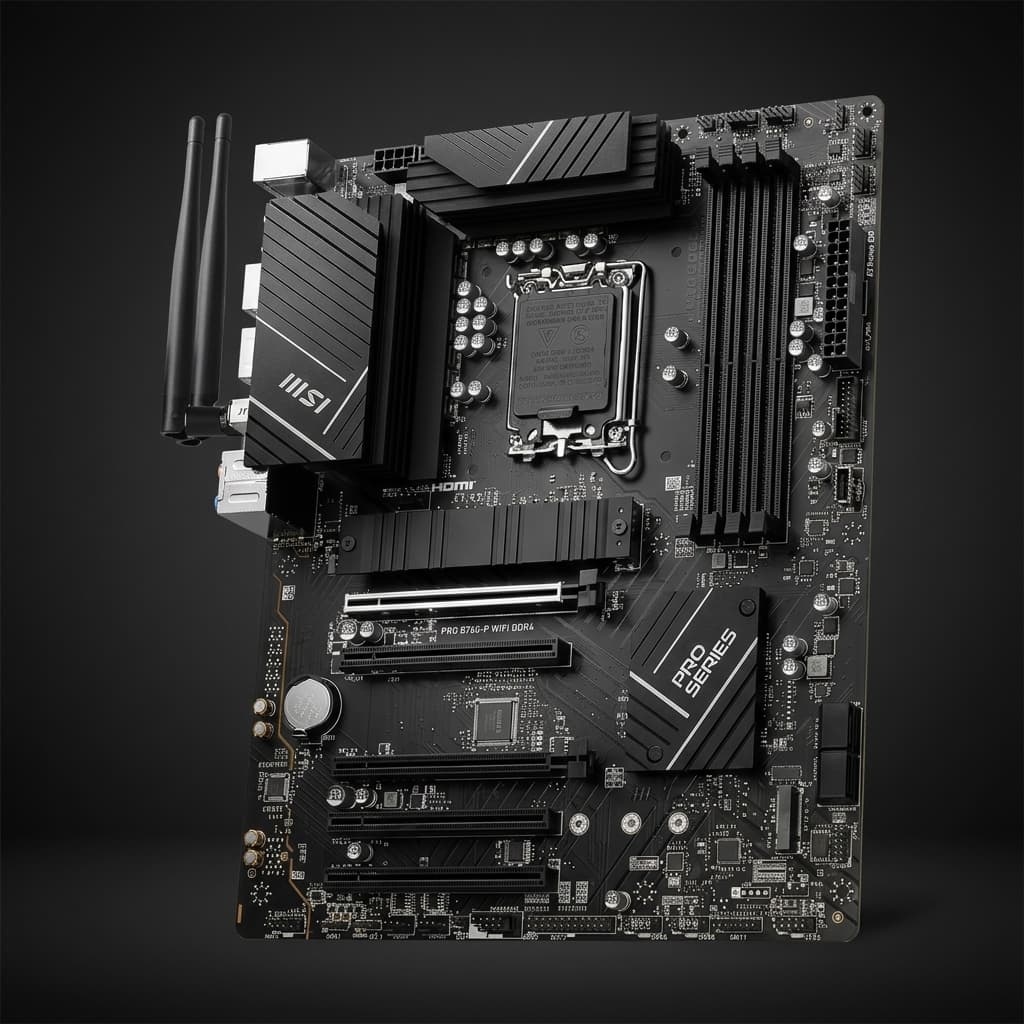
MSI PRO B760-P WiFi DDR4 ProSeries Motherboard
MSI PRO B760-P WiFi DDR4 review: an LGA 1700 ATX board for Intel 12th–14th Gen with four DDR4 slots, Wi-Fi 6E, Bluetooth 5.3, 2.5Gb LAN and two PCIe 4.0 M.2 slots, compared with the leading B760 DDR4 alternatives.
MSI PRO B760-P WiFi DDR4 Review: A Sensible DDR4 Board for 12th–14th Gen Intel
If you're building or upgrading an Intel LGA 1700 PC and want to keep using DDR4 memory, the MSI PRO B760-P WiFi DDR4 Motherboard is one of the more complete mainstream options. It pairs the Intel B760 chipset with four DDR4 slots, two PCIe 4.0 x4 M.2 slots, Intel Wi-Fi 6E, Bluetooth 5.3, 2.5Gb LAN, and a PCIe 4.0 x16 graphics slot in a standard ATX layout.
The short answer: it's a strong value choice for gamers and everyday users running a Core i5 or Core i7 on DDR4. It's less compelling if you want three or more M.2 drives, a PCIe 5.0 graphics slot, or DDR5.
Quick Verdict
- What it does well: Wi-Fi 6E and Bluetooth 5.3 built in, 2.5GbE, two Gen 4 x4 M.2 slots with a heatsink, an 8-pin + 4-pin CPU power layout, and support for 12th, 13th and 14th Gen Intel Core CPUs.
- Main limitations: DDR4 only, PCIe 4.0 rather than 5.0, only two M.2 slots, no CPU multiplier overclocking (a B760 chipset limit), and a fairly basic rear USB layout with four USB 2.0 ports.
- Who it suits: Builders reusing DDR4 RAM, budget and midrange gamers, and home-office users who need reliable wireless networking without buying an add-in card.
- DDR4 Intel builds: Yes, it makes sense, especially for locked or non-K processors, where B760 gives up little in practice.
MSI PRO B760-P WiFi DDR4 Specifications
| Specification | Details |
|---|---|
| Socket / Chipset | LGA 1700 / Intel B760 |
| CPU support | Intel Core 12th, 13th and 14th Gen, Pentium Gold, Celeron |
| Form factor | ATX, 243.84 × 304.8 mm |
| Memory | 4× DDR4 DIMM, up to 128GB, dual-channel, non-ECC unbuffered, XMP |
| Memory speed | DDR4-3200 (JEDEC); up to 5333+ MHz (OC, 1 DIMM per channel, single-rank) |
| Expansion | PCI_E1: PCIe 4.0 x16 (CPU); PCI_E3: PCIe 4.0 x4 (chipset); PCI_E2/4/5: PCIe 3.0 x1 (chipset) |
| M.2 | M.2_1: PCIe 4.0 x4 (CPU), up to 22110; M.2_2: PCIe 4.0 x4 or SATA (chipset), up to 2280 |
| SATA | 4× SATA 6Gb/s; RAID 0/1/5/10 |
| Networking | Realtek RTL8125BG 2.5GbE; Intel Wi-Fi 6E; Bluetooth 5.3 |
| Audio | Realtek ALC897, 7.1-channel, S/PDIF out |
| Display outputs | 1× HDMI 2.1 (4K 60Hz), 1× DisplayPort 1.4 (4K 60Hz); requires CPU integrated graphics |
| Rear USB | 1× USB 10Gbps Type-C, 2× USB 10Gbps Type-A, 4× USB 2.0 |
| Power | 12+1 Duet Rail Power System with P-PAK; 8-pin + 4-pin CPU power |
Design and Build Quality
The PRO B760-P WiFi DDR4 follows MSI's understated PRO Series look: a dark PCB, silver-grey heatsinks, and no onboard RGB lighting. MSI specifies a 6-layer PCB with 2oz copper, an extended VRM heatsink over the power stages, a chipset heatsink, and an M.2 Shield Frozr heatsink over the primary M.2 slot. The main PCIe x16 slot uses MSI's "Steel Armor" reinforcement.
Because it's a full-size ATX board, you'll need an ATX-compatible case. It works with most mid-tower cases. Builders should plan for the dual CPU power connectors (8-pin + 4-pin). Most modern PSUs provide both, but check before you buy. You'll also find two ARGB Gen2 headers, one 12V RGB header, a pump fan header, and five system fan headers, which gives plenty of room for cooling and lighting without extra controllers. MSI's EZ M.2 Clip makes SSD installation tool-free, and the four EZ Debug LEDs help you identify CPU, memory, VGA or boot problems during the first power-on.
CPU Compatibility and Performance Considerations
The board uses the LGA 1700 socket and supports Intel Core 12th Gen (Alder Lake), 13th Gen and 14th Gen (Raptor Lake) processors. It does not support newer Intel Core Ultra desktop chips on LGA 1851, and it is not compatible with older LGA 1200 CPUs.
Common pairings include the Intel Core i5-12400F, i5-13400F and i5-14400F for value gaming builds, and the i5-14600K, i7-13700K or i7-14700K for higher-end systems. These are examples of compatible processors by socket and generation, not processors GearNexis has tested on this board. Always confirm specific CPUs against MSI's CPU support list.
BIOS and 14th Gen processors
This board launched before Intel's 14th Gen processors, so early units may ship with a BIOS that does not recognise a 14th Gen chip. MSI's specification sheet does not list a CPU-less BIOS flashback button. If your board has an older BIOS, you may need a supported 12th or 13th Gen CPU to update it with M-Flash before installing a 14th Gen processor. Recent stock often ships with updated firmware, but this isn't guaranteed. Ask the seller, or plan for it.
B760 overclocking limits
B760 does not allow CPU multiplier overclocking, so unlocked K-series chips run at Intel's stock boost behaviour rather than being manually overclocked. Memory overclocking through XMP is supported. For a Core i5-14600K or Core i7-14700K owner who doesn't plan to overclock manually, that tradeoff is often acceptable, though a Z790 board is the right choice if CPU tuning matters to you.
DDR4 Memory Support
This is a DDR4-only motherboard. DDR5 modules will not fit or work. It has four DIMM slots, supports up to 128GB in dual-channel mode, and supports Intel XMP profiles. MSI rates JEDEC speeds up to DDR4-3200 and lists overclocked speeds up to 5333+ MHz, but only with one single-rank module per channel. With four single-rank modules, MSI's listed ceiling drops to 4400+ MHz, and with four dual-rank modules to 4000+ MHz. These are advertised maximums. Actual stable speeds depend on your CPU's memory controller, the RAM kit, and the BIOS.
The biggest practical reason to buy this board is reusing DDR4. If you already own a good 16GB or 32GB DDR4-3200 or DDR4-3600 kit, this board lets you move to a 12th–14th Gen Intel CPU without buying new memory.
PCIe Expansion and Graphics Card Compatibility
The primary PCI_E1 slot runs at PCIe 4.0 x16 from the CPU, which is plenty of bandwidth for current graphics cards. PCIe 5.0 graphics cards are backward-compatible and will work in this slot at PCIe 4.0 speeds. For today's GPUs the practical performance difference is generally small. MSI also lists a PCIe 4.0 x4 slot (PCI_E3) and three PCIe 3.0 x1 slots from the chipset, which is useful for capture cards, sound cards, extra network cards or NVMe adapters. Resizable BAR is supported in the BIOS.
M.2 and SATA Storage
You get two M.2 slots, both PCIe 4.0 x4. M.2_1 connects to the CPU, supports drives up to 22110 length, and sits under the M.2 Shield Frozr heatsink. M.2_2 connects through the chipset, supports PCIe 4.0 x4 or SATA M.2 drives up to 2280 length. Four SATA 6Gb/s ports cover hard drives and 2.5-inch SSDs, with RAID 0/1/5/10 support.
Note: if you install a SATA-mode M.2 SSD in M.2_2, the SATA8 port is disabled. An NVMe drive in that slot does not trigger this limit. If you plan to run three or more NVMe SSDs, consider a board with three M.2 slots, such as the competitors below.
Wi-Fi 6E, Bluetooth 5.3 and 2.5Gb LAN
The pre-installed Intel Wi-Fi 6E module supports 2.4GHz, 5GHz and 6GHz bands with 160MHz channels, rated by MSI at up to 2.4Gbps. The 6GHz band needs a Wi-Fi 6E router, Windows 11, and local regulatory approval to use. Real-world wireless speed depends on your router, distance and interference. Bluetooth 5.3 handles controllers, headsets and keyboards; MSI notes it needs Windows 10 21H1 or Windows 11. For wired networking, the Realtek RTL8125BG 2.5GbE port is useful with faster home internet plans or a NAS, provided your router or switch also supports 2.5GbE.
USB Connectivity and Rear I/O
The rear panel has a PS/2 keyboard/mouse port, four USB 2.0 ports, two USB 10Gbps (USB 3.2 Gen 2) Type-A ports, one USB 10Gbps Type-C port, HDMI, DisplayPort, the 2.5GbE port, Wi-Fi antenna connectors, audio jacks and S/PDIF optical out. Internal headers add four USB 2.0 ports, two USB 5Gbps Type-A ports, and one USB 5Gbps Type-C front-panel connector. There's no rear USB 20Gbps port. Several competitors include one.
The HDMI 2.1 and DisplayPort 1.4 outputs only work with a CPU that has integrated graphics. "F" models such as the i5-12400F or i5-14400F have no iGPU and need a dedicated graphics card.
Cooling, VRM and Power Delivery
MSI describes the power delivery as a 12+1 Duet Rail Power System with P-PAK MOSFETs and a digital PWM controller (its feature page also refers to a 12+1+1 design, counting an extra GT phase). It's fed by 8-pin + 4-pin CPU connectors and backed by MSI Core Boost. Cooling includes the extended heavy-plated VRM heatsink, 7W/mK MOSFET thermal pads, extra choke pads, and the M.2 Shield Frozr. This is a solid specification for a B760 board running Core i5 and Core i7 chips. With high-power Core i7/i9 K-series processors under long all-core loads, good case airflow and sensible power limits still matter, and we haven't measured VRM temperatures ourselves.
Gaming and Productivity Suitability
As an Intel B760 motherboard for gaming, it covers the essentials: a full-bandwidth PCIe 4.0 graphics slot, fast NVMe storage, low-hassle wireless, and support for capable gaming CPUs. It suits budget and midrange DDR4 gaming PCs, office and family PCs, light content creation, and multitasking systems. Storage-heavy builds are reasonable thanks to four SATA ports, but NVMe-only builds will run out of M.2 slots quickly. Your actual gaming and productivity performance depends mostly on the CPU, GPU, RAM, cooling and software, not the motherboard.
MSI PRO B760-P WiFi DDR4 vs Competitors
All four alternatives below are DDR4 versions of B760 boards. We compared them using each manufacturer's official specifications.
| Motherboard | Memory type | Wi-Fi | M.2 slots | Networking | Key advantage | Best suited for |
|---|---|---|---|---|---|---|
| MSI PRO B760-P WiFi DDR4 | DDR4, 4 DIMM, 128GB | Wi-Fi 6E + BT 5.3 | 2× PCIe 4.0 x4 | 2.5GbE | Wi-Fi 6E in a value PRO board | Wireless DDR4 builds on a budget |
| ASUS PRIME B760-PLUS D4 | DDR4, 4 DIMM, 128GB | None (Key-E slot, module sold separately) | 3 (x4, x4, x2) | 2.5GbE | PCIe 5.0 x16 slot, rear USB 20Gbps Type-C | Wired builds wanting a third M.2 |
| GIGABYTE B760 GAMING X DDR4 | DDR4, 4 DIMM, 128GB | None | 3× PCIe 4.0 x4/x2 | 2.5GbE | Q-Flash Plus BIOS updates without a CPU | Wired budget gaming builds |
| ASUS TUF GAMING B760-PLUS WIFI D4 | DDR4, 4 DIMM, 192GB | Wi-Fi 6 + BT 5.2 | 3× PCIe 4.0 x4 | 2.5GbE | PCIe 5.0 x16, 3 full-speed M.2, 192GB | Gamers wanting more storage and headroom |
| MSI MAG B760 TOMAHAWK WIFI DDR4 | DDR4, 4 DIMM, 128GB | Wi-Fi 6E + BT 5.3 | 3× PCIe 4.0 x4 | 2.5GbE | PCIe 5.0 x16, rear USB 20Gbps, 4× rear 10Gbps Type-A | Enthusiasts wanting the fullest DDR4 B760 feature set |
ASUS PRIME B760-PLUS D4
This ASUS board adds a PCIe 5.0 x16 slot, a third M.2 slot (the third runs at PCIe 4.0 x2), a rear USB 3.2 Gen 2x2 Type-C port, and a VGA output. It has no Wi-Fi out of the box, and ASUS lists DDR4 OC support up to 5066 MT/s. Choose it if you use Ethernet and want more storage. Choose the MSI if you need built-in wireless.
GIGABYTE B760 GAMING X DDR4
Gigabyte offers three M.2 slots, a PCIe 4.0 x16 slot, and Q-Flash Plus, which lets you update the BIOS without a CPU installed. That helps if you're starting with a 14th Gen chip. On the other hand, it has no Wi-Fi, only one rear 10Gbps USB port, DisplayPort 1.2, and a single 8-pin CPU power connector. It's a good fit for wired builds where storage and easy BIOS updates matter more than wireless.
ASUS TUF GAMING B760-PLUS WIFI D4
The TUF adds a PCIe 5.0 x16 slot, three PCIe 4.0 x4 M.2 slots, 192GB maximum memory, a rear 20Gbps USB-C port, and optical S/PDIF. However, its wireless is Wi-Fi 6 (no 6GHz band) with Bluetooth 5.2. Choose it for storage and expansion, and choose the MSI PRO for Wi-Fi 6E.
MSI MAG B760 TOMAHAWK WIFI DDR4
The Tomahawk is effectively the step-up version: the same Wi-Fi 6E, Bluetooth 5.3 and DDR4 memory support, plus a PCIe 5.0 x16 slot, a third M.2 slot, a rear 20Gbps USB-C port, and four rear 10Gbps Type-A ports. It usually costs more. If you need more than two NVMe drives or faster rear USB, it's worth paying for. If you don't, the PRO B760-P covers the essentials.
Who Should Buy This Motherboard?
- Builders reusing an existing DDR4 kit with a 12th, 13th or 14th Gen Intel CPU.
- Budget and midrange gamers running a Core i5 or locked Core i7.
- Users who need Wi-Fi 6E and Bluetooth without an add-in card.
- Home-office and family PC builders who prefer a clean, non-RGB board.
Who Should Avoid It?
- Anyone buying new RAM who prefers DDR5. Choose a DDR5 B760 or Z790 board.
- Builders who want a PCIe 5.0 x16 slot. The Tomahawk, TUF and Prime D4 boards have one.
- Users planning three or more NVMe SSDs.
- Overclockers who want to tune K-series CPU multipliers. That requires Z790.
- Anyone wanting a newer CPU platform with a longer upgrade path than LGA 1700.
Final Verdict
The MSI PRO B760-P WiFi DDR4 is a well-rounded, sensibly priced platform for DDR4-based Intel builds. Wi-Fi 6E, Bluetooth 5.3, 2.5GbE, dual Gen 4 M.2 slots and an 8+4-pin power layout cover what most gamers and everyday users need. Its limits are clear: no DDR5, no PCIe 5.0, two M.2 slots, and no CPU overclocking. If those don't matter for your build, it's an easy board to recommend. Check current pricing and availability for the MSI PRO B760-P WiFi DDR4 on Amazon.
Pros
- Four DDR4 slots supporting up to 128GB with XMP, so you can reuse existing DDR4 kits
- Pre-installed Intel Wi-Fi 6E (2.4/5/6GHz, 160MHz) and Bluetooth 5.3
- Realtek 2.5GbE wired networking
- Two PCIe 4.0 x4 M.2 slots, with the primary slot under an M.2 Shield Frozr heatsink and supporting 22110 drives
- Four SATA 6Gb/s ports with RAID 0/1/5/10
- Supports Intel Core 12th, 13th and 14th Gen processors on LGA 1700
- 12+1 Duet Rail power design with P-PAK, 8-pin + 4-pin CPU power and an extended VRM heatsink with 7W/mK thermal pads
- PCIe 4.0 x16 graphics slot with Steel Armor, plus a PCIe 4.0 x4 slot and three PCIe 3.0 x1 slots
- Rear USB 10Gbps Type-C and two USB 10Gbps Type-A, plus a front USB 5Gbps Type-C header
- Five system fan headers, a pump header, ARGB Gen2 and RGB headers, and EZ Debug LEDs
Cons
- DDR4 only; DDR5 memory is not supported
- Primary graphics slot is PCIe 4.0, not PCIe 5.0, unlike several similarly positioned DDR4 rivals
- No CPU multiplier overclocking because of the B760 chipset
- Only two M.2 slots, and a SATA M.2 drive in M.2_2 disables the SATA8 port
- No CPU-less BIOS flashback button listed, so a 14th Gen CPU on an older BIOS may need a 12th/13th Gen CPU to update first
- Rear USB includes four USB 2.0 ports and no 20Gbps USB-C
- LGA 1700 is a mature platform with no upgrade path to newer Intel desktop CPUs
Spec Sheet
Specifications
General
| Model | MSI PRO B760-P WIFI DDR4 |
|---|---|
| Chipset | Intel B760 |
| Form Factor | ATX |
| Dimensions | 243.84 mm x 304.8 mm |
| PCB | 6-layer, 2oz thickened copper |
| OS Support | Windows 11 64-bit, Windows 10 64-bit |
CPU
| Socket | LGA 1700 |
|---|---|
| Supported Processors | Intel Core 14th/13th/12th Gen, Pentium Gold, Celeron |
| Power Design | 12+1 Duet Rail Power System with P-PAK, digital PWM |
| CPU Power Connectors | 1x 8-pin + 1x 4-pin |
| CPU Overclocking | Not supported (B760 chipset) |
Memory
| Type | DDR4, non-ECC, unbuffered |
|---|---|
| Slots | 4x DIMM |
| Max Capacity | 128GB |
| Channel | Dual-channel |
| JEDEC Speeds | Up to 3200 MHz |
| OC Speeds | Up to 5333+ MHz (1DPC 1R); 4800+ (1DPC 2R); 4400+ (2DPC 1R); 4000+ (2DPC 2R) |
| Profiles | Intel XMP, MSI Memory Boost |
Expansion
| PCI_E1 | PCIe 4.0 x16 (CPU), Steel Armor |
|---|---|
| PCI_E3 | PCIe 4.0 x4 (chipset) |
| PCI_E2 / PCI_E4 / PCI_E5 | PCIe 3.0 x1 (chipset) |
Storage
| M.2_1 | PCIe 4.0 x4 (CPU), 2242/2260/2280/22110, M.2 Shield Frozr |
|---|---|
| M.2_2 | PCIe 4.0 x4 or SATA (chipset), 2242/2260/2280 |
| SATA | 4x SATA 6Gb/s |
| Sharing Note | SATA8 unavailable when a SATA M.2 SSD is installed in M.2_2 |
| RAID | SATA RAID 0/1/5/10 |
Networking
| LAN | Realtek RTL8125BG 2.5GbE |
|---|---|
| Wi-Fi | Intel Wi-Fi 6E, 2.4/5/6GHz, 160MHz, up to 2.4Gbps (pre-installed M.2 Key-E) |
| Bluetooth | 5.3 |
Audio
| Codec | Realtek ALC897, 7.1-channel HD audio |
|---|---|
| Digital Out | S/PDIF out (rear) |
Rear I/O
| Legacy | 1x PS/2 keyboard/mouse |
|---|---|
| USB 10Gbps Type-C | 1 |
| USB 10Gbps Type-A | 2 |
| USB 2.0 | 4 |
| Video | 1x HDMI 2.1 (4K 60Hz), 1x DisplayPort 1.4 (4K 60Hz) |
| Network | 1x 2.5GbE RJ-45, Wi-Fi antenna connectors |
| Audio | Audio jacks, S/PDIF out |
Internal Connectors
| Power | 1x 24-pin ATX, 2x CPU power (8-pin + 4-pin) |
|---|---|
| Fans | 1x CPU fan, 1x pump fan, 5x system fan |
| USB | 1x USB 5Gbps Type-C, 1x USB 5Gbps header (2 ports), 2x USB 2.0 headers (4 ports) |
| RGB | 2x ARGB Gen2 (JARGB_V2), 1x RGB (JRGB) |
| Other | TPM 2.0 header, COM, LPT, chassis intrusion, front audio, 2x front panel |
| Diagnostics | 4x EZ Debug LED |
Compatibility
| DDR5 | Not compatible |
|---|---|
| Display Outputs | Require a CPU with integrated graphics (not F models) |
| 14th Gen | Supported; may require a BIOS update |
| Wi-Fi 6E 6GHz | Requires Windows 11 and local regulatory approval |
| PCIe 5.0 GPUs | Compatible, run at PCIe 4.0 |
Frequently Asked Questions
Does the MSI PRO B760-P WiFi DDR4 support 14th Gen Intel processors?+
Does the MSI PRO B760-P WiFi DDR4 support DDR5 RAM?+
How much RAM can it support?+
How many M.2 slots does it have?+
Does it support PCIe 5.0?+
Does it have Wi-Fi 6E?+
Does it support Bluetooth?+
Is the MSI PRO B760-P WiFi DDR4 good for gaming?+
Can it run an Intel Core i7 or Core i9 processor?+
Does it support Intel XMP?+
Does it support CPU overclocking?+
Does the motherboard have built-in graphics?+
As an Amazon Associate we earn from qualifying purchases. See our affiliate disclosure.