
Kingston
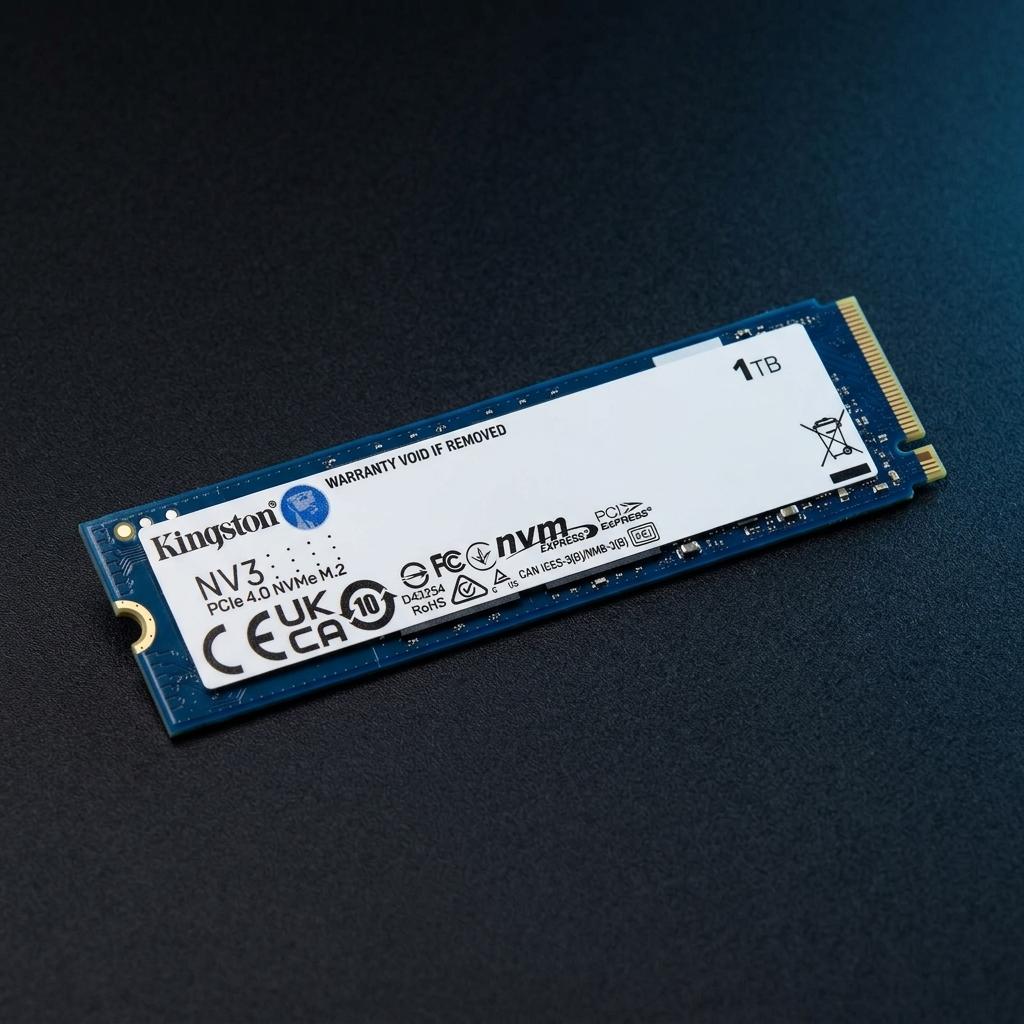
Kingston NV3 1TB M.2 2280 NVMe SSD
The Kingston NV3 1TB (SNV3S/1000G) is an entry-level PCIe 4.0 x4 NVMe SSD for desktops and compatible laptops. Kingston rates it at up to 6,000 MB/s sequential read and 4,000 MB/s sequential write, with 320TBW endurance in a standard M.2 2280 size. It is a practical upgrade for everyday computing, gaming and general storage.
This Kingston NV3 1TB review covers what the drive offers on paper, where it fits, and how it compares with other popular 1TB PCIe 4.0 SSDs. The Kingston NV3 1TB NVMe SSD (model SNV3S/1000G) is a budget-oriented M.2 2280 drive for people upgrading from a hard drive or an older SATA SSD. Kingston rates it at up to 6,000 MB/s sequential read and up to 4,000 MB/s sequential write.
How we wrote this review: it is based on Kingston's published specifications and publicly available information. GearNexis has not run its own benchmarks on this drive, and no performance figures on this page come from GearNexis testing.
Kingston NV3 1TB at a Glance
With 1TB of space, the NV3 has room for an operating system, applications, a sizeable game library and everyday files. It uses a PCIe 4.0 x4 NVMe interface and the common M.2 2280 size (22 mm wide, 80 mm long), so it suits most modern desktop motherboards and many laptops with a compatible NVMe slot.
- Capacity: 1TB
- Interface: PCIe 4.0 x4 NVMe
- Rated sequential read: up to 6,000 MB/s
- Rated sequential write: up to 4,000 MB/s (1TB model)
- Rated endurance: 320TBW
- Warranty: limited five-year warranty, subject to Kingston's terms
How Fast Is the Kingston NV3 1TB?
Kingston's figures of 6,000 MB/s read and 4,000 MB/s write are maximum sequential speeds. They describe large, continuous transfers on a suitable PCIe 4.0 system. They are not speeds you will see in every computer or every task.
What the numbers mean in everyday use
Starting Windows, opening applications, loading games and copying everyday files depend more on responsiveness than on peak sequential speed. Any NVMe SSD will feel much faster than a mechanical hard drive at these tasks. The gain over a decent SATA SSD is real but smaller than the headline numbers suggest. How much you notice depends on the drive you are replacing, the rest of your system and what you do.
Running it in a PCIe 3.0 slot
PCIe 4.0 drives generally work in PCIe 3.0 M.2 slots, but speed is then limited by the older interface. If your motherboard or laptop only supports PCIe 3.0, you will not get the NV3's rated maximum speeds.
Long transfers and heavy workloads
The NV3 is an entry-level drive. If you regularly move very large files, edit video in long sessions or need consistently high performance under sustained load, look at independent workload testing before you buy. Also note that Kingston's NV series has been reported to ship with different controller and NAND combinations, so results from one review sample may not match every drive sold.
Design and Compatibility
The standard SNV3S/1000G is a bare, single-sided M.2 2280 drive with no heatsink, 2.3 mm thick. That makes it a reasonable fit for laptops with tight clearance. In a desktop, you can use your motherboard's M.2 heatsink if it has one.
Check your M.2 slot before buying
A drive physically fitting an M.2 slot does not guarantee it will work. Some M.2 slots support only SATA drives, and others share bandwidth with SATA ports or other slots. Before ordering, confirm in your motherboard or laptop manual that the slot supports:
- PCIe NVMe drives (not SATA-only)
- 2280-length drives
- Enough physical clearance, especially in thin laptops
Endurance and Warranty
Kingston rates the 1TB NV3 for 320TB written (320TBW), calculated with the JEDEC client workload. TBW is an endurance rating used for warranty purposes. It is not a prediction of when the drive will fail. For typical home and gaming use, most people will write far less than this over the warranty period.
Kingston lists a limited five-year warranty. It ends when the five years are up or when the drive's "Percentage Used" figure (shown in Kingston SSD Manager) reaches its limit, whichever comes first. Kingston also says the NV3 is designed for desktop and notebook use and is not intended for server environments. Check Kingston's current warranty terms for your region before buying.
Kingston NV3 vs Other 1TB PCIe 4.0 SSDs
The 1TB PCIe 4.0 market is crowded. The table below lists manufacturer-rated sequential speeds for the 1TB version of each drive. These are not GearNexis test results, and higher rated sequential speeds do not automatically mean better real-world performance or reliability.
| SSD | Capacity | Interface | Advertised Sequential Read | Advertised Sequential Write | Best For |
|---|---|---|---|---|---|
| Kingston NV3 | 1TB | PCIe 4.0 x4 | Up to 6,000 MB/s | Up to 4,000 MB/s | Mainstream storage upgrades |
| WD Blue SN580 | 1TB | PCIe 4.0 x4 | Up to 4,150 MB/s | Up to 4,150 MB/s | Everyday and gaming storage |
| Crucial P3 Plus | 1TB | PCIe 4.0 x4 | Up to 5,000 MB/s | Up to 3,600 MB/s | Budget-oriented storage |
| Lexar NM790 | 1TB | PCIe 4.0 x4 | Up to 7,400 MB/s | Up to 6,500 MB/s | Builds wanting higher rated speeds |
| Samsung 990 EVO Plus | 1TB | PCIe 4.0 x4 / PCIe 5.0 x2 | Up to 7,150 MB/s | Up to 6,300 MB/s | Mainstream and performance builds |
Endurance ratings compared
Manufacturer endurance ratings for the 1TB models also differ. The Crucial P3 Plus is rated at 220TBW, the Kingston NV3 at 320TBW, the WD Blue SN580 and Samsung 990 EVO Plus at 600TBW, and the Lexar NM790 at 1,000TBW. If you write a lot of data, endurance is worth weighing alongside price.
Kingston NV3 vs WD Blue SN580
The NV3 has higher rated sequential read speed, while the WD Blue SN580 1TB has a slightly higher rated sequential write and a higher endurance rating. Compare current prices and independent tests to decide which matters more for your use.
Kingston NV3 vs Crucial P3 Plus
Both are budget-focused Gen 4 drives. On paper, the NV3 has higher rated sequential read and write speeds and a higher TBW rating than the Crucial P3 Plus 1TB. Real-world differences depend on the workload.
Higher-rated alternatives
The Lexar NM790 1TB and Samsung 990 EVO Plus 1TB have considerably higher rated sequential speeds and endurance. They usually cost more, so whether they are worth it depends on your workload and the price difference when you shop.
Who Should Buy the Kingston NV3 1TB?
- PC builders who want a 1TB PCIe 4.0 NVMe boot or game drive.
- Users upgrading from a mechanical hard drive or an older SATA SSD.
- Desktop and laptop owners with a compatible M.2 2280 NVMe slot.
- Gamers who want extra space for games and applications.
- Budget-conscious buyers comparing entry-level Gen 4 SSDs.
Who Should Consider Another SSD?
- Professionals with frequent long, sustained write workloads.
- Users who need consistently high performance under heavy load.
- Buyers who need hardware encryption or other business features.
- Anyone whose system lacks a compatible M.2 NVMe slot.
Final Verdict: Kingston NV3 1TB Review Summary
To sum up this Kingston NV3 1TB review: the drive offers solid headline specifications for a mainstream storage upgrade. It is rated at 6,000 MB/s sequential read and 4,000 MB/s sequential write, with 320TBW endurance and a five-year limited warranty, all in a standard M.2 2280 size.
It is an entry-level drive, though, and should not be treated as a replacement for a premium SSD in sustained professional workloads. Its value depends on its current price compared with drives like the WD Blue SN580, Crucial P3 Plus, Lexar NM790 and Samsung 990 EVO Plus.
If the NV3 is competitively priced and suits your workload, it is a sensible choice for everyday computing and gaming storage. If you need more consistent performance for demanding work, compare the higher-tier alternatives first.
Pros
- PCIe 4.0 x4 NVMe interface
- Rated sequential reads up to 6,000 MB/s
- Rated sequential writes up to 4,000 MB/s for the 1TB model
- Standard single-sided M.2 2280 size, suitable for many laptops
- 320TBW rated endurance for the 1TB version
- Limited five-year manufacturer warranty
Cons
- Entry-level positioning; not designed to match premium SSDs
- Controller and NAND combinations have been reported to vary across the NV series
- Rated speeds are not guaranteed in every system or workload
- Lower endurance rating than several 1TB competitors
- Requires a compatible M.2 2280 NVMe slot
- Not intended for server environments
Spec Sheet
Specifications
Storage
| Capacity | 1TB |
|---|---|
| Model Number | SNV3S/1000G |
| Product Series | Kingston NV3 |
Interface
| Interface | PCIe 4.0 x4 NVMe |
|---|---|
| Protocol | NVMe |
Form Factor
| Form Factor | M.2 2280 (single-sided) |
|---|
Performance
| Sequential Read | Up to 6,000 MB/s |
|---|---|
| Sequential Write | Up to 4,000 MB/s |
Memory
| NAND | 3D NAND |
|---|
Endurance
| Total Bytes Written | 320TBW |
|---|
Reliability
| MTBF | 2,000,000 hours |
|---|
Physical
| Dimensions | 22 mm × 80 mm × 2.3 mm |
|---|---|
| Weight | 7 g |
Thermal
| Operating Temperature | 0°C to 70°C |
|---|---|
| Storage Temperature | -40°C to 85°C |
Warranty
| Manufacturer Warranty | Limited five-year warranty, subject to terms and Percentage Used limit |
|---|
Frequently Asked Questions
Is the Kingston NV3 1TB a good SSD?+
What is the maximum read speed of the Kingston NV3 1TB?+
What is the maximum write speed of the Kingston NV3 1TB?+
Is the Kingston NV3 compatible with gaming PCs?+
Can I use the Kingston NV3 in a laptop?+
Does the Kingston NV3 1TB have a heatsink?+
What is the endurance rating of the Kingston NV3 1TB?+
What warranty does the Kingston NV3 have?+
Is the Kingston NV3 faster than a SATA SSD?+
Is the Kingston NV3 suitable for heavy video editing?+
Is the Kingston NV3 a PCIe Gen 4 SSD?+
Should I buy the Kingston NV3 or a more expensive SSD?+
As an Amazon Associate we earn from qualifying purchases. See our affiliate disclosure.