
ASUS
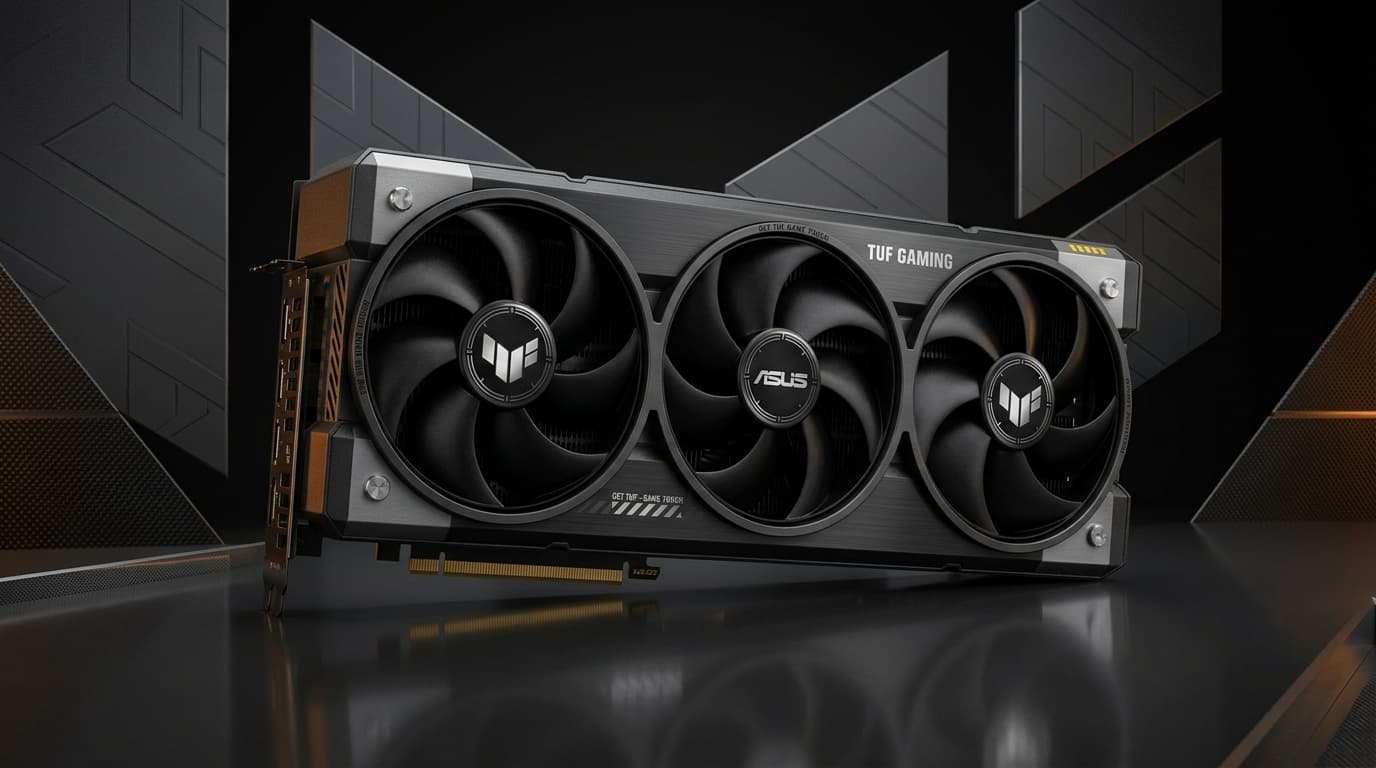
ASUS TUF Gaming GeForce RTX™ 5080 16GB GDDR7 OC Edition Graphics Card
The ASUS TUF Gaming GeForce RTX 5080 OC Edition is a high-end NVIDIA Blackwell graphics card with 16GB of GDDR7 memory, a 3.6-slot triple-fan cooler and a Quiet/Performance dual BIOS. It suits gamers who play at high refresh rates in 1440p or 4K and have a large case and an 850W or bigger power supply. It also suits creators who want NVIDIA’s DLSS 4, ray tracing and NVENC encoding features.
ASUS TUF Gaming RTX 5080 OC Review: Overview
The ASUS TUF Gaming GeForce RTX 5080 16GB GDDR7 OC Edition (model TUF-RTX5080-O16G-GAMING) is a premium partner version of NVIDIA's RTX 5080. It uses the same Blackwell GPU and 16GB of GDDR7 memory as every RTX 5080, but adds a very large triple-fan cooler, a dual BIOS, an extra HDMI port, and a small factory overclock.
Quick summary: This card is aimed at high-refresh 1440p and 4K gaming, where DLSS 4 helps a lot in demanding titles. Independent testing shows it can run cool and quiet in its Quiet BIOS mode. The trade-offs are a higher price than basic RTX 5080 models, a 3.6-slot body that is 348 mm long, and an 850W power supply recommendation.
Key Specifications
- GPU: NVIDIA GeForce RTX 5080 (Blackwell), 10,752 CUDA cores
- Memory: 16GB GDDR7, 256-bit, 30 Gbps
- Boost clock: 2730 MHz (OC mode), 2700 MHz (default mode), per ASUS
- Interface: PCI Express 5.0
- Outputs: 2x HDMI 2.1b, 3x DisplayPort 2.1b (up to 4 displays)
- Power: 1x 16-pin connector, 850W recommended PSU
- Size: 348 x 146 x 72 mm (13.7 x 5.7 x 2.8 in), 3.6 slots
Design and Build Quality
The TUF design is built for durability rather than flash. ASUS uses a die-cast shroud and an aluminum backplate to help prevent PCB flex, along with conformal coating on the PCB to protect against moisture and dust. The card also has ARGB lighting that works with Aura Sync.
A physical switch lets you choose between Performance and Quiet BIOS modes. HWCooling.net reports that the two modes use the same power limit and clocks and differ only in fan curve. In the box, ASUS includes a TUF graphics card holder to help support the card's weight.
Cooling and Thermal Performance
The cooler pairs three Axial-tech fans with dual-ball bearings, a large vapor chamber, and a phase-change GPU thermal pad. The fans stop below 50°C and start again above 55°C, so the card can stay silent at idle and under light loads.
In HWCooling.net's independent review (Cyberpunk 2077, RT Medium, 4K), the card measured:
- Quiet mode: 34.9–36.3 dBA, average peak GPU temperature of 74.2°C, memory at 78°C
- Performance mode: 44.4–46.4 dBA, average peak GPU temperature of 66.7°C, memory at 70°C
- GPU power: about 350W, against a 360W limit
HWCooling ranked Quiet mode among the quieter RTX 5080s it tested. It also said Performance mode is noticeably louder for very little benefit, so most buyers should leave the card in Quiet mode. Noise and temperatures will depend on your case airflow, room temperature, and workload.
ASUS TUF RTX 5080 Gaming Performance
The factory overclock is small, so in practice this card performs close to other RTX 5080s. That means the most useful benchmark guide is RTX 5080 testing in general, rather than figures specific to this board.
- vs RTX 4080 SUPER: TechSpot's launch review found the RTX 5080 about 9% faster on average at 4K across its game suite. The gap ranged from roughly 5% to 21% depending on the game.
- vs RTX 5090: Gamers Nexus found the RTX 5090 between 30% and 69% faster at 4K depending on the game, with most results in the 45–55% range.
These numbers come from early-2025 launch reviews. Results depend on the game, resolution, settings, CPU, test system, and driver version. NVIDIA's frame-generation numbers are marketing claims and are not the same as native-rendering benchmarks.
Is the RTX 5080 Good for 1440p and 4K Gaming?
1440p: The RTX 5080 is a strong fit for high-refresh 1440p monitors. In lighter games, a fast CPU may matter as much as the GPU.
4K: It handles many games well at 4K, but the heaviest ray-traced and path-traced titles usually need DLSS upscaling, and sometimes frame generation, to reach high frame rates. If you want the best possible native 4K performance, the RTX 5090 is the only faster GeForce card, and it costs much more.
Ray Tracing, DLSS 4, and AI Features
Like every RTX 50-series GPU, this card supports DLSS 4 with Multi Frame Generation, fifth-generation Tensor Cores, and NVIDIA Reflex 2. Multi Frame Generation can greatly increase displayed frame rates in supported games. However, generated frames do not lower input latency the way higher native frame rates do, and the feature works best when your base frame rate is already reasonable.
NVIDIA's ray-tracing hardware and DLSS support are among the biggest reasons to choose this card over AMD's Radeon alternatives.
Content Creation and Productivity
NVIDIA lists two ninth-generation NVENC encoders and two sixth-generation NVDEC decoders for the RTX 5080. That is useful for streaming and video editing. The card also works with NVIDIA Studio drivers and CUDA-accelerated apps such as Blender. HWCooling included Blender and V-Ray in its test suite.
The main limit for creators is VRAM. With 16GB, the card handles most editing and 3D work, but large local AI models or very heavy 3D scenes may run better on the 32GB RTX 5090.
RTX 5080 Power Supply Requirements
ASUS recommends an 850W power supply, which matches NVIDIA's guidance for the RTX 5080. NVIDIA rates the RTX 5080 at 360W total graphics power. The card uses one 16-pin connector. You can power it with a native PCIe 5.0 cable rated for 450W or more, or with the included 1-to-3 adapter using three 8-pin PCIe cables.
Make sure the 16-pin plug is fully seated, and avoid tight bends close to the connector. Systems with high-wattage CPUs may need more than 850W.
ASUS TUF RTX 5080 Dimensions and Compatibility
At 348 mm long, 146 mm tall, and 3.6 slots thick, this is a very large graphics card. Before you buy, check:
- Your case's maximum GPU length, after accounting for front fans or a radiator
- Side-panel clearance for the card's height plus the bend of the power cable
- That the 3.6-slot thickness won't block other PCIe slots you need
- Plans for using the included support bracket to prevent sag
HWCooling specifically warned that the card may not fit in shorter cases that have front-mounted fans.
Connectivity and Display Outputs
The card has two HDMI 2.1b ports and three DisplayPort 2.1b ports, and can drive up to four displays at once. Its maximum digital resolution is 7680 x 4320. The second HDMI port is handy for setups that combine a TV and a VR headset, or two HDMI monitors.
ASUS TUF RTX 5080 OC vs Competing GPUs
MSRPs below are launch prices for the reference or Founders Edition models, not current retail prices. Partner cards like the TUF usually sell above MSRP, so check the linked listings for current pricing.
| GPU | Architecture | VRAM / Bus | Board Power / Rec. PSU | Launch MSRP | Relative Performance | Best For |
|---|---|---|---|---|---|---|
| ASUS TUF RTX 5080 OC | Blackwell | 16GB GDDR7 / 256-bit | 360W / 850W | $999 (RTX 5080 base, Jan 2025)* | Baseline | Quiet, premium-build 1440p/4K gaming |
| RTX 5080 Founders Edition | Blackwell | 16GB GDDR7 / 256-bit | 360W / 850W | $999 (Jan 2025) | Similar | Smaller 2-slot builds |
| ASUS GeForce RTX 5090 | Blackwell | 32GB GDDR7 / 512-bit | 575W / 1000W | $1,999 (Jan 2025) | Much faster (commonly 45–55% at 4K, Gamers Nexus) | Maximum 4K performance, large AI models |
| PNY RTX 5070 Ti OC | Blackwell | 16GB GDDR7 / 256-bit | 300W / 750W | $749 (Feb 2025) | Slower (roughly 10–15%, per reviews summarized by TechRadar) | Better value at 1440p and entry-level 4K |
| GIGABYTE RTX 4080 SUPER Gaming OC | Ada Lovelace | 16GB GDDR6X / 256-bit | 320W / 750W | $999 (Jan 2024) | Slower (about 9% at 4K, TechSpot) | Buying only at a meaningful discount |
| ASUS Radeon RX 9070 XT | RDNA 4 | 16GB GDDR6 / 256-bit | 304W / 750W | $599 (Mar 2025) | Slower; close to the RTX 5070 Ti in raster, behind in ray tracing (TechSpot) | Value-focused 1440p/4K raster gaming |
*$999 is NVIDIA's launch MSRP for the RTX 5080. ASUS partner cards like the TUF OC launched above that, and current prices vary. Board power and PSU figures are NVIDIA or AMD reference guidance, and individual partner cards can differ.
RTX 5080 vs RTX 5090
The RTX 5090 is clearly faster and has twice the VRAM. But it also has a much higher launch price, a 575W power rating, and needs a 1000W PSU. The RTX 5080 is the more practical choice for most gaming builds.
RTX 5080 vs RTX 5070 Ti
Both cards have 16GB of GDDR7 memory on a 256-bit bus. The RTX 5070 Ti costs considerably less at MSRP and gets surprisingly close in many games. That makes it the value pick, unless you need the RTX 5080's extra headroom at 4K.
RTX 5080 vs RTX 4080 SUPER
The RTX 5080 offers modest raw gains over the RTX 4080 SUPER, plus support for Multi Frame Generation. If you already own an RTX 4080 or 4080 SUPER, upgrading usually isn't worth it.
RTX 5080 vs Radeon RX 9070 XT
The RX 9070 XT has a much lower launch MSRP and is competitive in rasterized games. The RTX 5080 is faster overall and has the advantage in ray tracing, DLSS 4, and CUDA-based creative apps.
Main Advantages
The TUF's biggest strengths are a cooler that independent testing shows is quiet in Quiet mode, a durable build with a metal shroud and backplate, a switchable dual BIOS, and an extra HDMI 2.1b output. Under the hood, it has the RTX 5080's 16GB of GDDR7 and full support for DLSS 4.
Limitations and Buying Considerations
HWCooling felt the TUF's price premium over basic RTX 5080 models was hard to justify, because the factory overclock adds very little performance. The card is also very large, and Performance mode is noticeably loud. Finally, 16GB of VRAM is less than the RTX 5090 offers, which matters for some AI and professional workloads.
Who Should Buy the ASUS TUF RTX 5080 OC?
- Gamers with high-refresh 1440p or 4K monitors who want low noise
- Builders with a roomy, well-ventilated case and a quality PSU of 850W or more
- Upgraders coming from an RTX 30-series card or older
- Streamers and creators who use NVENC and CUDA apps
Who Should Consider Alternatives?
- Value-focused buyers: the RTX 5070 Ti or RX 9070 XT
- Small-form-factor builders: a slimmer RTX 5080, such as the Founders Edition
- Current RTX 4080 or 4080 SUPER owners
- Buyers who want the fastest 4K performance or need more VRAM: the RTX 5090
Price and Value
We don't list a current price here because GPU pricing changes often. As a guide, the TUF has traditionally sold above the RTX 5080's $999 launch MSRP. It makes the most sense when its price is close to other well-cooled RTX 5080s. If the premium over basic models is large, a cheaper RTX 5080 will deliver nearly identical frame rates.
Final Verdict
The ASUS TUF Gaming RTX 5080 OC is a well-built, quiet, and capable RTX 5080 for serious 1440p and 4K gaming, especially if you value DLSS 4 and ray tracing. It doesn't make the RTX 5080 meaningfully faster. What you pay extra for is cooling, build quality, and features. If those matter to you and your case can fit it, it's a solid choice.
Check the current price of the ASUS TUF RTX 5080 OC on Amazon
Pros
- Quiet in Quiet BIOS mode: 34.9–36.3 dBA under 4K load in HWCooling.net’s testing
- Large vapor chamber and triple-fan cooler give plenty of thermal headroom
- Dual BIOS switch lets you choose Quiet or Performance mode
- Two HDMI 2.1b ports plus three DisplayPort 2.1b ports
- Die-cast shroud, aluminum backplate and conformal-coated PCB
- 16GB of GDDR7 with full DLSS 4 Multi Frame Generation support
Cons
- Costs more than basic RTX 5080 models, and the small factory overclock adds very little performance
- Very large: 348 mm long and 3.6 slots thick, so it may not fit shorter cases that have front fans
- Performance BIOS mode is noticeably louder (44.4–46.4 dBA) for minimal gain
- Needs an 850W PSU and a 16-pin connector or the included adapter
- 16GB of VRAM is less than the RTX 5090’s 32GB for large AI or 3D workloads
- Only a modest gain over the RTX 4080 SUPER (about 9% at 4K, per TechSpot)
Spec Sheet
Specifications
General
| Brand | ASUS |
|---|---|
| Product Name | ASUS TUF Gaming GeForce RTX 5080 OC Edition |
| Model | TUF-RTX5080-O16G-GAMING |
GPU
| Graphics Processor | NVIDIA GeForce RTX 5080 |
|---|---|
| Architecture | NVIDIA Blackwell |
| CUDA Cores | 10752 |
| OC Mode Clock | 2730 MHz |
| Default Boost Clock | 2700 MHz |
Memory
| Video Memory | 16GB GDDR7 |
|---|---|
| Memory Interface | 256-bit |
| Memory Speed | 30 Gbps |
Interface
| Bus Standard | PCI Express 5.0 |
|---|
Outputs
| HDMI | 2 x HDMI 2.1b (native) |
|---|---|
| DisplayPort | 3 x DisplayPort 2.1b (native) |
| Maximum Displays | 4 |
| HDCP | 2.3 |
Power
| Recommended PSU | 850W |
|---|---|
| Power Connector | 1 x 16-pin |
Physical
| Dimensions | 348 x 146 x 72 mm (13.7 x 5.7 x 2.8 in) |
|---|---|
| Slot Thickness | 3.6 slot |
Display
| Maximum Resolution | 7680 x 4320 |
|---|
Features
| Lighting | ARGB, Aura Sync |
|---|---|
| API Support | OpenGL 4.6 |
| Multi-GPU | Not supported (no NVLink) |
Accessories
| In the Box | Speedsetup manual, TUF graphics card holder, hook-and-loop strap, TUF magnet, TUF Gaming certificate, thank-you card, 1-to-3 adapter cable |
|---|
Software
| Utilities | ASUS GPU Tweak III, MuseTree, GeForce Game Ready and Studio drivers |
|---|
Frequently Asked Questions
Is the ASUS TUF RTX 5080 OC good for 4K gaming?+
How much VRAM does this graphics card have?+
What power supply does the ASUS TUF RTX 5080 OC require?+
Will this graphics card fit in my PC case?+
What are the display outputs on this model?+
How does the RTX 5080 compare with the RTX 5070 Ti?+
Is the RTX 5080 worth upgrading to from an older GPU?+
Is this card suitable for content creation?+
As an Amazon Associate we earn from qualifying purchases. See our affiliate disclosure.