
ASUS
ASUS TUF Gaming B550-PLUS WiFi II
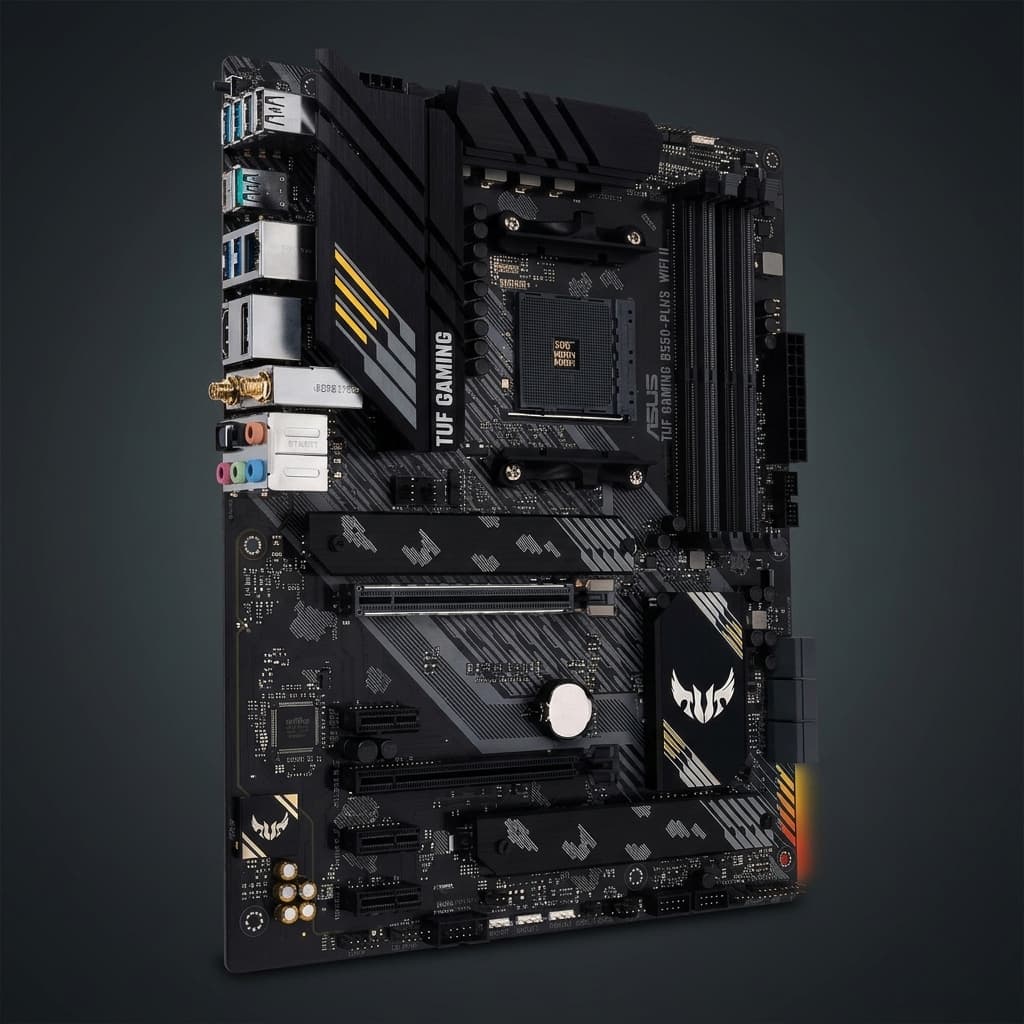
The ASUS TUF Gaming B550-PLUS WiFi II is a full-size ATX AM4 motherboard for Ryzen 5000 and 3000 builds. It has a PCIe 4.0 x16 graphics slot and two M.2 slots, the first running at PCIe 4.0. It also includes 2x2 Wi-Fi 6, Bluetooth 5.2, 2.5Gb Ethernet, a rear USB-C port, BIOS FlashBack and Aura Sync addressable RGB headers. It suits gamers building or upgrading an AM4 PC on a budget.
Building or upgrading a Ryzen gaming PC on AM4 means picking a B550 board that will not hold your CPU, graphics card or SSDs back. The ASUS TUF Gaming B550-PLUS WiFi II is ASUS's refreshed full-size ATX TUF board for that job. It is the "WiFi II" revision, not the original TUF Gaming B550-PLUS. It pairs 2x2 Wi-Fi 6 and Bluetooth 5.2 with 2.5Gb Ethernet, a PCIe 4.0 x16 graphics slot, two M.2 slots, six SATA ports and a rear BIOS FlashBack button.
This review covers its features, CPU-dependent limits, rival B550 boards and who should buy it. It is based on ASUS's official specifications and CPU support list; GearNexis has not physically tested this motherboard.
Quick Verdict: ASUS TUF Gaming B550-PLUS WiFi II
The board covers what most mid-range AM4 gaming builds need. Its main strengths are a CPU-connected PCIe 4.0 x16 slot and PCIe 4.0 M.2 slot with a Ryzen 5000 or 3000 processor, Wi-Fi 6 with Bluetooth 5.2, 2.5Gb LAN, six 4-pin fan headers, and BIOS FlashBack for firmware updates without a CPU or memory installed.
It is a sensible choice for builders who want a no-fuss ATX board for a Ryzen 5 or Ryzen 7 gaming system. The main considerations are platform-level. AM4 is a mature, end-of-road socket, and memory is DDR4 only. Wireless is Wi-Fi 6, not Wi-Fi 6E. The second M.2 slot shares bandwidth with two SATA ports. ASUS's spec sheet also does not list a front-panel USB Type-C header.
Check the latest price on Amazon
ASUS TUF B550-PLUS WiFi II Specifications at a Glance
| Feature | Specification |
|---|---|
| CPU socket | AMD AM4 |
| Chipset | AMD B550 |
| Supported CPU families | Ryzen 5000 Series, Ryzen 5000 G-Series, Ryzen 4000 G-Series and Ryzen 3000 Series desktop processors (see the CPU support list) |
| Memory | 4 x DIMM, up to 128GB DDR4, dual channel, un-buffered |
| Memory speeds | DDR4 2133–3200 MHz native; up to 4866 MHz (OC) |
| Primary graphics slot | PCIe 4.0 x16 (Ryzen 5000/3000); PCIe 3.0 x16 (Ryzen 5000 G/4000 G) |
| Other expansion | 1 x PCIe 3.0 x16 (x4 mode, chipset), 3 x PCIe 3.0 x1 |
| M.2 slots | 2 x M.2 (Key M, 2242/2260/2280/22110) |
| SATA | 6 x SATA 6Gb/s; RAID 0, 1, 10 |
| Wireless | 2x2 Wi-Fi 6 (802.11ax), 2.4/5GHz; Bluetooth 5.2 |
| Ethernet | Realtek 2.5Gb LAN |
| Rear USB | 8 ports: 2 x USB 3.2 Gen 2 (1 Type-A + 1 Type-C), 4 x USB 3.2 Gen 1 Type-A, 2 x USB 2.0 |
| Display outputs | 1 x DisplayPort 1.2, 1 x HDMI 2.1 (4K@60Hz), requires a Ryzen APU |
| Audio | Realtek 7.1 surround HD audio codec, optical S/PDIF out |
| BIOS FlashBack | Yes, rear button with LED |
| RGB | 2 x Aura Addressable Gen 2 headers, 2 x Aura RGB headers |
| Form factor | ATX, 30.5 x 24.4 cm |
Many of these numbers depend on the processor you install. PCIe generation, M.2_1 speed, display output and achievable memory speed all change with the CPU. The sections below explain where each difference applies.
Design and Build Quality
The board follows the familiar TUF Gaming look: a dark PCB, grey and black heatsinks, and minimal onboard lighting. That makes it easy to match with most cases. RGB is left to the fans and strips you connect to its headers.
ASUS lists a DIGI+ VRM with Dr. MOS power stages, DRAM overcurrent and overvoltage protection, ESD guards, TUF LANGuard, a reinforced SafeSlot, a stainless-steel back I/O and an aluminum M.2 heatsink. These are specification-level features, not results from durability testing.
The layout is standard ATX: four DIMM slots beside the socket, the primary PCIe 4.0 slot at the top, a second full-length slot wired at x4 from the chipset, and three PCIe 3.0 x1 slots.
Note that the second x16-length slot (PCIEX16_2) drops to x1 mode when any of the x1 slots is occupied. Plan your capture card, sound card or network card placement with that in mind.
CPU Compatibility and the AM4 Platform
The TUF Gaming B550-PLUS WiFi II uses AMD's AM4 socket. ASUS officially supports four Ryzen families on it:
- Ryzen 5000 Series
- Ryzen 5000 G-Series
- Ryzen 4000 G-Series
- Ryzen 3000 Series
The ASUS CPU support list also includes non-G Ryzen 4000 chips such as the Ryzen 3 4100 and Ryzen 5 4500. Popular gaming CPUs such as the Ryzen 5 5600X, Ryzen 7 5800X3D, Ryzen 7 5700X and Ryzen 9 5950X are listed as validated from the board's earliest BIOS (0303).
Newer AM4 releases are listed from BIOS 2803 onward, including the Ryzen 7 5700X3D, Ryzen 5 5600X3D, Ryzen 5 5500X3D, Ryzen 7 5800XT, Ryzen 9 5900XT, Ryzen 5 5600XT, 5600T, 5600GT and 5500GT.
A board from older stock may ship with an earlier BIOS. With one of these CPUs, it may need a BIOS update before it will POST. FlashBack makes that update possible without a supported CPU installed.
Not every AM4 processor is supported. At the time of research, the official list did not include Ryzen 1000 or 2000 Series desktop chips, or Ryzen 3000 G-Series APUs such as the Ryzen 5 3400G. Always check the CPU support list and the required BIOS version on ASUS's website before ordering.
DDR4 Memory Support
The board has four DDR4 DIMM slots running in dual-channel mode and supports up to 128GB of un-buffered memory. ASUS lists these speeds:
- Native JEDEC speeds from 2133 to 3200 MHz
- Overclocked profiles from 3333 MHz up to 4866 MHz
Overclocked speeds depend on the memory controller in your specific CPU, the memory kit, and whether you populate two or four DIMMs. ECC support varies by CPU. ASUS's Memory QVL is the best reference for tested kits.
In practice, many Ryzen gaming builds use a dual-channel DDR4-3200 or DDR4-3600 kit. This board lists both as supported speeds. DDR4 still makes sense if you already own a good kit, want to reuse a Ryzen 5000 CPU, or prefer lower memory costs over moving to a DDR5 platform.
PCIe 4.0 and Graphics Card Support
The main graphics slot is wired to the CPU. With a Ryzen 5000 or Ryzen 3000 Series processor, it runs at PCIe 4.0 x16. With a Ryzen 5000 G-Series or 4000 G-Series APU, it runs at PCIe 3.0 x16.
Some non-G Ryzen 5000 and 4000 models built on APU silicon are limited to PCIe 3.0 by AMD's own specifications. Examples include the Ryzen 5 5500, Ryzen 7 5700 and Ryzen 5 4500. Check AMD's product page for your exact chip.
PCIe 4.0 adds headroom rather than a guaranteed frame-rate boost. Gaming performance depends mainly on your GPU and CPU. The interface matters most for some lower-lane graphics cards and for fast NVMe storage.
The HDMI 2.1 and DisplayPort 1.2 outputs only work with a processor that has integrated graphics.
Storage and M.2 Connectivity
There are two M-key M.2 slots, each accepting 2242 to 22110 drives:
- M.2_1 (CPU): PCIe 4.0 x4 or SATA with Ryzen 5000/3000 Series. PCIe 3.0 x4 or SATA with Ryzen 5000 G/4000 G-Series.
- M.2_2 (B550 chipset): PCIe 3.0 x4 or SATA.
- SATA: Six SATA 6Gb/s ports with RAID 0, 1 and 10 support.
Important storage note: M.2_2 shares bandwidth with SATA6G_5 and SATA6G_6. Installing a drive in M.2_2 disables those two SATA ports, leaving four usable SATA connectors. If you plan to run two NVMe drives and more than four SATA drives, this board will not support all of them at once.
For most gaming builds, the best setup is a fast PCIe 4.0 SSD in M.2_1 for the OS and games. A second NVMe drive or SATA drives can then handle bulk storage. See our NVMe SSD buying guide for drive recommendations.
Wi-Fi 6, Bluetooth 5.2 and 2.5Gb Ethernet
Wireless is handled by a 2x2 Wi-Fi 6 (802.11ax) module operating on the 2.4GHz and 5GHz bands. ASUS lists Bluetooth 5.2, with full Bluetooth 5.2 functionality noted for Windows 11 or later.
This is Wi-Fi 6, not Wi-Fi 6E. The board cannot use the 6GHz band. If your router supports 6GHz and you want to use it, look at a Wi-Fi 6E board instead.
For wired networking, a Realtek 2.5Gb Ethernet controller sits behind ASUS's LANGuard protection. 2.5GbE is faster than standard gigabit and is useful with a 2.5Gb switch, router or NAS. With a typical home internet connection, the wired benefit is mainly a stable, low-latency link rather than a faster download speed.
USB Connectivity and Rear I/O
The rear panel has eight USB ports:
- 2 x USB 3.2 Gen 2 (10Gbps): one Type-A and one Type-C
- 4 x USB 3.2 Gen 1 (5Gbps) Type-A
- 2 x USB 2.0 Type-A
The rest of the rear I/O has DisplayPort and HDMI, Wi-Fi antenna connectors, the 2.5Gb LAN port, five audio jacks with optical S/PDIF out, and the BIOS FlashBack button.
Internal headers are a different matter from the rear ports. The board offers one USB 3.2 Gen 1 header for two front ports and two USB 2.0 headers for up to four more. ASUS's spec sheet does not list a front-panel USB Type-C header. If your case has a front USB-C port, it will not have a matching connector on this board.
Audio, Aura Sync RGB and BIOS Features
Audio: A Realtek 7.1 surround codec supports jack detection, multi-streaming and front-panel jack retasking, and ASUS lists playback up to 24-bit/192kHz. ASUS also lists audio shielding, premium capacitors and dedicated PCB layers. Armoury Crate adds Two-Way AI Noise Cancelation for headset microphones. This is suitable for gaming headsets and everyday speakers. Audiophiles may still prefer a dedicated DAC.
RGB: The board has two Aura Addressable Gen 2 headers and two standard Aura RGB headers. You can sync compatible fans, strips and coolers through Armoury Crate.
BIOS FlashBack: This rear button can update the BIOS from a USB drive without a CPU or memory installed. It is valuable when pairing an older board with a newer Ryzen chip.
Diagnostics: Q-LEDs point to CPU, DRAM, VGA or boot-device problems during startup. The board also uses Q-DIMM and Q-Slot designs.
Cooling: There are six 4-pin fan headers: CPU, CPU_OPT, AIO_PUMP and three chassis headers. They are controlled through Fan Xpert 4 or the UEFI BIOS. A thermal sensor header is also included.
Other headers: These include a Thunderbolt header, a COM port, an SPI TPM header and Clear CMOS.
Gaming and Everyday PC Building
For a gaming PC, this board's role is to provide stable power, enough connectivity and correct support for your chosen parts. It does not set your frame rate. Gaming performance depends primarily on the CPU, graphics card, memory configuration, cooling and software. We do not quote FPS figures for a motherboard.
The board fits a Ryzen 5 5600-class or Ryzen 7 5800X3D-class build with a modern graphics card in the PCIe 4.0 slot. Typical storage would be one PCIe 4.0 NVMe drive, plus extra NVMe or SATA drives as needed. Six fan headers suit airflow-focused cases, and AM4 lets you reuse existing DDR4 memory to keep build cost down. See our gaming PC build guide for complete part lists.
Advantages and Limitations
The strongest reasons to consider this board are practical. It has PCIe 4.0 for graphics and the primary SSD with Ryzen 5000/3000, built-in Wi-Fi 6 and Bluetooth 5.2, 2.5Gb Ethernet and a rear 10Gbps USB-C port. Generous fan headers, BIOS FlashBack and Q-LED diagnostics make building and upgrading easier.
The limitations are mostly platform choices rather than flaws. AM4 will not get future CPU generations, memory is DDR4 only, and wireless tops out at Wi-Fi 6. The second M.2 slot is PCIe 3.0 and disables two SATA ports, the second x16 slot runs at x4 (or x1), and no front USB-C header is listed.
ASUS TUF Gaming B550-PLUS WiFi II vs MSI, GIGABYTE and ROG B550 Boards
Here is how this board compares with four other ATX B550 motherboards sold on Amazon USA. All use the AM4 socket and B550 chipset, support up to 128GB of DDR4 across four DIMMs, and offer two M.2 slots: one PCIe 4.0 x4 from the CPU and one PCIe 3.0 x4 from the chipset. Specifications are from each manufacturer's official pages.
| Motherboard | Wireless | Ethernet | Max DDR4 (OC) | SATA | Rear USB-C | Notable features |
|---|---|---|---|---|---|---|
| ASUS TUF Gaming B550-PLUS WiFi II | Wi-Fi 6 (2.4/5GHz), BT 5.2 | Realtek 2.5Gb | 4866 MHz | 6 | Yes (USB 3.2 Gen 2) | BIOS FlashBack, Q-LED, 6 x 4-pin fan headers, Aura ARGB Gen 2 |
| MSI MAG B550 Tomahawk MAX WiFi | AMD Wi-Fi 6E, BT 5.2 | Realtek RTL8125B 2.5Gb | 5100+ MHz | 6 | Yes (USB 3.2 Gen 2) | Flash BIOS button, M.2 Shield Frozr, front USB-C header |
| GIGABYTE B550 AORUS Elite AX V2 | Wi-Fi 6 or 6E, depending on PCB revision | Realtek 2.5GbE | 4733 MHz | 4 | No (internal front USB-C header only) | Q-Flash Plus, chipset PCIe x16 slot runs at x2 |
| ASUS ROG Strix B550-F Gaming WiFi II | Wi-Fi 6E (2.4/5/6GHz), BT 5.2 | Intel I225-V 2.5Gb | 4800 MHz (Ryzen 5000/3000) | 6 | Yes (USB 3.2 Gen 2) | SupremeFX S1220A audio, BIOS FlashBack, pre-mounted I/O shield |
| MSI MPG B550 Gaming Edge WiFi | Intel Wi-Fi 6, BT 5.2 | Realtek 8125B 2.5Gb | 4866+ MHz | 6 | Yes (USB 3.2 Gen 2) | Flash BIOS button, pre-installed I/O shield, front USB-C header |
Which buyer suits each board?
- ASUS TUF Gaming B550-PLUS WiFi II: Builders who want a straightforward ATX board with Wi-Fi 6, plenty of fan headers and six SATA ports, and who do not need 6GHz Wi-Fi or a front USB-C header.
- MSI MAG B550 Tomahawk MAX WiFi: Buyers who want Wi-Fi 6E and a front USB-C header on a mainstream B550 board.
- GIGABYTE B550 AORUS Elite AX V2: Builders who need only four SATA ports and want a front USB-C header. Check the PCB revision for its wireless module, and note there is no rear USB-C port.
- ASUS ROG Strix B550-F Gaming WiFi II: Buyers who want Wi-Fi 6E, Intel 2.5Gb LAN, upgraded SupremeFX audio and ROG styling within the ASUS ecosystem.
- MSI MPG B550 Gaming Edge WiFi: Builders who want MSI's Mystic Light styling, a pre-installed I/O shield and a front USB-C header with Wi-Fi 6. This is an older model, so availability can vary.
For more options, see our best B550 motherboards guide.
Who Should Buy the ASUS TUF Gaming B550-PLUS WiFi II?
- Gamers building a new AM4 PC or replacing an older AM4 board
- Ryzen 5000-series owners, including Ryzen 7 5800X3D users, who want a supported B550 board with PCIe 4.0
- Builders who want built-in Wi-Fi 6 and Bluetooth instead of an add-in card
- Users who need multiple drives: two M.2 SSDs plus up to four SATA drives, or six SATA drives with one M.2
- Anyone who prefers a full-size ATX board with room for airflow and multiple expansion cards
Who Should Avoid It?
- Anyone starting a fresh build who wants a long upgrade path. AM5 supports newer Ryzen CPUs and DDR5.
- Users who specifically need DDR5 memory
- Buyers who need Wi-Fi 6E or Wi-Fi 7 and access to the 6GHz band
- Builders whose case has a front USB-C port they want to use
- Users who need two PCIe 4.0 M.2 slots, more than two M.2 slots, or a second full-bandwidth graphics slot
- Owners of Ryzen 1000/2000 or Ryzen 3000 G-Series processors, which are not on the official CPU support list
Final Verdict: Is the ASUS TUF Gaming B550-PLUS WiFi II Worth Buying?
For the right AM4 build, yes. It is a balanced, practical B550 board. With a Ryzen 5000 or 3000 processor, you get PCIe 4.0 where it matters most: the graphics slot and the primary M.2 slot. Wi-Fi 6, Bluetooth 5.2, 2.5Gb Ethernet, a rear USB-C port and BIOS FlashBack cover most gaming builders' needs.
Before ordering, confirm your CPU and its required BIOS on the ASUS support list, plan storage around the M.2_2/SATA6G_56 sharing, and make sure you can live without a front USB-C header and 6GHz Wi-Fi.
If you are building from scratch and want the longest upgrade path, an AM5 platform is likely the better long-term investment. If you are staying on AM4 with DDR4, this board deserves a place on your shortlist.
View the ASUS TUF Gaming B550-PLUS WiFi II on Amazon to check current price and availability.
Pros
- PCIe 4.0 x16 graphics slot and PCIe 4.0 x4 M.2_1 slot when paired with Ryzen 5000/3000 Series CPUs
- Built-in 2x2 Wi-Fi 6 and Bluetooth 5.2, plus Realtek 2.5Gb Ethernet
- Rear USB 3.2 Gen 2 Type-C and Type-A ports among eight rear USB ports
- BIOS FlashBack button for CPU-less BIOS updates, which helps with newer Ryzen chips that need BIOS 2803+
- Six 4-pin fan headers, including dedicated CPU_OPT and AIO_PUMP
- Six SATA 6Gb/s ports with RAID 0/1/10 support
- Q-LED diagnostics, plus two ARGB Gen 2 and two RGB headers for Aura Sync
- Official support for Ryzen 5000 chips, including Ryzen 7 5800X3D and Ryzen 9 5950X
Cons
- AM4 is an end-of-line platform with no future desktop CPU generations
- DDR4 only; no DDR5 support
- Wi-Fi 6 (2.4/5GHz) only, with no 6GHz Wi-Fi 6E band
- Populating M.2_2 disables SATA6G_5 and SATA6G_6, and M.2_2 is limited to PCIe 3.0 x4
- No front-panel USB Type-C header listed in ASUS’s specifications
- PCIe 4.0 needs a Ryzen 5000/3000 non-APU CPU; G-Series and some Ryzen 5000/4000 parts drop to PCIe 3.0
Spec Sheet
Specifications
General
| Model | TUF GAMING B550-PLUS WIFI II |
|---|---|
| Brand | ASUS |
| Series | TUF Gaming |
CPU
| Socket | AMD AM4 |
|---|---|
| Supported Processors | AMD Ryzen 5000 Series, Ryzen 5000 G-Series, Ryzen 4000 G-Series, Ryzen 3000 Series desktop processors |
| Compatibility Note | Check the ASUS CPU support list; newer chips (e.g., Ryzen 7 5700X3D, Ryzen 5 5600X3D, Ryzen 7 5800XT) are listed from BIOS 2803 |
Chipset
| Chipset | AMD B550 |
|---|
Memory
| DIMM Slots | 4 x DDR4 |
|---|---|
| Maximum Capacity | 128GB |
| Architecture | Dual channel, un-buffered |
| Native Speeds | 3200 / 3000 / 2933 / 2800 / 2666 / 2400 / 2133 MHz |
| Overclocked Speeds | 3333 MHz up to 4866 MHz (OC) |
| ECC | ECC mode support varies by CPU |
Graphics
| Display Outputs | 1 x DisplayPort 1.2, 1 x HDMI 2.1 (4K@60Hz) |
|---|---|
| Output Note | Requires a Ryzen processor with integrated graphics |
Expansion
| PCIe x16 (CPU) | 1 x PCIe 4.0 x16 (Ryzen 5000/3000); PCIe 3.0 x16 (Ryzen 5000 G/4000 G) |
|---|---|
| PCIe x16 (Chipset) | 1 x PCIe 3.0 x16 slot, x4 mode (runs x1 when any x1 slot is occupied) |
| PCIe x1 | 3 x PCIe 3.0 x1 |
Storage
| M.2_1 (CPU) | Key M, 2242/2260/2280/22110; PCIe 4.0 x4 & SATA (Ryzen 5000/3000), PCIe 3.0 x4 & SATA (Ryzen 5000 G/4000 G) |
|---|---|
| M.2_2 (Chipset) | Key M, 2242/2260/2280/22110; PCIe 3.0 x4 & SATA |
| SATA | 6 x SATA 6Gb/s |
| Bandwidth Sharing | M.2_2 shares bandwidth with SATA6G_56; SATA6G_56 is disabled when M.2_2 is populated |
| RAID | RAID 0, 1, 10 |
Networking
| Ethernet | Realtek 2.5Gb Ethernet, TUF LANGuard |
|---|---|
| Wi-Fi | 2x2 Wi-Fi 6 (802.11 a/b/g/n/ac/ax), 2.4/5GHz |
| Bluetooth | Bluetooth 5.2 (full function in Windows 11 or later) |
USB
| Rear USB 3.2 Gen 2 | 2 (1 x Type-A, 1 x Type-C) |
|---|---|
| Rear USB 3.2 Gen 1 | 4 x Type-A |
| Rear USB 2.0 | 2 x Type-A |
| Internal USB 3.2 Gen 1 Header | 1 (supports 2 ports) |
| Internal USB 2.0 Headers | 2 (support 4 ports) |
Audio
| Codec | Realtek 7.1 surround sound HD audio codec |
|---|---|
| Features | Up to 24-bit/192kHz playback, jack detection, multi-streaming, front-panel jack retasking, audio shielding |
| Rear Audio | 5 x analog jacks, 1 x optical S/PDIF out |
Internal Connectors
| Fan Headers | 1 x CPU, 1 x CPU_OPT, 1 x AIO_PUMP, 3 x chassis (all 4-pin) |
|---|---|
| Power | 1 x 24-pin ATX, 1 x 8-pin +12V |
| RGB | 2 x Aura Addressable Gen 2 headers, 2 x Aura RGB headers |
| Other | Thunderbolt header, COM port header, SPI TPM header (14-1 pin), front panel audio, thermal sensor header, Clear CMOS, system panel header |
Special Features
| TUF Protection | DIGI+ VRM (Dr. MOS), DRAM overcurrent protection, ESD guards, TUF LANGuard, overvoltage protection, SafeSlot, stainless-steel back I/O |
|---|---|
| Q-Design | Q-DIMM, Q-LED (CPU, DRAM, VGA, boot device), Q-Slot |
| Thermal | Aluminum M.2 heatsink |
| BIOS | 256Mb flash ROM, UEFI AMI BIOS, BIOS FlashBack button and LED, CrashFree BIOS 3, EZ Flash 3 |
| Software | Armoury Crate (Aura Sync, Two-Way AI Noise Cancelation), AI Suite 3, Fan Xpert 4 |
| Operating System (listed by ASUS) | Windows 10 64-bit |
Form Factor
| Form Factor | ATX |
|---|---|
| Dimensions | 30.5 cm x 24.4 cm (12 in x 9.6 in) |
Frequently Asked Questions
Is the ASUS TUF Gaming B550-PLUS WiFi II good for gaming?+
Which Ryzen processors does the ASUS TUF B550-PLUS WiFi II support?+
Does it support the Ryzen 7 5800X3D?+
Does it support the Ryzen 9 5950X?+
Does it support DDR4-3600 RAM?+
Does the ASUS TUF B550-PLUS WiFi II have PCIe 4.0?+
How many M.2 slots does it have?+
Does it support Wi-Fi 6 or Wi-Fi 6E?+
Does it have Bluetooth?+
Does it support BIOS FlashBack?+
Is it compatible with Windows 11?+
Is the ASUS TUF Gaming B550-PLUS WiFi II worth buying for an AM4 build?+
As an Amazon Associate we earn from qualifying purchases. See our affiliate disclosure.