
ASUS
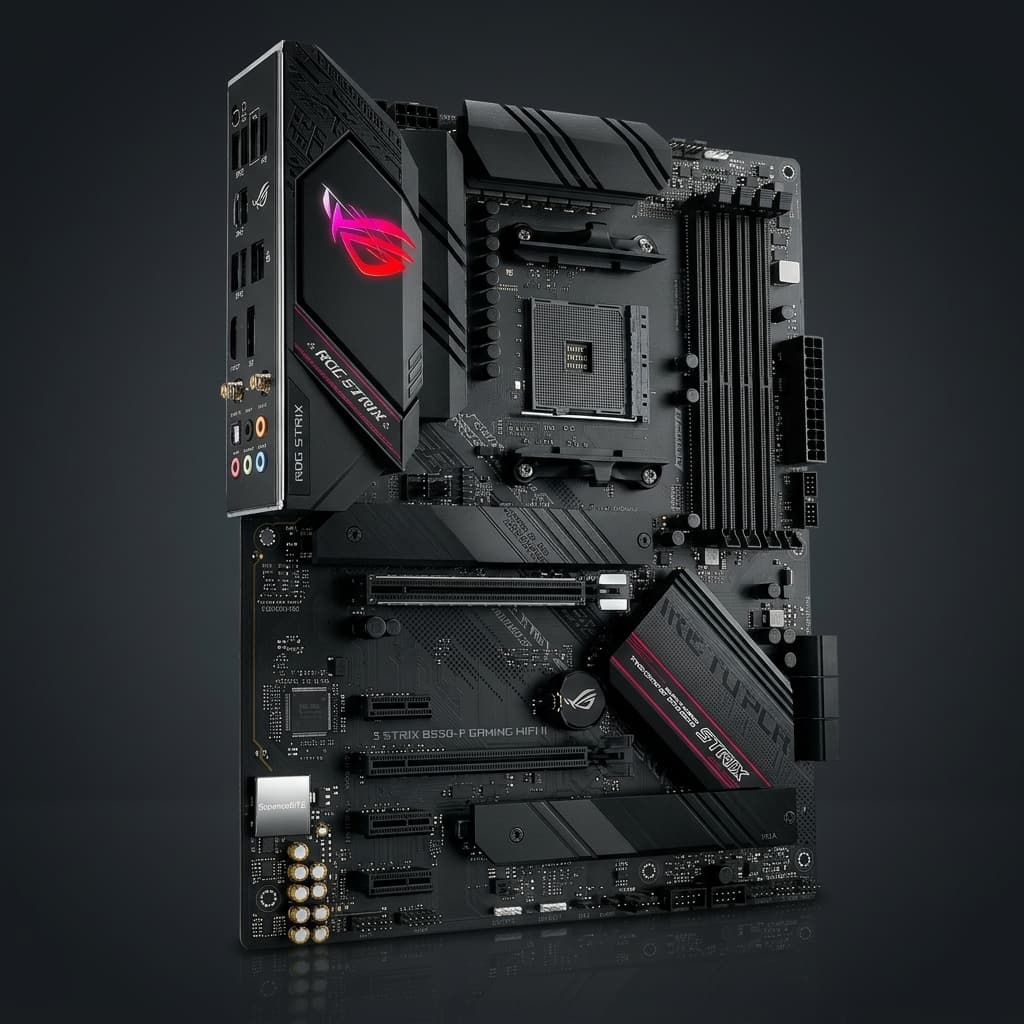
ASUS ROG Strix B550-F Gaming WiFi II AMD AM4 ATX DDR4 Gaming Motherboard
The ASUS ROG Strix B550-F Gaming WiFi II is a well-rounded AM4 ATX motherboard for Ryzen 5000 and 3000 Series processors. It pairs 12+2 power stages with Wi-Fi 6E, Bluetooth 5.2, Intel 2.5Gb Ethernet, a PCIe 4.0 graphics slot, two M.2 slots, six SATA ports, and SupremeFX audio. It suits Ryzen upgrades that reuse DDR4 memory, but new builds should weigh AM5 first.
ASUS ROG Strix B550-F Gaming WiFi II Review: Is This AM4 Board Still Worth It?
The ASUS ROG Strix B550-F Gaming WiFi II is a refreshed version of ASUS's B550-F Gaming WiFi. It keeps the original's 12+2 power stages, two M.2 slots, six SATA ports, Intel 2.5Gb Ethernet, and SupremeFX audio, and upgrades the wireless module from Wi-Fi 6 to Wi-Fi 6E with Bluetooth 5.2.
AM4 is no longer AMD's current platform, and newer Ryzen processors need an AM5 board. This board still makes sense for building or upgrading around a Ryzen 5000 processor, especially if you already own DDR4 memory. This review explains who it suits, where it falls short, and how it compares with four alternatives.
How we evaluated it: We have not tested this board ourselves. This review uses ASUS's official specifications, competitor specifications, and independent testing of the original B550-F Gaming WiFi, which shares the same 12+2 power design. We found no independent review of the WiFi II itself, so those results are indicative rather than exact.
Quick Verdict
The ASUS ROG Strix B550-F Gaming WiFi II covers everything most Ryzen 5000 gaming builds need. Its value depends on how much more it costs than simpler B550 boards.
- Best for: Ryzen 5000 or 3000 builds, upgrades that reuse DDR4, and buyers who want Wi-Fi 6E, Intel 2.5Gb Ethernet, and good onboard audio.
- Main strengths: 12+2 power stages, Wi-Fi 6E, Intel I225-V Ethernet, PCIe 4.0 graphics and M.2 slots, six SATA ports, BIOS FlashBack.
- Main limitations: No upgrade path beyond AM4, DDR4 only, two M.2 slots, and only one rear USB-C port.
- Consider instead: A cheaper B550 board if you don't need the extras, or AM5 if you're building from scratch.
CPU Compatibility and BIOS
ASUS lists support for Ryzen 5000 and 3000 Series desktop processors and Ryzen 5000 and 4000 G-Series APUs. Newer models such as the Ryzen 5000X3D chips need a recent BIOS, so check ASUS's CPU support list for your exact processor. If an update is needed, BIOS FlashBack updates the BIOS from a USB drive without a CPU or memory installed.
G-Series APUs support only PCIe 3.0, so with one installed, expect the graphics slot and M.2_1 to run at PCIe 3.0.
Memory Support
Four DDR4 slots support up to 128GB. ASUS lists overclocked speeds of up to 4800 MHz with Ryzen 5000/3000 processors and 5100 MHz with G-Series APUs. Anything above 3200 MHz is overclocking and depends on the CPU and memory kit. For most Ryzen 5000 builds, 2x16GB of DDR4-3200 or DDR4-3600 is the practical target.
Power Delivery and VRM Thermals
ASUS specifies 12+2 teamed power stages, an 8-pin plus 4-pin ProCool CPU power input, large VRM heatsinks, and a 6-layer PCB. Tom's Hardware measured peak VRM temperatures of 51°C at stock settings and 57°C overclocked on the original B550-F Gaming WiFi, which uses the same design. That is comfortably within safe limits, and enough headroom for a Ryzen 9 5950X in a case with reasonable airflow.
Expansion and Storage
The CPU-connected top slot runs at PCIe 4.0 x16, which suits every current graphics card. The chipset provides a PCIe 3.0 x16-length slot running at x4 and three PCIe 3.0 x1 slots. All of these share the chipset's link to the CPU.
M.2_1 connects to the CPU and supports PCIe 4.0 x4 or SATA drives. M.2_2 connects to the chipset and supports PCIe 3.0 x4 or SATA. Both slots have heatsinks. There are six SATA 6Gb/s ports, but installing a drive in M.2_2 disables SATA6G_5 and SATA6G_6, leaving four SATA ports when both M.2 slots are in use.
Networking, USB, and Audio
The 2x2 Wi-Fi 6E module covers the 2.4, 5, and 6GHz bands. ASUS notes that the 6GHz band needs Windows 11 and depends on local regulations, and you'll need a Wi-Fi 6E or Wi-Fi 7 router to use it. The Intel I225-V 2.5Gb Ethernet port helps only with multi-gigabit network hardware. Install the latest Intel driver during setup.
The rear panel has eight USB ports: one USB 3.2 Gen 2 Type-C, one Gen 2 Type-A, four Gen 1 Type-A, and two USB 2.0. ASUS lists no front USB-C header. The HDMI 2.1 and DisplayPort 1.2 outputs work only with a G-Series APU.
The SupremeFX S1220A codec is rated at 120 dB SNR output and adds headphone impedance sensing and an optical S/PDIF output. It drives most gaming headsets well.
Gaming and Everyday Performance
At stock settings, a motherboard barely affects frame rates. A Ryzen 7 5800X3D performs essentially the same on this board as on any well-built B550 board. The board's value comes from stable power delivery, memory tuning, networking, audio, and conveniences like Q-LEDs, the pre-mounted I/O shield, and six 4-pin fan headers.
Competitor Comparison: Four Alternatives
| Motherboard | Wireless | Ethernet | Best for |
|---|---|---|---|
| ASUS ROG Strix B550-F Gaming WiFi II | Wi-Fi 6E | Intel 2.5Gb | Well-rounded builds with strong networking and audio |
| MSI MAG B550 Tomahawk MAX WiFi | Wi-Fi 6E | Realtek 2.5Gb | A near-equal MSI rival |
| GIGABYTE B550 AORUS Pro AC | Wi-Fi 5 | 2.5Gb | Discounted builds that don't need 6GHz Wi-Fi |
| MSI B550-A PRO | None | Realtek 1Gb | Wired-only budget builds |
| ASUS TUF Gaming B550-PLUS WiFi II | Wi-Fi 6 | Realtek 2.5Gb | Much the same layout for less |
All five boards have two M.2 slots and six SATA ports. Check each model's exact specifications and current price before buying.
ASUS ROG Strix B550-F Gaming WiFi II vs MSI MAG B550 Tomahawk MAX WiFi
The MSI MAG B550 Tomahawk MAX WiFi is the closest rival, with Wi-Fi 6E and 2.5Gb Ethernet. The ASUS board adds Intel networking and SupremeFX audio. If both cost about the same, buy whichever BIOS you prefer; otherwise buy the cheaper one.
ASUS ROG Strix B550-F Gaming WiFi II vs GIGABYTE B550 AORUS Pro AC
The GIGABYTE B550 AORUS Pro AC uses older Intel Wi-Fi 5. It makes sense only if it's noticeably cheaper and you rely on wired networking.
ASUS ROG Strix B550-F Gaming WiFi II vs MSI B550-A PRO
The MSI B550-A PRO has no wireless and only gigabit Ethernet, but it runs a Ryzen 5000 processor and graphics card for less money. Choose it for a wired-only budget build.
ASUS ROG Strix B550-F Gaming WiFi II vs ASUS TUF Gaming B550-PLUS WiFi II
The ASUS TUF Gaming B550-PLUS WiFi II shares the same M.2 and SATA layout and the same rear USB ports. It uses Wi-Fi 6 rather than 6E, Realtek rather than Intel Ethernet, and standard Realtek audio. Choose it if it's meaningfully cheaper and you don't need the 6GHz band.
Who Should Buy This Motherboard?
- Builders upgrading an AM4 system who want to keep their Ryzen CPU and DDR4 memory.
- Ryzen 5000 gamers who want Wi-Fi 6E and Intel 2.5Gb Ethernet built in.
- Users who value good onboard audio and BIOS FlashBack.
Who Should Consider Another Motherboard?
- Anyone building from scratch who wants a future CPU upgrade path.
- Users who need three or more M.2 slots, or a front USB-C header.
- Wired-only budget builders who won't use the Wi-Fi or audio extras.
Buying Advice
- Confirm your CPU and its minimum BIOS version on ASUS's support list.
- Plan your drives: using both M.2 slots leaves four SATA ports.
- Check that your router supports Wi-Fi 6E and that you're running Windows 11.
- Compare the price with the TUF B550-PLUS WiFi II, the Tomahawk MAX WiFi, and an entry-level AM5 build.
Final Verdict
The ASUS ROG Strix B550-F Gaming WiFi II is a mature, well-equipped AM4 board. It combines strong power delivery, PCIe 4.0 graphics and SSD support, Wi-Fi 6E, Intel 2.5Gb Ethernet, and good audio. Its limits are the platform itself, DDR4, two M.2 slots, and a single rear USB-C port.
Bottom line: Buy it for a Ryzen 5000 upgrade or build that reuses DDR4, as long as its premium over the TUF B550-PLUS WiFi II stays modest. If you're starting fresh, price out AM5 first.
Pros
- Wi-Fi 6E and Bluetooth 5.2 built in.
- Intel I225-V 2.5Gb Ethernet.
- 12+2 power stages with large heatsinks.
- PCIe 4.0 x16 graphics slot and a PCIe 4.0 x4 M.2 slot.
- Six SATA ports and heatsinks on both M.2 slots.
- SupremeFX S1220A audio with optical output.
- BIOS FlashBack, Q-LEDs, and a pre-mounted I/O shield.
- Lets you reuse an existing Ryzen CPU and DDR4 memory.
Cons
- AM4 has no upgrade path to newer AMD processors.
- DDR4 only.
- Only two M.2 slots, and the second is limited to PCIe 3.0.
- Populating M.2_2 disables SATA ports 5 and 6.
- One rear USB-C port and no front USB-C header.
- Value depends on a modest premium over simpler B550 boards.
Spec Sheet
Specifications
General
| Brand | ASUS |
|---|---|
| Model | ROG Strix B550-F Gaming WiFi II |
Platform
| Chipset | AMD B550 |
|---|---|
| Socket | AMD AM4 |
| CPU Support | Ryzen 5000/3000 Series desktop and Ryzen 5000/4000 G-Series processors |
Form Factor
| Size | ATX, 30.5 × 24.4 cm |
|---|
Power
| Power Stages | 12+2 teamed power stages, ProCool 8-pin + 4-pin |
|---|
Memory
| Type | DDR4 |
|---|---|
| Slots | 4 DIMM |
| Maximum Capacity | 128GB |
| Overclocked Speed | Up to 4800 MHz (Ryzen 5000/3000), up to 5100 MHz (G-Series) |
Expansion
| Primary Slot | PCIe 4.0 x16 SafeSlot, CPU-connected |
|---|---|
| Secondary Slot | PCIe 3.0 x16-length, x4 mode |
| Additional Slots | 3 × PCIe 3.0 x1 |
Storage
| M.2 Slots | 2, both with heatsinks |
|---|---|
| M.2_1 | PCIe 4.0 x4 or SATA, CPU-connected |
| M.2_2 | PCIe 3.0 x4 or SATA, chipset-connected |
| SATA | 6 × SATA 6Gb/s, RAID 0/1/10; SATA6G_5/6 disabled when M.2_2 is used |
Networking
| Wireless | 2x2 Wi-Fi 6E |
|---|---|
| Ethernet | Intel I225-V 2.5Gb Ethernet |
| Bluetooth | Bluetooth 5.2 |
USB
| Rear Type-C | 1 × USB 3.2 Gen 2 |
|---|---|
| Rear USB Type-A | 1 × USB 3.2 Gen 2, 4 × USB 3.2 Gen 1, 2 × USB 2.0 |
| Front Headers | 1 × USB 3.2 Gen 1 (2 ports), 2 × USB 2.0 (4 ports) |
Video
| Outputs | HDMI 2.1, DisplayPort 1.2 (requires a G-Series APU) |
|---|
Audio
| Codec | ROG SupremeFX S1220A, optical S/PDIF out |
|---|
Cooling
| Fan Headers | CPU, CPU_OPT, AIO pump, 3 × chassis (all 4-pin) |
|---|
RGB
| Lighting | Aura Sync, 2 × RGB headers, 1 × addressable Gen 2 header |
|---|
DIY
| Features | BIOS FlashBack, Q-LED, Clear CMOS header, pre-mounted I/O shield |
|---|
BIOS
| Firmware | 256Mb flash ROM, UEFI AMI BIOS |
|---|
Frequently Asked Questions
Is the ASUS ROG Strix B550-F Gaming WiFi II still worth buying in 2026?+
What is the difference between the B550-F Gaming WiFi and the WiFi II?+
Does it support the Ryzen 7 5800X3D?+
Can the VRM handle a Ryzen 9 5950X?+
Does using both M.2 slots disable any SATA ports?+
Does it support PCIe 4.0 SSDs?+
Do I need Windows 11 for Wi-Fi 6E?+
Does this motherboard support BIOS FlashBack?+
As an Amazon Associate we earn from qualifying purchases. See our affiliate disclosure.