
ASRock
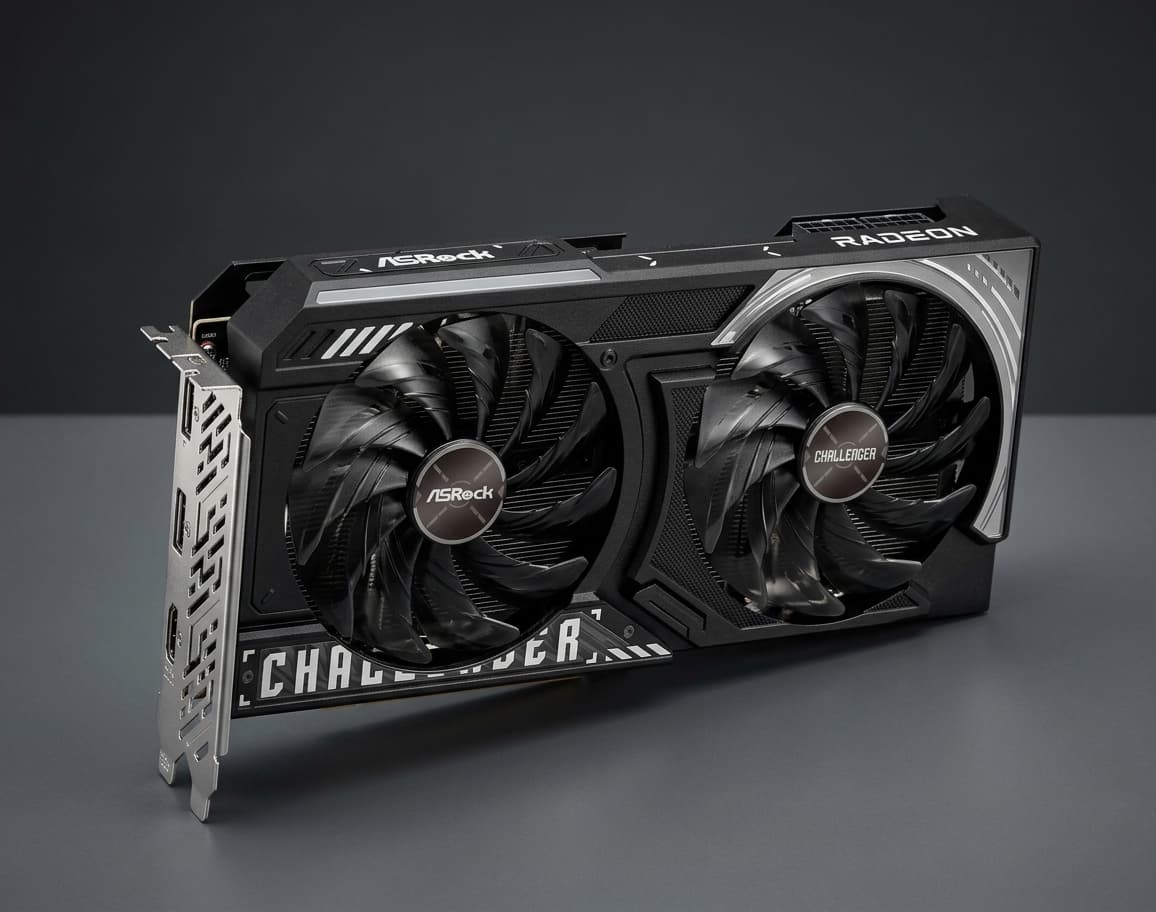
ASRock Radeon RX 9060 XT Challenger 16GB OC
ASRock’s compact dual-fan Radeon RX 9060 XT Challenger 16GB OC (RX9060XT CL 16GO) pairs AMD’s RDNA 4 GPU with 16GB of GDDR6, a 3,290 MHz boost clock, fan stop at idle and a single 8-pin connector. It is a 249 mm card for 1080p and 1440p gaming with FSR 4 support.
ASRock Radeon RX 9060 XT Challenger 16GB OC Review
The ASRock Radeon RX 9060 XT Challenger 16GB OC (ASRock part number RX9060XT CL 16GO) is one of the plainer, more compact versions of AMD's Radeon RX 9060 XT 16GB. It is aimed at gamers who want 16GB of video memory and modern AMD features without paying for a large triple-fan cooler or heavy RGB lighting.
This review covers what the Challenger OC changes compared with AMD's reference specification, how the RX 9060 XT performs at 1080p, 1440p and 4K in independent testing, what 16GB of VRAM on a 128-bit bus really means, the card's power and case requirements, and how it compares with the GeForce RTX 5060 Ti 16GB, RTX 5070, Radeon RX 9070 and Radeon RX 7600 XT. We have not tested this card ourselves. All performance, temperature and power figures below come from the named independent publications.
Quick Verdict
- Best for: 1080p high-refresh and 1440p gamers who want 16GB of VRAM in a roughly 25 cm (9.8-inch), two-slot card that runs from a single 8-pin connector.
- Strengths: 16GB of VRAM, FSR 4 support, ray tracing much improved over RDNA 3, modest power draw, a compact dual-fan cooler with fan stop at idle, and an LED you can switch off.
- Drawbacks: Raw performance trails the RTX 5060 Ti 16GB slightly in TechPowerUp's testing. DLSS still has wider game support than FSR 4. Only three display outputs. Its factory overclock adds very little.
- Resolution fit: A strong 1080p card that can handle 1440p, often with FSR upscaling in demanding or ray-traced games. Not a native-4K card for demanding new games.
- Value: Depends on the price you actually pay. At or near the RX 9060 XT 16GB's $349 launch price it is easy to recommend. As it gets closer to the RTX 5060 Ti 16GB's price, the NVIDIA card becomes more appealing.
ASRock RX 9060 XT Challenger 16GB OC Specifications
| Specification | ASRock RX 9060 XT Challenger 16GB OC |
|---|---|
| Part number | RX9060XT CL 16GO |
| GPU / architecture | AMD Radeon RX 9060 XT (Navi 44), RDNA 4 |
| Compute units / stream processors | 32 / 2,048 |
| Ray accelerators / AI accelerators | 32 / 64 |
| Boost clock | Up to 3,290 MHz (AMD reference: up to 3,130 MHz) |
| Game clock | 2,700 MHz (AMD reference: 2,530 MHz) |
| Memory | 16GB GDDR6, 20 Gbps, 128-bit |
| Memory bandwidth | Up to 320 GB/s (AMD figure) |
| AMD Infinity Cache | 32 MB |
| Interface | PCI Express 5.0 x16 |
| Display outputs | 2 x DisplayPort 2.1a, 1 x HDMI 2.1b (up to 3 displays) |
| Power connector | 1 x 8-pin |
| Recommended PSU | 550W (ASRock); AMD's minimum for the RX 9060 XT is 450W |
| AMD typical board power (reference) | 160W (ASRock's own figure for this OC model not confirmed) |
| Dimensions / weight | 249 x 132 x 41 mm (9.8 x 5.2 x 1.6 in) / 645 g |
| Cooling | Dual striped axial fans, 0dB Silent Cooling (fan stop), metal backplate |
| Lighting | Decorative LED with a physical on/off switch |
| APIs | DirectX 12 Ultimate, OpenGL 4.6, Vulkan |
Design, Cooling, and ASRock Challenger Features
The Challenger is ASRock's no-frills line, and this card follows that approach. It uses two of ASRock's "striped axial" fans over a heatsink that ASRock says uses tightly grouped heatpipes and welded fin contact. There is also a metal backplate that ASRock says helps prevent PCB bending. At 249 mm long and 41 mm thick, it is shorter than many triple-fan RX 9060 XT models, some of which exceed 300 mm in TechPowerUp's database. That should make it easy to fit in most mid-tower cases and many compact ones.
0dB Silent Cooling means the fans stop completely when the GPU is cool, such as at the desktop or during video playback, and start spinning once temperatures rise under load. This removes fan noise at idle. It does not mean the card is silent while gaming.
The "LED Indicator" in the Amazon title is a decorative light strip, not a status or diagnostic light. ASRock describes it as decoration and adds a physical switch to turn it off. One owner review on a retailer site notes that the light's color cannot be changed.
The factory overclock raises the rated boost clock by 160 MHz over AMD's reference. Do not expect a noticeable gain from it. When TechPowerUp tested a similarly overclocked Sapphire RX 9060 XT Pulse OC (3,290 MHz boost, the same as this card), it measured about 1% higher real-world performance than a reference-clocked card. We found no independent data that measures the Challenger's own overclock benefit.
RX 9060 XT 16GB Gaming Performance: 1080p, 1440p, and 4K
Few in-depth lab reviews cover this exact ASRock model. Results from other RX 9060 XT 16GB cards are useful for judging the GPU's performance, because the chip, memory and power limits are similar. They cannot tell you how hot, loud or fast the Challenger's own cooler runs. TechPowerUp said in its June 2025 coverage that it had no data for the Challenger.
1080p and 1440p
In TechPowerUp's review of the Sapphire RX 9060 XT Pulse OC 16GB (June 2025), the test system used a Ryzen 7 9800X3D. Games ran at their highest settings at native resolution, with no upscaling and ray tracing off. In that test, the RX 9060 XT 16GB was:
- about 4% slower than the GeForce RTX 5060 Ti 16GB at 1080p, and about 5% slower at 1440p;
- about 10% faster than the GeForce RTX 5060 at 1080p (12% at 1440p);
- about 37% faster than the Radeon RX 7600 XT at 1080p, and 43% faster at 1440p.
TechPowerUp called the RX 9060 XT primarily a 1080p card, with 1440p within reach in older games or with FSR upscaling turned on. That matches DigitalCitizen's hands-on review of this exact Challenger OC model. The reviewer described 1080p as strong and 1440p as good once you drop some settings or enable FSR. They reported frame rates in the mid-70s in Star Wars Outlaws at 1440p with the High preset and FSR Quality.
Esports and high-refresh gaming
Lighter competitive games are rarely limited by a GPU of this class at 1080p. In those games, your CPU, the game engine and your settings often decide the frame rate. If you are chasing very high frame rates on a 240Hz or faster monitor, pairing the card with a modern CPU matters as much as the GPU itself.
4K
None of the independent reviews we checked present the RX 9060 XT as a native-4K card for demanding new games. Expect to rely on FSR upscaling, lower presets, or both at 4K. Lighter and older games are a different story. If 4K is your main target, look at a higher tier, such as the RX 9070 or RTX 5070 class.
16GB VRAM and the 128-Bit Memory Bus Explained
VRAM capacity and memory bandwidth are separate things. Capacity decides whether a game's textures and other data fit on the card. Bandwidth decides how quickly the GPU can move that data. The RX 9060 XT pairs a large 16GB capacity with a narrow 128-bit GDDR6 bus. AMD rates its bandwidth at up to 320 GB/s, and a 32 MB Infinity Cache helps make up for it by keeping frequently used data on the chip.
In practice, TechPowerUp reported that no game in its test suite ran into trouble with 16GB, whether with ray tracing or path tracing. Its RX 9060 XT 8GB testing did show that the 8GB card runs out of memory in some higher-resolution or ray-traced scenarios. That is the strongest practical argument for the 16GB version. Extra VRAM does not raise frame rates in games that never fill 8GB, though. Also, monitoring tools often show memory that a game has reserved, which can be more than it actually needs.
Is the 128-bit bus a weakness? It is one reason the RX 9060 XT is positioned as a 1080p/1440p card and not a 4K card, since bandwidth demands grow with resolution. Judged within its price class, though, the benchmark results above already account for the narrow bus. It is a design trade-off, not a hidden flaw.
Ray Tracing, FSR 4, and Gaming Features
RDNA 4 is a big step forward for AMD in ray tracing. TechPowerUp measured the RX 9060 XT as essentially on par with the RTX 5060 Ti in its ray-tracing tests, with a gap similar to its 3% raster gap, and 64% faster than the RX 7600 XT. Results vary a lot by game, so other publications using different game mixes may report different averages. DigitalCitizen still found NVIDIA ahead in raw ray tracing in its own comparisons.
Upscaling and frame generation: The RX 9060 XT supports FSR 4, AMD's machine-learning upscaler, which AMD now groups under its "FSR Redstone" feature set. TechPowerUp rated FSR 4 image quality as close to NVIDIA's DLSS Transformer model but still behind it. It also noted that NVIDIA has much wider game support and offers multi-frame generation on RTX 50-series cards. Keep in mind that upscaling renders the game at a lower resolution and reconstructs the image. Frame generation inserts AI-generated frames, which makes motion look smoother but does not reduce input latency. Benchmarks that use these features are not comparable with native results.
Other features AMD lists for the RX 9060 XT include Radeon Anti-Lag 2, Fluid Motion Frames (driver-level frame generation), FreeSync, Smart Access Memory, Radeon Chill, and hardware AV1, HEVC and H.264 encoding and decoding. Not every game supports every feature.
Power Consumption, PSU, and Cooling Requirements
AMD rates the RX 9060 XT 16GB at 160W typical board power and recommends at least a 450W power supply. ASRock recommends 550W for the Challenger OC. Follow the higher figure unless you have checked your whole system's power budget. The card needs one 8-pin PCIe connector.
Independent measurements, each from a different test setup:
- TechPowerUp (card-only power measured with lab equipment, not software sensors, on several RX 9060 XT 16GB models) reported gaming power draw of around 170W. It said any half-decent PSU stronger than 400W should handle the GPU.
- DigitalCitizen (this exact Challenger OC; measurement method not detailed) reported a peak of 170W and a peak GPU temperature of 65°C. The reviewer described the card as quiet. They published no decibel measurement.
These are graphics-card figures, not total system power. Your CPU, the number of drives and fans, and power spikes all add to what the PSU must deliver. Case airflow and room temperature also affect how hot and loud any dual-fan card runs.
PC Compatibility and Installation Checklist
- Slot: Needs a full-length x16 PCIe slot. It runs at PCIe 5.0 x16 and is backward compatible with PCIe 4.0 and 3.0. Because it uses all 16 lanes, it should be less sensitive to older PCIe 3.0 systems than x8 cards, but we found no PCIe-scaling tests specific to this card.
- Clearance: Allow at least 249 mm of GPU length plus room for the cable, about two expansion slots (41 mm), and 132 mm of height.
- Power: One free 8-pin PCIe cable from a quality PSU. ASRock recommends 550W.
- Displays: 2 x DisplayPort 2.1a and 1 x HDMI 2.1b. If you run four or more monitors, choose a different card.
- CPU pairing: An older quad-core CPU can hold back high-refresh 1080p gaming. Check your processor before you upgrade.
- Platform features: Resizable BAR (AMD Smart Access Memory) should be enabled where your motherboard supports it.
Productivity and Other Workloads
The RX 9060 XT's media engine supports hardware AV1, HEVC and H.264 encoding, which is useful for streaming and video export in apps that support AMD encoding. 16GB of memory also helps with large textures and some local AI tools. Software support for AMD GPUs in creative and AI applications varies more than it does for NVIDIA's CUDA. Check that your specific apps support it before buying this card for work. Gaming benchmarks do not predict rendering or compute performance.
Pros and Cons
Pros
- 16GB VRAM avoids the memory limits independent testers found on 8GB cards
- Close to the RTX 5060 Ti 16GB in TechPowerUp's raster and ray-tracing averages
- FSR 4 upscaling support
- Compact 249 mm dual-fan design with fan stop at idle
- Single 8-pin connector and modest power draw (about 170W measured by TechPowerUp on RX 9060 XT 16GB cards)
- DisplayPort 2.1a and HDMI 2.1b; PCIe 5.0 x16
- LED can be switched off with a physical switch
Cons
- Slightly slower than the RTX 5060 Ti 16GB, which also has wider upscaling support
- Not suited to native 4K in demanding games
- Factory overclock offers little measurable benefit
- Only three display outputs
- Few independent lab reviews of this specific cooler's noise and temperatures
RX 9060 XT 16GB vs RTX 5060 Ti 16GB, RTX 5070, RX 9070, and RX 7600 XT
Relative performance uses the TechPowerUp GPU database's aggregated 1080p raster summary (checked October 19, 2026), with the RX 9060 XT 16GB set to 100%. Launch prices are the US launch MSRPs, not current prices. Board power figures are reference values.
| Product | GPU / generation | Memory | Relative performance (1080p, TPU) | Board power / connector (reference) | US launch MSRP | Upscaling / frame gen | Best for |
|---|---|---|---|---|---|---|---|
| ASRock Radeon RX 9060 XT Challenger 16GB OC | RX 9060 XT, RDNA 4 | 16GB GDDR6, 128-bit, 320 GB/s | 100% | 160W / 1 x 8-pin | $349 (GPU) | FSR 4, FSR frame generation, AFMF | 1080p/1440p with 16GB on a budget |
| ASUS Dual GeForce RTX 5060 Ti 16GB OC Edition | RTX 5060 Ti 16GB, Blackwell | 16GB GDDR7, 128-bit, 448 GB/s | 105% | 180W / 1 x 8-pin | $429 (GPU) | DLSS 4 incl. multi-frame generation | Buyers who value DLSS and broad game support |
| ASUS Prime GeForce RTX 5070 12GB OC Edition | RTX 5070, Blackwell | 12GB GDDR7, 192-bit, 672 GB/s | 135% | 250W / 1 x 16-pin | $549 (GPU) | DLSS 4 incl. multi-frame generation | High-refresh 1440p with a bigger budget |
| XFX Swift AMD Radeon RX 9070 OC Triple Fan Gaming Edition 16GB | RX 9070, RDNA 4 | 16GB GDDR6, 256-bit, 645 GB/s | 149% | 220W / 2 x 8-pin | $549 (GPU) | FSR 4, FSR frame generation, AFMF | 1440p ultra and entry-level 4K, with 16GB |
| AMD Radeon RX 9060 XT 8GB | RX 9060 XT 8GB, RDNA 4 | 8GB GDDR6, 128-bit, 320 GB/s | 94% | 150W / 1 x 8-pin | $299 (GPU) | FSR 4, FSR frame generation, AFMF | Strict budgets at 1080p, willing to lower textures |
| ASUS Dual Radeon RX 7600 XT OC Edition 16GB | RX 7600 XT, RDNA 3 | 16GB GDDR6, 128-bit, 288 GB/s | 74% | 190W / 1 x 8-pin | $329 (GPU) | FSR 3.1, FSR frame generation, AFMF (no official FSR 4) | Only if priced well below the RX 9060 XT 16GB |
What the comparison means
- RTX 5060 Ti 16GB: Its main advantage is NVIDIA's software. DLSS is supported in more games, image quality is slightly better according to TechPowerUp, and you get multi-frame generation. It is also a little faster. Its drawback is price: it launched $80 above the RX 9060 XT 16GB. It also uses a PCIe 5.0 x8 interface, which matters more in older PCIe 3.0 systems. If the price gap is small, it is a strong alternative.
- RTX 5070: A clear step up in performance, but it has 12GB, not 16GB. It needs more power (250W reference board power; TechPowerUp suggests a 600W PSU) and launched at a much higher price. It is the better choice for high-refresh 1440p if you can afford it.
- RX 9070: The same RDNA 4 features with twice the memory bus width and roughly half again the 1080p performance in TechPowerUp's summary. It is larger and more power-hungry, and the XFX Swift listed here is a triple-fan card. Consider it if you are targeting 1440p ultra or occasional 4K.
- RX 9060 XT 8GB: Only slightly slower in TechPowerUp's average results, but more likely to run out of VRAM in newer games and with ray tracing. The 16GB model is the safer long-term buy.
- RX 7600 XT: It also has 16GB, but it is far slower (about 37% to 43% behind in TechPowerUp's review testing), weaker in ray tracing, and lacks official FSR 4 support. It only makes sense if it is much cheaper.
Who Should Buy the ASRock RX 9060 XT Challenger 16GB OC?
- Budget-conscious 1080p gamers, and 1440p gamers willing to use FSR in demanding titles
- Buyers who want 16GB of VRAM for high texture settings and future games
- Owners of cards such as the RX 6600, RX 7600, GTX 1660 or RTX 2060 class looking for a meaningful upgrade
- Builders with mid-size or compact cases and a quality PSU of around 550W with an 8-pin cable
- People who want simple styling with lighting that can be switched off
Who Should Consider Another GPU?
- Ray tracing and upscaling enthusiasts: The RTX 5060 Ti 16GB offers similar ray-tracing speed with the more widely supported DLSS ecosystem. The RTX 5070 offers more performance overall.
- 4K gamers: Step up to the RX 9070 or RTX 5070 class or higher.
- Strict budgets: An RX 9060 XT 8GB can work at 1080p if you accept lower texture settings.
- Users who need specific creative or AI software: Check app support first. Many tools still prioritize NVIDIA CUDA.
- Four-monitor setups: This card has only three outputs.
Is the ASRock RX 9060 XT Challenger 16GB OC Worth Buying?
Yes, for the right buyer and at the right price. The RX 9060 XT 16GB delivers performance close to the RTX 5060 Ti 16GB in TechPowerUp's testing, has enough VRAM for the games independent testers ran, supports FSR 4, and draws modest power. The Challenger OC packages that in a compact card with fan stop at idle and an LED you can turn off. Its factory overclock is not a reason to pay more, so compare it against other RX 9060 XT 16GB models and the RTX 5060 Ti 16GB at the prices available when you shop. We could not verify a current US price for this review, so check the live price before deciding.
Final Verdict
The ASRock Radeon RX 9060 XT Challenger 16GB OC is a practical, compact way to get AMD's RX 9060 XT 16GB. It gives strong 1080p and capable 1440p performance, 16GB of VRAM, FSR 4 and reasonable power needs. Choose the RTX 5060 Ti 16GB if DLSS support matters most and the price gap is small. Step up to an RX 9070 or RTX 5070 if you want high-refresh 1440p or 4K. If the Challenger's price is close to the RX 9060 XT 16GB's launch MSRP, it is a sensible pick for most mainstream gaming PCs.
Check the latest price of the ASRock Radeon RX 9060 XT Challenger 16GB OC on Amazon
Pros
- 16GB of VRAM avoids the memory limits independent testers found on 8GB cards
- Close to the RTX 5060 Ti 16GB in TechPowerUp's raster and ray-tracing averages
- Supports AMD FSR 4 machine-learning upscaling
- Compact 249 mm dual-fan design with 0dB fan stop at idle
- Single 8-pin power connector and modest power draw
- DisplayPort 2.1a, HDMI 2.1b and PCIe 5.0 x16
- Decorative LED can be switched off with a physical switch
Cons
- Slightly slower than the RTX 5060 Ti 16GB, which also has wider DLSS support
- Not intended for native 4K in demanding games
- Factory overclock offers little measurable benefit
- Only three display outputs
- Few independent lab measurements of this specific cooler's noise and temperatures
Spec Sheet
Specifications
General
| Model | ASRock Radeon RX 9060 XT Challenger 16GB OC |
|---|---|
| Part Number | RX9060XT CL 16GO |
| Brand | ASRock |
GPU
| Graphics Engine | AMD Radeon RX 9060 XT |
|---|---|
| Architecture | AMD RDNA 4 |
| Compute Units | 32 |
| Stream Processors | 2048 |
| Ray Accelerators | 32 |
| AI Accelerators | 64 |
Performance
| Boost Clock | Up to 3290 MHz |
|---|---|
| Game Clock | 2700 MHz |
Memory
| Capacity | 16GB |
|---|---|
| Type | GDDR6 |
| Speed | 20 Gbps |
| Bus Width | 128-bit |
| Bandwidth | Up to 320 GB/s |
| AMD Infinity Cache | 32 MB |
Compatibility
| Bus Interface | PCI Express 5.0 x16 |
|---|---|
| DirectX | 12 Ultimate |
| OpenGL | 4.6 |
Connectivity
| DisplayPort | 2 x DisplayPort 2.1a |
|---|---|
| HDMI | 1 x HDMI 2.1b |
| Max Displays | 3 |
| Max Digital Resolution | 7680 x 4320 |
Power
| Power Connector | 1 x 8-pin |
|---|---|
| Recommended PSU | 550W |
| AMD Typical Board Power (reference) | 160W |
Cooling
| Fans | 2 (striped axial) |
|---|---|
| Zero-RPM | 0dB Silent Cooling (fan stop at low temperature) |
| Backplate | Metal |
| Lighting | Decorative LED with on/off switch |
Dimensions
| Size | 249 x 132 x 41 mm |
|---|---|
| Weight | 645 g |
Frequently Asked Questions
Is the ASRock RX 9060 XT Challenger 16GB OC good for gaming?+
Can the RX 9060 XT handle 1440p gaming?+
Can the RX 9060 XT run games at 4K?+
Is 16GB of VRAM enough for modern games?+
How does it compare with the RTX 5060 Ti 16GB?+
What power supply does this ASRock card need?+
What does 0dB Silent Cooling do?+
Is the RX 9060 XT good for ray tracing?+
Does the 128-bit memory bus hurt performance?+
Will it fit in my case?+
As an Amazon Associate we earn from qualifying purchases. See our affiliate disclosure.